Freedom251 › ISO Creation Software

AnyBurn
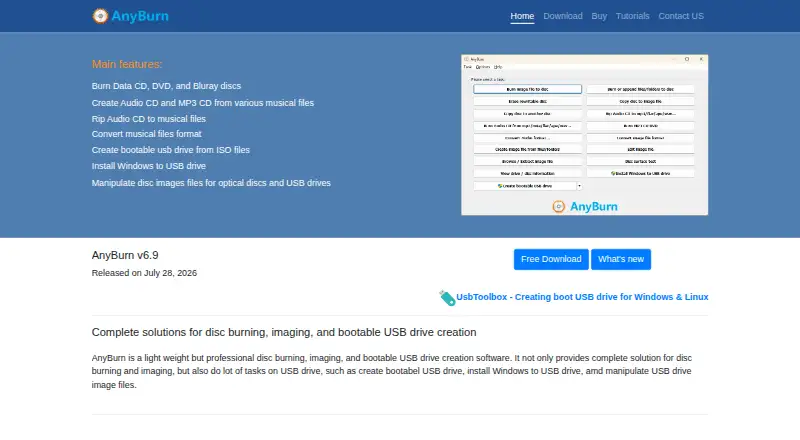
What AnyBurn is
AnyBurn is Windows software for burning optical discs, managing disc images, and creating bootable USB drives. It supports CD, DVD, and Blu-ray media, including data discs, Audio CDs, and MP3 CDs. Its image tools can create, extract, and convert ISO and other popular disc image files. For audio, it can build Audio CDs from MP3, M4A, FLAC, OGG, APE, WMA, and WAV files, and rip Audio CDs to audio files. USB tools create bootable drives and USB image files; Pro also supports installing Windows to USB. AnyBurn Free is available for personal and business use. AnyBurn Pro costs $39.95, paid once for a lifetime license, including lifetime updates and unlimited email technical support. A fully functional portable edition is available without installation. The listed supported Windows systems range from Windows 2000 through Windows 11. The software checks for updates online, and its EULA says no personal information is sent in that process.
Who it suits
It suits Windows users who need disc burning, disc image tools, audio CD handling, or bootable USB creation. The portable edition may suit users who prefer not to install software.
What it does well
- Free for personal and business use.
- Supports CD, DVD, and Blu-ray.
- Creates, extracts, and converts disc images.
- Portable edition requires no installation.
- Pro includes lifetime updates and unlimited email support.
What to know first
- Pro costs $39.95, paid once.
- Windows installation to USB is a Pro feature.
- EULA disclaims warranties and liability for data loss.
Limits
The free plan does not include audio file format conversion or Windows installation to USB; both are listed as Pro features. Pro costs 39.95 USD once.
Plans
| Plan | Billed and limits | Price |
|---|---|---|
| AnyBurn Free | Personal and business use · Core burning, imaging, audio ripping, disc testing and bootable USB creation | Free |
| AnyBurn Pro | US$39.95 lifetime license · Adds audio file format conversion and Windows-to-USB installation; license includes lifetime updates and unlimited email technical support | $39.95, paid once |
| AnyBurn Pro lifetime license | US$39.95 one time · Adds audio-format conversion · Installs Windows to USB · Removes limits · Lifetime updates · Unlimited email support | $39.95, paid once |
As anyburn.com lists them, read 15 Oct 2026. The maker's own page has the final word.
Getting started
- Visit the AnyBurn website.
- Choose the Windows download for your supported Windows version.
- Use the portable edition if you want to run it without installation.
- Start with AnyBurn Free, or purchase the Pro lifetime license for its added features.
Verdict
AnyBurn Free covers disc and image tools, audio CD ripping, and bootable USB creation. Pro adds audio conversion and Windows-to-USB installation for a lifetime-license payment.
Questions
Is AnyBurn free?
Yes. AnyBurn Free costs nothing and is listed for personal and business use.
What does AnyBurn Pro cost?
AnyBurn Pro costs 39.95 USD once for a lifetime license. It includes lifetime updates and unlimited email technical support.
Which platforms does AnyBurn support?
AnyBurn is for Windows. Listed supported systems range from Windows 2000 through Windows 11.
Can AnyBurn create bootable USB drives?
Yes. Bootable USB creation is included in AnyBurn Free. Windows installation to a USB drive is a Pro feature.
Does AnyBurn have a portable edition?
Yes. A fully functional portable version is available and does not require installation.
What disc image formats does AnyBurn support?
Listed formats include ISO, BIN/CUE, NRG, DMG, MDF/MDS, DAA, UIF, and ISZ.
Facts from AnyBurn's own pages
- API and SDK status
- The public developer material documents a command-line utility but does not describe a web API, SDK or software-development library. · anyburn.com, 15 Oct 2026
- Audio
- It can create Audio CDs from MP3, M4A, FLAC, OGG, APE, WMA, and WAV files, and rip Audio CDs to audio files. · anyburn.com, 30 Sept 2026
- Audio CDs
- It creates Audio CDs from MP3, M4A, FLAC, OGG, APE, WMA and WAV files. · anyburn.com, 15 Oct 2026
- Audio ripping
- It rips Audio CDs to MP3, FLAC, OGG, APE, WAV and WMA. · anyburn.com, 15 Oct 2026
- Automatic updates
- The installer enables online upgrade notifications by default, and users can disable that setting. · anyburn.com, 15 Oct 2026
- Bootable USB
- It creates bootable USB drives and can write image files to USB media. · anyburn.com, 15 Oct 2026
- Command-line utility
- The package includes abcmd.exe, which supports burning images, copying and erasing discs, making images and ripping CDs. · anyburn.com, 15 Oct 2026
- Current release
- The download page lists version 6.9, released July 28, 2026. · anyburn.com, 30 Sept 2026
- Data burning
- It burns files and folders directly to optical discs and supports on-the-fly writing. · anyburn.com, 15 Oct 2026
- Disc copying
- It copies discs to image files and copies one disc to another. · anyburn.com, 15 Oct 2026
- Disc images
- It supports ISO and other popular disc image files and can create, extract, and convert them. · anyburn.com, 30 Sept 2026
- Disc testing
- It tests disc surfaces and displays drive and disc information. · anyburn.com, 15 Oct 2026
- Documentation
- Official tutorials cover burning, copying, conversion, extraction, image editing, audio work, USB tools, settings and command-line use. · anyburn.com, 15 Oct 2026
- Image conversion
- It converts image files between supported formats and can create or edit image files. · anyburn.com, 15 Oct 2026
- Image extraction
- It browses and extracts disc-image contents. · anyburn.com, 15 Oct 2026
- Integrations
- The maker's credits page says AnyBurn uses LAME for MP3 ripping, Monkey's Audio SDK to decode APE files, and the FLAC library to decode FLAC files. · anyburn.com, 30 Sept 2026
- Latest release
- Version 6.9 was released July 28, 2026 with minor bug fixes and enhancements. · anyburn.com, 15 Oct 2026
- Licence
- The EULA grants freeware use at home or work but restricts redistribution in commercial products without permission. · anyburn.com, 15 Oct 2026
- Limit: administrator requirement
- MajorGeeks says creating a bootable USB requires running AnyBurn as Administrator. · majorgeeks.com, 15 Oct 2026
- Limit: retro interface
- Softpedia characterized the user interface as having a retro look. · softpedia.com, 15 Oct 2026
- Limit: Trustpilot complaint
- A Trustpilot reviewer reported that formatting a CD-RW left the disc unusable. · trustpilot.com, 15 Oct 2026
- Limit: Windows-only
- Independent download listings describe AnyBurn as a Windows application and list Windows operating systems only. · majorgeeks.com, 15 Oct 2026
- Maker legal name
- The product copyright and EULA identify the maker as Power Software Ltd. · anyburn.com, 15 Oct 2026
- Microsoft Store availability
- A 64-bit AnyBurn listing exists in the Microsoft Store. · apps.microsoft.com, 15 Oct 2026
Where AnyBurn stands on Freedom251
- ISO Creation Software#6 of 33