Freedom251 › ISO Creation Software
Express Burn
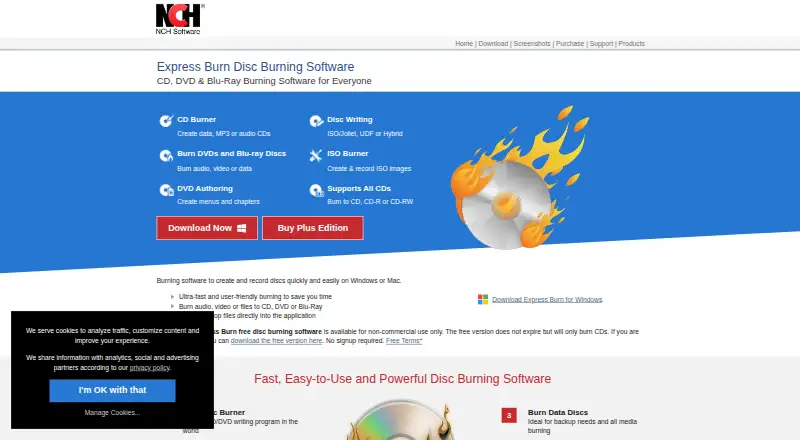
What Express Burn is
Express Burn is disc-burning software for Windows and macOS that writes audio, video, and data to CDs, DVDs, and Blu-ray discs. It can create MP3 or audio CDs and supports WAV, MP3, WMA, OGG, and FLAC. For video, it burns DVD and Blu-ray discs, supports chapter management, and offers PAL or NTSC output. DVD authoring includes more than 20 menu templates, with options to add custom images. Data discs can use ISO/Joliet, UDF, or Hybrid formats, and the software can create and burn ISO images. Other listed functions include bootable data discs, disc copying, dual-layer DVD and Blu-ray burning, and support for recordable and rewritable discs. Command-line operation supports automation and integration with other programs. The free edition does not expire, but is for non-commercial use and burns CDs only. Annual paid plans cost $34.99 a year for CD burning, $49.99 a year for CD and DVD recording, or $59.95 a year for all supported disc types. NCH says the audio and video functions are for users' own content and cannot be used to break copy or region protections.
Who it suits
Express Burn suits people who need to author or copy audio, video, or data discs on Windows or macOS. Its command-line option may suit users who want to automate disc-burning tasks.
What it does well
- Burns CD, DVD, and Blu-ray discs.
- Supports WAV, MP3, WMA, OGG, and FLAC.
- Creates and burns ISO images.
- Includes bootable discs and disc copying.
- Free edition does not expire.
What to know first
- Free edition is for non-commercial use.
- Free edition burns CDs only.
- DVD and Blu-ray features require paid plans.
Limits
The free edition is non-commercial, does not expire, and burns CDs only. The $34.99 a year plan covers audio and data CD burning; the $49.99 a year plan covers CD and DVD recording; the $59.95 a year plan covers all supported disc types.
Plans
| Plan | Billed and limits | Price |
|---|---|---|
| Express Burn Free | Non-commercial use · does not expire · burns CDs only | Free |
| Express Burn Plus CD Burner Annual Plan | Annual · Audio and data CD burning | $34.99 a year |
| Express Burn Plus CD + DVD Authoring Annual Plan | Annual · CD and DVD recording | $49.99 a year |
| Express Burn Plus CD + DVD + Blu-ray Authoring Annual Plan | Annual · All supported disc types | $59.95 a year |
As nch.com.au lists them, read 2 Oct 2026. The maker's own page has the final word.
Getting started
- Visit https://www.nch.com.au/burn/.
- Choose the free edition or an annual plan based on the disc types you need.
- Install Express Burn on Windows or macOS.
- Add audio, video, or data for the disc type supported by your edition.
Overview
Express Burn is desktop software for making audio CDs, authoring video discs, and writing data to optical media. It is a good fit for people who need several disc formats or repeatable burning workflows; occasional users who only need CDs may find the free edition sufficient.
Its breadth is the main reason to consider it, but the free version stops at non-commercial CD burning. DVD and Blu-ray work requires an annual plan, so the right choice depends on the formats you actually use.
Key features
Audio projects can become MP3 or audio CDs, with support for WAV, MP3, WMA, OGG, and FLAC. That range accommodates common source formats, while the free edition's CD-only cap makes it a practical starting point for personal audio projects rather than a general-purpose burner.
Video tools include DVD and Blu-ray burning, chapter management, and PAL or NTSC output. DVD authoring adds more than 20 menu templates and the option to use custom images. These controls suit users preparing a structured video disc; they are unnecessary overhead for someone who only wants to archive files, and are not included in the free edition.
For data, users can choose ISO/Joliet, UDF, or Hybrid formats, and create or burn ISO images. Bootable data discs, disc copying, rewritable media, and dual-layer DVD and Blu-ray support broaden its use for backups and disc projects. Command-line operation can help automate repeatable jobs or connect burning to other programs, though it offers little to a user making a disc by hand now and then.
NCH says the software is not for breaking copy-protected or region-protected media, and that its audio and video functions are intended for users' own content. NCH also says its programs may collect anonymous usage data, such as how often menus or options are used. Its site uses SSL to encrypt personal information in transit and says it does not store credit card information.
Support includes troubleshooting and how-to articles, a forum, a help manual, and a technical-support contact option. NCH Software Pty Ltd says its development team has released more than 80 applications since 1993.
Pricing
The free edition costs nothing, does not expire, and is restricted to non-commercial CD burning. It suits personal users who do not need DVD or Blu-ray; commercial use and higher-capacity formats call for a paid plan.
Express Burn Plus CD Burner Annual Plan costs $34.99 a year, billed annually, and covers audio and data CD burning. It is the lowest-cost paid option, but gives up DVD and Blu-ray recording.
Express Burn Plus CD + DVD Authoring Annual Plan costs $49.99 a year, billed annually, and adds CD and DVD recording. Choose it for DVD projects that do not require Blu-ray; it does not cover all supported disc types.
Express Burn Plus CD + DVD + Blu-ray Authoring Annual Plan costs $59.95 a year, billed annually, and covers all supported disc types. It is the relevant tier for Blu-ray users, while CD-only users would pay for formats they do not need.
Platforms
Express Burn runs on macOS and Windows. That covers users on either desktop platform, but not Linux.
Who it's for
Choose Express Burn if you need one desktop tool for audio CDs, authored DVDs or Blu-rays, data discs, ISO images, or automated burning. The free edition makes sense for non-commercial CD use; users who need video discs should choose a paid annual tier according to their format needs.
Look elsewhere if your priority is a free, open-source burner, a Linux option, or a tool focused only on ISO creation. The annual plans are harder to justify for occasional CD burning, and the media restrictions rule out using the software to bypass copy protection.
Pros and cons
- Broad disc coverage: Audio, video, data, ISO, bootable media, copying, and dual-layer support make it useful for varied disc tasks.
- Video authoring controls: Chapter management, PAL or NTSC output, and customizable DVD menus suit users preparing more than a basic file disc.
- Persistent free edition: Non-commercial CD burning has no expiry, but the free version cannot burn DVDs or Blu-rays.
- Annual cost for expanded formats: DVD and Blu-ray capabilities require recurring plans, so occasional users may not get enough use from them.
- Two-platform desktop scope: macOS and Windows are supported, but Linux users need another option.
Alternatives
ISO Creation Software is a directory of tools to consider when creating ISO images is the main requirement.
- Folder2ISO is a free option for Linux, macOS, and Windows; commercial use or distribution requires the author's permission.
- Open Burning Suite is free and open source under the BSD 2-Clause license, with Linux, macOS, and Windows support.
- PhotoDirector is a macOS and Windows freemium option with a limited-features free plan; consider it when that plan's limits suit your needs.
- ImgBurn is a free Windows disc-burning application, making it an option for Windows users seeking freeware.
- InfraRecorder is free CD/DVD-burning software for Windows, labeled beta.
- SysTools ISO Creator has a free edition with limits on large ISO files and saving edited or bootable ISOs; its full version starts at 29.00 USD once and removes file limits.
- Active@ ISO Manager is a free Windows option for users considering another ISO manager.
- Alcohol 52% offers a 15-day trial and a free edition not for business use on Windows except 98/ME.
Verdict
Express Burn is best for users who need more than basic CD writing, especially those authoring DVDs or Blu-rays or automating repeatable disc jobs. Its range of formats and authoring tools are the case for choosing it; the CD-only free edition and annual cost for broader disc support are the reasons to look elsewhere if your needs are occasional or narrowly focused.
Verdict
Express Burn covers audio, video, and data discs, with ISO, bootable media, and command-line functions also listed. The free edition is restricted to non-commercial CD burning; annual paid plans extend disc support.
Questions
Is Express Burn free?
Yes. Express Burn Free costs nothing, does not expire, and is for non-commercial use. It burns CDs only.
What do the paid plans cost?
The annual plans cost $34.99 a year for CD burning, $49.99 a year for CD and DVD recording, and $59.95 a year for all supported disc types.
Which platforms does Express Burn support?
Express Burn supports Windows and macOS.
Can it create ISO images?
Yes. Express Burn can create and burn ISO images.
Who makes Express Burn?
NCH Software Pty Ltd is the maker. The company says its software development team has released more than 80 applications since 1993.
Can Express Burn bypass copy protection?
NCH says the software cannot be used to break copy-protected or region-protected videos and audio. Its audio and video functions are for users' own content.
Facts from Express Burn's own pages
- Audio
- It creates MP3 or audio CDs and supports formats including WAV, MP3, WMA, OGG, and FLAC. · nch.com.au, 2 Oct 2026
- Automation
- The software supports command-line operation for automation and integration with other programs. · nch.com.au, 2 Oct 2026
- Content restrictions
- NCH says the software cannot be used to break copy-protected or region-protected videos and audio/video functions are for users' own content. · nch.com.au, 2 Oct 2026
- Data and ISO
- Data discs can use ISO/Joliet, UDF, or Hybrid formats, and the software can create and burn ISO images. · nch.com.au, 2 Oct 2026
- Disc support
- It supports recordable and rewritable discs, dual-layer DVD and Blu-ray burning, bootable data discs, and disc copying. · nch.com.au, 2 Oct 2026
- DVD authoring
- DVD authoring includes over 20 menu templates and lets users add custom images to templates. · nch.com.au, 2 Oct 2026
- Founded
- 1993 · nch.com.au, 28 Sept 2026
- Free edition limit
- The free edition is for non-commercial use, does not expire, and only burns CDs. · nch.com.au, 2 Oct 2026
- Headquarters
- Canberra, Australian Capital Territory, Australia · nch.com.au, 28 Sept 2026
- Maker
- NCH Software Pty Ltd says its software development team has released more than 80 applications since 1993. · nch.com.au, 2 Oct 2026
- Platforms
- The product page lists Windows 7 to 11 and macOS 10.5 or above, along with a disc drive that supports burning, as system requirements. · nch.com.au, 2 Oct 2026
- Privacy
- NCH says its programs may collect anonymous usage data such as how often menus or options are used. · nch.com.au, 2 Oct 2026
- Purpose
- Express Burn burns audio, video, and data to CD, DVD, and Blu-ray discs. · nch.com.au, 2 Oct 2026
- Security
- NCH says its site uses SSL to encrypt personal information in transit and that it does not store credit card information. · nch.com.au, 2 Oct 2026
- Support
- Express Burn support offers troubleshooting and how-to articles, a forum, a help manual, and a contact option for technical support. · nch.com.au, 2 Oct 2026
- Video
- It burns video DVDs and Blu-ray discs, supports chapter management, and offers PAL or NTSC output. · nch.com.au, 2 Oct 2026
Where Express Burn stands on Freedom251
- ISO Creation Software#9 of 33