Freedom251 › Capacity Planning Software

Float
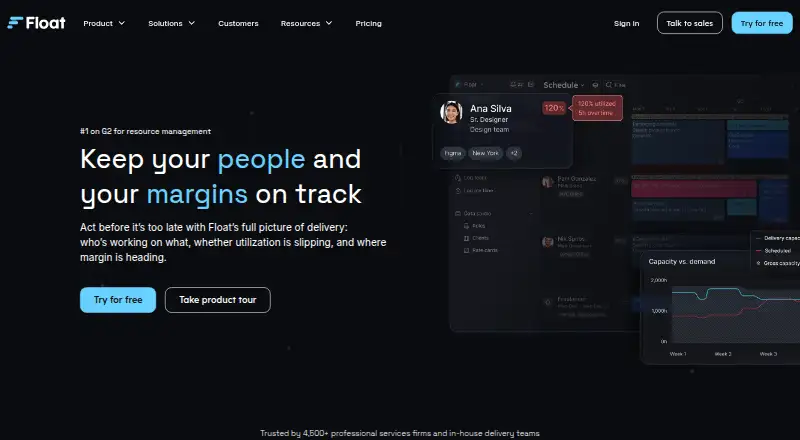
What Float is
Float gives agencies, professional services firms, and in-house delivery teams a live view of assignments, availability, utilization, delivery, and project margins. Teams can use availability, roles, and experience to plan capacity, then set a project’s price, budget, roles, and timeline baselines. AI-assisted staffing is available for project planning. Reports cover capacity, utilization, actuals, margin, and budget burn, and the API supports work with team data and project workflows. Integrations listed include Aprimo, Asana, Basecamp, ClickUp, Google Calendar, HubSpot, Jira, and Karbon, as well as Claude through Float MCP beta. Calendar sync and recurring tasks are supported. The iOS and Android apps let users check schedules, add time off, and log hours. Starter costs $7 a month per scheduled person; Pro costs $12 a month per scheduled person. Both have a free 30-day Pro trial that requires no credit card, and Float says trial data remains afterward. Enterprise pricing is by discussion.
Who it suits
Float suits agencies, professional services firms, and in-house delivery teams planning people and project capacity. It is available on web, iOS, Android, and through an API.
What it does well
- Shows availability, roles, and experience for capacity planning
- Reports on utilization, actuals, margin, and budget burn
- Mobile apps support schedule checks, time off, and hour logging
- Pro includes time tracking and advanced reporting
What to know first
- No free plan is listed
- Starter costs $7 per scheduled person/month
- Enterprise pricing is available by discussion
Limits
Starter is for resource scheduling, capacity and time-off management, project scoping, and API and integrations access. Time tracking, AI people experience profiles, multi-currency client rate cards, project cost estimation, advanced reporting, SSO, and domain restrictions are included with Pro instead.
Plans
| Plan | Billed and limits | Price |
|---|---|---|
| Starter | USD per scheduled person/month · Resource scheduling · capacity and time off management · project scoping · API and integrations access | $7 a month |
| Pro | USD per scheduled person/month · Starter features · time tracking · AI people experience profiles · multi-currency client rate cards · project cost estimation · advanced reporting · SSO and domain restrictions | $12 a month |
| Enterprise | Let's talk · Best for 100+ seat teams · onboarding and training · integration and data import consultation · custom contracts and SLAs · priority support | On request |
As float.com lists them, read 8 Oct 2026. The maker's own page has the final word.
Getting started
- Visit https://www.float.com/.
- Start the free 30-day Pro trial without a credit card.
- Choose Starter at $7 per scheduled person/month or Pro at $12 per scheduled person/month.
- Use Float on web, iOS, or Android, or connect through its API.
- Use the API and integrations access included with Starter.
Verdict
Float combines team scheduling, project planning, and financial reporting in one resource-planning product. The 30-day Pro trial offers a way to assess it before choosing a paid plan.
Questions
Does Float have a free plan?
No. Float offers a free 30-day Pro trial that does not require a credit card.
How much do Starter and Pro cost?
Starter costs $7 per scheduled person/month, and Pro costs $12 per scheduled person/month. Both are billed monthly.
Which platforms does Float support?
Float supports web, iOS, Android, and API access.
What does the mobile app do?
The iOS and Android apps support checking schedules, adding time off, and logging hours.
What integrations are listed?
The integrations page lists connections and workflows involving Aprimo, Asana, Basecamp, Claude via Float MCP beta, ClickUp, Google Calendar, HubSpot, Jira, and Karbon.
What is included with Enterprise?
Enterprise is described as best for teams with 100+ seats. It includes onboarding and training, integration and data import consultation, custom contracts and SLAs, and priority support; pricing is available by discussion.
Facts from Float's own pages
- API
- Float provides an API for interacting with team data and building project workflows. · float.com, 8 Oct 2026
- Company
- Float says it has grown independently since 2011 and was founded after Glenn Rogers and Lars Gelfan met at an ad agency in New York. · float.com, 8 Oct 2026
- Data hosting
- Float says its website and service are hosted by Google Cloud Platform in the United States. · float.com, 8 Oct 2026
- Founded
- 2011 · float.com, 28 Sept 2026
- Integrations
- The integrations page lists connections and workflows involving Aprimo, Asana, Basecamp, Claude via Float MCP beta, ClickUp, Google Calendar, HubSpot, Jira, and Karbon. · float.com, 8 Oct 2026
- Mobile
- The iOS and Android app supports checking schedules, adding time off, and logging hours. · float.com, 8 Oct 2026
- Product
- Float provides a live view of who is working on what, utilization, delivery, and project margins. · float.com, 8 Oct 2026
- Project planning
- Float lets teams set project price, budget, roles, and timeline baselines and offers AI-assisted staffing. · float.com, 8 Oct 2026
- Reporting
- Reporting covers capacity, utilization, actuals, margin, and budget burn. · float.com, 8 Oct 2026
- Scheduling
- The product shows team availability, roles, and experience to help teams plan resource capacity. · float.com, 8 Oct 2026
- Security
- Float states that it is SOC 2 certified and GDPR compliant and supports AES 256-bit encryption and TLS 1.2. · float.com, 8 Oct 2026
- Support
- The pricing page lists 24/7 AI chat and Monday-to-Friday human support, with priority support on Enterprise. · float.com, 8 Oct 2026
- Trial
- The Pro trial is free for 30 days and does not require a credit card; the pricing page says trial data stays intact afterward. · float.com, 8 Oct 2026
- Who it is for
- Float describes its intended customers as agencies, professional services firms, and in-house delivery teams. · float.com, 8 Oct 2026
Where Float stands on Freedom251
- Capacity Planning Software#7 of 62
- Resource Scheduling#3 of 20
- Resource Management Software#10 of 25
- Project Estimation Software#11 of 27
- Time Management Apps#17 of 35