Freedom251 › Garage Door Software

FieldForge
What FieldForge is
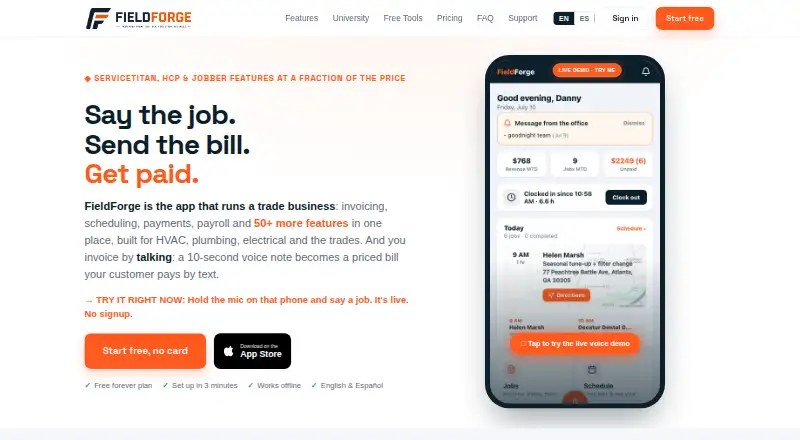
FieldForge is field service management software for HVAC, plumbing, electrical, appliance repair, garage door, and pool and spa businesses. Its tools include lead management, estimates, parts inventory, technician dispatch, invoicing, and payment processing. Technicians can describe a job in English or Spanish, and FieldForge uses the company price book, labor rate, and tax rule to prepare a draft invoice. A Dispatch board supports scheduling; route optimization is included with Crew and Fleet plans. Invoices include Stripe-powered card payments, with a stated 1% platform fee. Paid jobs can sync to QuickBooks Online or Xero, and approved hours can be exported to Gusto or QuickBooks for payroll. The installable mobile app queues voice notes recorded without signal and uploads them when coverage returns. Account owners can export customers, invoices, estimates, line items, and the price book as CSV files in a ZIP. FieldForge offers a free Solo plan for one technician and 15 invoices per month. Paid plans include Solo Pro at $19 a month. It is available on iOS and the web; its iPhone app requires iOS 15.0 or later.
Who it suits
FieldForge suits small field service businesses in the listed trades that need dispatch, estimates, invoicing, and payment processing. The free Solo plan is for one technician, while paid plans cover larger teams and add route optimization on Crew and Fleet.
What it does well
- Free Solo plan includes one technician and 15 invoices monthly.
- Voice invoicing supports English and Spanish.
- Offline voice notes upload when coverage returns.
- Paid jobs sync to QuickBooks Online or Xero.
- Account owners can export business records as CSV files.
What to know first
- No free trial is offered.
- Card payments carry a 1% platform fee.
- Route optimization is limited to Crew and Fleet plans.
- iPhone app requires iOS 15.0 or later.
Limits
Solo includes one technician and 15 invoices per month, with no logo or branding. Solo Pro costs $19 a month and includes one technician with unlimited invoices.
Plans
| Plan | Billed and limits | Price |
|---|---|---|
| Solo | 1 tech · 15 invoices/month · no logo or branding | Free |
| Fleet | Monthly · 15 techs · unlimited invoices | $149 a month |
| Solo Pro | Monthly · 1 tech · unlimited invoices | $19 a month |
| Trio | Monthly · 3 techs · unlimited invoices | $29 a month |
| Front Desk | Monthly · Invite-only beta · 100 minutes included · then 45¢/min | $49 a month |
| Crew | Monthly · 7 techs · unlimited invoices | $69 a month |
As usefieldforge.com lists them, read 29 Sept 2026. The maker's own page has the final word.
Getting started
- Open https://usefieldforge.com/ in a web browser.
- Choose the free Solo plan or a paid plan.
- Use the iOS app on an iPhone running iOS 15.0 or later, or access FieldForge on the web.
- Set up lead imports from Thumbtack or Angi if needed.
- Connect QuickBooks Online or Xero for paid-job syncing, or Gusto or QuickBooks for approved-hours exports.
FieldForge is field-service software for trade contractors who want scheduling, job records and billing in one system. It is most compelling for small HVAC, plumbing, electrical, repair and pool-service teams, especially those that want technicians to draft invoices by voice. The free tier can support a solo operator with light billing, but its invoice cap makes it a narrow fit for regular use.
Overview
FieldForge combines lead management, estimates, parts inventory, technician dispatch, invoicing and payment processing. Technicians can describe a job in English or Spanish, and the system uses the company’s price book, labor rate and tax rule to prepare a draft invoice. That links field notes to billing without making a spoken description the final invoice; someone still needs to review the draft.
Card payments are powered by Stripe, and FieldForge states a 1% platform fee for card payments. Paid jobs can sync to QuickBooks Online or Xero, while approved hours can be exported to Gusto or QuickBooks for payroll. Lead imports from Thumbtack and Angi help bring prospective jobs into the workflow. Account owners can export customers, invoices, estimates, line items and the price book as CSV files in a ZIP, a useful way to retain core records outside the service.
Key features
Dispatch and mobile work
The Dispatch board handles scheduling and technician dispatch. Route optimization is limited to Crew and Fleet, so Solo Pro and Trio buyers should not count on it to plan more efficient routes. The installable mobile app queues voice notes made without a signal and uploads them when coverage returns, which is useful for field work in dead zones.
Payments, integrations and data
Stripe handles card numbers and banking details rather than FieldForge, according to its privacy policy. Voice recordings go to Groq for transcription and invoice parsing, then are discarded without audio files being stored. FieldForge says it uses HTTPS/TLS, access controls and regular security reviews, with optional two-factor authentication. The support team typically responds within one business day.
Pricing
Solo is free and allows one technician and 15 invoices per month, with no logo or branding. It is a practical starting point for a solo contractor with modest billing, but the invoice ceiling and branding restriction make it less suitable as a business grows.
Solo Pro costs $19 a month, billed monthly, for one technician and unlimited invoices. It removes the invoice cap without adding another seat. Trio costs $29 a month, billed monthly, and supports three technicians with unlimited invoices, making it the more relevant step for a small team. Neither plan includes the route optimization reserved for Crew and Fleet.
Crew costs $69 a month, billed monthly, and covers seven technicians with unlimited invoices. Fleet costs $149 a month, billed monthly, and covers 15 technicians on the same invoice terms. These are the plans to consider when technician capacity and route optimization matter; smaller teams pay for more seats than they may need if they move up solely for routing.
Front Desk is an invite-only beta at $49 a month, billed monthly. It includes 100 minutes, then charges 45¢/min, so teams considering it should account for usage beyond the included allowance. FieldForge has no free trial.
Platforms
FieldForge is available on the web and iOS. Its iPhone app requires iOS 15.0 or later.
Who it's for
FieldForge fits service businesses that want lead intake, dispatch, estimates, parts, invoicing and payment collection together, with voice-based draft invoices as a distinctive field workflow. Solo operators can begin without a subscription, while teams can match paid tiers to technician count. It is a weaker fit for a solo user who needs route optimization, since that feature requires Crew or Fleet, or for a business that needs more than 15 invoice slots while staying on the free plan.
Pros and cons
- Pros: Voice descriptions in English or Spanish become draft invoices using the business’s own price book, labor rate and tax rule, helping connect field work with billing.
- Pros: Offline voice-note queuing and later upload supports technicians working where mobile coverage drops.
- Pros: Unlimited invoices start at $19 a month for one technician, and the paid tiers set clear technician limits.
- Cons: The free plan stops at 15 invoices per month and removes logo and branding, limiting its usefulness for a growing operation.
- Cons: Route optimization requires Crew or Fleet, a substantial step up from the smaller paid plans.
- Cons: Card payments carry a stated 1% platform fee in addition to Stripe processing.
Alternatives
For a garage-door-focused shortlist, browse Garage Door Software. Choose Striven instead if you want a paid product with a free plan and trial, broader platform support including Android and API, and monthly Standard or Enterprise tiers. Fieseros is another option if a lifetime allowance of 100 jobs on its free plan suits better than FieldForge’s recurring monthly invoice cap; it also has a free trial and Android, iOS, API and web support.
Pillar may suit a garage door business that values a free plan with every feature, at least 25 GB storage and 100 monthly jobs, estimates and invoices. Choose SAWIN Service Automation if you want a product available on self-hosted platforms as well as web and mobile, and are prepared to request a demo for pricing. HiveSuite is worth considering if you need desktop platforms including macOS and Windows and want a free trial; its Solo plan is £34.99 a month, including VAT, with one admin and two crew.
Brivium may suit a buyer willing to commit annually: its Solo plan is $19.99 a month billed annually as $239.88/year, and it offers a free trial. If route optimization on a lower starting tier matters, Home Service Pro includes it in its $65 a month Starter plan for one user, alongside scheduling, dispatch, CRM, invoicing and a mobile app. Kaldrex is an alternative for a one-user, one-trade workflow at $29 a month, with additional trades priced at $15 each.
Verdict
FieldForge is a strong choice for small trade-service teams that want dispatch and billing connected, particularly if voice-drafted invoices and offline note capture fit the way technicians work. The free plan offers a low-risk start, and paid pricing scales by technician count. Look elsewhere if route optimization is essential for a small team: FieldForge keeps it behind Crew and Fleet, while card payments also add a stated 1% platform fee.
Verdict
FieldForge brings dispatch, voice-assisted draft invoices, and payment processing together for service businesses. The free plan has a 15-invoice monthly limit, while route optimization is reserved for Crew and Fleet.
Questions
Is FieldForge free?
Yes. The Solo plan is free and includes one technician and 15 invoices per month, without logo or branding.
What do paid plans cost?
Solo Pro is $19 a month, Trio $29 a month, Front Desk $49 a month, Crew $69 a month, and Fleet $149 a month. Front Desk is an invite-only beta with 100 minutes included, then 45¢ per minute.
Which platforms does FieldForge support?
FieldForge is available on iOS and the web. The iPhone app requires iOS 15.0 or later.
What services does it connect with?
Paid jobs can sync to QuickBooks Online or Xero. Approved hours can be exported to Gusto or QuickBooks, and lead imports are supported from Thumbtack and Angi.
Facts from FieldForge's own pages
- Data export
- Account owners can export customers, invoices, estimates, line items, and the price book as CSV files in a ZIP. · usefieldforge.com, 29 Sept 2026
- Integrations
- Paid jobs can sync to QuickBooks Online or Xero, while approved hours can be exported to Gusto or QuickBooks for payroll. · usefieldforge.com, 29 Sept 2026
- iOS app
- The App Store listing says FieldForge for Contractors is available for iPhone and requires iOS 15.0 or later. · apps.apple.com, 29 Sept 2026
- Lead imports
- FieldForge supports lead imports from Thumbtack and Angi, with setup steps described for each service. · usefieldforge.com, 29 Sept 2026
- Offline use
- The installable mobile app queues voice notes recorded without signal and uploads them when coverage returns. · usefieldforge.com, 29 Sept 2026
- Payment data
- The privacy policy says card numbers and banking details are handled by Stripe and are not stored by FieldForge. · usefieldforge.com, 29 Sept 2026
- Payments
- Invoices include Stripe-powered card payments, and the product states a 1% platform fee for card payments. · usefieldforge.com, 29 Sept 2026
- Product
- FieldForge is field service management software for HVAC, plumbing, electrical, appliance repair, garage door, and pool and spa businesses. · usefieldforge.com, 29 Sept 2026
- Scheduling
- The Dispatch board supports scheduling and dispatch, and route optimization is included with Crew and Fleet plans. · usefieldforge.com, 29 Sept 2026
- Security
- FieldForge states it uses HTTPS/TLS, access controls, and regular security reviews, and offers optional two-factor authentication. · usefieldforge.com, 29 Sept 2026
- Support
- The support page says the team typically responds within one business day. · usefieldforge.com, 29 Sept 2026
- Voice data
- The privacy policy says voice recordings are sent to Groq for transcription and invoice parsing, then immediately discarded without storing audio files. · usefieldforge.com, 29 Sept 2026
- Voice invoicing
- Technicians can describe a job in English or Spanish, and FieldForge uses the company price book, labor rate, and tax rule to create a draft invoice. · usefieldforge.com, 29 Sept 2026
Where FieldForge stands on Freedom251
- Garage Door Software#2 of 25