Freedom251 › Garage Door Software

Pillar
What Pillar is
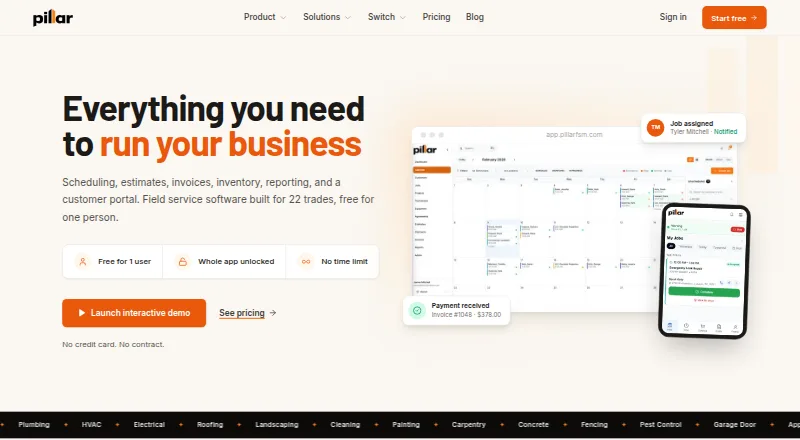
Pillar is field service management software for trade businesses, bringing scheduling, dispatch, estimates, invoicing, payments, and a customer portal together. It says it supports 22 trades, including plumbing, HVAC, electrical, roofing, landscaping, and cleaning. The calendar has drag-and-drop scheduling, technician lanes, conflict warnings, and an unscheduled-jobs panel. Customers can approve and sign estimates online; accepted estimates can become jobs without entering the details again. Technicians can use a phone app for assigned jobs, checklists, photos, and signatures, installed through a browser rather than an app store. Pillar lists QuickBooks Online, Google Calendar, and Stripe integrations, plus import presets for seven platforms. QuickBooks Online is supported; Xero and Sage are marked as coming soon. The free first-person plan costs nothing and includes 100 jobs, estimates, and invoices monthly. Each additional person costs $39 per month, month to month, and lifts those caps when a second person is added. Accounts can export several record types to a spreadsheet.
Who it suits
Pillar suits trade businesses that need scheduling, estimates, invoicing, payments, and technician workflows in one service. Its free first-person plan may fit a small operation within the monthly record limits.
What it does well
- Supports 22 trades.
- Online estimates can be signed and converted into jobs.
- Integrates with QuickBooks Online, Google Calendar, and Stripe.
- Accounts can export records to a spreadsheet.
- Card numbers do not reach Pillar's servers.
What to know first
- Free first-person plan caps jobs, estimates, and invoices at 100 monthly.
- Xero and Sage are not yet available.
- No SOC 2, ISO 27001, PCI, or HIPAA certification.
- Each additional person costs $39 per month.
Limits
The free first-person plan is limited to 100 jobs, 100 estimates, and 100 invoices per month; the counts reset monthly. Adding a second person lifts these caps. Each additional person costs $39 per month, month to month.
Plans
| Plan | Billed and limits | Price |
|---|---|---|
| First person | $0/mo · Every feature · Unlimited customers · At least 25 GB storage · 100 jobs, estimates, and invoices per month | Free |
| Each additional person | $39/mo per person, month to month · Every feature · Adds 25 GB storage per person · Monthly job, estimate, and invoice caps lift when a second person is added | $39 a month |
As pillarfsm.com lists them, read 29 Sept 2026. The maker's own page has the final word.
Getting started
- Visit https://www.pillarfsm.com/.
- Start with the free first-person plan.
- Set up schedules, estimates, invoices, and customer access.
- Install the technician app from a browser.
- Add a person at $39 per month if you need another user or want the monthly job, estimate, and invoice caps lifted.
Overview
Pillar is field-service software for trade businesses that brings scheduling, estimates, jobs, invoicing, payments, and customer access together. It is best suited to small teams that want to start free and add people as work grows. The main trade-off is that a one-person account has monthly job and document caps.
Its central strength is a connected estimate-to-job workflow: customers can approve and sign estimates online, then the business can turn them into jobs without entering the details again. Firms needing certified security controls or a particular accounting integration should weigh those requirements before choosing Pillar.
Key features
Scheduling and job flow
The calendar combines drag-and-drop scheduling, technician lanes, conflict warnings, and an unscheduled-jobs panel. That gives dispatchers practical tools for assigning work and spotting clashes, particularly when coordinating multiple technicians. Estimates can be approved and signed online before becoming jobs, reducing repeated entry; lead management and an estimate builder support the earlier stages of that workflow.
Technician work, billing, and records
Technicians can open assigned jobs on a phone, work through checklists, and capture photos and signatures. The app installs from a browser rather than an app store, which is worth factoring into rollout plans. Pillar also supports invoicing and payment processing, and customer card entry takes place on Stripe’s hosted payment page; Pillar says card numbers do not reach its servers.
Parts inventory is among its listed capabilities. Accounts can export customers, jobs, invoices, estimates, equipment, service agreements, price books, and technicians to a spreadsheet, a useful safeguard for businesses that want a way to take core records elsewhere.
Integrations and security
Pillar integrates with QuickBooks Online, Google Calendar, and Stripe. It offers data-import presets for ServiceTitan, Housecall Pro, Jobber, FieldEdge, ServiceM8, Workiz, and Square, giving businesses on those platforms a defined starting point for moving data. QuickBooks Online is the supported accounting sync; Xero and Sage are marked Coming Soon, so businesses that depend on either should not assume a current connection.
Pillar describes company data isolation, request-level role checks, encrypted connections, and a 90-day audit log. It does not have SOC 2, ISO 27001, PCI, or HIPAA certification, making it a weaker fit for organizations that require one of those formal attestations. Support messages receive an email reply within one business day, usually the same day.
Pricing
Pillar uses a freemium model, has no free trial, and starts paid access at $39/user/mo. Its pricing scales by person rather than requiring a paid entry plan.
- First person — free, billed $0/mo. Includes every feature, unlimited customers, at least 25 GB of storage, and 100 jobs, 100 estimates, and 100 invoices per month. Those monthly caps reset each month. This is a useful way to evaluate the workflow or run a low-volume operation, but a solo business with more than 100 jobs or documents of any one type in a month will hit a ceiling.
- Each additional person — $39 a month, billed $39/mo per person, month to month. Includes every feature and adds 25 GB of storage per person. Adding a second person lifts the monthly job, estimate, and invoice caps. It suits growing teams that need more capacity and technician access, though the per-person charge means staffing growth raises the recurring bill.
Platforms
Pillar supports Android, iOS, and web. The technician phone app is installed through a browser rather than an app store, so teams should account for that installation route when onboarding staff.
Who it's for
Pillar says it supports 22 trades, including plumbing, HVAC, electrical, roofing, landscaping, and cleaning. Its broad trade coverage and connected estimates, dispatch, field work, and billing make it a sensible candidate for small service businesses that want these workflows in one product. The free plan is most compelling for a low-volume solo user or a team assessing fit; the caps make it less suitable for a busy one-person operation. Companies that require certified security or depend on Xero or Sage should look elsewhere.
Pros and cons
- Pros: Customers can sign estimates online and carry them into jobs without re-entry, linking approval to scheduling.
- Pros: The free first-person plan includes every feature, unlimited customers, and at least 25 GB storage, with no paid entry tier.
- Pros: Spreadsheet exports cover a wide range of operational records, supporting data portability.
- Cons: A solo account is capped at 100 jobs, estimates, and invoices per month, limiting headroom for higher-volume work.
- Cons: Each additional person costs $39 a month, so the monthly spend rises with team size.
- Cons: QuickBooks Online is the available accounting sync; Xero and Sage are not yet available, and Pillar has no SOC 2, ISO 27001, PCI, or HIPAA certification.
Alternatives
For garage-door-specific options, browse Garage Door Software. Choose Fieseros if a lifetime allowance of 100 jobs on a free plan, with quotes, estimates, invoices, payments, and a basic calendar, better suits your workload. FieldForge is worth comparing for a one-technician setup: its free Solo plan allows 15 invoices per month, while Solo Pro costs $19 a month for unlimited invoices.
Striven is another option to compare. HiveSuite may suit buyers seeking a paid Solo plan at £34.99 a month, including VAT, with one admin and two crew. Brivium, EyeOnTask, Home Service Pro, and MrTask are also alternatives to consider.
Verdict
Choose Pillar if you run a trade business that wants an integrated path from online estimate approval through field work and invoicing, and can work within the free solo caps or budget $39 a month for each added person. Its connected workflow and free first-person plan are the strongest reasons to shortlist it. Look elsewhere if your solo volume exceeds the monthly limits, your accounting depends on Xero or Sage, or your organization requires formal security certification.
Verdict
Pillar combines core field-service workflows and supports several trade categories. Review the free plan's monthly caps, available integrations, and additional-person cost before choosing it.
Questions
Does Pillar have a free plan?
Yes. The first person costs $0 per month and includes every feature, unlimited customers, at least 25 GB of storage, and 100 jobs, estimates, and invoices per month.
How much does an additional person cost?
Each additional person costs $39 per month, billed month to month. Adding a second person lifts the monthly job, estimate, and invoice caps.
Which platforms does Pillar support?
Pillar is available on the web, Android, and iOS. The technician app installs from a browser rather than an app store.
What integrations does Pillar list?
It lists QuickBooks Online, Google Calendar, and Stripe. Xero and Sage are marked Coming Soon.
Can Pillar import data from other systems?
It offers import presets for ServiceTitan, Housecall Pro, Jobber, FieldEdge, ServiceM8, Workiz, and Square.
Can I export data from Pillar?
Yes. Accounts can export customers, jobs, invoices, estimates, equipment, service agreements, price books, and technicians to a spreadsheet.
Facts from Pillar's own pages
- Card data
- Customer card entry is handled on Stripe's hosted payment page, and Pillar says card numbers never reach its servers. · pillarfsm.com, 29 Sept 2026
- Company
- Pillar Software Solutions LLC is a Pennsylvania company founded in 2025 and built in Lancaster, Pennsylvania. · pillarfsm.com, 29 Sept 2026
- Data portability
- Accounts can export customers, jobs, invoices, estimates, equipment, service agreements, price books, and technicians to a spreadsheet. · pillarfsm.com, 29 Sept 2026
- Estimates and jobs
- Customers can approve and sign estimates online, which can then become jobs without re-entering the details. · pillarfsm.com, 29 Sept 2026
- Founded
- 2025 · pillarfsm.com, 28 Sept 2026
- Headquarters
- Lancaster, Pennsylvania, USA · pillarfsm.com, 28 Sept 2026
- Integrations
- Pillar lists QuickBooks Online, Google Calendar, and Stripe integrations, and offers data import presets for seven platforms: ServiceTitan, Housecall Pro, Jobber, FieldEdge, ServiceM8, Workiz, and Square. · pillarfsm.com, 29 Sept 2026
- Notable free limits
- A one-person account is limited to 100 jobs, 100 estimates, and 100 invoices per month; those counts reset monthly and lift with a second person. · pillarfsm.com, 29 Sept 2026
- Product
- Pillar is field service management software for trade businesses, combining scheduling, dispatch, estimates, invoicing, payments, and a customer portal. · pillarfsm.com, 29 Sept 2026
- QuickBooks sync limit
- QuickBooks Online is supported; Pillar says Xero and Sage are not yet available and are marked Coming Soon. · pillarfsm.com, 29 Sept 2026
- Scheduling
- Its calendar supports drag-and-drop scheduling, technician lanes, conflict warnings, and an unscheduled jobs panel. · pillarfsm.com, 29 Sept 2026
- Security
- Pillar describes company data isolation, role checks on each request, encrypted connections, and a 90-day audit log; it says it has no SOC 2, ISO 27001, PCI, or HIPAA certification. · pillarfsm.com, 29 Sept 2026
- Support
- Pillar says support messages receive an email reply within one business day, usually the same day. · pillarfsm.com, 29 Sept 2026
- Technician app
- Technicians can use a phone app for assigned jobs, checklists, photos, and signatures; Pillar installs from a browser rather than an app store. · pillarfsm.com, 29 Sept 2026
- Trades served
- Pillar says it supports 22 trades, including plumbing, HVAC, electrical, roofing, landscaping, and cleaning. · pillarfsm.com, 29 Sept 2026
Where Pillar stands on Freedom251
- Garage Door Software#3 of 25