Freedom251 › Exam Scheduling Software
FET
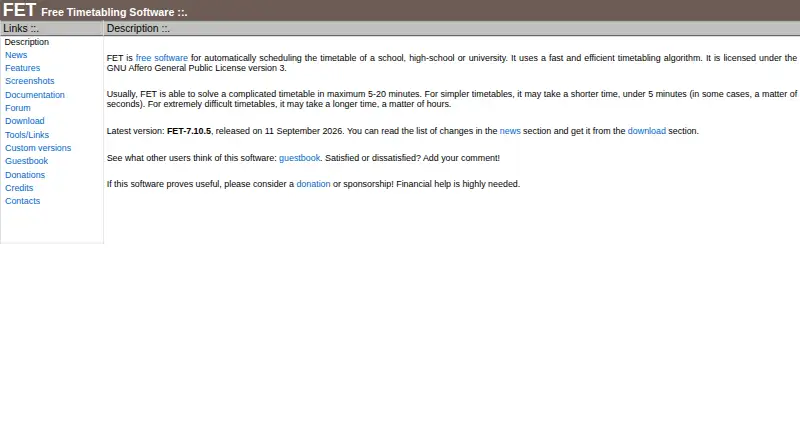
What FET is
FET is free timetable-scheduling software for schools, high schools, and universities. It can allocate activities automatically, semi-automatically, or manually, taking account of teacher and student availability, preferred times and rooms, gaps, working hours, and room or building changes. FET imports CSV and accepts flexible XML input; finished timetables can be exported as HTML, XML, or CSV. Its stated algorithm limits are 500,000 activities, 30,000 student subgroups, 30,000 rooms, and 30,000 buildings. It runs on Linux, macOS, and Windows and is licensed under the GNU Affero General Public License version 3. The maker provides documentation and a user forum, and lists third-party tools for converting FET XML results to Microsoft Excel and importing compatible timetables into RosarioSIS. Stated generation times range from under five minutes for simpler timetables to hours for extremely difficult ones. The maker also offers advice or possible help with custom variants for institutions.
Who it suits
FET suits schools and universities that need to build schedules around teacher, student, room, and time constraints. It offers both automatic and manual allocation approaches.
What it does well
- Supports automatic, semi-automatic, and manual allocation.
- Accounts for teacher and student availability and room constraints.
- Imports CSV and XML; exports HTML, XML, and CSV.
- Runs on Linux, macOS, and Windows.
- Free software under the GNU Affero General Public License version 3.
What to know first
- Extremely difficult timetables may take hours to generate.
- The stated algorithm limits include 30,000 rooms and buildings.
Plans
| Plan | Billed and limits | Price |
|---|---|---|
| FET | No stated usage limits | Free |
As lalescu.ro lists them, read 3 Oct 2026. The maker's own page has the final word.
Getting started
- Open the FET website.
- Choose the version for Linux, macOS, or Windows.
- Prepare timetable input in CSV or flexible XML format.
- Set the required time and space constraints.
- Allocate activities automatically, semi-automatically, or manually, then export the timetable as HTML, XML, or CSV.
FET is a free timetable generator for schools, high schools, and universities. It best suits institutions that need detailed control over teacher, student, room, and time constraints without a software fee.
Overview
FET can build schedules automatically, or let schedulers allocate activities semi-automatically or manually. That range is valuable for institutions whose constraints require human decisions, but it also means FET is not simply a push-button answer for every timetable. The maker says simpler schedules usually take under five minutes, complicated ones 5–20 minutes, and extremely difficult ones may take hours.
Key features
Time and space constraints cover teacher and student availability, preferred times and rooms, gaps, working hours, and room or building changes. This breadth lets schools model practical limits that can otherwise make a timetable unusable. The trade-off is that more complicated constraint sets may take longer to solve.
FET accepts flexible XML input and imports and exports CSV; it exports completed timetables in HTML, XML, and CSV. Those formats give institutions several ways to exchange or publish schedules. Third-party tools can convert FET XML results to Microsoft Excel or import FET-compatible timetables into RosarioSIS, but these are separate tools rather than built-in integrations.
The stated algorithm limits are 500,000 activities, 30,000 student subgroups, 30,000 rooms, and 30,000 buildings. Those high ceilings make FET relevant to large institutions, though they describe algorithm limits, not a promise that every schedule will finish quickly. The download page publishes SHA256 checksums for release files and an ASCII signature for the source archive, a useful integrity check for organizations managing software distribution.
Pricing
FET costs nothing under its FET plan, with no stated usage limits. There is no free trial because the software itself is free. It is free software under the GNU Affero General Public License version 3, making it a strong fit for institutions seeking timetable software without a subscription charge. The trade-off is that there is no paid plan described here with a different service level or feature set.
Platforms
FET supports Linux, macOS, and Windows. That desktop operating-system coverage suits institutions with mixed environments, but it does not include a web or mobile platform.
Who it's for
FET is a sensible choice for schools, high schools, and universities that need extensive time, room, teacher, and student-group constraints, and can accommodate a desktop workflow. Its manuals, instructions, tips, FAQs, and user forum give schedulers reference and peer-support channels. The authors also say they may help make a custom variant when a requested change is not too difficult, or advise on how to implement it. Institutions needing a guaranteed custom development commitment should not treat that as one.
Pros and cons
- Pros: Free software with no stated usage limits makes broad scheduling capacity available without a listed license cost.
- Pros: Automatic, semi-automatic, and manual allocation offer flexibility when a schedule needs human intervention.
- Pros: Multiple import and export formats support exchange with spreadsheet, publishing, and other scheduling workflows.
- Cons: Very difficult schedules may take hours, so it may not suit teams that require a predictable short turnaround.
- Cons: Linux, macOS, and Windows support leaves out web and mobile access.
Alternatives
For a broader shortlist, see School Scheduling Software or Exam Scheduling Software.
Choose UniTime instead if you need a free option with web, self-hosted, and API platforms, or want commercial support available for a fee. Peñalara GHC is a freemium alternative with a free trial and Android, iOS, web, and Windows platforms. GC Education Analytics K–12 Master Scheduler is another free option, delivered on the web.
SchoolGrid offers a free plan and trial on the web, with an annual-billed evaluation for one school and up to 15 drafts during that evaluation. Tes Timetable is a paid option for web and Windows. TimetableMaster is freemium with a free trial and broad platform support, but no free plan.
UniversiTools Schedulers is a paid web option whose scope and pricing require a separate approved proposal or agreement. aSc Timetables is a paid alternative with a free trial across Android, iOS, Linux, macOS, web, and Windows; its trial has no purchase requirement before generating a schedule, but export is unavailable.
Verdict
Choose FET if your school or university needs detailed constraint-based scheduling, broad file-format support, and freedom from a software fee. Its strongest case is the combination of flexible allocation modes and generous stated algorithm limits. Look elsewhere if web or mobile access is essential, or if extremely difficult timetables must be generated within a predictable short window.
Verdict
FET covers a broad set of scheduling constraints and offers multiple ways to allocate activities. Its file formats, platform support, and stated scale limits help institutions assess whether it fits their scheduling needs.
Questions
Is FET free?
Yes. The listed FET plan is free, and the software is licensed under the GNU Affero General Public License version 3.
Which operating systems does FET support?
FET runs on Linux, macOS, and Windows.
What file formats can FET use?
It imports CSV and accepts flexible XML input. Completed timetables can be exported as HTML, XML, or CSV.
What are FET's stated algorithm limits?
The maker states limits of 500,000 activities, 30,000 student subgroups, 30,000 rooms, and 30,000 buildings.
Does FET connect with Microsoft Excel or RosarioSIS?
The maker lists third-party tools for converting FET XML results to Microsoft Excel and importing FET-compatible timetables into RosarioSIS.
How long can timetable generation take?
The maker says simpler timetables may take under five minutes, complicated ones usually take 5–20 minutes, and extremely difficult ones may take hours.
Facts from FET's own pages
- Customization
- FET authors say they can help make a custom variant for an institution if the requested change is not too difficult, or advise on how to do it. · lalescu.ro, 3 Oct 2026
- Data formats
- FET imports and exports CSV, accepts input in a flexible XML format, and exports resulting timetables as HTML, XML, and CSV. · lalescu.ro, 3 Oct 2026
- Generation time
- The maker says complicated timetables usually take 5–20 minutes, simpler ones under five minutes, and extremely difficult ones may take hours. · lalescu.ro, 3 Oct 2026
- Integrations
- The maker lists third-party tools for converting FET XML timetable results to Microsoft Excel and for importing FET-compatible timetables into RosarioSIS. · lalescu.ro, 3 Oct 2026
- License
- FET is free software licensed under the GNU Affero General Public License version 3. · lalescu.ro, 3 Oct 2026
- Platforms
- The current release is available for GNU/Linux, Windows, and macOS. · lalescu.ro, 3 Oct 2026
- Purpose
- FET automatically schedules timetables for schools, high schools, and universities. · lalescu.ro, 3 Oct 2026
- Scale limits
- The stated algorithm limits include 500,000 activities, 30,000 student subgroups, 30,000 rooms, and 30,000 buildings. · lalescu.ro, 3 Oct 2026
- Scheduling constraints
- Its time and space constraints cover teacher and student availability, preferred times and rooms, gaps, working hours, and room or building changes. · lalescu.ro, 3 Oct 2026
- Scheduling modes
- FET supports fully automatic, semi-automatic, and manual allocation. · lalescu.ro, 3 Oct 2026
- Security and integrity
- The download page publishes SHA256 checksums for release files and an ASCII signature for the source archive. · lalescu.ro, 3 Oct 2026
- Support
- The maker provides a user forum and documentation, including manuals, instructions, tips, and frequently asked questions. · lalescu.ro, 3 Oct 2026
Where FET stands on Freedom251
- Exam Scheduling Software#2 of 37
- School Scheduling Software#2 of 29