Freedom251 › School Scheduling Software
GC Education Analytics K–12 Master Scheduler
Visit GC Education Analytics K–12 Master Scheduler Alternatives Pricing
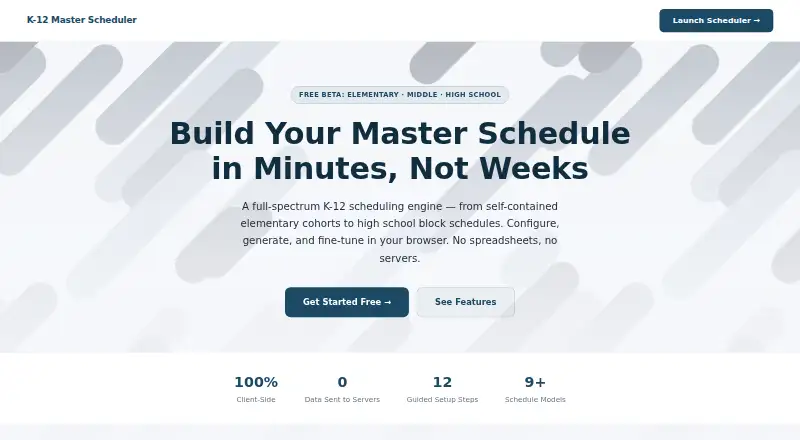
What GC Education Analytics K–12 Master Scheduler is
GC Education Analytics K–12 Master Scheduler is a browser-based engine for building and refining school master schedules, from elementary cohorts through high school block schedules. It supports elementary, middle, high, K–8, and 6–12 configurations. Scheduling options include self-contained, departmentalized, partner/platooning, split-band, traditional daily, A/B block, 4x4 semester, trimester, team-based, modified block, rotating drop, and multiple-variant schedules. Users can place sections by cohort and automatically create elementary Art, Music, and PE rotations for homerooms. Controls include teacher-period locks, unavailable times, room requirements, and course priorities. Conflict counts update in real time, while placement logs explain where sections went or why placement failed. Teachers and courses can be imported from CSV, and schedules exported as CSV for an SIS or printing. The tool runs in the browser without accounts or servers, keeps school data on the user's machine, and auto-saves in browser IndexedDB. It is described as a free beta with no sign-up, installation, or cost.
Who it suits
It suits school staff building schedules for elementary, middle, high, K–8, or 6–12 configurations. Its cohort placement, constraints, and CSV import and export support schedule planning and review.
What it does well
- Supports elementary through high school configurations.
- Offers a wide range of scheduling models.
- Automatically generates elementary Art, Music, and PE rotations.
- Real-time conflicts and placement logs aid schedule review.
- Browser data stays on the user's machine.
What to know first
- The product is described as a free beta.
- It runs in a browser only.
- Work is saved in browser IndexedDB.
Limits
The available product is described as a free beta. The listed platform is web.
Plans
| Plan | Billed and limits | Price |
|---|---|---|
| Free Beta | Elementary · Middle · High School | Free |
As app.gceducationanalytics.com lists them, read 2 Oct 2026. The maker's own page has the final word.
Getting started
- Open the scheduler website in a browser.
- Import teachers and courses from CSV, if available.
- Choose a school configuration and scheduling model.
- Set teacher availability, period locks, room requirements, and course priorities.
- Generate the schedule and review it in teacher, room, or master-grid views.
- Export the schedule as CSV for an SIS or printing.
GC Education Analytics K–12 Master Scheduler is a free-beta browser tool for building school master schedules. It is best suited to K–12 teams comparing timetable models or placing cohorts around teacher and room constraints. Its unusually broad model range makes it a worthwhile option to evaluate, while its browser-local workflow is a meaningful limitation for teams that need work to travel between devices.
Overview
The scheduler covers elementary, middle, high, K–8, and 6–12 configurations, spanning elementary cohort timetables through high-school blocks. That makes it relevant to schools with varied grade structures, especially those weighing multiple schedule approaches rather than starting from one fixed template.
The free beta requires no sign-up or installation. The product says it runs without accounts or servers, collects no data, and keeps school data on the user's machine. It auto-saves work in that browser's IndexedDB, which supports returning to a schedule on the same local setup but makes the browser and device important to preserving access.
Key features
Scheduling models and cohorts
Supported patterns include self-contained, departmentalized, partner/platooning, split-band, traditional daily, A/B block, 4x4 semester, trimester, team-based, modified block, rotating drop, and multiple-variant schedules. This range is useful for teams modeling different structures; the number of options alone does not establish that every school's particular rules can be represented.
Cohort-based section placement helps schools schedule student groups together. For elementary homerooms, the tool also generates Art, Music, and PE rotations automatically, reducing the need to arrange those specials separately.
Constraints and conflict feedback
Users can lock teachers to periods, mark unavailable times, set room requirements, and define course priorities. These controls give schedulers a way to express practical staffing and room needs rather than treating every placement as interchangeable.
Real-time conflict counts and placement logs show where sections landed or why a placement could not be made. That feedback can help teams diagnose a difficult schedule, although users still need to interpret the conflicts and adjust their constraints or plans.
Generation and data exchange
Schedule generation runs in a background Web Worker, and users can review teacher, room, and master-grid views. Teachers and courses can be imported from CSV; schedules can be exported as CSV for an SIS or printing. These exchange options provide a straightforward path into the scheduler and out to other workflows, but the stated exchange format is CSV.
Pricing
Free Beta: free for Elementary · Middle · High School. The beta has no sign-up, installation, or cost, making it suitable for schools that want to evaluate timetable models without a purchase. No seat count or usage cap is stated. Its trade-off is the beta and browser-local setup rather than a published paid tier or account-based workspace.
Platforms
The product is web-based and runs in the browser. Because work auto-saves in local IndexedDB, the workflow is centered on the browser and machine holding the schedule.
Who it's for
This is a strong fit for elementary through high-school scheduling teams that need to compare multiple timetable structures, place cohorts, generate elementary specials rotations, or balance teacher and room requirements. Schools exploring a schedule before committing to a paid system may particularly value the free beta. Teams that need an account-based, server-backed workflow or a stated supported production plan should look elsewhere.
Pros and cons
- Pro: A wide range of school configurations and scheduling models supports work beyond a single conventional timetable structure.
- Pro: Teacher and room constraints, priorities, and conflict logs make placement decisions more transparent to schedulers.
- Pro: Automatic Art, Music, and PE rotations address a concrete elementary scheduling task.
- Pro: Free beta access and CSV import/export lower the barrier to evaluation and moving schedule data.
- Con: Local IndexedDB saving keeps work tied to the browser and machine, limiting the convenience of moving between setups.
- Con: The product is a beta, so schools seeking a clearly established paid offering should consider alternatives.
Alternatives
For a broader set of school scheduling options, start with School Scheduling Software. Consider Peñalara GHC if you want a freemium option with a free trial and apps across mobile, desktop, and web platforms. Prime Timetable may suit teams wanting a multi-platform tool with a free evaluation plan and a 30-day trial.
FET is a free alternative with no stated usage limits, though it runs on Linux, macOS, and Windows rather than the web. Choose UniTime if open-source software and self-hosting matter; commercial support is available for a fee. SchoolGrid is another web option, with a free tier for one school and a 30-day scheduling and publishing evaluation.
Tes Timetable is a paid web and Windows alternative. Ad Astra is a paid option with web and API platforms, while Cardonex Schedule is a paid web alternative.
Verdict
GC Education Analytics K–12 Master Scheduler is a sensible first choice for K–12 teams that want to model varied schedules, apply concrete teacher and room constraints, and inspect placement conflicts without paying or creating an account. Its strongest reason to choose is the breadth of scheduling models paired with useful feedback and elementary rotations. Look elsewhere if schedules need to live in an account-based, server-backed workflow or if a beta is not suitable for the school's needs.
Verdict
This scheduler combines multiple school configurations and scheduling models with constraints, conflict feedback, and CSV exchange. Its free beta runs locally in the browser without accounts or servers, so users should note its browser-only setup and local saving.
Questions
How much does it cost?
The Free Beta plan costs nothing.
Is there a free plan?
Yes. The product page describes a free beta with no sign-up, installation, or cost.
Which school configurations and scheduling models does it support?
It supports elementary, middle, high, K–8, and 6–12 configurations. Models include traditional daily, A/B block, 4x4 semester, trimester, team-based, modified block, rotating drop, and multiple-variant schedules, among others.
Can it import or export schedules?
Teachers and courses can be imported from CSV, and schedules can be exported as CSV for an SIS or printing.
Where is scheduling data kept?
The product page says data stays on the user's machine and work auto-saves in browser IndexedDB.
Who makes the scheduler?
The maker is GC Education Analytics. Its site names the company GC Education Analytics LLC.
Facts from GC Education Analytics K–12 Master Scheduler's own pages
- Cohorts and specials
- It supports cohort-based section placement and automatically generates elementary Art, Music, and PE rotations for homerooms. · app.gceducationanalytics.com, 2 Oct 2026
- Conflict detection
- The scheduler provides real-time conflict counts and placement logs explaining where sections were placed or why they could not be placed. · app.gceducationanalytics.com, 2 Oct 2026
- Constraints
- Users can lock teachers to periods, mark unavailable times, set room requirements, and define course priorities. · app.gceducationanalytics.com, 2 Oct 2026
- Current availability
- The page describes the product as a free beta and says there is no sign-up, installation, or cost. · app.gceducationanalytics.com, 2 Oct 2026
- Data handling
- The product page says the scheduler runs in the browser, uses no accounts or servers, collects no data, and keeps school data on the user's machine. · app.gceducationanalytics.com, 2 Oct 2026
- Import and export
- Users can import teachers and courses from CSV and export schedules as CSV for an SIS or printing. · app.gceducationanalytics.com, 2 Oct 2026
- Local persistence
- Work auto-saves in the browser's IndexedDB so users can return to it later. · app.gceducationanalytics.com, 2 Oct 2026
- Maker
- The scheduler page identifies GC Education Analytics as its maker; the maker's site names the company GC Education Analytics LLC. · gceducationanalytics.com, 2 Oct 2026
- Maker focus
- GC Education Analytics says it builds custom software and analytics for schools and provides AI workshops for school administrators. · gceducationanalytics.com, 2 Oct 2026
- Purpose
- The browser-based scheduling engine builds and refines K–12 master schedules, from elementary cohorts to high school block schedules. · app.gceducationanalytics.com, 2 Oct 2026
- Schedule generation
- The scheduler builds schedules using a background Web Worker and offers teacher, room, and master-grid review views. · app.gceducationanalytics.com, 2 Oct 2026
- Scheduling models
- Listed models include self-contained, departmentalized, partner/platooning, split-band, traditional daily, A/B block, 4x4 semester, trimester, team-based, modified block, rotating drop, and multiple-variant schedules. · app.gceducationanalytics.com, 2 Oct 2026
- Target schools
- The scheduler supports elementary, middle, high, K–8, and 6–12 school configurations. · app.gceducationanalytics.com, 2 Oct 2026
Where GC Education Analytics K–12 Master Scheduler stands on Freedom251
- School Scheduling Software#5 of 29