Freedom251 › School Scheduling Software

SchoolGrid
What SchoolGrid is
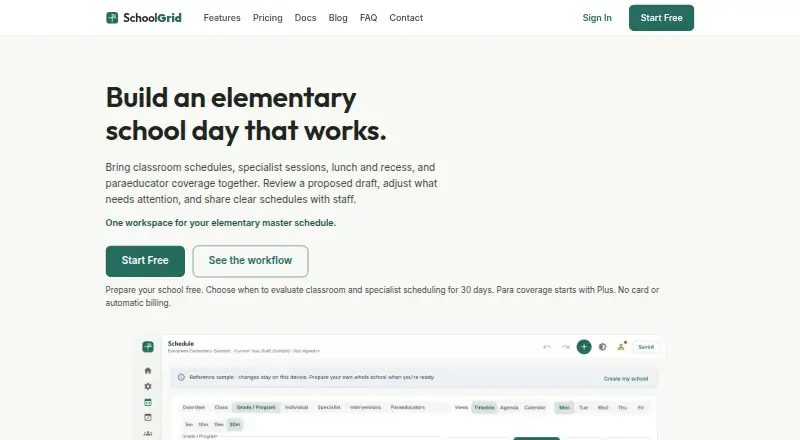
SchoolGrid is a browser-based scheduling app for elementary schools. It brings classroom, specialist, intervention, lunch, recess, instructional-minute, and paraeducator coverage needs into a master schedule. Its automatic scheduler drafts schedules from configured school constraints, including teacher and room constraints, and users can review and revise the drafts. Timeline, Agenda, and Calendar views help staff inspect schedules, which can be exported as PDF or CSV or published to Google Drive and Microsoft OneDrive. Plus and Pro users can use monthly Schedule Transfer credits to turn related spreadsheets or PDFs into schedule proposals for review. SchoolGrid says it does not request student names, rosters, grades, or student accounts and is not designed to hold student records. The service runs in a browser without installation. A free plan includes a 30-day scheduling and publishing evaluation, with paid plans starting at $99/yr. Pro supports up to three schools or sites and includes priority email support and video onboarding.
Who it suits
SchoolGrid suits elementary principals, assistant principals, office managers, instructional coaches, and support staff leads coordinating schedules. Pro may fit teams managing up to three schools or sites.
What it does well
- Drafts schedules from configured school constraints.
- Includes Timeline, Agenda, and Calendar views.
- Exports PDF and CSV files.
- Publishes schedules to Google Drive or OneDrive.
- Does not request student records or accounts.
What to know first
- Free evaluation allows up to 15 drafts.
- Free plan has no para coverage or transfer credits.
- Plus costs $99 a year.
- Pro costs $499 a year.
Limits
SchoolGrid Free provides a 30-day scheduling and publishing evaluation with up to 15 drafts, no para coverage, and no Schedule Transfer credits. SchoolGrid Plus is limited to 15 drafts and five monthly Schedule Transfer credits; SchoolGrid Pro supports up to three schools or sites and includes 15 monthly setup credits.
Plans
| Plan | Billed and limits | Price |
|---|---|---|
| SchoolGrid Free | annual · 1 school · staff entry and roster import · 30-day scheduling/publishing evaluation · up to 15 drafts during evaluation · no para coverage · no Schedule Transfer credits | Free |
| SchoolGrid Pro | annual · up to 3 schools/sites · unlimited drafts · 15 monthly setup credits · priority email support · 3 hours video onboarding | $499 a year |
| SchoolGrid Plus | annual · 1 school/site · up to 15 drafts · Auto-Build Draft · para and student-support coverage · PDF/CSV and roster import/export · Google Drive and OneDrive publishing · 5 monthly Schedule Transfer credits | $99 a year |
As schoolgrid.app lists them, read 1 Oct 2026. The maker's own page has the final word.
Getting started
- Open app.schoolgrid.app in a browser.
- Choose the SchoolGrid Free evaluation or a paid plan.
- Configure school constraints for the auto-scheduler.
- Review and revise the generated draft in Timeline, Agenda, or Calendar view.
- Export schedules as PDF or CSV, or publish to Google Drive or OneDrive.
SchoolGrid is a browser-based master-scheduling app for elementary schools, aimed at principals, office managers, instructional coaches, and staff responsible for support coverage. It is strongest when a school needs constraint-aware drafts and clear review tools in one place; its free offering is primarily an evaluation, so ongoing use generally means a paid plan.
Overview
SchoolGrid brings classrooms, specialists, interventions, lunch, recess, instructional minutes, and paraeducator coverage into a single scheduling workflow. Its automatic timetable builder uses configured school, teacher, and room constraints to produce a draft, while conflict detection flags clashes for human review. That division of labor is sensible: the software handles an otherwise tedious first pass, but school staff retain control over revisions and final decisions.
The service is deliberately not a student-record system. It says it does not request student names, rosters, grades, or student accounts and is not designed to hold student records. SchoolGrid also says it does not sell or rent personal information, use advertising trackers, or use schedule data except to provide the service. Passwords use PBKDF2 one-way hashing, connections use HTTPS, and Stripe handles payment details under PCI-DSS certification. Those practices reduce exposure for a scheduling tool, although each school remains responsible for its own data policies.
Key features
Timeline, Agenda, and Calendar views let staff inspect the same schedule at different levels of detail. Timeline is suited to scanning the day’s structure, while Agenda and Calendar provide alternative ways to review assignments and timing before publication. PDF and CSV export support printing, sharing, or further spreadsheet work.
Publishing can send schedule files to Google Drive or Microsoft OneDrive. Google Drive uses the drive.file permission, and OneDrive uses Files.ReadWrite.AppFolder, keeping the connection scoped to the app’s file area rather than requiring broad drive access. Roster import and export are included on paid plans.
Schedule Transfer is a practical upgrade for schools with existing materials: Plus and Pro can use monthly setup credits to turn related spreadsheets or PDFs into a reviewable schedule proposal. It is not unlimited conversion, so schools with frequent timetable changes should compare the credit allowance with their workflow.
Pricing
| Plan | Price | What it includes |
|---|---|---|
| SchoolGrid Free | free, billed annual | 1 school; staff entry and roster import; 30-day scheduling and publishing evaluation; up to 15 drafts during evaluation; no para coverage or Schedule Transfer credits |
| SchoolGrid Plus | $99 a year, billed annual | 1 school/site; up to 15 drafts; Auto-Build Draft; para and student-support coverage; PDF/CSV and roster import/export; Google Drive and OneDrive publishing; 5 monthly Schedule Transfer credits |
| SchoolGrid Pro | $499 a year, billed annual | Up to 3 schools/sites; unlimited drafts; 15 monthly setup credits; priority email support; 3 hours of video onboarding |
Free is useful for a month-long evaluation, but its 15-draft ceiling and missing para coverage make it unsuitable as a permanent no-cost operating plan. Plus is the economical choice for one site that needs the full scheduling and publishing workflow, though it still caps drafts at 15 and transfer credits at five per month. Pro earns its higher annual price for multi-site organizations, teams that iterate beyond 15 drafts, or administrators who need onboarding and prioritized support.
Platforms
SchoolGrid runs at app.schoolgrid.app in a web browser and requires no installation. Its browser delivery suits mixed-device school offices; a dedicated desktop or mobile application is not part of the offering.
Who it's for
SchoolGrid is tailored to elementary principals, assistant principals, office managers, instructional coaches, and support-staff leads coordinating a complex school day. It is a particularly good fit when paraeducator or student-support coverage must be considered alongside rooms, specialists, and instructional minutes. Schools managing several sites should start with Pro; a single elementary campus with modest revision needs can use Plus. Organizations seeking a continuing free service, or a system intended to store student records, should look elsewhere.
Pros and cons
- Pros: Constraint-based automatic drafts reduce manual timetable assembly.
- Pros: Conflict detection plus teacher and room constraints support realistic school scheduling.
- Pros: Para coverage, student-support scheduling, exports, and cloud-drive publishing address operational handoff.
- Pros: The product minimizes student-data exposure and uses HTTPS, PBKDF2 hashing, and PCI-DSS-certified payment processing.
- Cons: The Free plan expires as a 30-day evaluation and excludes para coverage and transfer credits.
- Cons: Plus allows only 15 drafts and five monthly transfer credits, which may constrain heavily iterative schools.
- Cons: Multi-site use and unlimited drafting require the $499-per-year Pro plan.
Alternatives
The School Scheduling Software directory is a useful starting point for comparing broader scheduling choices. Choose Peñalara GHC instead if you need Android, iOS, Windows, and web coverage alongside a freemium model. Prime Timetable suits readers wanting a cross-platform timetable tool with a 30-day trial and a free evaluation plan.
FET is the better fit for a fully free desktop option on Linux, macOS, or Windows, while UniTime is preferable when open-source deployment, APIs, or self-hosting matter. GC Education Analytics K–12 Master Scheduler is an alternative web scheduler with a free beta spanning elementary, middle, and high school. Choose Tes Timetable, Ad Astra, or Cardonex Schedule when their paid offerings better match your procurement requirements.
Verdict
Choose SchoolGrid if you run an elementary school and want automatic, constraint-aware timetable drafts with review views, para coverage, exports, and cloud publishing. Plus is the sensible single-site plan; Pro is justified by multiple sites, unlimited drafts, or guided onboarding. Look elsewhere if you need an ongoing free plan, a non-browser application, or a platform designed to retain student records.
Verdict
SchoolGrid combines schedule drafting, review, export, and publishing for elementary school workflows. The free evaluation is limited, while paid plans add para coverage, transfer credits, or support for multiple sites.
Questions
Is there a free plan or trial?
Yes. SchoolGrid Free costs nothing and provides a 30-day scheduling and publishing evaluation. A 30-day trial is also listed.
What do the paid plans cost?
SchoolGrid Plus costs $99 a year, billed annually. SchoolGrid Pro costs $499 a year, billed annually.
Which platforms does SchoolGrid support?
It is web-based and runs at app.schoolgrid.app in a browser. Nothing needs to be installed.
Can SchoolGrid publish to cloud storage?
Yes. It supports publishing schedule files to Google Drive and Microsoft OneDrive.
Does SchoolGrid store student records?
SchoolGrid says it does not ask for student names, rosters, grades, or student accounts and is not designed to hold student records.
What support comes with Pro?
Pro includes priority email support and three hours of video onboarding. Free users can use the contact form.
Facts from SchoolGrid's own pages
- Audience
- SchoolGrid is built for elementary principals, assistant principals, office managers, instructional coaches, and support staff leads. · schoolgrid.app, 1 Oct 2026
- Auto-scheduling
- Its auto-scheduler drafts schedules from configured school constraints, and users can review and revise the result. · schoolgrid.app, 1 Oct 2026
- Data practices
- SchoolGrid says it does not sell or rent personal information, use advertising trackers, or use schedule data except to provide the service. · schoolgrid.app, 1 Oct 2026
- Exports
- SchoolGrid supports PDF and CSV exports and publishing schedule files to Google Drive or Microsoft OneDrive. · schoolgrid.app, 1 Oct 2026
- Headquarters
- Snohomish, Washington, United States · schoolgrid.app, 28 Sept 2026
- Integrations
- Google Drive publishing uses the drive.file permission and OneDrive publishing uses the Files.ReadWrite.AppFolder permission. · schoolgrid.app, 1 Oct 2026
- Platform
- The app runs at app.schoolgrid.app in a browser and requires nothing to install. · schoolgrid.app, 1 Oct 2026
- Purpose
- SchoolGrid is a browser-based master-scheduling app for elementary schools that combines classrooms, specialists, interventions, lunch, recess, instructional minutes, and paraeducator coverage. · schoolgrid.app, 1 Oct 2026
- Schedule Transfer
- Plus and Pro can use monthly setup credits to turn related spreadsheets or PDFs into a reviewable schedule proposal. · schoolgrid.app, 1 Oct 2026
- Schedule views
- The app provides Timeline, Agenda, and Calendar views for reviewing schedules. · schoolgrid.app, 1 Oct 2026
- Security
- Passwords use PBKDF2 one-way hashing, connections use HTTPS encryption, and payment details are handled by PCI-DSS-certified Stripe. · schoolgrid.app, 1 Oct 2026
- Student data
- SchoolGrid says it does not ask for student names, rosters, grades, or student accounts and is not designed to hold student records. · schoolgrid.app, 1 Oct 2026
- Support
- Free users can use the contact form, while Pro includes priority email support and three hours of video onboarding. · schoolgrid.app, 1 Oct 2026
Where SchoolGrid stands on Freedom251
- School Scheduling Software#7 of 29