Freedom251 › Exam Scheduling Software
Prime Timetable
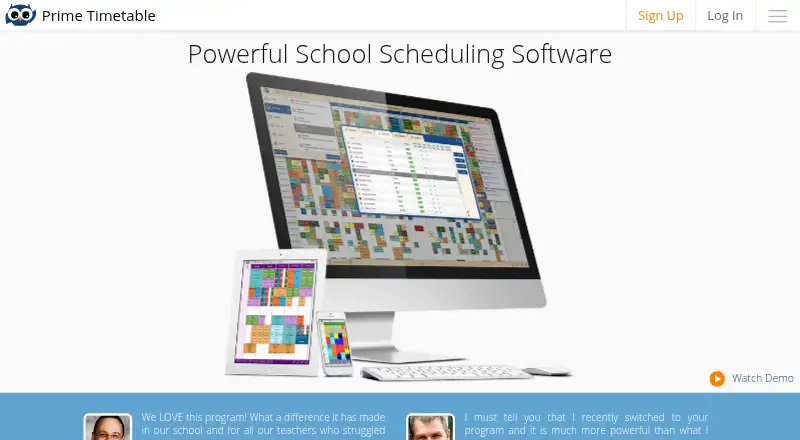
What Prime Timetable is
Prime Timetable provides automatic and manual scheduling for schools, universities, and similar institutions. Users can plan multiple weeks at flexible times, move timetable cards in master or individual views, and divide classes into groups for electives. Its generator can account for pinned cards and forbidden time slots, then optimize teacher and student loads, gaps, room use, and building moves. Timetables can be customized, viewed on any device, printed as master or individual schedules, and exported to formats and apps. Data can be imported by copy and paste. The maker says schedules are backed up every 24 hours and that the service is used in over 120 countries. The free plan is for evaluation, includes premium support, and provides a 30-day trial period; it requires an internet connection. Commercial plans enable offline work. Basic is for small and medium schools with up to 40 teachers, while Premium is aimed at larger and campus schools with up to 100 teachers. Both paid plans offer a web app and premium support, with total price shown after a duration is selected.
Who it suits
Prime Timetable suits schools, universities, and similar institutions scheduling classes, teachers, rooms, and student groups. Basic is described for small and medium schools; Premium is aimed at larger or campus schools.
What it does well
- Automatic and manual timetable scheduling
- Generator handles pinned cards and forbidden time slots
- Supports group scheduling for electives
- Commercial plans enable offline work
What to know first
- Free plan requires an internet connection
- Paid plan prices depend on selected duration
- Student data is retained only as long as needed for the service
Limits
The Free plan is for evaluation, runs as a web app, and requires an internet connection; it includes a 30-day trial period. Basic supports up to 40 teachers and Premium up to 100; both commercial plans enable offline work.
Plans
| Plan | Billed and limits | Price |
|---|---|---|
| Free | evaluation only · web app · premium support · 30-day trial | Free |
| Basic | $299/yr. · web app · premium support · up to 40 teachers | $299 a year |
| Premium | $499/yr. · web app · premium support · up to 100 teachers | $499 a year |
As primetimetable.com lists them, read 14 Oct 2026. The maker's own page has the final word.
Getting started
- Open the Prime Timetable website.
- Choose the Free evaluation plan or review Basic and Premium for your school size.
- Select a one-to-five-year duration for a commercial plan to see its total price.
- Import scheduling data by copy and paste.
- Create or generate a timetable, then customize, print, or export it.
Overview
Prime Timetable is a timetabling platform for schools, universities and similar institutions managing classes, teachers and rooms.
The combination of manual editing, constraint-based generation and broad publishing options is useful for institutions with competing scheduling requirements. The trade-off is that continued use requires a commercial plan whose price depends on the term selected, and offline work is reserved for those plans.
Key features
Schedulers can work across multiple weeks and flexible time patterns, moving timetable cards in master or individual views. Classes can be split into groups for electives, a practical fit for schools where students do not all follow the same schedule. This level of control is valuable when a timetable needs careful adjustment, but it is more machinery than a small organization with a simple calendar may need.
The automatic generator works with pinned cards and forbidden time slots, and can optimize teacher and student loads, gaps, room use and building moves. Teacher and room constraints, conflict detection and multi-campus support extend its reach to schedules with many interdependent requirements. Automation can help reconcile those requirements, but planners still need to encode the rules the institution wants the schedule to follow.
Timetables can be customized, viewed from any device, printed as master or individual schedules, and exported to formats and apps. Data can be brought in by copy and paste, though no named integrations are described. The maker says schedules are backed up every 24 hours. Commercial plans allow offline work; the free plan requires an internet connection, a meaningful limitation for users who need to edit without connectivity.
For institutions weighing student-data handling, the privacy policy says student data is neither sold nor used for advertising and is kept only as long as needed to provide the educational service. The SaaS security measures include encrypted traffic, vulnerability and network safeguards, access policies, audit logs, and physical and procedural controls. Cloud data centres are in the US; after a subscription ends, current system data and associated encrypted backups may be retained for up to one year.
Pricing
Prime Timetable has a 30-day trial period and a free plan priced at $0. The Free plan is explicitly for evaluation, includes the web app for all devices and premium support, and requires an internet connection. It is a way to assess the workflow, not a substitute for commercial offline access.
Basic is intended for small and medium schools and supports up to 40 teachers; Premium targets larger and campus schools and supports up to 100 teachers. Both include the web app for all devices and premium support. Their prices are custom pricing: buyers choose a term of 1–5 years, and the total appears after selecting the plan and duration. That term choice matters for institutions comparing costs, while the teacher ceilings make Basic a poor fit once staffing exceeds 40 and Premium unsuitable above 100.
Platforms
Prime Timetable supports Android, iOS, Linux, macOS, web and Windows. The web app is included across all plans; offline work is a commercial-plan capability rather than a free-plan option.
Who it's for
Prime Timetable is aimed at schools, universities and similar institutions that coordinate teachers, student groups, rooms or multiple campuses. Flexible manual editing and constraint-based generation suit planners balancing many rules, while print and export options help distribute the resulting schedules. Its maker says the service is trusted in over 120 countries.
It is less suitable for a small team seeking a simple, low-commitment calendar, or for a buyer who needs a known upfront commercial price before choosing a term. Institutions with more than 100 teachers also exceed the stated Premium capacity.
Pros and cons
- Pros: Manual editing and automatic generation coexist, so planners can combine direct control with optimization of loads, gaps, rooms and building moves.
- Pros: Teacher and room constraints, conflict detection, student groups and multi-campus support address real institutional scheduling complexity.
- Pros: Customizable views, printing and exports provide several ways to distribute schedules across devices and formats.
- Cons: The free plan is evaluation-only and requires internet access, limiting its usefulness for ongoing or offline scheduling.
- Cons: Commercial prices depend on choosing a 1–5 year term, and teacher caps of 40 and 100 may rule out the lower tiers for larger institutions.
- Cons: Data centres are in the US, and data and backups can remain for up to a year after subscription termination, a consideration for institutions with strict data-location or deletion requirements.
Alternatives
For a wider scan of exam-focused products, browse Exam Scheduling Software; for broader school timetable choices, see School Scheduling Software.
- OpenEduCat is a freemium alternative with Android, iOS, Linux, API and self-hosted platforms; choose it if those deployment options matter more than Prime Timetable's listed cross-platform web offering.
- UniTime is free open-source software with commercial support available for a fee, and supports API, Linux, macOS, self-hosted, web and Windows; it is the alternative to consider if a free, self-hostable option is the priority.
- FET is free, has no stated usage limits, and supports Linux, macOS and Windows; it suits buyers prioritizing no-cost desktop availability.
- TimetableForMe offers a free-forever web plan for up to 10 teachers; it is a fit for a smaller school seeking a free option with a stated capacity limit.
- Classify Exam Management is a web-based alternative with founding-institution access for exactly three selected institutions for the 2026–2027 academic year; consider it if that limited access opportunity fits.
- Examduler is free and open-source software for the web.
- SchoolKit Exam Timetable Builder is a free web tool capped at 20 subjects, 10 rooms and two time slots per day; it fits a smaller exam timetable within those limits.
- EMS Academic Scheduling is a paid alternative across web, desktop, mobile, API and self-hosted platforms, with pricing available by demo or sales contact.
Verdict
Choose Prime Timetable if your school or university needs both direct timetable editing and automated handling of teacher, student and room constraints, especially across groups or campuses. Its most persuasive advantage is the range of scheduling controls paired with practical publishing options. Look elsewhere if you need a free ongoing service, offline access without a commercial plan, a firm price before selecting a multi-year term, or capacity beyond 100 teachers.
Verdict
Prime Timetable combines manual timetable editing with constraint-based automatic generation and publishing options. The free plan is for evaluation, while commercial plans enable offline work and vary by teacher capacity.
Questions
Is Prime Timetable free?
The Free plan costs nothing and is intended for evaluation. It includes a 30-day trial period and premium support.
What do the paid plans cost?
No fixed total is shown for Basic or Premium. The total is displayed after selecting a plan and a duration of one to five years.
Which platforms are supported?
The service lists Android, iOS, Linux, macOS, web, and Windows. The Free plan is described as a web app for all devices.
Can it work offline?
The maker says commercial plans enable offline work. The Free plan requires an internet connection.
What scheduling tasks can it handle?
It supports manual and automatic timetabling, constraints for teachers and rooms, conflict detection, and student group scheduling. Its generator can account for pinned cards and forbidden time slots.
Where is data hosted and how is student data used?
The maker says its cloud data centres are in the US and its US hosting provider is ISO/IEC 27001:2013 certified. Its privacy policy says student data is not sold or used for advertising.
Facts from Prime Timetable's own pages
- Automatic generator
- Its generator handles constraints such as teacher and student loads, gaps, room use, building moves and forbidden slots. · primetimetable.com, 14 Oct 2026
- Backup
- The homepage says timetables are backed up every 24 hours. · primetimetable.com, 7 Oct 2026
- Backups
- The home page states that timetables are backed up every 24 hours. · primetimetable.com, 14 Oct 2026
- Billing
- Subscriptions are prepaid for selected periods and are not automatically renewed without explicit consent. · primetimetable.com, 14 Oct 2026
- Collaboration
- Multiple timetable editors can collaborate on shared timetables with synchronized changes. · primetimetable.com, 14 Oct 2026
- Company founded
- CompanyWall records the business as founded on 24 January 2013. · companywall.rs, 14 Oct 2026
- Company headquarters
- CompanyWall lists Micria at Vladislava Bajčevića 23/6/26, 11000 Belgrade, Serbia. · companywall.rs, 14 Oct 2026
- Company legal name
- The terms identify the operator as Danijel Štulić PR Micria. · primetimetable.com, 14 Oct 2026
- Company ownership
- CompanyWall lists Danijel Štulić as owning 100 percent of the business. · companywall.rs, 14 Oct 2026
- Company size
- CompanyWall classifies Micria as a micro enterprise and reports one employee for 2025. · companywall.rs, 14 Oct 2026
- Conflict validation
- The software shows real-time notifications, visual indicators and tools for resolving timetable conflicts. · primetimetable.com, 14 Oct 2026
- Data location
- The GDPR page states that its cloud data centres are in the US and its US hosting provider is ISO/IEC 27001:2013 certified. · primetimetable.com, 7 Oct 2026
- Data retention
- After a customer terminates a subscription, current system data and associated backups are retained for a maximum of one year, and the page says backup data is encrypted. · primetimetable.com, 7 Oct 2026
- Documentation depth
- The maker says its revised user guide contains more than 150 how-to articles. · primetimetable.com, 14 Oct 2026
- Exports and integrations
- Built-in exports target PowerSchool, iSAMS, SmartSchool, Siged and Excel or Google Sheets. · primetimetable.com, 14 Oct 2026
- Import
- Data can be imported for days, periods, subjects, rooms, teachers, classes, groups, students, activities and clips, including advanced custom fields. · primetimetable.com, 14 Oct 2026
- Independent pricing report
- EdTech Impact lists a 30-day trial, Basic at $149 per year for up to 40 teachers and Premium at $299 per year for up to 100 teachers. · edtechimpact.com, 14 Oct 2026
- Integrations
- The site describes importing data by copy and paste and exporting to various formats and apps, without naming specific integrations on the page. · primetimetable.com, 7 Oct 2026
- Licence
- Terms grant a limited, non-exclusive, revocable licence and prohibit redistribution, derivative works and reverse engineering without permission, indicating proprietary software. · primetimetable.com, 14 Oct 2026
- Limit: plan capacity
- Published Basic and Premium plans cap scheduled teachers at 40 and 100 respectively, with larger deployments requiring direct pricing discussions. · primetimetable.com, 14 Oct 2026
- Limit: trial expiry
- After the evaluation period, saving changes is disabled, accounts may later be locked and data may eventually be deleted unless a paid plan is purchased. · primetimetable.com, 14 Oct 2026
- Manual editing
- Users can drag timetable cards in master and individual views and pin cards to protect them from generator changes. · primetimetable.com, 14 Oct 2026
- Offline support
- Commercial plans support offline work, while the free plan requires an internet connection. · primetimetable.com, 14 Oct 2026
- Offline use
- The maker states that commercial plans enable offline work, while the free plan requires an internet connection. · primetimetable.com, 7 Oct 2026
Where Prime Timetable stands on Freedom251
- Exam Scheduling Software#5 of 37
- School Scheduling Software#4 of 29