Freedom251 › Disk Defragmentation Software
e4defrag
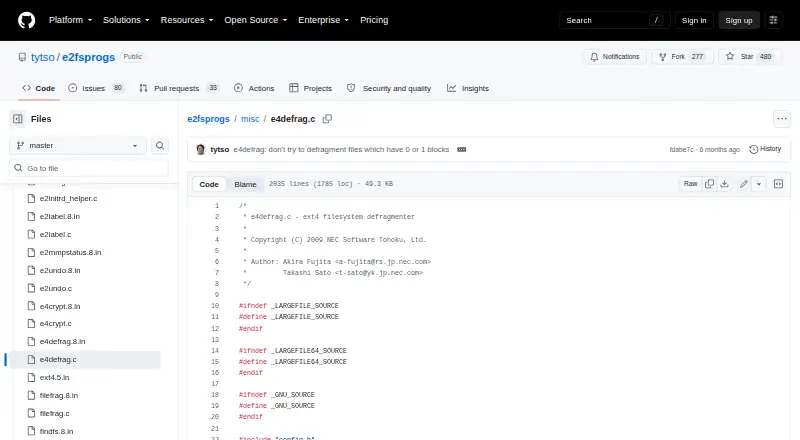
What e4defrag is
e4defrag is a Linux utility for defragmenting extent-based files on ext4 filesystems. It can target an individual file, a directory and its files, or a device mounted as ext4. Its goal is to give target files more contiguous blocks, which the manual associates with faster file access. Use the -c option to view current and ideal fragmentation counts and a fragmentation score without defragmenting; the score is shown only when the command is run as root. With -v, it displays error messages and each file’s fragmentation count before and after the operation. e4defrag checks that the filesystem is ext4 and reports an error for other filesystem types. It does not support swap files, files in lost+found, or files allocated in indirect blocks. A device or mount-point target excludes files belonging to another device’s mount point. Fragmented or insufficient free space can prevent an improvement. The manual says it can run while another application uses a file, although shared memory and disk bandwidth may slow both. It is free and open source.
Who it suits
e4defrag suits Linux users who need to defragment files on ext4 and want to inspect fragmentation before making changes. It is limited to supported file types and filesystem conditions.
What it does well
- Targets files, directories, or ext4 devices
- Checks fragmentation without defragmenting
- Verbose mode shows counts before and after
- Can run while another application uses a file
What to know first
- Works only with ext4 filesystems
- Does not support swap files or lost+found files
- Indirect-block files are unsupported
- Fragmented or limited free space can prevent improvement
Limits
The free plan covers ext4 files only. Swap files, files in lost+found, and files allocated in indirect blocks are unsupported; limited or fragmented free space can prevent improvement.
Plans
| Plan | Billed and limits | Price |
|---|---|---|
| e4defrag | Ext4 files only · swap files, files in lost+found, and files allocated in indirect blocks are unsupported | Free |
As github.com lists them, read 4 Oct 2026. The maker's own page has the final word.
Getting started
- Open the e4defrag source page in the e2fsprogs project.
- Follow the project README’s build and installation instructions.
- Choose an eligible file, directory, or device mounted as ext4.
- Use -c to check fragmentation counts and, when running as root, the fragmentation score.
- Run e4defrag on the selected target; add -v to display messages and before-and-after counts.
e4defrag is a focused Linux command-line utility for checking and defragmenting files on ext4 filesystems. It suits administrators and experienced users who need file-level control rather than a broad desktop optimizer. The main trade-off is precision: it works within ext4’s rules, but those rules exclude several file types and make available free space important.
Overview
You can target a regular file, a directory, or a device mounted as ext4. Choosing a directory applies the operation to the files it contains. When you specify a device or mount point, e4defrag does not follow files belonging to another device’s mount point, which helps keep a maintenance job scoped to the intended filesystem.
The utility tries to place a target file’s extents in more contiguous blocks, an arrangement the manual associates with faster file access. That is a targeted intervention, not a promise of a faster system overall. Fragmented or insufficient free space may prevent any improvement, so it is most useful when you can identify particular files or directories and have enough room for relocation.
Key features
Check before changing files
The -c option reports current and ideal fragmentation counts and calculates a fragmentation score without defragmenting the target. This gives a practical basis for deciding whether an operation is justified. Non-privileged users can check their own files, but the score is printed only when the check runs as root, limiting the diagnostic value of unprivileged checks.
Verbose results
Use -v to print error messages and each file’s fragmentation count before and after defragmentation. That before-and-after view is useful for administrators who need to see whether a particular operation changed a file’s layout rather than simply accepting a successful command.
Ext4 scope and exclusions
e4defrag verifies that the filesystem is ext4 and reports an error on other filesystem types. It does not support swap files, files in lost+found, or files allocated in indirect blocks. These boundaries make it a poor fit for mixed-filesystem maintenance or jobs that must cover every file on a system.
Use during normal activity
The manual considers it safe to run on a file while another application is using it. Shared memory and disk bandwidth can slow both the application and the defragmentation process, however, so scheduling work during quieter periods remains the sensible choice.
Pricing
| Plan | Price | Includes |
|---|---|---|
| e4defrag | free | Ext4 files only; swap files, files in lost+found, and files allocated in indirect blocks are unsupported |
This is free, open-source software with no paid tier or trial period. The zero-cost plan is appropriate for Linux users who can work with its command-line, ext4-only scope; it does not buy broader filesystem coverage or support for the excluded file types.
Platforms
e4defrag runs on Linux. Its filesystem support is described as multi-filesystem at the product level, but the utility itself accepts ext4 targets and rejects other filesystem types, so that label should not be read as universal defragmentation coverage.
Who it's for
Choose e4defrag when you administer ext4 storage and want to inspect or act on named files, directories, or mounts. It is particularly suitable for users comfortable with command-line maintenance, root privileges for full fragmentation scores, and planning around free-space constraints.
Look elsewhere if you need a graphical workflow, Windows support, or one tool that handles several filesystem formats and all file categories without ext4-specific exclusions.
Pros and cons
- Pros: Check-only mode reports current and ideal fragmentation before making changes.
- Pros: Verbose output shows per-file counts before and after an operation.
- Pros: File, directory, and device targets provide useful control over scope.
- Pros: It can run while another application uses the file.
- Cons: It works only with ext4 and errors on other filesystems.
- Cons: Swap files, lost+found files, and files in indirect blocks are unsupported.
- Cons: Low or fragmented free space can prevent improvement.
- Cons: Root access is required to print the fragmentation score during checks.
Alternatives
For a broader directory of disk-maintenance choices, see Disk Defragmentation Software.
- Btrfsmaintenance is the better Linux choice when your storage uses btrfs and you want filesystem-maintenance scripts.
- Disk SpeedUp suits Windows users seeking free defragmentation software.
- Puran Defrag is a Windows alternative, with directory consolidation limited to NTFS partitions.
- WinContig fits Windows users who want freeware for personal or commercial use without registration.
- Autoruns is a free Windows utility, but it serves a different system-maintenance purpose.
- IObit Uninstaller is a Windows freemium tool for removing applications and leftovers rather than defragmenting files.
- Auslogics Driver Updater targets Windows driver updates, not filesystem defragmentation.
- Microsoft Quick Assist is for remote support on Windows, macOS, and the web, not disk layout work.
Verdict
e4defrag is a sound choice for Linux administrators who need targeted ext4 defragmentation and a non-destructive fragmentation check at no cost. Choose it for that narrow control and its useful before-and-after reporting; look elsewhere when your systems use other filesystems, your files fall into its exclusions, or you need a graphical, general-purpose optimizer.
Verdict
e4defrag provides targeted defragmentation and a check-only option for ext4 files. Its unsupported file types and dependence on available free space are important limits to consider.
Questions
How much does e4defrag cost?
The listed plan is free. It is open source.
Which operating system does it support?
Linux is the listed platform.
Which filesystems can it defragment?
It supports ext4 filesystems and reports an error when the filesystem is not ext4.
Can I check fragmentation without changing a target?
Yes. The -c option reports current and ideal fragmentation counts and a score without defragmenting. The score is printed only when the check runs as root.
Which files are unsupported?
The manual says it does not support swap files, files in lost+found, or files allocated in indirect blocks.
Who are the authors?
The source credits Akira Fujita and Takashi Sato as authors.
Facts from e4defrag's own pages
- Authors
- The e4defrag source credits Akira Fujita and Takashi Sato as authors. · github.com, 4 Oct 2026
- Defragmentation
- It aims to give targeted files more contiguous blocks, which the manual says improves file access speed. · man7.org, 4 Oct 2026
- Fragmentation check
- The -c option reports current and ideal fragmentation counts and a fragmentation score without defragmenting the target. · man7.org, 4 Oct 2026
- Free space
- Fragmented or insufficient filesystem free space can prevent e4defrag from improving a file’s fragmentation. · man7.org, 4 Oct 2026
- Other mount points
- When given a device or mount point, it does not defragment files belonging to another device’s mount point. · man7.org, 4 Oct 2026
- Permissions
- Non-privileged users can run it on their own files, but the fragmentation score is not printed for -c runs unless run as root. · man7.org, 4 Oct 2026
- Project
- The maker’s README describes e2fsprogs as second extended filesystem management programs and says it supplies instructions for building and installing them. · github.com, 4 Oct 2026
- Purpose
- e4defrag is an online defragmenter for extent based files on ext4 filesystems. · man7.org, 4 Oct 2026
- Support
- The project README directs bug reports for its programs to Ted Ts’o by email. · github.com, 4 Oct 2026
- Supported filesystem
- The source checks for ext4 and reports an error when the filesystem is not ext4. · github.com, 4 Oct 2026
- Targets
- It accepts a regular file, directory, or device mounted as ext4; a directory target covers its files. · man7.org, 4 Oct 2026
- Unsupported files
- The manual says e4defrag does not support swap files, files in lost+found, or files allocated in indirect blocks. · man7.org, 4 Oct 2026
- Use while active
- The manual says it is safe to run on a file while another application uses it, though shared memory and disk bandwidth can slow both. · man7.org, 4 Oct 2026
- Verbose output
- The -v option prints error messages and each file’s fragmentation count before and after defragmentation. · man7.org, 4 Oct 2026
Where e4defrag stands on Freedom251
- Disk Defragmentation Software#7 of 20