Freedom251 › Disk Defragmentation Software

DiskTuna
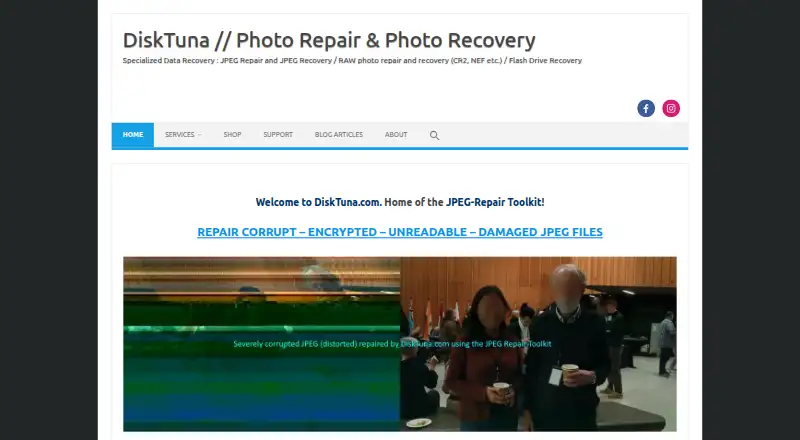
What DiskTuna is
DiskTuna’s JPEG-Repair Toolkit brings together JPEG-Repair for damaged photos and JpegDigger for finding lost images. It runs on Windows 7, 8, 10, and 11, and processes files locally on the PC without uploading them to remote servers. JPEG-Repair can address corrupt headers, invalid markers, bad-sector damage, and JPEG bitstream errors, with visual feedback during repair. It can also recover JPEG data from corrupt RAW photos, including Canon CR2 and Nikon NEF files. JPEG-Repair does not re-encode images, so the original JPEG quality is preserved.
The demo provides low-resolution previews, while the full version enables high-quality saves. Repairing a corrupt JPEG header requires a reference photo taken with the same camera and settings. The toolkit focuses on JPEG and the specified RAW formats; it does not repair PNG files. Its listed plan includes both JpegDigger and JPEG-Repair and is priced at €29.00–€49.00, excluding applicable taxes. Downloads are unsigned and may prompt Windows SmartScreen warnings, including after updates. The maker offers a refund only when the demo works on the files but the full version fails on those same files. The toolkit is described as suitable for beginners and professionals, including photographers and data recovery engineers.
Who it suits
The toolkit suits photographers, data recovery engineers, and other users who need to repair damaged JPEGs or recover lost images on Windows. Its local processing and visual feedback may also suit beginners who want to work with photo files on their own PC.
What it does well
- Includes tools for JPEG repair and lost-image recovery.
- Repairs several JPEG damage types with visual feedback.
- Can recover JPEG data from corrupt Canon CR2 and Nikon NEF photos.
- Processes files locally on the PC.
- Does not re-encode JPEG images.
- Compatible with Windows 7, 8, 10, and 11.
What to know first
- The demo allows only low-resolution previews.
- A corrupt JPEG header needs a same-camera, same-settings reference photo.
- It does not repair PNG files.
- Unsigned downloads may trigger Windows SmartScreen warnings.
Limits
The free demo provides low-resolution previews; high-quality saves require the full version. Repairing a corrupt JPEG header requires a reference photo taken with the same camera and settings, and the toolkit does not repair PNG files.
Plans
| Plan | Billed and limits | Price |
|---|---|---|
| JPEG-Repair Toolkit | €29.00 – €49.00 · Includes JpegDigger and JPEG-Repair · prices exclude applicable taxes | On request |
As disktuna.com lists them, read 3 Oct 2026. The maker's own page has the final word.
Getting started
- Visit the DiskTuna website.
- Use a compatible Windows 7, 8, 10, or 11 PC.
- Start with the demo to preview files at low resolution.
- Choose the JPEG-Repair Toolkit plan for both JpegDigger and JPEG-Repair.
- For high-quality saves, use the full version.
Verdict
Choose the JPEG-Repair Toolkit if you need local Windows tools for repairing JPEG damage and recovering lost images, including data in specified RAW formats. The demo previews at low resolution, and high-quality saves require the full version. Look elsewhere if you need PNG repair or cannot provide a matching reference photo for a corrupt header.
Questions
How much does the JPEG-Repair Toolkit cost?
The listed plan is €29.00–€49.00, excluding applicable taxes. It includes JpegDigger and JPEG-Repair.
Is there a free version?
A demo is available with low-resolution previews. The full version unlocks high-quality saves.
Which platforms does it support?
The toolkit is compatible with Windows 7, 8, 10, and 11.
What does the toolkit do?
JPEG-Repair works on damaged photos, while JpegDigger recovers lost images. JPEG-Repair can address corrupt headers, invalid markers, bad-sector damage, and JPEG bitstream errors.
Does it repair RAW photos?
It can recover JPEG data from corrupt RAW photos such as Canon CR2 and Nikon NEF files.
Does it upload my files?
No. The toolkit processes files locally on the PC, without uploads to remote servers.
Facts from DiskTuna's own pages
- Audience
- The toolkit is described as designed for beginners and professionals, including photographers and data recovery engineers. · disktuna.com, 3 Oct 2026
- Format limitation
- The toolkit does not repair PNG files and specializes in JPEG and specified RAW formats. · disktuna.com, 3 Oct 2026
- Free demo
- The demo offers low-resolution previews; the full version unlocks high-quality saves. · disktuna.com, 3 Oct 2026
- Local processing
- The toolkit processes files locally on the PC, with no uploads to remote servers. · disktuna.com, 3 Oct 2026
- Maker background
- Joep van Steen says he has over 20 years of experience developing data recovery and disk utilities. · disktuna.com, 3 Oct 2026
- Platform
- The maker states that JPEG-Repair Toolkit is compatible with Windows 7, 8, 10, and 11. · disktuna.com, 3 Oct 2026
- Preserves quality
- JPEG-Repair does not re-encode JPEG images, preserving their original quality. · disktuna.com, 3 Oct 2026
- Purpose
- The JPEG-Repair Toolkit combines JPEG-Repair for repairing damaged photos with JpegDigger for recovering lost images. · disktuna.com, 3 Oct 2026
- RAW support
- The toolkit can recover JPEG data from corrupt RAW photos such as Canon CR2 and Nikon NEF. · disktuna.com, 3 Oct 2026
- Refund
- The maker offers a refund only if the demo works on the files but the full version fails on those same files. · disktuna.com, 3 Oct 2026
- Repair features
- JPEG-Repair can fix corrupt headers, invalid markers, bad-sector damage, and JPEG bitstream errors using visual feedback. · disktuna.com, 3 Oct 2026
- Repair limitation
- Repairing a corrupt JPEG header requires a reference photo taken with the same camera and settings. · disktuna.com, 3 Oct 2026
- Security and trust
- The maker says its downloads are unsigned and may trigger Windows SmartScreen warnings, including after software updates. · disktuna.com, 3 Oct 2026
- Support
- The maker says messages are usually answered within one working day and provides direct email contact. · disktuna.com, 3 Oct 2026
Where DiskTuna stands on Freedom251
- Disk Defragmentation Software#6 of 20