DOSBox PSP
What DOSBox PSP is
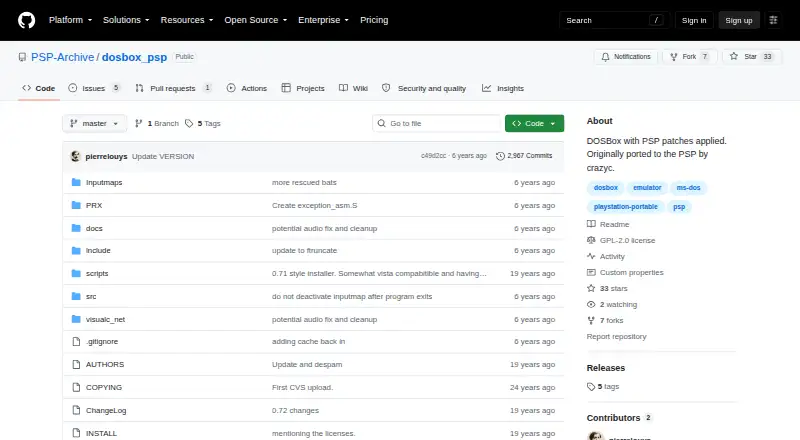
DOSBox PSP is a free, open-source port of DOSBox for the PlayStation Portable, intended to run MS-DOS software on the handheld. The project describes it as DOSBox with PSP patches and credits crazyc with the original PSP port. It supports CUE/BIN disk images, gamepads, audio CDs, and Neo Geo CD. The repository lists a GPL-2.0 license, and the project wiki includes resources on configuration, input mapping, compatibility, batch files, IR keyboard support, and launchers. Settings are stored in dosbox.conf; some options can be changed through batch files, while others require editing that file. CPU cycle settings affect performance and may take trial and error to tune. The dynamic CPU core can improve performance for most games, though it may reduce stability. Memory varies by PSP model: the PSP 1000 is limited to around 12 MB, while PSP 2000, 3000, and Go models can allocate about 42 MB by changing memsize in dosbox.conf. The initial pre-release build starts at a command line without a file manager, and release notes recommend adding a third-party launcher such as LaunchBox for MS-DOS.
Who it suits
DOSBox PSP is for PSP owners who want to run MS-DOS software and are comfortable adjusting configuration settings. It may also suit users willing to add a separate launcher for command-line startup.
What it does well
- Free and open source under GPL-2.0
- Supports gamepads and CUE/BIN disk images
- Supports audio CDs and Neo Geo CD
- Wiki covers configuration and input mapping
What to know first
- PSP 1000 memory is around 12 MB
- Initial pre-release build has no file manager
- CPU tuning may require trial and error
- Dynamic core may reduce stability
Limits
The PSP 1000 is limited to around 12 MB of memory; PSP 2000, 3000 and Go models can allocate about 42 MB by changing memsize in dosbox.conf. Higher memory settings may cause instability, and the dynamic CPU core's extra speed may also reduce stability.
Plans
| Plan | Billed and limits | Price |
|---|---|---|
| Free | No paid plans stated; PSP port | Free |
| DOSBox PSP | PlayStation Portable port · DOSBox with PSP patches | Free |
As github.com lists them, read 7 Oct 2026. The maker's own page has the final word.
Getting started
- Open the project website on GitHub.
- Use a PlayStation Portable to run the PSP port.
- Configure DOSBox options in dosbox.conf or through batch files where supported.
- Tune CPU cycle settings for the game; this may take trial and error.
- For the initial pre-release build, add a third-party launcher such as LaunchBox for MS-DOS and configure dosbox.conf to start it.
- To build the project, install the PSP toolchain and follow the repository's compile and packaging instructions.
Overview
DOSBox PSP is a port of DOSBox for running MS-DOS software on Sony’s PlayStation Portable. It suits PSP owners comfortable editing configuration files and tuning games; users looking for a ready-to-launch library or dependable on-screen typing should look elsewhere.
Its appeal is specific: DOS emulation on PSP, with gamepad support and options to tune performance.
Key features
- Configuration through dosbox.conf: Some settings can be changed with batch files, but others require direct edits. That gives technically confident users control while making setup less inviting for casual players.
- Game-by-game performance tuning: CPU cycle settings are the main determinant of performance and may take trial and error. The dynamic CPU core can improve speed for most games, but the added speed may also reduce stability.
- Memory varies by PSP model: PSP 1000 is limited to around 12 MB. PSP 2000, 3000 and Go can allocate about 42 MB by changing memsize in dosbox.conf; setting memory too high can cause instability. Owners of later models have more room, but still need to balance capacity against reliability.
- Practical input and media support: Gamepad and audio CD support are included, and the supported disk image format is cue/bin. The on-screen keyboard remains unreliable, so users who need keyboard input may find PSP controls a substantial constraint.
- Command-line launch: The initial prerelease starts at a command line and has no file manager. The project recommends adding a third-party launcher such as LaunchBox for MS-DOS and configuring dosbox.conf to start it, which can make access more convenient but adds setup work.
- Documentation and source: The project wiki covers configuration, input mapping, compatibility, batch files, IR keyboard support and launchers. Source is available under GPL-2.0; building requires the PSP toolchain, so compiling is best suited to developers already equipped for PSP software work.
Pricing
DOSBox PSP is free and open source. The Free plan costs nothing and the DOSBox PSP plan costs nothing; both describe the PSP port, with no paid tier to unlock. There is no trial period or subscription term to weigh. Its cost is instead the time needed to configure, tune and launch software on the device.
Platforms
DOSBox PSP runs on PlayStation Portable and targets MS-DOS software. Support was restored for PSP 2000, 3000 and Go models, alongside the PSP 1000’s tighter memory budget. It supports cue/bin disk images, gamepad input, audio CD and Neo Geo CD; save states are not supported.
Who it's for
This is a sensible choice for PSP owners who want DOS software on the handheld and are willing to work with configuration files, command-line startup and per-game cycle settings. Later-model owners have more memory headroom. It is a weaker fit for anyone who expects a built-in file manager, reliable on-screen keyboard, save states or minimal setup.
Pros and cons
Pros
- Free and open source: There is no paid plan to budget for, and the source is available under GPL-2.0.
- Broad tuning resources: Wiki coverage of configuration, compatibility and input mapping gives users practical starting points for adapting the emulator.
- Model support beyond PSP 1000: PSP 2000, 3000 and Go can allocate about 42 MB through configuration, offering more room than the roughly 12 MB available on PSP 1000.
Cons
- Performance can be a balancing act: Cycle settings may need trial and error, while the faster dynamic core can reduce stability.
- Input limitations: The on-screen keyboard is still unreliable, which complicates software that needs keyboard entry.
- No save states: Players cannot rely on emulator save states to preserve progress.
Alternatives
For DOS software on a PSP, DOSBox PSP is the focused option in this group. For a broader Neo Geo comparison, see the Neo Geo Emulators list or the MS-DOS Emulators list.
- Virtual Jaguar is a free, open-source emulator core for Android, iOS, Linux, macOS, web and Windows, but requires a libretro frontend such as RetroArch. Choose it when those platforms and that frontend setup suit your needs better than PSP.
- GnGeo is a free Linux option that requires SDL 1.2.x, libz and a NeoGeo BIOS; its license notes commercial use of GnGeo as a whole is forbidden. Choose it for Linux Neo Geo emulation if those requirements and terms fit.
- NeoCD/SDL is free for Linux and Windows and requires an original NeoGeo CD BIOS; selling is not allowed, and source reuse and technical knowledge are limited to non-commercial purposes. Choose it for those platforms if those conditions work for you.
- NeoDS is free to use for non-commercial purposes. Choose it if that use restriction fits your needs.
- NeoRAGEx is a free Windows emulator; games and BIOS are not included. Choose it if you want a Windows option and already have the needed game and BIOS files.
- DREAMNEOCD is another free option, with selling barred and source-code and technical-knowledge reuse limited to noncommercial purposes.
- NeoCD/PS2 is free software for self-hosted use and requires a NeoGeo CD BIOS that is not provided.
- NeoCD/SDLx Unleashed is for Original Xbox and reads original NeoGeo CDs in ISO9660 format.
Verdict
Choose DOSBox PSP if you specifically want DOS emulation on a PlayStation Portable and are prepared to configure games and accept hardware-dependent memory limits. Its free, open-source PSP port is the main reason to choose it; its command-line start, unreliable on-screen keyboard and absent save states are strong reasons to look elsewhere if convenience matters.
Verdict
DOSBox PSP brings DOSBox to the PlayStation Portable, with support for several disk and input formats. Expect to configure settings yourself, and note the command-line startup and model-dependent memory limits.
Questions
Is DOSBox PSP free?
Yes. The listed plan is free, and the project is open source.
What platform does it run on?
Its supported host platform is PlayStation Portable (PSP), and its DOS target is MS-DOS.
What disk images and peripherals does it support?
It supports CUE/BIN disk images, gamepads, audio CDs and Neo Geo CD.
Is the source code available, and what is its license?
Yes. The repository lists a GPL-2.0 license.
Does it have a file manager or working on-screen keyboard?
The initial pre-release build has no file manager and starts at a command line. A release note says the on-screen keyboard was still largely broken.
How much memory can PSP models use?
The PSP 1000 is limited to around 12 MB. PSP 2000, 3000 and Go models can allocate about 42 MB by changing memsize in dosbox.conf.
Facts from DOSBox PSP's own pages
- Base version
- A release describes DOSBox PSP as based on DOSBox 0.72. · github.com, 7 Oct 2026
- Build requirement
- Building the project requires the PSP toolchain, and the README documents compiling and packaging a PSP executable. · github.com, 7 Oct 2026
- Build requirements
- The repository build instructions require installing the PSP toolchain. · github.com, 7 Oct 2026
- Compatibility resources
- The project wiki lists configuration, input mapping, compatibility information, batch files, IR keyboard support and launchers among its resources. · github.com, 7 Oct 2026
- Configuration
- DOSBox settings are stored in dosbox.conf, with some options changeable through batch files and others requiring direct edits to the configuration file. · github.com, 7 Oct 2026
- Documentation
- The project wiki lists pages about configuration, input methods and mapping, compatibility, batch files, IR keyboard support, and launchers. · github.com, 7 Oct 2026
- Dynamic core
- A prerelease says support for the dynamic core was restored. · github.com, 7 Oct 2026
- Game tuning
- The project says CPU cycle settings are the main determinant of game performance and may require trial and error. · github.com, 7 Oct 2026
- Keyboard limitation
- A release notes that the on-screen keyboard was still pretty much broken. · github.com, 7 Oct 2026
- Launch behavior
- The first prerelease boots to the command line and does not include a file manager. · github.com, 7 Oct 2026
- Launcher
- The initial pre-release build has no file manager and boots to a command line; its release notes recommend including a third-party launcher such as LaunchBox for MS-DOS. · github.com, 7 Oct 2026
- Launcher workaround
- The project recommends adding a third-party launcher such as LaunchBox for MS-DOS to the DOSBox folder and configuring dosbox.conf to start it. · github.com, 7 Oct 2026
- License
- The repository lists a GPL-2.0 license. · github.com, 7 Oct 2026
- Memory limit
- A release says PSP 2000, 3000, and Go owners can allocate about 42 MB by changing memsize in dosbox.conf. · github.com, 7 Oct 2026
- Memory limits
- The PSP 1000 is limited to around 12 MB of memory, while later models may use up to around 44 MB; higher values can cause instability. · github.com, 7 Oct 2026
- Model support
- A release says support was restored for PSP 2000, 3000 and Go models, which can allocate about 42 MB by changing memsize in dosbox.conf. · github.com, 7 Oct 2026
- Origin
- The project describes itself as DOSBox with PSP patches applied and says it was originally ported to PSP by crazyc. · github.com, 7 Oct 2026
- Performance
- The dynamic CPU core can improve performance for most games, though the extra speed may reduce stability. · github.com, 7 Oct 2026
- Purpose
- DOSBox PSP is a port of DOSBox for the PlayStation Portable. · github.com, 7 Oct 2026
- Slim model support
- A prerelease says support for PSP Slim models was restored. · github.com, 7 Oct 2026
- What it does
- DOSBox PSP is a port of DOSBox for the PlayStation Portable. · github.com, 7 Oct 2026
Where DOSBox PSP stands on Freedom251
- MS-DOS Emulators#10 of 26