DosKit
What DosKit is
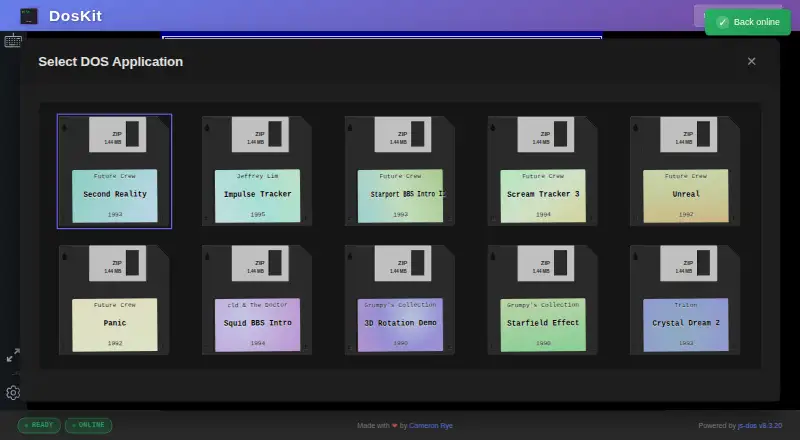
DosKit is a free, cross-platform foundation for running DOS applications through js-dos WebAssembly technology. It opens at an interactive DOS command prompt and is available as a Progressive Web App that can be installed on desktop and mobile devices. After the first visit, service-worker caching enables offline use. URL parameters can load applications such as Second Reality and Impulse Tracker. Input includes DOS keyboard keys, function keys, special characters, and mobile touch controls; audio emulation covers Sound Blaster and AdLib. DosKit uses js-dos 8.3.20 WebAssembly and supports DOSBox and DOSBox-X backends. Its command interface includes pause, resume, mute, unmute, screenshots, and filesystem read/write operations. It requires JavaScript and WebAssembly, with at least 2GB of RAM recommended. Internet Explorer is unsupported, and iOS Safari versions before 15 have limited WebAssembly support. The project is MIT-licensed; js-dos and DOSBox are listed under GPL-2.0 licenses.
Who it suits
DosKit suits people who want to run DOS applications across desktop and mobile devices, including offline after the first visit. Users should have JavaScript and WebAssembly available and check the stated browser limitations.
What it does well
- Works offline after the first visit.
- Installable PWA for desktop and mobile.
- Supports DOS keyboard input and mobile touch controls.
- Offers Sound Blaster and AdLib emulation.
What to know first
- Requires JavaScript and WebAssembly.
- At least 2GB of RAM is recommended.
- Internet Explorer is unsupported.
- Earlier iOS Safari versions have limited WebAssembly support.
Limits
The free plan costs nothing. The listed browser limits exclude Internet Explorer, and iOS Safari versions earlier than 15 have limited WebAssembly support.
Plans
| Plan | Billed and limits | Price |
|---|---|---|
| Free | MIT-licensed open source · browser-based PWA | Free |
As doskit.net lists them, read 1 Oct 2026. The maker's own page has the final word.
Getting started
- Open https://doskit.net/ in a browser with JavaScript and WebAssembly support.
- Install the Progressive Web App on a desktop or mobile device if desired.
- Load an application with a URL parameter, or use the interactive DOS prompt.
- Use keyboard, mobile touch controls or a gamepad to interact.
Overview
DosKit is a browser-based DOS environment for people who want to run DOS applications without committing to a desktop-only emulator. Its combination of a command prompt, installable PWA and offline operation makes it a flexible option across devices, provided the browser and hardware can handle WebAssembly.
Rather than opening straight into one program, DosKit boots to an interactive DOS prompt. URL parameters can also load applications such as Second Reality and Impulse Tracker, offering a direct way to reach a particular experience. The project is open source under the MIT License; js-dos and DOSBox are listed under GPL-2.0 licenses.
Key features
DosKit uses js-dos 8.3.20 WebAssembly and supports DOSBox and DOSBox-X backends. The prompt is useful for users who want to enter DOS commands, while deep links provide a simpler route for launching a named application. It supports standard DOS keyboard input, including function keys and special characters, alongside mobile touch controls and gamepad support.
Sound Blaster and AdLib emulation provide audio output, important for applications that rely on those sound standards. Its command interface also exposes pause, resume, mute, unmute, screenshot and filesystem read/write commands. That breadth gives DosKit more flexibility than a launcher limited to opening preset applications, although it remains a browser-based environment rather than a conventional installed desktop emulator.
DosKit can be installed as a Progressive Web App on desktop and mobile devices. After the first visit, service-worker caching enables offline use, a practical advantage for travel or unreliable connectivity. Offline access does not bypass the browser requirements: both WebAssembly and JavaScript are needed, and at least 2GB of RAM is recommended.
Pricing
DosKit is free. Its Free plan costs nothing and is described as an MIT-licensed, browser-based PWA. That makes it a straightforward choice for users who want an open-source DOS environment without a paid plan. The plan details do not establish a separate paid tier or usage quota.
Platforms
DosKit supports web, Windows, macOS, Linux, iOS and Android, with installation as a PWA on desktop and mobile. Browser compatibility is a meaningful constraint: Internet Explorer is unsupported, and iOS Safari versions earlier than 15 have limited WebAssembly support. Users on older Apple devices should check compatibility before relying on it.
Who it's for
DosKit suits people who want a DOS prompt and application-loading links in a portable browser environment, especially those who value offline access or use both desktop and mobile devices. Its keyboard, touch and gamepad input options widen the range of devices it can serve. It is less suitable when a device cannot meet the WebAssembly and memory requirements, or when a reader needs dependable support from an unsupported browser.
Pros and cons
- Pros: Free, MIT-licensed and source available, with no paid tier needed for the browser-based PWA.
- Pros: Offline use after the first visit and installation on desktop and mobile offer flexibility beyond a connected browser session.
- Pros: DOS prompt, deep links, sound emulation and keyboard, touch and gamepad input cover varied ways of running and controlling applications.
- Cons: WebAssembly and JavaScript are required, with at least 2GB of RAM recommended; low-memory or incompatible devices may not be good candidates.
- Cons: Internet Explorer is unsupported, and iOS Safari before version 15 has limited WebAssembly support.
Alternatives
DOS Browser is another free browser-based option for readers who want indexed storage; its database can be cleared and it does not offer cross-device play. A js-dos Premium plan offers cloud saves and progress sync, which may suit users prioritizing those features.
DOS Wasm X may suit users who want a self-hosted or web-based DOS emulator with specified hard-drive and RAM options. DOSBox is a free, open-source alternative for Linux, macOS and Windows. DOSBox Pure is a standalone desktop emulator with a free download and donations welcome.
DOSBox Staging is free for personal use and intended for personal, low-stakes scenarios, with no warranty. Magic DosBox is a freemium Android alternative with a free Lite plan. DOSBox Optionals and dosbox-automation are other free options for Windows, with the latter also supporting API and Linux platforms. For a broader comparison, see the MS-DOS Emulators list.
Verdict
DosKit is a strong fit for users who want a free, open-source DOS environment that works across desktop and mobile, can be installed as a PWA, and remains usable offline after its first visit. Choose it for the mix of prompt access and application deep links; look elsewhere if your browser lacks adequate WebAssembly support or your device falls short of the recommended memory.
Verdict
DosKit combines a DOS prompt, app-loading links, audio emulation, and offline use in a free PWA. Check browser compatibility and memory recommendations before relying on it for a particular device.
Questions
How much does DosKit cost?
Its Free plan costs nothing.
Which platforms does DosKit support?
It supports web, Windows, macOS, Linux, iOS and Android.
Can DosKit work offline?
Yes. It works offline after the first visit through service-worker caching.
Is DosKit open source?
Yes. DosKit is licensed under MIT. The project lists js-dos and DOSBox under GPL-2.0 licenses.
Who makes DosKit?
The repository identifies Cameron Rye as the maker.
What browser requirements does it have?
JavaScript and WebAssembly are required, and at least 2GB of RAM is recommended. Internet Explorer is unsupported; iOS Safari versions earlier than 15 have limited WebAssembly support.
Facts from DosKit's own pages
- Audio
- The emulator provides Sound Blaster and AdLib emulation with audio output. · github.com, 1 Oct 2026
- Browser requirements
- WebAssembly and JavaScript are required, and at least 2GB of RAM is recommended. · github.com, 1 Oct 2026
- Compatibility limit
- Internet Explorer is unsupported, and iOS Safari versions earlier than 15 have limited WebAssembly support. · github.com, 1 Oct 2026
- Deep links
- URL parameters can load specific applications such as Second Reality and Impulse Tracker. · github.com, 1 Oct 2026
- DOS prompt
- It boots directly to a fully functional interactive DOS command prompt. · github.com, 1 Oct 2026
- Emulation engine
- DosKit uses js-dos 8.3.20 WebAssembly and supports DOSBox and DOSBox-X backends. · github.com, 1 Oct 2026
- Input
- It supports standard DOS keyboard input, including function keys and special characters, plus mobile touch controls. · github.com, 1 Oct 2026
- License
- The project is licensed under the MIT License; js-dos and DOSBox are listed under GPL-2.0 licenses. · github.com, 1 Oct 2026
- Maker
- The repository identifies Cameron Rye as the maker, and his personal site describes him as a software engineer and architect. · github.com, 1 Oct 2026
- Offline use
- The app works completely offline after the first visit through service-worker caching. · github.com, 1 Oct 2026
- Programmatic API
- Its command interface exposes pause, resume, mute, unmute, screenshot, and filesystem read/write commands. · github.com, 1 Oct 2026
- Purpose
- DosKit is a cross-platform foundation for running DOS applications using js-dos WebAssembly technology. · github.com, 1 Oct 2026
- PWA
- DosKit is a Progressive Web App installable on desktop and mobile devices. · github.com, 1 Oct 2026
- Support
- The project directs users to review existing GitHub issues or open a new issue with browser, operating-system, and console-error details. · github.com, 1 Oct 2026
Where DosKit stands on Freedom251
- MS-DOS Emulators#6 of 26