dosbox-automation
What dosbox-automation is
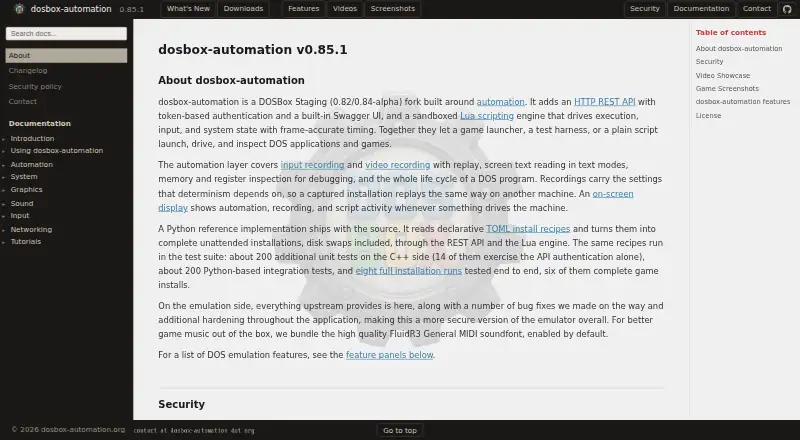
dosbox-automation is a DOSBox Staging fork for automating DOS applications and games. Launchers, scripts and test harnesses can use its HTTP REST API, which has bearer-token authentication and a Swagger UI, or its sandboxed Lua engine with frame-accurate timing. It can record and replay keyboard and mouse input, capture frames, record video, read screen text in text modes, and inspect memory and CPU registers. TOML recipes and a Python reference implementation can automate installations, including disk swaps. The project includes DOSBox Staging functionality, additional fixes and hardening, and a FluidR3 General MIDI soundfont enabled by default. Official builds are available for Windows and Linux; the Linux build is statically linked and targets x86_64. The built-in webserver is off by default. When enabled, it binds to localhost by default, requires a bearer token, and restricts mounted paths; Lua scripts have no filesystem or process access. The project is free under GNU GPL v2+. Windows 9x is not supported, and there are no official macOS builds.
Who it suits
It suits developers, launchers and test teams automating DOS software, including unattended installation and repeatable input runs. Users need Windows or Linux for an official build; the Linux build targets x86_64.
What it does well
- REST API and Lua support automation.
- Records and replays input with frame-accurate timing.
- TOML recipes can automate installs and disk swaps.
- Includes memory, register and screen-text inspection.
- Free under GNU GPL v2+.
What to know first
- Windows 9x is not supported.
- No official macOS build is provided.
- Linux build targets x86_64.
Limits
The official Linux build currently targets x86_64. Windows 9x is unsupported; macOS has no official build, and compiling from source is described as untested.
Getting started
- Visit https://www.dosbox-automation.org/.
- Choose the official Windows or Linux build for your host platform.
- Enable the built-in HTTP webserver in the configuration to use its API.
- Use the API's bearer-token authentication and Swagger UI to access automation controls.
- Use Lua scripts or TOML install recipes to automate runs and installations.
Verdict
dosbox-automation combines DOS emulation with interfaces for scripting, testing and inspection. Its platform and Windows 9x limits matter when choosing a host or DOS target.
Questions
Is dosbox-automation free?
Yes. Its pricing model is free, and a free plan is listed.
Which platforms have official builds?
Official builds are provided for Windows and Linux. The Linux build targets x86_64; there are no official macOS builds.
Is it open source?
Yes. The independent project is licensed under GNU GPL v2+ and is based on DOSBox Staging.
How does automation work?
It provides an HTTP REST API with bearer-token authentication and Swagger UI, plus a sandboxed Lua engine with frame-accurate timing.
Can it automate DOS installations?
Yes. TOML recipes can perform unattended installations, including disk swaps, through the REST API and Lua engine.
Does it support Windows 9x?
No. Windows 95, 98, and ME are not supported.
Facts from dosbox-automation's own pages
- Automation
- It provides an HTTP REST API with bearer-token authentication and Swagger UI, plus a sandboxed Lua engine with frame-accurate timing. · dosbox-automation.org, 3 Oct 2026
- Automation interface
- It provides an HTTP REST API with bearer-token authentication and a built-in Swagger UI. · dosbox-automation.org, 3 Oct 2026
- Emulation
- The project includes DOSBox Staging functionality, additional bug fixes and hardening, and a FluidR3 General MIDI soundfont enabled by default. · dosbox-automation.org, 3 Oct 2026
- Inspection
- It supports screen-text reading in text modes and memory and register inspection for debugging. · dosbox-automation.org, 3 Oct 2026
- Inspection and capture
- The API supports screen capture and video recording, text reading in text modes, and memory and CPU register inspection. · dosbox-automation.org, 3 Oct 2026
- Install recipes
- A Python reference implementation reads TOML recipes to perform unattended installations, including disk swaps, through the REST API and Lua engine. · dosbox-automation.org, 3 Oct 2026
- Integrations
- The maker describes use with shell scripts, Python programs, game launchers, automated test harnesses, and CI/CD pipelines. · dosbox-automation.org, 3 Oct 2026
- License
- The independent project is licensed under GNU GPL v2+ and is based on DOSBox Staging. · dosbox-automation.org, 3 Oct 2026
- Linux limit
- The official Linux build is statically linked and currently targets x86_64. · dosbox-automation.org, 3 Oct 2026
- macOS availability
- The maker says there are no official macOS builds, but users can compile from source; it describes that route as untested. · dosbox-automation.org, 3 Oct 2026
- MCP bridge
- A separate Python package, dosbox-mcp, wraps the REST API as MCP tools for compatible clients such as Claude Code. · dosbox-automation.org, 3 Oct 2026
- Mount restrictions
- When the webserver is enabled, mount paths are validated and restricted by configured whitelists, and a one-way mount lock can freeze drive configuration until restart. · dosbox-automation.org, 3 Oct 2026
- Notable compatibility limit
- The documentation says Windows 9x (95, 98, ME) is not supported. · dosbox-automation.org, 3 Oct 2026
- Platforms
- The project states that official builds are available for Windows and Linux, and that it has no official macOS builds. · dosbox-automation.org, 3 Oct 2026
- Purpose
- dosbox-automation is a DOSBox Staging fork that lets launchers, test harnesses, and scripts launch, drive, and inspect DOS applications and games. · dosbox-automation.org, 3 Oct 2026
- Recording
- The automation layer supports input and video recording with replay, plus single-frame capture through the API. · dosbox-automation.org, 3 Oct 2026
- Recording and replay
- It can record and replay keyboard and mouse input with frame-accurate timing for deterministic runs. · dosbox-automation.org, 3 Oct 2026
- Scripting
- Its sandboxed Lua engine drives execution, input, and system state with frame-accurate timing. · dosbox-automation.org, 3 Oct 2026
- Security
- The API requires a bearer token, the webserver binds to localhost by default, and Lua scripts run without filesystem or process access. · dosbox-automation.org, 3 Oct 2026
- Security support
- The main branch and latest release are supported with security updates, and the policy gives an email address for private vulnerability reports. · dosbox-automation.org, 3 Oct 2026
- Support
- The main branch and latest release are supported with security updates; the policy says private vulnerability reports receive a human reply. · dosbox-automation.org, 3 Oct 2026
- Supported downloads
- The maker says official builds are provided for Windows and Linux; the official Linux build is x86_64 and runs on most desktop Linux distributions. · dosbox-automation.org, 3 Oct 2026
- Unattended installs
- Declarative TOML install recipes can automate complete installations, including disk swaps, through the API and Lua engine. · dosbox-automation.org, 3 Oct 2026
- Webserver setting
- The built-in HTTP webserver is off by default and must be enabled in the configuration. · dosbox-automation.org, 3 Oct 2026
Where dosbox-automation stands on Freedom251
- MS-DOS Emulators#7 of 26