Freedom251 › Multi-System Emulators
Dolphin
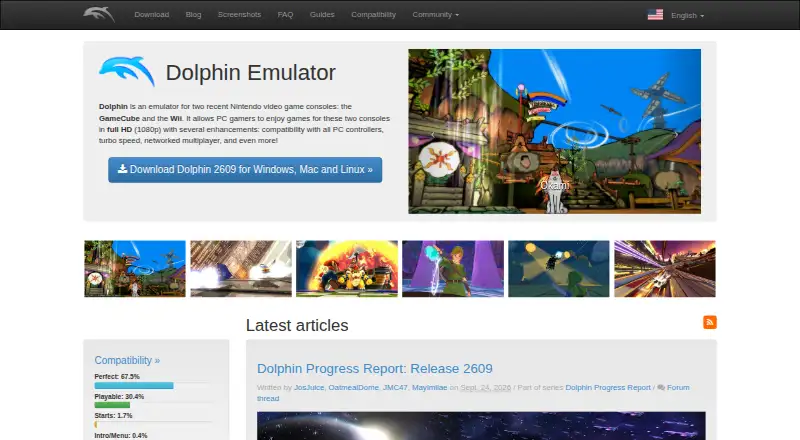
What Dolphin is
Dolphin is a free emulator for playing Nintendo GameCube and Wii games on a PC or Android device. It lists full HD (1080p), PC controller compatibility, turbo speed, and networked multiplayer among its enhancements. Its FAQ describes compatibility as high across most games for the two consoles, while noting that some titles have defects, errors, or crashes. Dolphin is open source under GPLv2+; anyone distributing it must provide the source code and attribution. It supports 64-bit systems, including Windows 10 or newer, macOS 11 Big Sur or newer, Linux, and Android 7.0 or newer. Downloads include Windows x64 and ARM64, macOS for ARM and Intel, Android, and Linux Flatpak packages. Stable releases come every few months; development builds arrive several times a day and are less tested. The FAQ recommends at least 2 GB of RAM and GPU support for DirectX 11.1 and OpenGL 4.4. Community help is linked through Discord, forums, a wiki, and GitHub. Dolphin states that it is not affiliated with Nintendo.
Who it suits
Dolphin suits players who want to run GameCube or Wii games on a supported 64-bit PC or Android device. It may also suit users seeking networked multiplayer or controller support.
What it does well
- Free to use, with no paid plans listed.
- Offers 1080p, turbo speed, and PC controller compatibility.
- Networked multiplayer is listed as an enhancement.
- Available for Windows, macOS, Linux, and Android.
- GPLv2+ license requires source release and attribution when distributed.
What to know first
- Does not support 32-bit operating systems.
- Some games can have defects, errors, or crashes.
- Development builds are less tested than stable releases.
- Requires GPU support for DirectX 11.1 and OpenGL 4.4.
Limits
Dolphin has no paid plans listed. It does not support 32-bit operating systems, and some games can have defects, errors, or crashes.
Plans
| Plan | Billed and limits | Price |
|---|---|---|
| Dolphin Emulator | No paid plans or pricing listed on the official pages opened | Free |
As dolphin-emu.org lists them, read 28 Sept 2026. The maker's own page has the final word.
Getting started
- Visit the Dolphin website.
- Choose a download for Windows, macOS, Android, or Linux.
- Check that your system is 64-bit and meets the listed operating-system requirements.
- Choose a stable release or a development version.
- Use Discord, the forums, wiki, or GitHub for community support; report bugs through the issue tracker.
Dolphin emulates Nintendo GameCube and Wii games on computers and Android devices. It suits players who want those two libraries with enhancements such as HD output and networked multiplayer. Its free, open-source model is compelling, but 64-bit system requirements and game-specific defects make compatibility worth weighing.
Overview
Dolphin’s focus is clear: it brings GameCube and Wii games to supported PCs and Android devices rather than aiming to cover every console generation. The project says compatibility is high across the majority of titles, though some games can show defects, errors, or crashes. That makes it a strong fit for players whose target games work well, but a less certain choice if a particular title must run reliably.
There is no BIOS requirement, and the project supports netplay. Dolphin is not affiliated with Nintendo. It is licensed under GPLv2+; distributing it requires releasing the source code and providing attribution.
Key features
- Resolution and speed options: Full HD (1080p) output and turbo speed can make Dolphin more appealing than playing on original hardware, though the FAQ’s compatibility caveat still applies.
- Controller support: PC controller compatibility helps players use familiar input devices.
- Networked multiplayer: Netplay gives players an online multiplayer option, a meaningful addition for compatible games.
- Graphics support: Shader and upscaling support give players options to improve presentation. The FAQ also calls for GPU support for DirectX 11.1 and OpenGL 4.4.
- Two console libraries: Dolphin supports GameCube and Wii games; it is not a general-purpose multi-console emulator.
Stable releases arrive every few months. Development builds appear several times a day but are less tested, so they suit users willing to trade a more experimental build for more frequent updates.
Pricing
| Plan | Price | Best for |
|---|---|---|
| Dolphin Emulator | free | Anyone who wants Dolphin’s GameCube and Wii emulation without a paid plan. |
Dolphin is free, with no paid plans. There is no free trial because the software itself is free; no subscription renewal or plan-based seat limits are stated.
Platforms
Dolphin supports Android, Linux, macOS, and Windows. The FAQ sets minimums at Android 7.0, macOS 11 Big Sur, and Windows 10; Linux is also supported. All supported operating systems must be 64-bit, ruling out older 32-bit machines. The FAQ recommends at least 2 GB of RAM, and suitable DirectX 11.1 or OpenGL 4.4 GPU support is important.
Downloads include Windows x64 and ARM64 builds, macOS builds for ARM and Intel, Android, and Linux Flatpak packages. The choice of builds is useful across desktop hardware, but Dolphin’s 64-bit requirement remains the key constraint.
Who it's for
Dolphin is right for players seeking GameCube or Wii emulation on a compatible 64-bit computer or Android device, especially those who value 1080p output, PC controllers, turbo speed, or netplay. It is less suitable for users on 32-bit systems or anyone who needs assurance that every game will run without issues.
Players who prefer a stable build can use the releases made every few months; those comfortable with less-tested software can opt for development builds published several times a day. The project points users to community Discord, forums, a wiki, GitHub, and an issue tracker for bug reports.
Pros and cons
Pros
- Free and open source: The GPLv2+ license allows distribution when source code is released and attribution is given.
- Useful gameplay enhancements: 1080p, turbo speed, controller compatibility, and netplay add options beyond basic emulation.
- Broad device coverage: Windows, macOS, Linux, and Android downloads serve desktop and mobile users.
- No BIOS required: Users can avoid a separate BIOS requirement.
Cons
- 64-bit only: Dolphin does not support 32-bit operating systems.
- Some titles have problems: Defects, errors, or crashes can affect individual games despite broad compatibility across most of the libraries.
- Development builds are less tested: Their frequent publication may suit update-seekers, but stable releases are the safer choice for users who prioritize testing.
Alternatives
For broader platform coverage, RetroArch is free and open source and runs on Android, iOS, Linux, macOS, web, and Windows; choose it when those platforms matter more than Dolphin’s specific GameCube and Wii focus. Azahar is a free, open-source 3DS emulator for Android, iOS, Linux, macOS, and Windows, making it the relevant pick for that system instead.
PPSSPP is a free PSP emulator on Android, iOS, Linux, macOS, and Windows; it fits players looking for PSP emulation, with a separate Gold plan also listed. BlastEm is another free option for readers considering an alternative emulator.
bsnes is free GPLv3 software for Linux, macOS, and Windows. DuckStation is free on Android, Linux, macOS, and Windows, but requires a user-provided BIOS image and legally purchased, dumped games. melonDS is a free Nintendo DS emulator for Linux, macOS, and Windows that requires console BIOS and firmware dumps for some emulation. mGBA is a free, open-source Game Boy Advance emulator for Linux, macOS, and Windows.
Browse Game Console Emulators, Multi-System Emulators, or Emulator Software for more options.
Verdict
Choose Dolphin if you want free, open-source GameCube and Wii emulation with HD output, controller support, turbo speed, and netplay on a 64-bit system. Its focused console support and useful enhancements are the main reasons to choose it; look elsewhere if you need 32-bit support or dependable performance across every individual game.
Verdict
Dolphin combines GameCube and Wii emulation with listed enhancements such as 1080p and networked multiplayer. Check the 64-bit system requirements and the possibility of game-specific issues before choosing it.
Questions
How much does Dolphin cost?
The Dolphin Emulator plan is free. No paid plans or pricing are listed.
Which platforms does it support?
Android, Linux, macOS, and Windows are listed. Dolphin requires a 64-bit operating system; supported versions include Windows 10 or newer, macOS 11 Big Sur or newer, and Android 7.0 or newer.
Is Dolphin open source?
Yes. Dolphin is licensed under GPLv2+. Distributing it requires releasing the source code and giving attribution.
Does Dolphin offer a free trial?
No free trial is listed; the software is free.
Is Dolphin affiliated with Nintendo?
No. Dolphin states that it is not affiliated with Nintendo.
Where can users get help?
The official site links to Discord, forums, a wiki, and GitHub. Bug reports go to its issue tracker.
Facts from Dolphin's own pages
- Affiliation
- The FAQ states that Dolphin is not affiliated with Nintendo. · dolphin-emu.org, 28 Sept 2026
- Community and support
- The official site links users to community Discord, forums, a wiki, and GitHub, and directs bug reports to its issue tracker. · dolphin-emu.org, 28 Sept 2026
- Compatibility
- The FAQ describes Dolphin as having high compatibility across the majority of GameCube and Wii titles, while noting that some games have issues. · dolphin-emu.org, 28 Sept 2026
- Downloads
- The download page lists builds for Windows x64 and ARM64, macOS for ARM and Intel, Android, and Linux Flatpak packages. · dolphin-emu.org, 28 Sept 2026
- Enhancements
- The project lists full HD (1080p), PC controller compatibility, turbo speed, and networked multiplayer as enhancements. · dolphin-emu.org, 28 Sept 2026
- Founded
- 2003 · dolphin-emu.org, 28 Sept 2026
- Hardware guidance
- The FAQ recommends at least 2 GB of RAM and says GPU support for DirectX 11.1 and OpenGL 4.4 is important. · dolphin-emu.org, 28 Sept 2026
- Limitations
- The FAQ says Dolphin does not support 32-bit operating systems and that some games can have defects, errors, or crashes. · dolphin-emu.org, 28 Sept 2026
- Open source
- Dolphin is licensed under GPLv2+; distributing it requires releasing the source code and giving attribution. · dolphin-emu.org, 28 Sept 2026
- Privacy
- The project provides a privacy policy on its official site. · dolphin-emu.org, 28 Sept 2026
- Purpose
- Dolphin emulates Nintendo GameCube and Wii consoles so users can play games for those systems on a PC. · dolphin-emu.org, 28 Sept 2026
- Recent security incident
- A September 2026 progress report says a vulnerability briefly allowed a generic cryptominer attack to compromise the macOS buildbot, and says no builds were compromised. · dolphin-emu.org, 28 Sept 2026
- Release cadence
- Stable releases are created every few months, while development versions are published several times each day and are less tested. · dolphin-emu.org, 28 Sept 2026
- Supported systems
- The FAQ lists Windows 10 or newer, macOS 11 Big Sur or newer, Linux, and Android 7.0 or newer, and requires 64-bit operating systems. · dolphin-emu.org, 28 Sept 2026
Where Dolphin stands on Freedom251
- Multi-System Emulators#12 of 54
- Game Console Emulators#8 of 35
- Emulator Software#9 of 39