Freedom251 › Emulator Software
86Box
What 86Box is
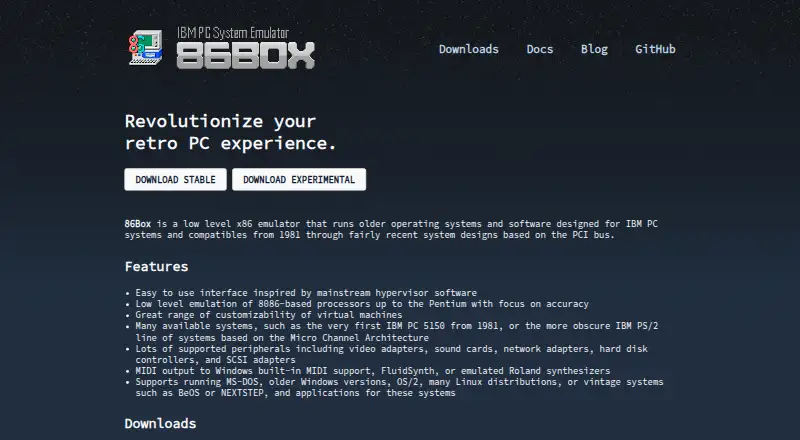
86Box emulates x86-based IBM PC systems and compatible computers from 1981 through systems based on the PCI bus. It recreates processors from the 8086 through the Pentium, with an emphasis on accuracy, and supports configurable virtual machines including the IBM PC 5150 and IBM PS/2 line. Emulated hardware options include video and sound cards, network adapters, hard disk controllers, and SCSI adapters. Guest systems include MS-DOS, older Windows versions, OS/2, many Linux distributions, BeOS, and NEXTSTEP. MIDI output can use Windows built-in support, FluidSynth, or emulated Roland synthesizers. 86Box is free and available for Windows, Linux, and macOS. The project offers stable and experimental builds, noting that experimental versions may be less stable or performant. Most emulation logic runs in a single thread, so performance depends on host and guest configuration. The built-in virtual machine manager is a preview, and the project recommends manager applications for multiple virtual machines.
Who it suits
86Box suits people who want to run older PC systems and guest operating systems in configurable virtual machines. It can also suit users seeking emulation of vintage PC peripherals and MIDI options.
What it does well
- Free to use.
- Emulates systems from 1981 through PCI-based systems.
- Supports a wide range of guest systems.
- Offers Windows, Linux, and macOS builds.
- Supports configurable virtual machines.
What to know first
- Most emulation logic runs in a single thread.
- Experimental builds may be less stable or performant.
- Built-in virtual machine manager is only a preview.
- BIOS is required.
Limits
86Box is free, with donations welcome. A BIOS is required. The built-in virtual machine manager is a preview, and experimental builds may be less stable or performant than release builds.
Plans
| Plan | Billed and limits | Price |
|---|---|---|
| 86Box | No charge for the emulator · Donations welcome | Free |
As 86box.net lists them, read 9 Oct 2026. The maker's own page has the final word.
Getting started
- Visit https://86box.net/ and choose a stable or experimental build.
- Use a supported host: Windows 7 SP1 or newer, Ubuntu 16.04 or Debian 9.0 or newer, or macOS 10.14 Mojave or newer.
- Provide a BIOS for the virtual machine.
- Configure a virtual machine and its supported peripherals.
- For multiple virtual machines, use a manager application; the built-in manager is a preview.
Verdict
86Box offers detailed emulation options across older x86 computers, peripherals, and operating systems. Its single-threaded emulation and preview manager are important considerations for setup and performance.
Questions
How much does 86Box cost?
The emulator is free; donations are welcome.
Which operating systems can host 86Box?
The listed platforms are Windows, Linux and macOS. The stated minimums are Windows 7 SP1, Ubuntu 16.04 or Debian 9.0, and macOS 10.14 Mojave.
What guest systems can it run?
Supported guests include MS-DOS, older Windows versions, OS/2, many Linux distributions, BeOS and NEXTSTEP.
Does 86Box require a BIOS?
Yes. A BIOS is required.
What license does 86Box use?
86Box is released under the GNU General Public License version 2 or later.
Are there stable and experimental builds?
Yes. Experimental builds may be less stable or performant than release builds.
Facts from 86Box's own pages
- Builds
- The site offers stable and experimental builds, and notes experimental builds may be less stable or performant than release builds. · 86box.net, 9 Oct 2026
- Guest systems
- 86Box supports MS-DOS, older Windows versions, OS/2, many Linux distributions, BeOS, and NEXTSTEP. · 86box.net, 9 Oct 2026
- Hardware requirements
- The site recommends a 64-bit Intel Core 2, AMD Athlon 64, or ARMv8 processor or newer and at least 4 GB of RAM. · 86box.net, 9 Oct 2026
- Host platforms
- The site lists Windows, Linux, and macOS system requirements, with Windows 7 SP1 or newer on Intel/AMD, Ubuntu 16.04 or Debian 9.0 or newer for Linux, and macOS 10.14 Mojave or newer. · 86box.net, 9 Oct 2026
- License
- 86Box is released under the GNU General Public License version 2 or later. · 86box.net, 9 Oct 2026
- Management
- The project recommends manager applications for handling multiple virtual machines and says its built-in virtual machine manager is a preview. · 86box.net, 9 Oct 2026
- MIDI
- MIDI output can use Windows built-in MIDI support, FluidSynth, or emulated Roland synthesizers. · 86box.net, 9 Oct 2026
- Performance limit
- Most emulation logic runs in a single thread, and performance depends on host and guest configuration. · 86box.net, 9 Oct 2026
- Peripherals
- Supported peripherals include video adapters, sound cards, network adapters, hard disk controllers, and SCSI adapters. · 86box.net, 9 Oct 2026
- Processor emulation
- It emulates 8086-based processors up to the Pentium with a focus on accuracy. · 86box.net, 9 Oct 2026
- Purpose
- 86Box emulates x86-based IBM PC systems and compatibles from 1981 through systems based on the PCI bus. · 86box.net, 9 Oct 2026
- Security reporting
- The project security policy says to report vulnerabilities by opening a GitHub issue or joining its Discord server. · github.com, 9 Oct 2026
- Support
- The project offers community discussion through IRC and Discord and links to a documentation site. · 86box.net, 9 Oct 2026
- Virtual machines
- The emulator supports customizable virtual machines and a range of systems including the IBM PC 5150 and IBM PS/2 line. · 86box.net, 9 Oct 2026
Where 86Box stands on Freedom251
- Emulator Software#7 of 39
- Multi-System Emulators#10 of 54