Freedom251 › Help Authoring Tools

DITA Exchange
What DITA Exchange is
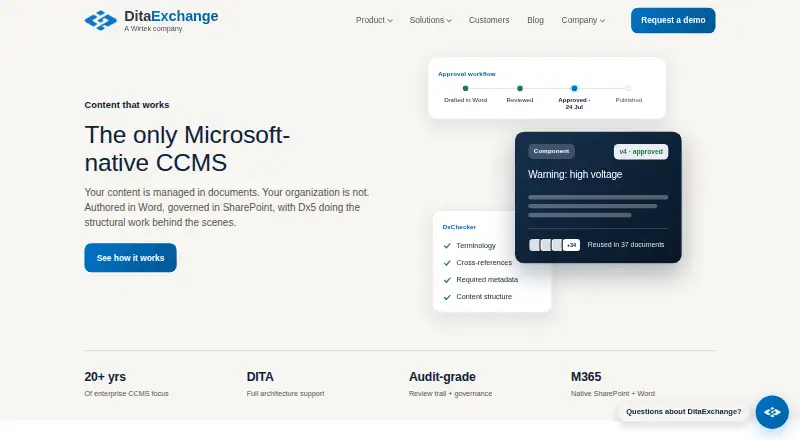
DITA Exchange manages DITA content components in SharePoint, with authoring in Microsoft Word and review, approval, quality checks, and publishing in Dx5. DxAuthor+ adds DITA structure in Word and supports tagging, cross-topic links, and content references. Teams can update an approved component and refresh documents that use it, with version history and approval records. DxMigrationTool imports Word, HTML, Markdown, and plain-text files, captures metadata, repairs links, and separates documents into topics. DxChecker applies configurable machine-checkable rules, including terminology and metadata checks. Dx5 publishes to Word, HTML, and XML and offers REST endpoints; listed publishing outputs also include PDF, JSON, Markdown, plain text, portal pages, and API. Integrations include Microsoft Teams, OneDrive, Power Automate, Power Apps, Loop, and Microsoft Entra ID single sign-on. The product supports SharePoint Online and SharePoint Server 2019 or Subscription Edition. The maker says it runs inside the customer’s Microsoft 365 tenant. Pricing is on request. Dx5 records component approvals, but the maker does not claim these are validated electronic signatures or Part 11 sign-offs.
Who it suits
It suits organizations with an existing Microsoft environment where inconsistent content can have regulatory, legal, financial, or operational consequences. It is probably not suitable for organizations that are not standardized on Microsoft 365.
What it does well
- Approved component changes can flow to documents that use them.
- Includes configurable content and metadata checks.
- Supports SharePoint Online and specified SharePoint Server editions.
- Offers integrations with Microsoft collaboration and workflow tools.
- Publishes to multiple listed formats.
What to know first
- Pricing is on request.
- No help-authoring tool of its own.
- Translation work remains with the customer’s vendor and tools.
- Component approvals are not validated electronic signatures or Part 11 sign-offs.
Getting started
- Visit the DitaExchange website.
- Confirm whether your environment uses SharePoint Online or SharePoint Server 2019 or Subscription Edition.
- Ask DitaExchange about pricing and deployment options.
- Choose whether DxAuthor+ will be customer-managed or hosted for SharePoint Online.
- Contact DitaExchange with product inquiries; it says inquiries typically reach the right person within one Danish or US East Coast business day.
DITA Exchange is a structured-content system for teams that need governed reuse, review, and publishing in a Microsoft environment. It is most suitable for organizations where inconsistent documentation has regulatory, legal, financial, or operational consequences. Choose it for component control inside SharePoint and Word; look elsewhere if you need a standalone help-authoring suite or a non-Microsoft deployment.
Overview
Dx5 manages DITA components in SharePoint while combining Microsoft Word authoring with review, approval, quality checks, and publishing workflows. An approved component can be changed once and then refreshed across every document that uses it. Version history and approval records make those changes traceable, reducing the risk of maintaining divergent copies of important text.
The hybrid authoring model keeps writers in Word while DxAuthor+ applies DITA structure behind the scenes. Authors can tag content, create cross-topic links, and add content references without leaving the Microsoft editor. DxMigrationTool imports Word, HTML, Markdown, and plain-text files, captures metadata, repairs links, and breaks documents into topics, providing a practical route from legacy files to reusable content. Translation packages and language-variant tracking are included, but translation itself remains with the customer's vendor and translation-memory tools.
Key features
Reuse and governance
Component storage, version control, and approval records give teams a central source for text that appears in many deliverables. A single approved change can propagate to assembled documents, which is valuable when a correction or policy update must be applied consistently. Dx5 records approvals at component level, but the maker does not present them as validated electronic signatures or Part 11 sign-offs; regulated teams requiring those controls should verify their compliance process separately.
Authoring and migration
DxAuthor+ supports tagging, cross-topic links, and content references in Word. That lowers the disruption of adopting DITA for Microsoft-based writers, while still enabling structured reuse. DxMigrationTool's import, metadata capture, link repair, and topic componentization address the costly preparation work involved in moving existing documentation into a component model.
Checking and publishing
DxChecker applies configurable, machine-checkable rules to Word documents or a SharePoint repository. Terminology, metadata, and controlled-language checks can catch consistency problems before publication, and the rules can be tailored to an organization's standards. Dx5 publishes to Word, HTML, and XML and exposes REST endpoints for downstream consumers; its listed outputs also include PDF, JSON, Markdown, plain text, portal pages, and API delivery.
Microsoft integration and security
Native connections include Microsoft Teams, OneDrive, Power Automate, Power Apps, and Loop, with Microsoft Entra ID single sign-on. The system runs inside the customer's Microsoft 365 tenant and uses that tenant's identity, access control, data residency, and audit log. Deployment supports SharePoint Online and SharePoint Server 2019 or Subscription Edition. For SharePoint Online, DxAuthor+ can be customer-managed or hosted.
Pricing
DITA Exchange uses paid, custom pricing, with pricing supplied on request. That makes it a procurement-led choice rather than a self-serve subscription and leaves the eventual cost dependent on the organization's requirements. Prospective buyers should assess the scope of SharePoint deployment, authoring setup, integrations, users, and publishing needs with the vendor before committing.
Platforms
DITA Exchange is offered through web and API access, with self-hosted and Windows support. Its deployment model is specifically aligned with SharePoint Online or SharePoint Server 2019 and Subscription Edition, and DxAuthor+ runs as a Word add-in. This is a strong fit for Microsoft estates but a significant constraint for teams standardized on another collaboration stack.
Who it's for
Dx5 is aimed at organizations already using Microsoft 365 where inconsistent content can create regulatory, legal, financial, or operational consequences. Technical documentation, policy material, and other multi-document content benefit most from approved components, repository-wide checks, and controlled publishing. It is probably unsuitable for organizations that are not standardized on Microsoft 365, and it does not provide its own help-authoring tool, so teams seeking an all-in-one help-authoring environment will need another product alongside it.
Pros and cons
Pros
- Governed reuse: one approved component change can update every document that references it, with version history and approval records.
- Word-based structured authoring: DxAuthor+ brings DITA tagging, links, and references into a familiar Microsoft editor.
- Actionable quality control: configurable terminology, metadata, and controlled-language rules run against documents or a SharePoint repository.
- Broad delivery: publishing includes Word, HTML, XML, PDF, JSON, Markdown, plain text, portal pages, and API outputs.
- Tenant-aligned controls: operation inside the customer's Microsoft 365 tenant uses existing identity, access, data-residency, and audit facilities.
Cons
- Microsoft dependency: the product is a poor match for organizations without a Microsoft 365 standard.
- No built-in help-authoring tool: teams creating conventional help systems may need separate authoring software.
- Approval-signature boundary: component approvals are not claimed as validated electronic signatures or Part 11 sign-offs.
- Custom pricing: there is no published entry price for smaller teams to assess independently.
- Translation handoff: the platform packages and tracks translations, but the customer's vendor and translation-memory tools perform the translation work.
Alternatives
Choose Help Authoring Tools when you want to compare dedicated help-authoring products rather than a SharePoint-centered component system.
Dokiel is a free, open-source Scenari publishing chain for Linux, macOS, self-hosted, web, and Windows users.
XMLmind XML Editor offers a free Personal Edition across Linux, macOS, web, and Windows, with professional conversion and DOCX import features reserved for its paid capability set.
Dr.Explain suits Windows users wanting a freemium help-authoring option, including a free license limited to 20 topics and a Business Temporary subscription for five users.
HelpNDoc is a Windows freemium alternative with a personal edition for non-commercial use and supported documentation formats.
Paligo is a paid, web-and-API CCMS with a free trial; its Business plan starts at $15,000 per year for two authors and two languages.
Heretto is a paid CCMS with RESTful JSON API, dynamic delivery, output integrations, personalization, and publishing customization.
Author-it is a paid option offered through API, self-hosted, web, and Windows deployments, with subscription pricing based on team size, deployment model, and requirements.
Fluid Topics is a paid API and web platform for teams considering another delivery-focused approach.
Verdict
DITA Exchange is a strong choice for Microsoft 365 organizations that need reusable, auditable DITA content, Word-based authoring, configurable checks, and many publishing outputs. Its central advantage is controlled component reuse inside the customer's SharePoint and Microsoft security model. Look elsewhere if your organization is not Microsoft-centered, needs a built-in help-authoring tool, or requires approval records that qualify as validated electronic signatures or Part 11 sign-offs.
Verdict
DITA Exchange combines reusable DITA components, Word authoring, checks, and publishing within a Microsoft environment. Its Microsoft 365 fit and approval-signature limit are important considerations before choosing it.
Questions
How much does DITA Exchange cost?
Pricing is available on request.
Which SharePoint environments does it support?
It supports SharePoint Online and SharePoint Server 2019 or Subscription Edition.
Can the product handle translations?
Dx5 can generate translation packages and track language variants. Translation work remains with the customer's vendor and translation-memory tools.
Does Dx5 provide validated electronic signatures or Part 11 sign-offs?
The maker says Dx5 records component-level approvals but does not claim those are validated electronic signatures or Part 11 sign-offs.
What does it publish?
Listed outputs include Word, HTML, XML, PDF, JSON, Markdown, plain text, and portal pages. Dx5 also provides REST endpoints for downstream consumers.
Who makes DITA Exchange?
DitaExchange ApS is a Danish company headquartered in Aarhus and part of Wirtek A/S.
Facts from DITA Exchange's own pages
- Audience
- Dx5 is aimed at organizations with regulatory, legal, financial, or operational consequences from inconsistent content and an existing Microsoft environment. · ditaexchange.com, 3 Oct 2026
- Authoring
- DxAuthor+ adds structured-content features to Microsoft Word, including taxonomy tagging, cross-topic links, and content references. · ditaexchange.com, 4 Oct 2026
- Company
- DitaExchange ApS is a Danish company and part of Wirtek A/S; the site lists Aarhus, Denmark and Radnor, Pennsylvania, USA. · ditaexchange.com, 4 Oct 2026
- Compliance limit
- The company says Dx5 records component-level approvals but does not claim that its approval workflow is a validated electronic signature or a 21 CFR Part 11 sign-off. · ditaexchange.com, 4 Oct 2026
- Content reuse
- Dx5 stores reusable components with version history and approval records, so a component change can flow to every document that uses it. · ditaexchange.com, 4 Oct 2026
- Deployment
- The product supports SharePoint Online and SharePoint Server 2019 and Subscription Edition; the company also describes national-cloud, hybrid, and air-gapped deployments. · ditaexchange.com, 4 Oct 2026
- Headquarters
- Aarhus, Denmark · ditaexchange.com, 28 Sept 2026
- Integrations
- Dx5 integrates with Teams, OneDrive, Power Automate, Power Apps, and Loop, and supports Microsoft Entra ID single sign-on. · ditaexchange.com, 4 Oct 2026
- Intended customers
- The company describes Dx5 as intended for organizations where inconsistent content has regulatory, legal, financial, or operational consequences and the IT environment is already Microsoft. · ditaexchange.com, 4 Oct 2026
- Limit
- The maker says Dx5 has no help-authoring tool of its own and is probably not suitable for organizations that are not standardized on Microsoft 365. · ditaexchange.com, 3 Oct 2026
- Migration
- DxMigrationTool imports Word, HTML, Markdown, and plain-text files, captures metadata, repairs links, and componentizes documents into topics. · ditaexchange.com, 3 Oct 2026
- Product
- DitaExchange manages DITA components in Microsoft SharePoint and lets subject matter experts author in Microsoft Word. · ditaexchange.com, 4 Oct 2026
- Publishing
- Dx5 publishes content to Word, HTML, and XML, and provides REST endpoints for downstream consumers. · ditaexchange.com, 4 Oct 2026
- Quality
- DxChecker applies configurable machine-checkable content rules, including terminology, metadata, and controlled-language checks. · ditaexchange.com, 3 Oct 2026
- Quality checks
- DxChecker applies configurable, machine-checkable rules to a Word document or SharePoint repository, including terminology and metadata checks. · ditaexchange.com, 4 Oct 2026
- Reuse
- Dx5 lets teams update an approved content component once and refresh the documents assembled from it. · ditaexchange.com, 3 Oct 2026
- Security
- DitaExchange says it runs inside the customer's Microsoft 365 tenant and uses its identity, access control, data residency, and underlying audit log. · ditaexchange.com, 4 Oct 2026
- Support
- The contact page says inquiries typically reach the right person within one Danish or US east-coast business day. · ditaexchange.com, 4 Oct 2026
- Translation limit
- Dx5 generates translation packages and tracks language variants, while translation work remains with the customer's vendor and translation-memory tools. · ditaexchange.com, 4 Oct 2026
Where DITA Exchange stands on Freedom251
- Help Authoring Tools#15 of 29