Freedom251 › Desktop Widget Software

Delta Widgets
What Delta Widgets is
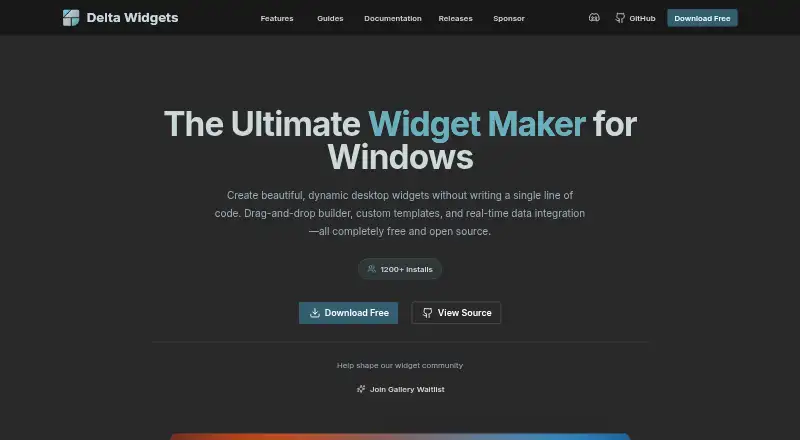
Delta Widgets is a free, open-source Windows app for making desktop widgets without code. Its visual drag-and-drop editor supports built-in templates, custom HTML/CSS widgets, URL-based widgets, and creations made from scratch. Widgets can show live time, system statistics, media information, and weather. Pre-installed options include date and time, media controls, an audio visualizer, weather, disks, RAM, CPU, and battery. Expressions and variables can add and format dynamic values in widget text and images, and custom layouts let users arrange widgets. URL widgets can display webpages, dashboards, web apps, or online tools; the maker describes these as sandboxed to display external content only. An optional assistant accepts a user-supplied key for OpenAI, Anthropic, Google, Ollama, or OpenRouter. The maker says those keys are stored encrypted on the user’s device. Compatibility is listed for Windows 10 and Windows 11, with Windows 10 April 2018 or later required. The download page says the app collects anonymous install and widget-enable events through Mixpanel, and does not track personal data. The project uses the GPL-3.0 license.
Who it suits
Delta Widgets suits Windows users who want to build and arrange desktop widgets without writing code. It may also fit users who want to display system statistics, weather, or URL-based content.
What it does well
- Visual editor supports drag-and-drop widget creation.
- Built-in widgets cover system stats, weather, and media.
- Custom HTML/CSS and URL widgets are supported.
- Assistant supports five listed AI providers.
- Open source under GPL-3.0.
What to know first
- Windows only; no other platform is listed.
- Windows 10 must be April 2018 release or later.
- Download page reports anonymous install and widget-enable events.
Plans
| Plan | Billed and limits | Price |
|---|---|---|
| Free | Free and open source under GPL-3.0 · Windows 10/11 | Free |
As deltawidgets.com lists them, read 7 Oct 2026. The maker's own page has the final word.
Getting started
- Visit the Delta Widgets website.
- Download the Windows app for Windows 10 April 2018 or later, or Windows 11.
- Use the visual editor to choose a template or create a widget from scratch.
- Add dynamic values, custom HTML/CSS, or content from a URL as needed.
- Arrange widgets in a custom layout.
Delta Widgets is a free, open-source builder for Windows desktop widgets. It suits users who want live system information alongside highly customized layouts, especially when visual editing alone is not enough. Its broad creation options are compelling, but people using other operating systems should look elsewhere.
Overview
Delta Widgets lets you assemble widgets without writing code through a drag-and-drop editor, then go further with custom HTML and CSS or content loaded from a URL. Templates provide a quick starting point, while blank projects support a more deliberate design. Expressions and variables can insert and format changing values in widget text and images, so the result can respond to current data rather than remain a static panel.
Its built-in set covers date and time, media controls, an audio visualizer, weather, disk usage, RAM, CPU, battery, and other system statistics. The project is released under the GPL-3.0 license. Documentation, GitHub issue reporting, and a community Discord provide routes for help and feedback.
Key features
Live data and flexible construction
Live time, weather, media information, and machine statistics make Delta Widgets useful for monitoring and everyday desktop information. The combination of templates, visual layout, and custom HTML/CSS gives beginners a low-code entry point without preventing advanced customization. Users who only need a fixed clock may find this breadth unnecessary, while dashboard builders gain substantially more room to shape a display.
Web content and optional AI assistance
URL widgets can show webpages, dashboards, web apps, or online tools. They are described as sandboxed for displaying external content, which makes them suitable for bringing a web-based panel onto the desktop while keeping its purpose focused on presentation. The optional bring-your-own-key assistant supports OpenAI, Anthropic, Google, Ollama, and OpenRouter. Provider keys are stored encrypted on the device, according to the maker. Because the assistant requires your own provider key, it is an optional extension rather than an included service.
The download page says anonymous install and widget-enable events are sent through Mixpanel, without tracking personal data. Readers who require no telemetry should weigh that behavior before installing.
Pricing
Free — free. The sole plan includes the complete free and open-source GPL-3.0 project and Windows 10/11 support. There is no free trial because the software itself is free, and no subscription, seat allowance, quota, or renewal charge is given. This is a straightforward choice for individual users and developers who value inspectable software and unrestricted experimentation without a paid tier.
Platforms
Delta Widgets supports Windows 10 and Windows 11. Windows 10 compatibility begins with the April 2018 release or later. There is no support for macOS, Linux, Android, iOS, or web use, making it unsuitable when the same widget setup must follow users across platforms.
Who it's for
Choose Delta Widgets if you use Windows and want one tool that can combine system monitoring, weather, media controls, and custom layouts. It is particularly well suited to users willing to move from templates into expressions, HTML/CSS, or URL-based panels. It is a weaker choice for a simple single-purpose gadget, for households with mixed operating systems, or for anyone unwilling to use software that reports anonymous installation and enablement events.
Pros and cons
Pros
- Open-ended widget creation: visual editing, templates, custom HTML/CSS, and URL widgets cover both quick setups and elaborate dashboards.
- Useful live information: time, weather, media, and core hardware readings are available through built-in widgets.
- Genuinely free and open source: the GPL-3.0 license avoids paid upgrades and makes the project suitable for users who want source-available software.
- Optional provider choice: bring your own key to connect the assistant to several major AI services or local Ollama deployments.
Cons
- Windows only: there is no cross-platform option for users on macOS, Linux, mobile, or the web.
- External-content trade-off: URL widgets are useful for dashboards and web apps, but their value depends on the sites being embedded.
- Anonymous telemetry: Mixpanel receives install and widget-enable events, which may matter to privacy-focused users.
- AI usage is not bundled: the assistant relies on a provider key supplied by the user.
Alternatives
Mango Mirror is the better pick when you need Android, iOS, Linux, web, and Windows coverage, a two-screen free license, or a paid Pro tier with a trial. Choose Nexus for broad platform support and an ad-free free plan. SAWAS Dashboard fits readers seeking free private and commercial use without ads or a subscription. Duckboard suits macOS and Windows users who prefer a defined dashboard allowance, with a one-time Extended upgrade for unlimited widgets. GKrellM is a cross-platform GPL option for traditional system monitoring. ClocX is a focused Windows freeware analog clock. Eww is a Linux-only standalone widget system under the MIT license. GadgetPack is a Windows 10/11 package with a 23MB download and administrative-rights requirement. Browse Desktop Widget Software for the wider category.
Verdict
Delta Widgets is a strong recommendation for Windows users who want live system and web information in layouts they can build visually or extend with code, at no cost. Its main reason to choose it is the unusual range from ready-made widgets to expressions, HTML/CSS, and URL content. Look elsewhere if you need macOS, Linux, mobile, or web support, or if anonymous telemetry conflicts with your privacy requirements.
Verdict
Delta Widgets combines a visual editor with templates, dynamic values, and custom web content. It is free and open source, but its listed platform support is limited to Windows.
Questions
How much does Delta Widgets cost?
The Free plan costs nothing. The pricing model is free.
Is Delta Widgets open source?
Yes. The project is open source under the GPL-3.0 license.
Which platforms does it support?
Windows 10 April 2018 or later and Windows 11.
What can I make with Delta Widgets?
You can create widgets with the visual editor, custom HTML/CSS, or URLs. Built-in options cover date and time, media, audio visualization, weather, disks, RAM, CPU, and battery.
Does it include an AI assistant?
An optional assistant supports OpenAI, Anthropic, Google, Ollama, and OpenRouter using a key you provide. The maker says provider keys are stored encrypted on your device.
What usage data does the app collect?
The download page says it collects anonymous install and widget-enable events through Mixpanel and does not track personal data.
Facts from Delta Widgets's own pages
- AI key storage
- The maker says assistant provider keys are stored encrypted on the user's device. · deltawidgets.com, 7 Oct 2026
- AI providers
- The optional bring-your-own-key assistant supports OpenAI, Anthropic, Google, Ollama, and OpenRouter. · deltawidgets.com, 7 Oct 2026
- Built-in widgets
- Pre-installed widgets include date and time, media controls, audio visualizer, weather, disks, RAM, CPU, and battery. · deltawidgets.com, 7 Oct 2026
- Dynamic data
- Widgets can display live time, system statistics, media information, and weather data. · deltawidgets.com, 7 Oct 2026
- Expressions
- Expressions and variables can insert and format dynamic values in widget text and images. · deltawidgets.com, 7 Oct 2026
- External content
- URL widgets can embed webpages, dashboards, web apps, or online tools, and are described as sandboxed to display external content only. · deltawidgets.com, 7 Oct 2026
- License
- The project is open source under the GPL-3.0 license. · deltawidgets.com, 7 Oct 2026
- Platform support
- The maker lists Windows 10 and Windows 11 compatibility and specifies Windows 10 April 2018 release or later. · deltawidgets.com, 7 Oct 2026
- Purpose
- Delta Widgets is a free, open-source widget maker for Windows that lets users create desktop widgets without writing code. · deltawidgets.com, 7 Oct 2026
- Support
- The maker links to documentation, GitHub issue reporting, and a community Discord for help and feedback. · deltawidgets.com, 7 Oct 2026
- Telemetry
- The download page says the app collects anonymous install and widget-enable events via Mixpanel and does not track personal data. · deltawidgets.com, 7 Oct 2026
- Templates
- Users can start with built-in templates or create their own from scratch. · deltawidgets.com, 7 Oct 2026
- Widget creation
- It offers a visual drag-and-drop editor, custom HTML/CSS widgets, and widgets made from URLs. · deltawidgets.com, 7 Oct 2026
Where Delta Widgets stands on Freedom251
- Desktop Widget Software#9 of 29