Freedom251 › Desktop Widget Software
GadgetPack (formerly 8GadgetPack)
Visit GadgetPack (formerly 8GadgetPack) Alternatives Pricing
What GadgetPack (formerly 8GadgetPack) is
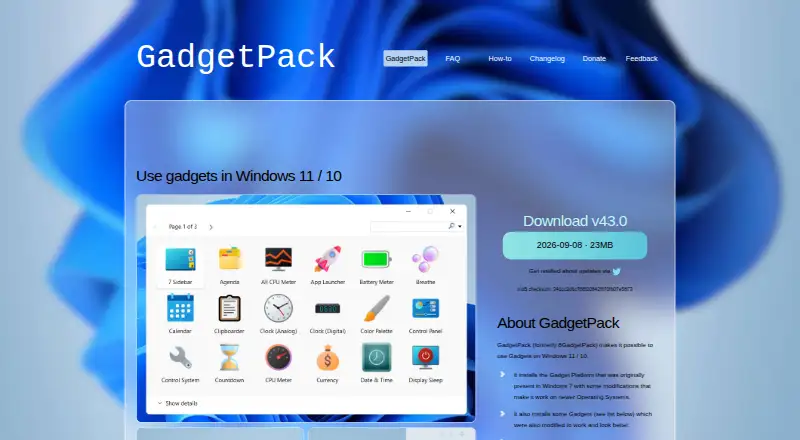
GadgetPack, formerly called 8GadgetPack, brings desktop gadgets to Windows 10 and 11. It installs a modified version of the Gadget Platform that first appeared in Windows 7, and lets users add .gadget files. The package installs gadgets such as a sidebar, agenda, clocks, calendar, currency display, CPU meter, drive information, and network monitor. Other listed categories include weather, reminders, sticky notes, calculator, volume control, unit conversion, and radio. Pressing Win+Shift+G displays the gadgets and switches among them; GadgetPack Tools can optionally assign that role to Win+G. The software is free and supports 64-bit Windows 7, 8.1, 10, and 11. Installation requires administrative rights. The installer and website are English-only, though many gadgets have other localizations. The site warns that gadgets may contain viruses or trojans, making an opened gadget as risky as an executable file. The developer says the project is maintained in spare time, so replies to feedback may take some time.
Who it suits
GadgetPack suits Windows users who want desktop gadgets such as calendars, clocks, system monitors, or sticky notes. It requires administrative rights to install.
What it does well
- Free plan for Windows
- Installs a range of gadgets automatically
- Allows users to install .gadget files
- Win+Shift+G displays and switches between gadgets
- Many gadgets have multiple localizations
What to know first
- Requires administrative rights to install
- Installer and website are English-only
- Gadgets may contain viruses or trojans
- Developer support is provided in spare time
Plans
| Plan | Billed and limits | Price |
|---|---|---|
| GadgetPack | Windows 11/10; 23MB download; administrative rights required | Free |
As gadgetpack.net lists them, read 1 Oct 2026. The maker's own page has the final word.
Getting started
- Visit https://gadgetpack.net/.
- Download the free GadgetPack installer for Windows.
- Install it with administrative rights.
- Use the included gadgets or install .gadget files.
- Press Win+Shift+G to show and switch between gadgets.
Verdict
GadgetPack restores a variety of desktop gadgets on supported Windows versions, with optional keyboard access through GadgetPack Tools. Consider the stated installation requirements and the security warning before opening third-party gadgets.
Questions
How much does GadgetPack cost?
GadgetPack is free. The listed plan is free.
Which Windows versions does it support?
It supports 64-bit Windows 7, 8.1, 10 and 11.
Can I install additional gadgets?
Yes. GadgetPack supports installing .gadget files.
Does installation require administrator access?
Yes, installation requires administrative rights.
What should I know about gadget security?
The site warns that gadgets may contain viruses or trojans, and that opening one carries risks comparable to running an executable file.
Which languages are available?
The installer and website are English-only, while many gadgets have multiple localizations.
Facts from GadgetPack (formerly 8GadgetPack)'s own pages
- Advertising
- The website uses Google AdSense and says third-party advertising and measurement services may use cookies or similar technologies. · gadgetpack.net, 1 Oct 2026
- Clipboard integration
- The changelog says Clipboarder has improved LibreOffice support. · gadgetpack.net, 1 Oct 2026
- Gadget installation
- Users can install .gadget files when GadgetPack is installed. · gadgetpack.net, 1 Oct 2026
- Gadget platform
- It installs the Gadget Platform originally present in Windows 7, modified to work on newer operating systems. · gadgetpack.net, 1 Oct 2026
- Gadget security
- The site warns that gadgets can contain viruses or trojans and that opening a gadget is as dangerous as running an executable file. · gadgetpack.net, 1 Oct 2026
- Included gadgets
- The package automatically installs gadgets including 7 Sidebar, Agenda, All CPU Meter, Clipboarder, clocks, Calendar, Currency, CPU Meter, Drive Info and Network Monitor. · gadgetpack.net, 1 Oct 2026
- Installer contents
- The installer says it installs only original Microsoft files, necessary registry entries, GadgetPack Tools and an uninstaller, without adware. · gadgetpack.net, 1 Oct 2026
- Keyboard access
- Win+Shift+G shows the gadgets and switches between them; GadgetPack Tools can optionally override Win+G. · gadgetpack.net, 1 Oct 2026
- Language support
- The installer and website are English-only, while many gadgets have multiple localizations. · gadgetpack.net, 1 Oct 2026
- Latest release
- Version 43.0 was released on 2026-09-08, is listed as 23MB, and has MD5 checksum 341cc2d6c788f20842fff70fb07e5873. · gadgetpack.net, 1 Oct 2026
- Privacy
- The website collects log-file data such as IP address, browser type, ISP, visit times, referring pages and click patterns for analysis and site administration. · gadgetpack.net, 1 Oct 2026
- Purpose
- GadgetPack (formerly 8GadgetPack) makes it possible to use Gadgets on Windows 11 and Windows 10. · gadgetpack.net, 1 Oct 2026
- Support
- The developer says the project is developed and supported in spare time and that replies to feedback can take quite some time. · gadgetpack.net, 1 Oct 2026
- Supported systems
- The software works on 64-bit Windows 7, 8.1, 10 and 11, and installation requires administrative rights. · gadgetpack.net, 1 Oct 2026
- VLC integration
- Version 42 added a Webradio-Player-Gadget and VLC-plugin files that the gadget relies on. · gadgetpack.net, 1 Oct 2026
Where GadgetPack (formerly 8GadgetPack) stands on Freedom251
- Desktop Widget Software#14 of 29