Freedom251 › Desktop Widget Software

DeskWidgets
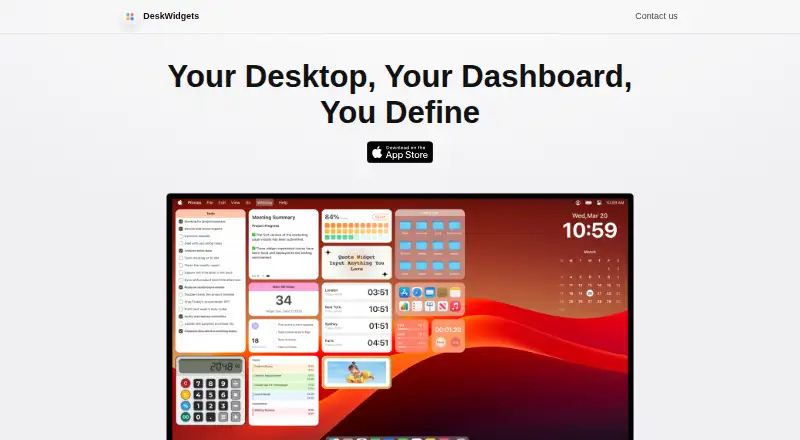
What DeskWidgets is
DeskWidgets is a customizable desktop widget app for Mac, with interactive tools for productivity and information widgets for everyday reference. Its interactive widgets include a desktop file organizer, sticky notes, to-do lists, reminders, an app launcher, a calculator, and a browser. Information options include clocks, a calendar and agenda, a Pomodoro timer, stopwatch, world clock, year progress, photo gallery, quotes, countdown timer, and CPU, RAM, and network statistics.
Users can adjust widget colors, fonts, sizes, and styles, and arrange widgets with themes, colors, and compact layouts. Version 5.2 added an Always on Top setting, drag-and-drop adding from the Widget Gallery, and calculator input history. DeskWidgets requires macOS 12.4 or later. Its plans are a free plan, a 0.99 USD monthly subscription, a 7.49 USD yearly subscription, and a 50.00 USD one-time purchase. The maker's privacy policy says the application does not request, store, or collect personal information, device information, or other user data. The website identifies Shenzhen Chengsi Technology Co., Ltd. as the copyright holder; support questions and feedback can be sent to [email protected].
Who it suits
DeskWidgets suits Mac users who want desktop tools such as notes, reminders, to-do lists, and a file organizer alongside calendar, clock, and system status widgets. It also fits users who want to customize widget appearance and use compact layouts.
What it does well
- Offers interactive and information widget categories.
- Widget appearance can be customized by color, font, size, and style.
- Includes calendar, agenda, and CPU, RAM, and network widgets.
- Version 5.2 added Always on Top and drag-and-drop gallery adding.
- Has a free plan.
What to know first
- Requires macOS 12.4 or later.
- Paid plans include a 0.99 USD monthly subscription, 7.49 USD yearly subscription, and 50.00 USD one-time purchase.
Plans
| Plan | Billed and limits | Price |
|---|---|---|
| Monthly Subscription | — | $0.99 a month |
| DeskWidgets | — | $50, paid once |
| Yearly Subscription | — | $7.49 a year |
As deskwidgets.com lists them, read 8 Oct 2026. The maker's own page has the final word.
Getting started
- Visit deskwidgets.com.
- Confirm the Mac runs macOS 12.4 or later.
- Choose the free plan or one of the listed paid plans.
- Add widgets from the Widget Gallery and customize their appearance and layout.
- Use ⌘B to bring widgets to the front, or customize the shortcut in Settings.
Verdict
Choose DeskWidgets if you use a compatible Mac and want a broad set of customizable interactive and information widgets. Consider the paid plans if you want a subscription or one-time purchase; the free plan is also available.
Questions
Is DeskWidgets free?
Yes. DeskWidgets has a free plan. Its listed paid plans are $0.99 a month, $7.49 a year, and 50.00 USD once.
Which Macs does DeskWidgets support?
It is listed for Mac and requires macOS 12.4 or later.
What does the 50.00 USD plan cover?
The listed DeskWidgets plan costs $50, paid once.
Who makes DeskWidgets?
The website identifies Shenzhen Chengsi Technology Co., Ltd. as the copyright holder.
What is the shortcut to bring widgets to the front?
The default shortcut is ⌘B, and it can be customized in Settings.
Where are desktop files stored?
Original desktop files are stored in the folder configured under Settings → Desktop File Storage Location.
Facts from DeskWidgets's own pages
- Customization
- Users can change widget colors, fonts, sizes, and styles. · apps.apple.com, 8 Oct 2026
- FAQ shortcut
- The FAQ says the default shortcut to bring widgets to the front is ⌘B and that the shortcut can be customized in Settings. · byteapps.super.site, 8 Oct 2026
- File storage
- The FAQ says original desktop files are stored in the folder configured under Settings → Desktop File Storage Location. · byteapps.super.site, 8 Oct 2026
- Information widgets
- Information widgets include clocks, a calendar and agenda, Pomodoro timer, stopwatch, world clock, year progress, photo gallery, quotes, countdown timer, and system stats for CPU, RAM, and network. · apps.apple.com, 8 Oct 2026
- Interactive widgets
- Interactive widgets include a desktop file organizer, sticky notes, to-do lists, reminders, an app launcher, a calculator, and a browser. · apps.apple.com, 8 Oct 2026
- Maker
- The website identifies Shenzhen Chengsi Technology Co., Ltd. as the copyright holder. · deskwidgets.com, 8 Oct 2026
- Platform requirement
- DeskWidgets is listed for Mac and requires macOS 12.4 or later. · apps.apple.com, 8 Oct 2026
- Privacy
- The maker's privacy policy says the application does not request, store, or collect personal information, device information, or other user data. · byteapps.super.site, 8 Oct 2026
- Product
- DeskWidgets provides customizable, colorful desktop widgets for Mac, including interactive widgets for productivity and widgets for personalization. · apps.apple.com, 8 Oct 2026
- Purchase restoration
- The FAQ instructs users to restore missing purchase status through the in-app purchase page and notes Apple purchase-status synchronization may sometimes be temporarily unstable. · byteapps.super.site, 8 Oct 2026
- Recent features
- Version 5.2 added Always on Top for widgets, drag-and-drop adding from the Widget Gallery, and input history for the Calculator widget. · apps.apple.com, 8 Oct 2026
- Support
- The maker lists [email protected] for questions and feedback. · deskwidgets.com, 8 Oct 2026
- Themes and layouts
- The app offers themes and colors and compact widget layouts. · apps.apple.com, 8 Oct 2026
Where DeskWidgets stands on Freedom251
- Desktop Widget Software#11 of 29