Freedom251 › Desktop Widget Software
SAWAS Dashboard
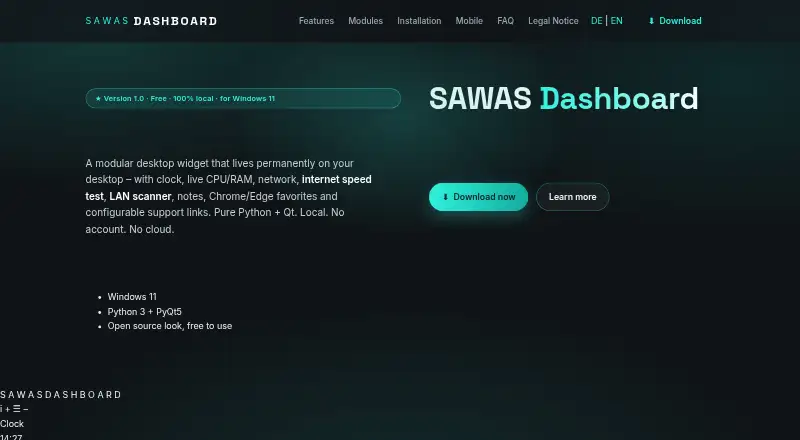
What SAWAS Dashboard is
SAWAS Dashboard is a free Windows desktop widget that remains visible behind regular windows. Its modules bring together a clock, live CPU and RAM readings, network transfer rates, notes, browser favorites, and support links. CPU, RAM, and network history is stored locally in SQLite every 15 seconds, with charts for day, week, or month views. Favorites can read bookmarks from Chrome and Microsoft Edge profiles and support search and pinning. The network scanner finds local devices using ping, ARP, and reverse DNS; it can run every 30 minutes while the PC is idle. A speed test reports ping, download, and upload, and can run on the same idle schedule using speedtest-cli. Users can add Python modules by placing files in the modules folder and reloading modules in the dashboard. The maker says there is no telemetry, cloud service, or sign-in, and dashboard data stays on the PC. One privacy consideration: network device usernames, passwords, and notes are stored as plain text in network_devices.json. The maker lists Windows 11, Python 3.10 or newer, PyQt5, and psutil as requirements.
Who it suits
SAWAS Dashboard suits Windows users who want system, network, notes, and browser-favorites modules visible on the desktop. It may also suit people who want to add Python modules or use local network tools.
What it does well
- Displays live CPU, RAM, download, and upload readings.
- Keeps usage history locally in SQLite.
- Supports Chrome and Microsoft Edge bookmark search and pinning.
- Can discover devices on the local network.
- Free for private and commercial use, without ads or subscription.
What to know first
- Requires Windows 11, Python 3.10 or newer, PyQt5, and psutil.
- Network device credentials and notes are stored as plain text.
- Local network scans run automatically only while the PC is idle.
- The maker lists less than 100 MB of disk space, but the requirements include several dependencies.
Plans
| Plan | Billed and limits | Price |
|---|---|---|
| Free | Free for private and commercial use · no ads · no subscription | Free |
As sawas.at lists them, read 9 Oct 2026. The maker's own page has the final word.
Getting started
- Visit the SAWAS website.
- Use a Windows 11 PC with Python 3.10 or newer, PyQt5 and psutil.
- Install the dashboard; the FAQ says it uses less than 100 MB of disk space.
- Open the dashboard to use its clock, monitoring, notes, favorites and support-link modules.
- To add a custom module, place its Python file in the modules folder and reload modules.
SAWAS Dashboard is a free desktop widget that brings system readings, browser favorites, notes, and local network tools into one configurable view. It best suits Windows users who want those utilities together and are comfortable with a Python-based setup. Its useful mix of monitoring and LAN tools is offset by a Windows-only requirement and plain-text storage for network-device credentials.
Overview
The dashboard keeps clock, system, network, notes, favorites, and support-link modules behind ordinary windows. Custom layouts let users shape the panel around the information they check most. The combination is more useful than a clock or status display alone, particularly for people who want local network utilities close at hand. Its scope stays tied to the desktop: the maker says there is no cloud service, sign-in, or telemetry, and dashboard data stays on the PC.
SAWAS is free for private and commercial use, with no ads or subscription. In return, setup calls for Windows 11, Python 3.10 or newer, PyQt5, and psutil. The installation uses less than 100 MB of disk space, but this is not a plug-in-and-go choice for users seeking broad platform support.
Key features
Live readings and history
The system module shows live CPU and RAM use, while the network module reports current download and upload rates. SAWAS saves this history locally in SQLite every 15 seconds and offers day, week, and month charts. That makes it possible to review patterns over time while keeping the records on the PC; it does not provide a cloud monitoring view.
Favorites and desktop utilities
Favorites modules read bookmarks from Chrome and Microsoft Edge profiles, with search and pinning to make a large bookmark collection easier to reach. Notes and clock modules round out the everyday desktop tools. Users who rely on other browsers will not get the same bookmark integration from these modules.
LAN discovery and speed checks
The network scanner identifies devices on the local network using ping, ARP, and reverse DNS. It can scan every 30 minutes while the PC is idle, and the speed test can run on the same schedule, reporting ping, download, and upload through speedtest-cli. Automatic checks suit a PC that stays on and idle, but they offer less value on a machine that is usually shut down or busy.
Customization and recovery
Users can add Python modules by putting a module file in the modules folder and reloading modules in the dashboard. That is a meaningful extension point for people who can work with Python, though it is less approachable for users who expect customization through a visual editor alone. Backups can include settings, notes, counters, support links, and known network devices in a ZIP; restoring data creates a .bak file before overwriting it.
Pricing
Free: free. The plan covers private and commercial use, includes no ads, and has no subscription. There is no free trial because the software is free. There are no published seat or quota caps to weigh, so it suits both personal use and commercial users who want the desktop features without a recurring charge.
Platforms
SAWAS Dashboard is supported on Windows. The FAQ specifies Windows 11, Python 3.10 or newer, PyQt5, and psutil, with an installation size under 100 MB. Although the platform summary also names Android, iOS, and web, the stated system requirements and desktop-widget features make Windows the practical choice described for using the dashboard.
Who it's for
SAWAS is a good fit for Windows users who want local CPU, RAM, and network readings alongside browser bookmarks, notes, and LAN discovery. Its free commercial-use terms and source-code ZIP also suit technically capable users who want to modify the software or add modules. It is a poor match for people who need a cross-platform dashboard, cloud access, or encrypted storage for saved network credentials.
Pros and cons
- Pros: Live CPU, RAM, and network readings plus charts based on locally saved history give both current status and longer-term context.
- Pros: Chrome and Edge bookmarks, notes, network scanning, and speed checks bring several desktop tasks into one customizable widget.
- Pros: The free plan permits private and commercial use without ads or a subscription, and the maker provides a source-code ZIP for modification.
- Cons: Network-device usernames, passwords, and notes are stored in plain text in network_devices.json, making folder security an important concern.
- Cons: The stated requirements center on Windows 11 and a Python setup, which narrows its fit for people expecting straightforward support across operating systems.
- Cons: Adding custom modules requires placing Python files in a folder, a barrier for users who do not want to work with code.
Alternatives
Choose Mango Mirror if you need a widget option across Android, iOS, Linux, web, and Windows, or want its free plan's two screen licenses, custom layouts, and clock, news, weather, background image, and quote widgets. Its free plan is limited to two screen licenses, and a Pro plan is also offered at $5.99 per mon.
Nexus is another free option spanning Android, iOS, Linux, macOS, web, and Windows. It may suit readers looking for broader platform support; SAWAS has the more specifically described local monitoring and LAN utilities.
Duckboard fits macOS or Windows users who want a dashboard with a clear widget cap: its free plan allows one dashboard and up to three widgets, while a one-time 29.00 USD Extended upgrade provides unlimited widgets on one dashboard.
For a free desktop widget released under the GNU General Public License and supported on Linux, macOS, and Windows, consider GKrellM. ClocX is a Windows freeware analog clock. Delta Widgets is a free, open-source option for Windows 10 and 11 under GPL-3.0. Linux users looking for a standalone widget system under the MIT license can consider Eww. GadgetPack supports Windows 10 and 11, with a 23 MB download and an administrative-rights requirement.
Browse more options in Desktop Widget Software.
Verdict
Choose SAWAS Dashboard if you use Windows, want local monitoring and network utilities beside everyday desktop tools, and value a free plan with no subscription. Its mix of history charts, browser favorites, and LAN features gives it a clear purpose. Look elsewhere if Windows 11 and Python setup do not suit your environment, or if plain-text network credentials are unacceptable.
Verdict
SAWAS Dashboard combines local monitoring, browser favorites, notes, and network utilities in a modular desktop widget. Review its Windows requirements and plain-text credential storage before using its network-device features.
Questions
How much does SAWAS Dashboard cost?
The Free plan costs nothing. It is described as free for private and commercial use, with no ads or subscription.
Is there a free trial?
No. The listed plan is free, and there is no free trial.
Which platform does it support?
The listed supported platform is Windows. The FAQ specifies Windows 11.
Does SAWAS Dashboard require an account?
The maker says there is no sign-in, telemetry or cloud service, and dashboard data stays on the PC.
Can I add my own modules?
Yes. Users can place Python module files in the modules folder and reload modules in the dashboard.
Where are network-device credentials stored?
Usernames, passwords and notes for network devices are stored as plain text in network_devices.json in the dashboard folder.
Facts from SAWAS Dashboard's own pages
- Backup
- The dashboard can back up settings, notes, counters, support links and known network devices to ZIP and creates a .bak file before overwriting data during restore. · sawas.at, 9 Oct 2026
- Browser support
- The favorites modules read bookmarks from Chrome and Microsoft Edge profiles and provide search and pinning features. · sawas.at, 9 Oct 2026
- Credential storage
- Network device usernames, passwords and notes are stored in plain text in network_devices.json in the dashboard folder. · sawas.at, 9 Oct 2026
- Custom modules
- Users can add their own Python modules by placing a module file in the modules folder and reloading modules in the dashboard. · sawas.at, 9 Oct 2026
- Headquarters
- Gaschurn, Austria · sawas.at, 28 Sept 2026
- History
- CPU, RAM and network history is saved locally in SQLite every 15 seconds and can be viewed as day, week or month charts. · sawas.at, 9 Oct 2026
- Intended users
- The maker describes the software as free for private and commercial use and provides a source-code ZIP for users who want to modify it or add modules. · sawas.at, 9 Oct 2026
- LAN tools
- The network scanner finds devices on the local network using ping, ARP and reverse DNS, and can scan automatically every 30 minutes while the PC is idle. · sawas.at, 9 Oct 2026
- Maker and location
- The legal notice identifies Holger Sahler in Gaschurn, Austria, as the website's named individual. · sawas.at, 9 Oct 2026
- Platforms
- The desktop program is for Windows 11; a free mobile web version runs in a phone browser, while native iOS and Android apps are under development. · sawas.at, 9 Oct 2026
- Privacy
- The maker says there is no telemetry, cloud service or sign-in and that dashboard data stays on the PC. · sawas.at, 9 Oct 2026
- Purpose
- SAWAS Dashboard is a modular desktop widget that stays visible behind normal windows and combines clock, system, network, notes, favorites and support link modules. · sawas.at, 9 Oct 2026
- Requirements
- The FAQ lists Windows 11, Python 3.10 or newer, PyQt5 and psutil, and says the installation uses less than 100 MB of disk space. · sawas.at, 9 Oct 2026
- Speed test
- An internet speed test reports ping, download and upload and can run automatically every 30 minutes while the PC is idle; it uses speedtest-cli. · sawas.at, 9 Oct 2026
- Support
- For startup troubleshooting, the maker directs users to run start_debug.bat and email the resulting output. · sawas.at, 9 Oct 2026
- System monitoring
- The system module displays live CPU and RAM usage, and the network module shows real-time download and upload rates. · sawas.at, 9 Oct 2026
Where SAWAS Dashboard stands on Freedom251
- Desktop Widget Software#8 of 29