Freedom251 › Productivity Bots Software

DailyBot
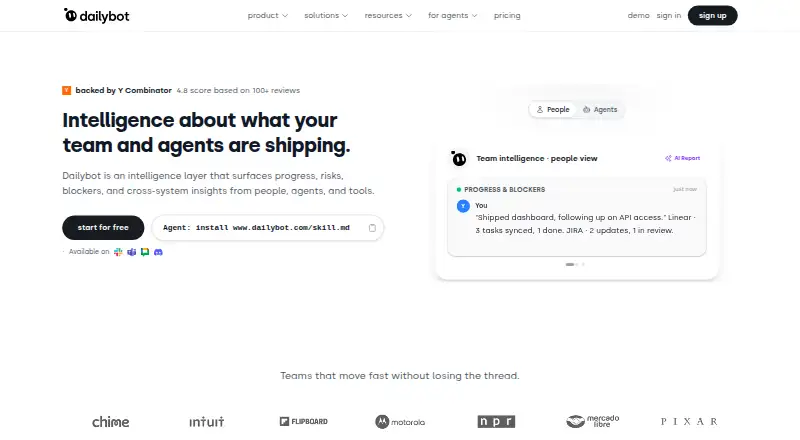
What DailyBot is
DailyBot is an async coordination platform for teams that manage work through chat check-ins, workflows and AI agents. It supports automated standups, retrospectives and team updates, while AI summarizes reports, surfaces blockers and draws insights from team responses. Teams can set workflows to trigger actions from check-in answers, schedules or team events without code. DailyBot also includes tools for kudos, mood tracking and recognition. It works natively with Slack, Microsoft Teams, Google Chat and Discord, and lists connectors such as GitHub, Bitbucket, Jira, ClickUp, Shortcut, Linear and Google Calendar. The free Starter plan allows one workspace per organization, unlimited members, up to 50 compiled check-in reports monthly and 14 days of history. Essentials is $2.40 per active user per month, with six months of history; Advanced is $5 per active user per month, with unlimited history, AI-generated reports, a public API, AI workflows, CLI and an agent skill pack. DailyBot offers web, API and extension platforms.
Who it suits
DailyBot suits product and engineering groups, distributed teams and teams coordinating work with AI agents. Its check-ins and integrations may also fit teams that want updates and workflow actions in chat.
What it does well
- Automates standups, retrospectives and team updates.
- Triggers workflow actions without code.
- Works with four listed chat platforms.
- Free Starter plan includes unlimited members.
- Offers a public API and AI workflows on Advanced.
What to know first
- Starter limits monthly reports to 50.
- Starter history lasts 14 days.
- Advanced costs $5 per active user per month.
Limits
Starter provides up to 50 compiled check-in reports per organization each month and 14 days of history. Essentials includes six months of history; Advanced includes unlimited history.
Plans
| Plan | Billed and limits | Price |
|---|---|---|
| Starter | free · 1 workspace per organization · unlimited members · daily standups · free Kudos · 50 compiled reports per organization/month · 14-day history | Free |
| Essentials | $2.40 /active user /mo; annual billing discounts available · unlimited members · full-stack check-ins · integrations · custom questions · AI summaries · participation metrics · 6-month history | $2.40 a month |
| Advanced | $5 /active user /mo; annual billing discounts available · multiple workspaces · unlimited members · Dailybot CLI · agent skill pack · public API · AI workflows · agent analytics · unlimited history · advanced security controls | $5 a month |
| Enterprise | custom pricing · Advanced features · SLA agreements · priority support · data-protection agreements · SOC 2 Type II report access · white-glove onboarding · dedicated API integration support · flexible billing | On request |
As dailybot.com lists them, read 15 Oct 2026. The maker's own page has the final word.
Getting started
- Visit the DailyBot website.
- Choose the free Starter plan or a paid plan.
- Use DailyBot through the web, an extension, or its API.
- Connect it to Slack, Microsoft Teams, Google Chat, or Discord.
- Add listed work tools such as Jira, GitHub, or Google Calendar as needed.
DailyBot is an async coordination platform for teams that want check-ins, reporting and follow-up workflows inside chat. It is best suited to distributed product and engineering teams already using Slack, Microsoft Teams, Google Chat or Discord. Its free tier is generous on members but restrictive on reporting history; teams that rely on a durable record will need a paid plan.
Overview
DailyBot collects standups, retrospectives and team updates, then uses AI to summarize reports, flag blockers and draw insights from responses. No-code workflows can act on check-in answers, schedules or team events, making it useful for more than gathering status: teams can connect updates to follow-up actions. Kudos, mood tracking and recognition add a culture layer, though teams seeking only a lightweight standup tool may find that broader scope unnecessary.
The product also supports AI agents reporting progress and working through its CLI and skill pack, which are part of Advanced. DailyBot says it launched in 2017 and joined Y Combinator in 2021 (S21).
Key features
- Check-ins and reporting: Automated standups, retrospectives and team updates provide a recurring async structure. AI summaries and blocker detection can help teams scan responses, but the value of that reporting depends on how much history their plan retains.
- Workflow automation: Actions triggered by answers, schedules or team events can reduce manual follow-up without code. AI also powers smart workflows.
- Team culture: Kudos, mood tracking and recognition suit teams that want coordination and morale signals in the same service.
- Integrations: Native chat support covers Slack, Microsoft Teams, Google Chat and Discord. Connectors include GitHub, Bitbucket, Jira, ClickUp, Shortcut, Linear, Google Calendar, Integrately and Zapier, giving product and engineering teams several routes to connect updates with their work tools.
- Security and privacy: DailyBot says it is SOC 2 Type II compliant, encrypts data in transit with TLS 1.3 and at rest with AES-256, and hosts on AWS in the U.S. It says it does not store conversations and processes only events where it is directly involved.
Pricing
DailyBot is freemium, with paid plans from $2.40/user/mo. All plans allow unlimited members, but Starter's organization-wide report quota means headcount alone does not determine whether the free tier will suffice.
| Plan | Price | What it includes | Practical trade-off |
|---|---|---|---|
| Starter | free | One workspace per organization, unlimited members, up to 50 compiled check-in reports per organization each month, and 14 days of history. | A useful no-cost start, but the shared report cap and short history can limit regular use across a larger team. |
| Essentials | $2.40 a month | $2.40 /active user /mo; annual billing discounts available. Unlimited members and compiled reports, six months of history, AI summaries and integrations. | Removes the report ceiling and adds summaries, but retains a finite history window and does not include the Advanced plan's AI-generated reports, public API, AI workflows, CLI or agent skill pack. |
| Advanced | $5 a month | $5 /active user /mo; annual billing discounts available. Unlimited members, compiled reports and history, plus AI-generated reports, Public API, AI workflows, CLI and agent skill pack. | The stronger fit for teams needing long-term reporting or agent-oriented workflows, at a higher per-active-user rate. |
| Enterprise | Custom pricing | Everything in Advanced, SLA agreements, priority support, data protection agreements, white-glove onboarding and dedicated API integration support. | For organizations that need those service and agreement provisions; pricing requires contacting the team. |
Support is available through in-app chat, email and the Help Center; Enterprise adds priority support and dedicated customer success managers. The published prices are per active user per month for paid tiers, with annual billing discounts available.
Platforms
DailyBot supports API, extension and web. Its chat integrations make it most relevant to teams that already coordinate through one of its supported chat platforms.
Who it's for
DailyBot suits distributed teams, especially product and engineering groups, that want to gather updates in chat and turn them into reports or automated actions. Teams working with AI agents may also benefit from Advanced's CLI and skill pack. It is less compelling for groups that need only basic status collection, or whose reporting requirements exceed Starter's 50 monthly compiled reports or 14-day history.
Pros and cons
- Pro: Starter allows unlimited members at no charge, making it possible to try the workflow across a team before paying.
- Pro: Chat integrations and connectors cover common collaboration and development tools, so updates can sit within existing team routines.
- Pro: Advanced combines unlimited history with API and agent-oriented tools for teams that want to extend coordination beyond chat prompts.
- Con: Starter caps compiled reports at 50 per organization each month and keeps only 14 days of history, limiting its usefulness as a continuing reporting archive.
- Con: Essentials has six months of history, so teams needing a full record must move to Advanced.
- Con: Enterprise pricing is custom, which makes direct cost comparison harder for organizations weighing its support and onboarding provisions.
Alternatives
For a broader comparison, see Daily Standup Software.
- asyncmate is another freemium option with a web platform and a free trial; consider it if those are the key criteria.
- DailyStand offers API, self-hosted and web platforms. Its free plan allows one team, five members and seven days of history, so it may suit a small team prioritizing self-hosting over DailyBot's unlimited-member Starter.
- DailyStandup has a free tier for up to five members with daily AI summaries and seven days of history; it is a fit to consider for a small team that wants summaries without a paid plan.
- Estimioo centers its free tier on estimation sessions, with five sessions and five AI estimates per month for up to 10 participants, alongside basic retrospectives and standups. Consider it when estimation is central to the team's needs.
- Geekbot is a freemium alternative with a free trial and API and web platforms; consider it if those are your priorities.
- ScrumAI offers a free beta for up to five teammates per workspace, with Slack and Discord support and AI summaries; it is worth considering for a small team focused on those capabilities.
- StandupSync offers a month-to-month Pro plan for $9 a month, with up to 50 members, unlimited teams, channel routing, templates, weekly digests and analytics. Consider it if those team-routing and digest features suit your workflow.
- Team O'clock offers a Growth plan at $3 a month per active member, starting at 10 monthly active members, with retrospective activities, unlimited activity history, team metrics and meeting features. Consider it if retrospectives and team metrics are a higher priority than DailyBot's broader chat automation.
Verdict
Choose DailyBot if your distributed team wants chat-based check-ins that can feed AI reporting and no-code follow-up, particularly if you use its supported chat and work integrations. Starter is a capable entry point, but its monthly report cap and brief history make Essentials the more practical baseline for recurring use; choose Advanced when unlimited history or agent-oriented tools matter. Look elsewhere if you only need a simpler status collector or want to avoid a per-active-user subscription for sustained reporting.
Verdict
DailyBot brings check-ins, workflow automation and team-culture tools into chat-based coordination. Compare its report and history limits across plans with your team's needs.
Questions
Does DailyBot have a free plan?
Yes. Starter is free for everyone and includes one workspace per organization, unlimited members, up to 50 compiled check-in reports each month, and 14 days of history.
How much do the paid plans cost?
Essentials costs $2.40 per active user per month, and Advanced costs $5 per active user per month. Annual billing discounts are available. Enterprise uses custom pricing.
Which chat platforms does DailyBot support?
It works natively with Slack, Microsoft Teams, Google Chat, and Discord.
What integrations are listed?
Connectors include GitHub, Bitbucket, Jira, ClickUp, Shortcut, Linear, Google Calendar, Integrately, and Zapier.
What does Advanced include?
Advanced includes unlimited history and compiled check-in reports, AI-generated reports, a public API, AI workflows, CLI, and an agent skill pack.
What does DailyBot say about data security and privacy?
DailyBot says it is SOC 2 Type II compliant, encrypts data in transit with TLS 1.3 and at rest with AES-256, and hosts on AWS in the U.S. It says it does not store conversations and processes only events where it is directly involved.
Facts from DailyBot's own pages
- Agent skills
- An installable skill pack supports Claude Code, Cursor, Codex, Gemini and Copilot with 13 documented sub-skills. · dailybot.com, 15 Oct 2026
- AI
- Its AI summarizes standup reports, detects blockers, generates insights from team responses, and powers smart workflows. · dailybot.com, 30 Sept 2026
- AI summaries
- AI summarizes standups and collaboration data, detects blockers and generates team insights. · dailybot.com, 15 Oct 2026
- API access limit
- Higher API rate limits, dedicated support and custom integrations are reserved for Enterprise plans. · dailybot.com, 15 Oct 2026
- Async check-ins
- The service collects recurring check-ins and standup responses in chat and compiles them into reports. · dailybot.com, 15 Oct 2026
- Audience
- Dailybot describes its customers as teams across industries and specifically highlights product and engineering teams, distributed teams, and teams working with AI agents. · dailybot.com, 30 Sept 2026
- Automation
- Workflows can trigger actions from check-in responses, schedules, or team events without code. · dailybot.com, 30 Sept 2026
- Chat platforms
- Dailybot works natively with Slack, Microsoft Teams, Google Chat, and Discord. · dailybot.com, 30 Sept 2026
- Check-ins
- Dailybot supports automated standups, retrospectives, and team updates. · dailybot.com, 30 Sept 2026
- CLI
- The Dailybot CLI supports API-key or login authentication and terminal automation for reports, forms, kudos, conversations and workflows. · dailybot.com, 15 Oct 2026
- Company history
- Dailybot says it launched in 2017 and joined Y Combinator in 2021 (S21). · dailybot.com, 30 Sept 2026
- Company legal name
- The company identifies itself as DailyBot Inc. · dailybot.com, 15 Oct 2026
- Company size
- LinkedIn reports 11–50 employees. · linkedin.com, 15 Oct 2026
- Developer API
- The public REST API documents resources such as check-ins, forms, workflows, kudos, messages, users, teams and integrations. · dailybot.com, 15 Oct 2026
- Forms
- Dailybot supports forms, including approval flows and response expiration or limits. · dailybot.com, 15 Oct 2026
- Founded and launch
- LinkedIn lists Dailybot as founded in 2021, while the company About page says the product launched in 2017. · linkedin.com, 15 Oct 2026
- Funding and accelerator
- Dailybot is listed as a Y Combinator Summer 2021 company with founders Mauricio Morales and Sergio Florez. · ycombinator.com, 15 Oct 2026
- Headquarters
- LinkedIn lists New York City, New York as headquarters; Crunchbase lists Westwood, New Jersey. · linkedin.com, 15 Oct 2026
- Integrations
- Native connectors include Slack, Microsoft Teams, Google Chat, Discord, GitHub, Bitbucket, Jira, ClickUp, Shortcut, Linear and Google Calendar; Zapier and Integrately are also listed. · dailybot.com, 15 Oct 2026
- Kudos
- Kudos lets teammates recognize one another in chat and maintains a team leaderboard tied to company values. · dailybot.com, 15 Oct 2026
- Limit: customization
- Reviewers mention limited message or report customization and a plain interface with some advanced features less intuitive. · g2.com, 15 Oct 2026
- Limit: editing and notifications
- Capterra and GetApp reviews report limited task editing, inability to edit submitted Google Chat text and notification-time constraints. · capterra.com, 15 Oct 2026
- Limit: free-tier limits
- G2 and Trustpilot reviewers complain that the free tier can run out of monthly reports or check-ins and require an upgrade. · g2.com, 15 Oct 2026
- Mobile availability
- There is no standalone Dailybot mobile app; the help page directs users to Slack, Teams, Discord or Google Chat mobile apps. · dailybot.com, 15 Oct 2026
Where DailyBot stands on Freedom251
- Productivity Bots Software#1 of 25
- Standup Bots#1 of 17
- Daily Standup Software#2 of 24