Freedom251 › Daily Standup Software

asyncmate
What asyncmate is
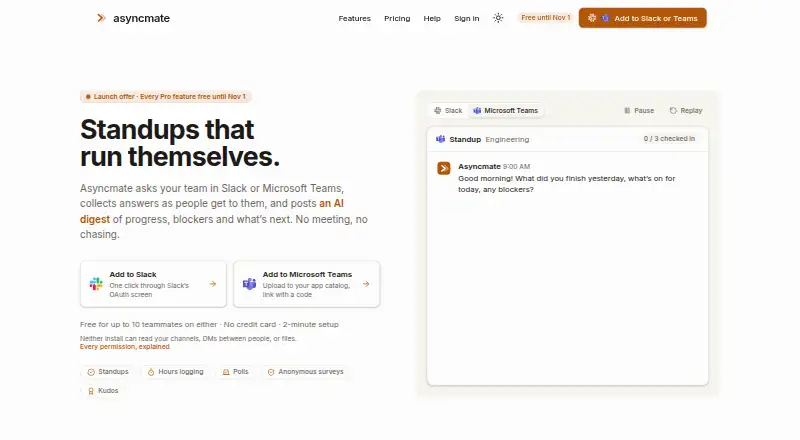
Asyncmate runs asynchronous team check-ins through Slack or Microsoft Teams. It sends standup questions, gathers replies, and posts a digest of progress, blockers, and next steps. Teams can also use it to log project hours, run polls and anonymous surveys, and give kudos. Its optional Pro AI digest uses Anthropic’s Claude API to turn check-in answers into blockers and action items; workspaces can disable the feature so check-in content is not sent to Anthropic. An optional Notion integration archives completed check-in runs in a database. The Free plan supports up to 10 active teammates and includes a plain daily digest and 90-day history. Pro is $2.50 per active participant per month, billed monthly, with $0 pricing until November 1, 2026. After that, its 14-day trial requires a card and can be canceled before billing. The Teams app is in beta and cannot post digests to private channels. Asyncmate is for business users, not consumers.
Who it suits
Asyncmate suits companies and organizations that want standups and project updates collected asynchronously in Slack or Microsoft Teams. Teams considering Microsoft Teams should note its beta status and private-channel limitation.
What it does well
- Supports Slack and Microsoft Teams check-ins.
- Logs project hours and tracks blockers.
- Offers polls, anonymous surveys, and kudos.
- Optional Notion integration archives closed runs.
- Workspaces can disable AI digests.
What to know first
- Not offered to consumers.
- Teams app is in beta.
- Digest posting to private channels is unsupported.
- Pro billing after November 1, 2026 is per active participant.
Limits
The Free plan allows up to 10 active teammates, 90 days of check-in and hours history, and 20 kudos per month. Pro is free through November 1, 2026; afterward, its 14-day trial requires a card and can be canceled before billing.
Plans
| Plan | Billed and limits | Price |
|---|---|---|
| Free | forever · Up to 10 active teammates · Standups, check-ins, reminders, polls and project hours logging · Plain daily digest · 90-day check-in and hours history · Up to 20 kudos/month | Free |
| Pro | per active participant, billed monthly; $0 until Nov 1, 2026, then $2.50 per active participant/month · Unlimited active teammates · AI digests · Blocker insights and trends · Unlimited kudos · Anonymous polls and surveys · Full reporting history · Priority support · Passive members, poll voters and reminder recipients are free | $2.50 a month |
As asyncmate.com lists them, read 2 Oct 2026. The maker's own page has the final word.
Getting started
- Visit https://asyncmate.com/.
- Choose the Free plan or review Pro; Pro features are free through November 1, 2026.
- Connect Slack or Microsoft Teams for check-ins; the Teams app installs through the organization’s app catalog and is in beta.
- Optionally enable the Notion integration to archive closed check-in runs.
- For Pro after November 1, 2026, start the 14-day trial with a card and cancel before billing if needed.
Asyncmate is a business-focused tool for collecting asynchronous team updates in Slack or Microsoft Teams. It suits teams that want check-ins alongside hours logging and feedback tools; its free tier has a useful starting cap, while Pro’s participant-based billing and Teams beta caveats matter before rollout.
Overview
Asyncmate asks standup questions, gathers replies on each participant’s schedule, then shares a digest of progress, blockers and next steps. That keeps routine updates inside team chat rather than requiring a live meeting. Hours logging, polls, surveys and kudos broaden it beyond a standup bot, though the service is for business use, not consumers.
The main trade-off is breadth against channel maturity: Slack and Microsoft Teams are supported, but the Teams app is still in beta and cannot post digests to private channels. Teams that rely on private channels should treat that as a practical constraint, not a minor footnote.
Key features
Check-ins and reporting
Async check-ins and reminders collect updates, and the daily digest surfaces progress, blockers and next steps. Blocker tracking and a reporting dashboard help teams follow issues over time; the Free plan limits check-in and hours history to 90 days, while Pro offers full reporting history and blocker insights and trends.
Hours, polls and feedback
Project hours logging makes Asyncmate more useful than a standup-only tool for teams that want time entries alongside updates. Polls and kudos support lightweight team feedback. Pro adds anonymous polls and surveys and unlimited kudos; Free allows up to 20 kudos a month. Anonymous survey answers use a per-run one-way hash without a technical link to the respondent, but free-text wording can still identify its author.
AI and integrations
Pro’s optional AI digest uses Anthropic’s Claude API to turn check-in answers into blockers and action items. Workspaces can turn AI digests off so check-in content is not sent to Anthropic, and Asyncmate says it does not use Customer Data to train AI models. The optional Notion integration archives each closed check-in run in a Notion database, a fit for teams that want a record beyond chat.
Pricing
Asyncmate is freemium, with a Free plan at no cost, billed forever, and Pro at $2.50 a month, billed monthly per active participant. Pro is $0 until November 1, 2026; after that, it costs $2.50 per active participant per month. An active participant is someone who answered a check-in or survey question or logged hours in the trailing 30 days. Passive members, poll voters and reminder recipients are free, so the bill tracks recent contributors rather than everyone in a workspace.
Free supports up to 10 active teammates, standups, check-ins, reminders, polls and project hours logging, a plain daily digest, 90-day history and up to 20 kudos a month. It is a sensible starting point for a small team, but the teammate cap and fixed history make it less suited to growing teams or long-term reporting. Pro removes the active-teammate limit and adds AI digests, blocker insights and trends, unlimited kudos, anonymous polls and surveys, full reporting history and priority support.
Every workspace gets all Pro features free through November 1, 2026. After that, Pro has a 14-day trial requiring a card; it can be canceled before billing. That trial terms matter to teams evaluating the paid tier after the promotional period.
Platforms
Asyncmate is a web product with Slack and Microsoft Teams integrations. Teams installs through an organization’s app catalog; its beta status and lack of private-channel digest posting may rule it out for teams that depend on those channels. The maker says Customer Data is hosted in Germany within the European Economic Area and workspace data is erased 14 calendar days after uninstall. Its privacy policy describes AES-256-GCM encryption for Slack bot tokens at rest, HTTPS/TLS in transit and tenant isolation; Asyncmate does not claim SOC 2 or ISO 27001 certification.
Who it's for
Asyncmate is best for business teams that already work in Slack or Teams and want async status updates, hours logging and lightweight feedback in one workflow. The Free plan is practical for teams with no more than 10 active contributors and modest kudos use. Pro better fits larger or reporting-focused teams, especially if AI summaries, anonymous surveys or unlimited kudos are useful. It is not a consumer service, and teams requiring mature Teams support for private channels should look elsewhere.
Pros and cons
- Pro: Check-ins, hours logging, polls and kudos share one chat-centered workflow, which can suit teams wanting more than standups alone.
- Pro: Passive members, poll voters and reminder recipients do not count as active participants, keeping Pro billing tied to recent contributions.
- Pro: AI digests can be disabled, and the maker says Customer Data is not used to train AI models.
- Con: Free is capped at 10 active teammates and 20 kudos a month, which limits its usefulness for larger teams or frequent recognition.
- Con: Teams is in beta and cannot post digests to private channels, a significant gap for organizations that use them.
- Con: The maker does not claim SOC 2 or ISO 27001 certification, which may matter to organizations with formal certification requirements.
Alternatives
Daily Standup Software is the broader category to browse if Asyncmate’s Teams beta or business-only positioning is not a fit.
- DailyBot is worth comparing if a free plan with unlimited members is more important than Asyncmate’s hours logging and kudos; its free tier caps compiled check-in reports at 50 per organization each month.
- DailyStand suits teams looking for self-hosted availability or MCP support in its free tier, though that tier is limited to one team, five members and seven days of history.
- DailyStandup is an option for teams that want daily AI summaries on a free plan, with its free tier capped at five members, one team and seven days of history.
- Estimioo may suit teams focused on estimation sessions and retrospectives; its free plan includes five sessions and five AI estimates per month.
- Geekbot is another freemium option for teams comparing standup tools; its Starter plan covers 10 users.
- StandupSync is an alternative for teams seeking month-to-month Pro billing, with a 50-member limit and per-team channel routing.
- Team O'clock is worth considering when retrospective activities and team metrics are central; its Growth plan starts at 10 monthly active members.
- AsyncUp is a free alternative for teams that want to compare another web-based option.
Verdict
Choose Asyncmate if your business team wants async updates, hours logging and feedback tools together in Slack or Teams, and its free cap or Pro’s active-participant billing suits your scale. Its strongest case is that combined workflow; the clearest reason to look elsewhere is the Teams beta limitation, especially if private-channel digests are essential.
Verdict
Asyncmate brings asynchronous updates, hours logging, and team feedback into Slack or Microsoft Teams. Business teams should weigh the Teams beta limitations and Pro’s per-active-participant billing after November 1, 2026.
Questions
Is Asyncmate free?
Yes. The Free plan is billed forever at 0.00 USD and supports up to 10 active teammates. Pro features are free for every workspace through November 1, 2026.
What does Pro cost?
Pro is $2.50 per active participant per month, billed monthly, after November 1, 2026. It has a 14-day trial that requires a card and can be canceled before billing.
Which platforms and chat tools does it support?
Asyncmate is a web product and supports Slack and Microsoft Teams. The Teams app is in beta and installs through an organization’s app catalog.
Does Asyncmate integrate with Notion?
An optional Notion integration archives each closed check-in run in a Notion database.
How is AI used, and can it be turned off?
The optional Pro AI digest uses Anthropic’s Claude API to summarize answers into blockers and action items. Workspaces can disable AI digests so check-in content is not sent to Anthropic.
Who operates Asyncmate, and who can use it?
It is operated by Code7 d.o.o., registered in Croatia. The service is offered to companies, organizations and people acting in a business capacity, not consumers.
Facts from asyncmate's own pages
- AI summaries
- Its optional Pro AI digest summarizes check-in answers into blockers and action items using Anthropic’s Claude API. · asyncmate.com, 2 Oct 2026
- Anonymous surveys
- Anonymous survey responses use a per-run one-way hash without a technical link to the respondent, though free-text answers may still reveal who wrote them. · asyncmate.com, 2 Oct 2026
- Audience
- The service is offered to companies, organizations, and people acting in a business capacity, and is not offered to consumers. · asyncmate.com, 2 Oct 2026
- Billing limit
- An active participant is someone who answered a check-in or survey question or logged hours within the trailing 30 days; passive members, poll voters, and reminder recipients are free. · asyncmate.com, 2 Oct 2026
- Data hosting
- The maker says Customer Data is hosted in Germany within the European Economic Area, and uninstalled workspace data is erased after 14 calendar days. · asyncmate.com, 2 Oct 2026
- Features
- The product includes async check-ins, project hours logging, polls, anonymous surveys, and kudos. · asyncmate.com, 2 Oct 2026
- Integrations
- Asyncmate supports Slack and Microsoft Teams, and offers an optional Notion integration that archives each closed check-in run in a Notion database. · asyncmate.com, 2 Oct 2026
- Maker
- Asyncmate is operated by Code7 d.o.o., registered in Croatia at Zagorska ulica 105, 42220 Novi Marof. · asyncmate.com, 2 Oct 2026
- Privacy
- The maker says it does not use Customer Data to train AI models, and workspaces can turn off AI digests so check-in content is not sent to Anthropic. · asyncmate.com, 2 Oct 2026
- Product
- Asyncmate sends standup questions in Slack or Microsoft Teams, collects answers asynchronously, and posts a digest of progress, blockers, and next steps. · asyncmate.com, 2 Oct 2026
- Security
- The privacy policy describes AES-256-GCM encryption for Slack bot tokens at rest, HTTPS/TLS in transit, tenant isolation, and says Asyncmate does not claim SOC 2 or ISO 27001 certification. · asyncmate.com, 2 Oct 2026
- Support
- The Pro plan includes priority support, and the site lists [email protected] as its contact address. · asyncmate.com, 2 Oct 2026
- Teams beta
- The Microsoft Teams app is in beta and installs through an organization’s app catalog; posting digests into private channels is not yet supported. · asyncmate.com, 2 Oct 2026
- Trial
- Every Pro feature is free for every workspace through November 1, 2026; after that, Pro has a 14-day trial that requires a card and can be canceled before billing. · asyncmate.com, 2 Oct 2026
Where asyncmate stands on Freedom251
- Daily Standup Software#4 of 24
- Standup Bots#3 of 17