Freedom251 › Daily Standup Software
StandupSync
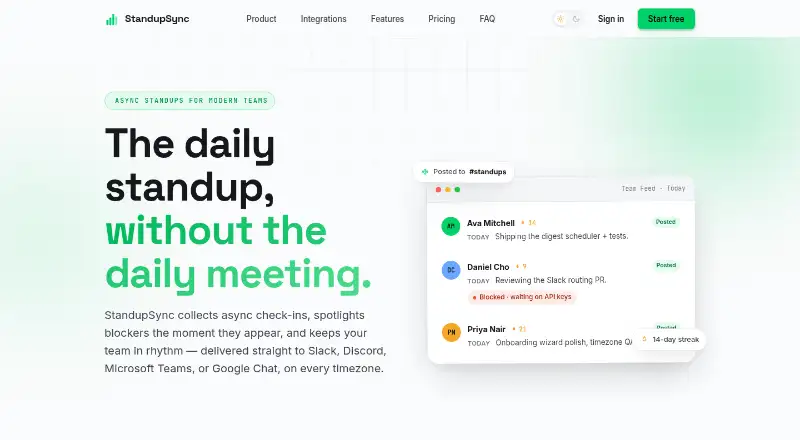
What StandupSync is
StandupSync collects asynchronous team check-ins, highlights blockers, and sends updates to chat platforms. It is a web tool described for distributed teams working across timezones. Teams can create custom templates with typed fields and schedule reminders that account for timezones. Flagged blockers appear in a dedicated lane with severity highlighting and notifications to leads. The service can post feeds, blocker alerts, and weekly digests to Slack, Discord, Microsoft Teams, and Google Chat; connecting and posting are available on every plan. Per-team channel routing is limited to Pro. StandupSync tracks participation, streaks, and blocker trends, with branded PDF and raw CSV exports. Users can sign in with Google Workspace or Microsoft 365, and workspaces include owner, admin, lead, and member roles. The Free plan supports up to 10 members in one team and keeps 30 days of history. Pro costs $9 a month, billed month-to-month, and supports up to 50 members. Enterprise has custom pricing and includes priority support and onboarding assistance.
Who it suits
StandupSync suits distributed teams coordinating check-ins across timezones, especially those that want blocker alerts and updates delivered to chat. Pro may fit teams needing per-team channel routing, analytics, or longer history.
What it does well
- Supports timezone-aware reminders and custom templates.
- Connects to Slack, Discord, Teams, and Google Chat.
- Tracks participation, streaks, and blocker trends.
- Exports branded PDFs and raw CSV files.
What to know first
- Free supports up to 10 members and one team.
- Free history is limited to 30 days.
- Per-team channel routing requires Pro.
- Enterprise pricing is custom.
Limits
The Free plan allows up to 10 members on one team and keeps 30 days of history. Per-team channel routing is available on Pro, which costs $9 a month billed month-to-month.
Plans
| Plan | Billed and limits | Price |
|---|---|---|
| Pro | month-to-month; no lock-in · Up to 50 members · Unlimited teams · Per-team channel routing · Custom templates · Weekly digests · Analytics, streaks and exports · Unlimited history | $9 a month |
| Free | month-to-month; no lock-in · Up to 10 members · 1 team · Async standups and templates · Blocker tracking · Slack, Discord, Teams and Google Chat · 30-day history · Email reminders | On request |
| Enterprise | Custom · Unlimited members and teams · Everything in Pro · Priority support · Onboarding assistance · Custom agreements | On request |
As getstandupsync.com lists them, read 2 Oct 2026. The maker's own page has the final word.
Getting started
- Open https://getstandupsync.com/ in a web browser.
- Choose the Free plan or Pro; Enterprise pricing is custom.
- Sign in with Google Workspace or Microsoft 365.
- Create a workspace and assign owner, admin, lead, or member roles.
- Set up a check-in template and schedule timezone-aware reminders.
- Connect a supported chat platform to post updates.
Verdict
StandupSync brings check-ins, blocker tracking, and chat updates into a web-based workflow. Its free tier has member, team, and history limits; Pro adds per-team routing for $9 a month.
Questions
Is StandupSync free?
Yes. Its Free plan supports up to 10 members and one team, with 30-day history.
How much does Pro cost?
Pro costs $9 a month, billed month-to-month.
Which chat platforms does it support?
It posts feeds, blocker alerts, and weekly digests to Slack, Discord, Microsoft Teams, and Google Chat.
Can users export their information?
StandupSync supports branded PDF and raw CSV exports. Its privacy policy also says users can export standups and analytics.
What platforms can I use it on?
StandupSync is available on the web.
Who makes StandupSync?
StandupSync is the product name; the listed support contact is [email protected].
Facts from StandupSync's own pages
- Access and roles
- Users can sign in with Google Workspace or Microsoft 365, and workspaces support owner, admin, lead, and member roles. · getstandupsync.com, 2 Oct 2026
- Analytics and exports
- The product tracks participation, streaks, and blocker trends and supports branded PDF and raw CSV exports. · getstandupsync.com, 2 Oct 2026
- Audience
- StandupSync describes itself as an async standup tool for distributed teams working across timezones. · getstandupsync.com, 2 Oct 2026
- Blockers
- Flagged blockers appear in a dedicated lane with severity highlighting and notifications to leads. · getstandupsync.com, 2 Oct 2026
- Integrations
- StandupSync posts feeds, blocker alerts, and weekly digests to Slack, Discord, Microsoft Teams, and Google Chat. · getstandupsync.com, 2 Oct 2026
- Payment handling
- Billing is handled by Stripe, with card details entered into Stripe-hosted fields and kept off StandupSync servers. · getstandupsync.com, 2 Oct 2026
- Privacy
- The privacy policy says StandupSync does not sell personal data and lets users export standups and analytics or request account deletion. · getstandupsync.com, 2 Oct 2026
- Product
- StandupSync collects asynchronous team check-ins, surfaces blockers, and delivers updates to chat platforms. · getstandupsync.com, 2 Oct 2026
- Routing limit
- Per-team channel routing is a Pro feature, while connecting and posting to chat platforms is available on every plan. · getstandupsync.com, 2 Oct 2026
- Security
- The security page says traffic uses TLS and sensitive integration credentials are encrypted at rest with AES-256-GCM. · getstandupsync.com, 2 Oct 2026
- Support
- Enterprise includes priority support and onboarding assistance, and the privacy page lists [email protected] for questions. · getstandupsync.com, 2 Oct 2026
- Templates and reminders
- Teams can create custom templates with typed fields and schedule reminders that respect timezones. · getstandupsync.com, 2 Oct 2026
Where StandupSync stands on Freedom251
- Daily Standup Software#17 of 24