Freedom251 › Content Collaboration Software
CryptPad Rich Text
What CryptPad Rich Text is
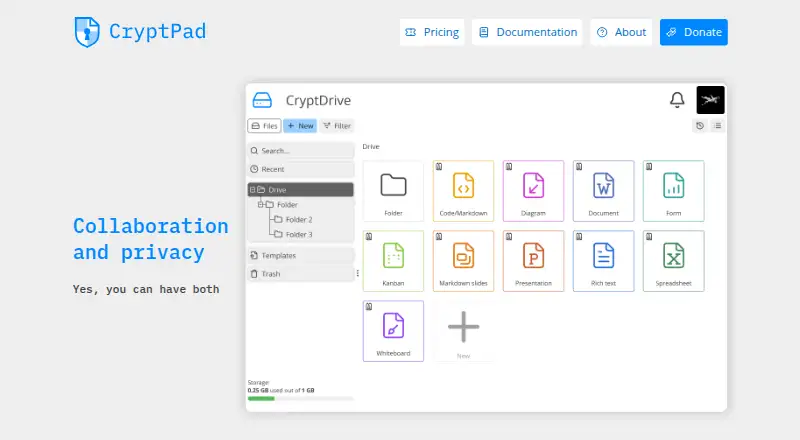
CryptPad Rich Text is a browser-based editor for creating and collaborating on documents. It supports real-time editing and comments, with formatting for headings, lists, blockquotes, tables, bullet points, and code blocks. You can add images or other media from CryptDrive or upload files directly, then export a document as HTML or .docx. An outline view and a separate comments view help navigate a document, while version history lets users return to earlier versions. Documents can be shared through encrypted links, with optional password protection and view or edit permissions; recipients do not need an account. CryptPad encrypts data in the browser, so readable document content stays on the user's device and service administrators cannot see it. The editor is part of the open-source CryptPad suite, which also includes spreadsheets, code and Markdown, Kanban, slides, whiteboards, and forms. Individuals can use a free account on a public instance or self-host the software. Organizations can arrange managed cloud hosting or on-premise support, with options such as custom domains, branding, storage controls, and SSO integration. The maker, CryptPad, is part of XWiki, based in Paris, France.
Who it suits
CryptPad Rich Text suits people and teams working on shared documentation, meeting notes, content plans, reports, or proposals. It is also relevant to organizations that need browser-encrypted collaboration and want managed cloud hosting or on-premise support.
What it does well
- Supports real-time editing and commenting.
- Exports documents to HTML and .docx.
- Encrypted links can allow viewing or editing without recipient sign-up.
- Browser encryption keeps readable content from service administrators.
- Free software can be hosted and modified by anyone.
What to know first
- Track changes is not supported.
- The free plan is an account on a public instance.
- Paid hosting plans include annual prices up to $25,000 a year.
Limits
The free plan provides an account on a public instance; self-hosting is also available. Track changes is not supported.
Plans
| Plan | Billed and limits | Price |
|---|---|---|
| Free | Free account on a public instance · self-hosting is available | Free |
| Medium | 500 users · 500GB storage · SSO Guide + help · response time 1 day (critical), 2 days | $12,500 a year |
| Your Own Instance | Fully hosted and managed on cloud, or on-premise support | $1.50 a year |
| Education and nonprofits Mini | 50 users · 100GB storage · response time 2 days (critical) | $1,500 a year |
| Large | 1000 users · 1TB storage · SSO Install session · response time 1 day | $25,000 a year |
| Mini | 50 users · 100GB storage · response time 2 days (critical) | $3,000 a year |
| Education and nonprofits Small | 250 users · 200GB storage · SSO Guide · response time 2 days | $3,000 a year |
| CryptPad.fr | Additional storage · priority support · individuals, teams, and organizations | $5,100 a month |
The first 8 of 10 plans, as cryptpad.org lists them, read 11 Oct 2026. The maker's own page has the final word. Every plan
Getting started
- Visit https://cryptpad.org/.
- Use a free account on a public instance, or self-host the software.
- Create a Rich Text document for collaboration.
- Share it with an encrypted link and choose view or edit permissions.
- For organizational hosting, arrange a managed cloud instance or on-premise support.
Verdict
Choose CryptPad Rich Text for collaborative documents when browser encryption, link-based sharing, and open-source self-hosting matter. Look elsewhere if you need track changes, which it does not support.
Questions
Is CryptPad Rich Text free?
Yes. The pricing model is freemium, and the Free plan costs nothing.
Can I host CryptPad myself?
Yes. CryptPad is free software that anyone can host and modify, and self-hosting is available.
Which platforms does it support?
The listed platforms are self-hosted and web.
Can people open shared documents without signing up?
Yes. Encrypted links can grant view or edit permissions without requiring recipients to sign up.
What can I export from Rich Text?
Documents can be exported to HTML and .docx.
Who makes CryptPad?
CryptPad is made at XWiki, a company based in Paris, France.
Facts from CryptPad Rich Text's own pages
- Collaboration
- Rich Text supports real-time editing and commenting, plus an outline view and comments view. · cryptpad.org, 11 Oct 2026
- Company
- CryptPad is made at XWiki, a company based in Paris, France. · cryptpad.org, 11 Oct 2026
- Editing
- The editor is built on CKEditor and provides formatting for headings, lists, blockquotes, and keyboard shortcuts. · cryptpad.org, 11 Oct 2026
- Encryption
- CryptPad encrypts data in the browser so readable content does not leave the user's device, and service administrators cannot see document content. · cryptpad.org, 11 Oct 2026
- Enterprise hosting
- Organizations can have a managed cloud instance or on-premise support, with options including a custom domain, branding, storage controls, and SSO integration. · cryptpad.org, 11 Oct 2026
- Export
- Rich Text documents can be exported to HTML and .docx. · cryptpad.org, 11 Oct 2026
- Headquarters
- Paris, France · cryptpad.org, 28 Sept 2026
- Media
- Users can insert images or other media from CryptDrive or upload files directly, and add tables, bullet points, and code blocks. · cryptpad.org, 11 Oct 2026
- Open source
- CryptPad is free software that anyone can host and modify. · cryptpad.org, 11 Oct 2026
- Product
- CryptPad Rich Text is a web rich text editor for secure online collaboration. · cryptpad.org, 11 Oct 2026
- Security reporting
- The security policy asks users to report vulnerabilities to [email protected] and says publicly known issues are reported as CVEs. · cryptpad.org, 11 Oct 2026
- Sharing
- Documents can be shared with encrypted links, optional password protection, and view or edit permissions without requiring recipients to sign up. · cryptpad.org, 11 Oct 2026
- Suite integrations
- The wider CryptPad suite includes Rich Text, spreadsheets, code/Markdown, Kanban, slides, whiteboard, and forms. · cryptpad.org, 11 Oct 2026
- Use cases
- The maker describes Rich Text use for team documentation, meeting notes, content planning, and business reports or proposals. · cryptpad.org, 11 Oct 2026
- Version history
- Users can track changes and revert to previous document versions. · cryptpad.org, 11 Oct 2026
Where CryptPad Rich Text stands on Freedom251
- Content Collaboration Software#8 of 28
- Word Processing Software#14 of 45
- Document Creation Software#9 of 25
- Cloud Content Collaboration Software#11 of 30
- Document Collaboration Software#14 of 32
- Collaborative Document Software#15 of 33