Freedom251 › Code Clone Detection Tools
CopyPaste
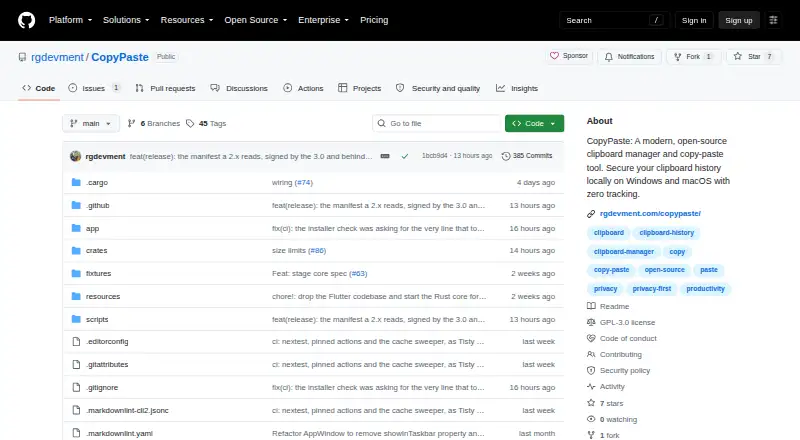
What CopyPaste is
CopyPaste is a free clipboard manager for Windows and macOS that keeps a searchable history on the device. It handles text, images, files, folders, links, audio, and video, with previews that reflect the content type. Full-text search, pins, labels, colors, and filters by content, category, and item type help organize saved items; snippets and rich text are supported too.
The project says history stays local, with no cloud, servers, sync, telemetry, analytics, or accounts. CopyPaste works offline and skips passwords and clipboard material from password managers such as 1Password and Bitwarden. Its standalone edition checks for updates without sending user data. Windows installation options include the Microsoft Store, Scoop, and a standalone installer; macOS options include Homebrew and a disk image. Requirements are Windows 10 version 1809 or later or Windows 11 on x64, and macOS Ventura 13.0 or later. Linux support ended after v2.11.0. CopyPaste is open source under GPL-3.0.
Who it suits
CopyPaste suits developers, students, writers, creators, and support or operations teams who frequently copy and paste. It is for people using Windows or macOS who want local clipboard history and search.
What it does well
- Free and open source, with no premium tiers or paywalls.
- Stores text, images, files, links, audio, and video.
- Full-text search, pins, labels, colors, and filters.
- Works offline and keeps history on the device.
- Ignores passwords and clipboard content from password managers.
What to know first
- Linux support ended after v2.11.0.
- Requires Windows 10 version 1809 or later, or Windows 11 on x64.
- Requires macOS Ventura 13.0 or later.
- No cross-device sync.
Plans
| Plan | Billed and limits | Price |
|---|---|---|
| CopyPaste | Free and open source · no premium tiers, subscriptions, or paywalls | Free |
As github.com lists them, read 5 Oct 2026. The maker's own page has the final word.
Getting started
- On Windows, install through Microsoft Store or Scoop, or use the standalone installer.
- On macOS, install through Homebrew or use the standalone disk image.
- Use a compatible system: Windows 10 version 1809 or later, Windows 11 on x64, or macOS Ventura 13.0 or later.
CopyPaste is a local-first clipboard manager for Windows and macOS aimed at people who constantly reuse copied material. It is particularly suitable for developers, students, writers, creators, and support or operations teams that want searchable history without an account. Its broad format handling and privacy controls are compelling, but the lack of sync and discontinued Linux development narrow its audience.
Overview
CopyPaste keeps clipboard history on the computer and supports text, images, files, folders, links, audio, and video. Content-aware previews help distinguish items quickly, while full-text search, pins, custom labels and colors, and filters by content, category, and item type make a large history manageable. This is a practical fit for workflows that move between code, documents, media, and downloaded files rather than only short text snippets.
The local-only approach is unusually comprehensive. There is no cloud, server, synchronization, telemetry, analytics, or account, and the application works offline. Passwords and clipboard data from password managers such as 1Password and Bitwarden are ignored rather than stored. The standalone build checks for updates without sending user data. Diagnostic exports contain no clipboard content and automatically redact usernames, home-folder paths, and email addresses, reducing the exposure involved in requesting support.
Key features
History and organization
Searchable history, pins, labels, colors, and multiple filters let users turn repeated copy-and-paste work into a personal reference library. Snippet support and rich-text handling are useful for reusable responses, code fragments, and formatted passages. The trade-off is that organization remains tied to one device because cross-device sync is not provided.
Privacy and support
Ignoring password-manager content is an important safeguard for anyone who handles credentials. GitHub Issues accepts bug reports and feature suggestions, Discussions provides a question channel, and users can optionally attach a diagnostic log bundle. The GPL-3.0 license permits use and redistribution, although putting the software inside your own product requires separate terms.
Pricing
The CopyPaste plan costs free. It is free and open source, with no premium tiers, subscriptions, or paywalls. There is no free trial because the complete offering is already free. This makes it a straightforward choice for individuals and teams that do not need hosted synchronization or commercial support terms. The free plan gives up cross-device sync entirely, so users working across several computers must manage each history separately.
Platforms
CopyPaste supports Windows and macOS. Windows installation is available through the Microsoft Store, Scoop, or a standalone installer; Windows requires version 10 1809 or later, or Windows 11 on x64. macOS requires Ventura 13.0 or later, and the universal binary supports both Apple Silicon and Intel. Linux development ended after v2.11.0, and those builds receive no fixes, security updates, or new features, making CopyPaste unsuitable for a maintained Linux setup.
Who it's for
Choose CopyPaste if you frequently reuse varied clipboard material and want that archive to remain offline. Developers can keep code and links searchable; writers and students can retrieve passages; creators can revisit media and files; and support or operations teams can organize recurring snippets. It is less suitable for households or distributed teams that expect synchronized clips, and Linux users should choose an actively maintained alternative.
Pros and cons
- Pros: Handles text, images, files, folders, links, audio, and video with previews, so one history covers mixed workflows.
- Pros: Full-text search, pins, labels, colors, and filters provide concrete ways to retrieve and classify old clips.
- Pros: Local storage, offline operation, no accounts or telemetry, and exclusion of password-manager content strengthen privacy.
- Pros: Free, open-source GPL-3.0 distribution has no subscriptions or paywalls.
- Cons: No cross-device sync means histories cannot follow you between computers.
- Cons: Linux builds are frozen after v2.11.0 without fixes or security updates.
- Cons: macOS users need Ventura 13.0 or later, excluding older systems.
Alternatives
For a broader device mix and optional syncing, consider Pasteable, which has Android, iOS, Linux, macOS, web, and Windows versions, a free plan, and a free trial. Relic is the better direction if you want open-source apps, sync server, encryption code, and self-hosting across many platforms.
ClipboardFusion suits users who want a freemium product with a free trial and an optional lifetime Pro Standard license. Clipman is a free, MIT-licensed option spanning Android, iOS, Linux, macOS, self-hosting, and Windows. CopyQ is another free GPL-3.0 clipboard manager for Linux, macOS, and Windows. On Apple devices, Flycut focuses on macOS and iOS and retains the 40 most recent iOS clippings. Octoclip offers a freemium cross-device copy/paste service for Android, iOS, macOS, and Windows.
For more options, browse Clipboard Manager Software. If your priority is identifying duplicated code rather than managing clipboard history, see Code Clone Detection Tools.
Verdict
CopyPaste is a strong choice for Windows and macOS users who need rich, searchable clipboard history while keeping data strictly on-device. Its zero-cost, open-source model and careful handling of sensitive content make privacy-conscious reuse its clearest advantage. Look elsewhere if cross-device synchronization, maintained Linux support, or a hosted collaboration workflow is essential.
Verdict
CopyPaste combines broad clipboard format support with search and organization tools while keeping history local. Linux users should note that supported development ended after v2.11.0.
Questions
How much does CopyPaste cost?
CopyPaste is free: free. The project describes it as free and open source, with no premium tiers, subscriptions, or paywalls.
Which platforms does it support?
CopyPaste supports Windows and macOS. Windows requirements are Windows 10 version 1809 or later or Windows 11 on x64; macOS requires Ventura 13.0 or later.
Does CopyPaste sync clipboard history between devices?
No. Cross-device sync is not supported, and the project says clipboard history stays on the device.
Is CopyPaste open source?
Yes. It is distributed under the GPL-3.0 license. Redistributing it inside a product of your own requires separate terms.
How can I install CopyPaste?
Windows options are Microsoft Store, Scoop, and a standalone installer. macOS options are Homebrew and a standalone disk image.
Facts from CopyPaste's own pages
- Clipboard support
- It handles text, images, files, folders, links, audio, and video, with content-aware previews. · github.com, 5 Oct 2026
- Integrations and installation
- Windows installation options include Microsoft Store, Scoop, and a standalone installer; macOS options include Homebrew and a standalone disk image. · github.com, 5 Oct 2026
- Intended users
- The maker describes it for developers, students, writers and creators, support and operations teams, and others who frequently copy and paste. · github.com, 5 Oct 2026
- License
- The project is distributed under GPL-3.0; redistributing it inside a product of your own requires separate terms. · github.com, 5 Oct 2026
- Linux limitation
- Linux support was discontinued after v2.11.0; those builds receive no fixes, security updates, or new features. · github.com, 5 Oct 2026
- macOS compatibility
- The listed macOS requirement is Ventura 13.0 or later, with a universal binary for Apple Silicon and Intel. · github.com, 5 Oct 2026
- Offline use
- CopyPaste works offline; the standalone version checks for updates without sending user data. · github.com, 5 Oct 2026
- Privacy
- The project says clipboard history stays on the device, with no cloud, servers, sync, telemetry, analytics, or accounts. · github.com, 5 Oct 2026
- Search and organization
- Features include full-text search, pins, custom labels and colors, and filters by content, category, and item type. · github.com, 5 Oct 2026
- Security details
- The project says exported logs contain no clipboard content and automatically redact usernames, home-folder paths, and email addresses. · github.com, 5 Oct 2026
- Sensitive content
- Passwords and clipboard content from password managers such as 1Password and Bitwarden are ignored and not saved. · github.com, 5 Oct 2026
- Support
- Users can report bugs or suggest features through GitHub Issues, ask questions in Discussions, and optionally attach an exported diagnostic log bundle. · github.com, 5 Oct 2026
- What it does
- CopyPaste is a local-first clipboard manager and clipboard history app for Windows and macOS. · github.com, 5 Oct 2026
- Windows compatibility
- The listed Windows requirements are Windows 10 version 1809 or later and Windows 11 on x64. · github.com, 5 Oct 2026
Where CopyPaste stands on Freedom251
- Code Clone Detection Tools#5 of 23
- Clipboard Managers#10 of 40
- Clipboard Manager Software#13 of 39