Freedom251 › Clipboard Managers

Pasteable
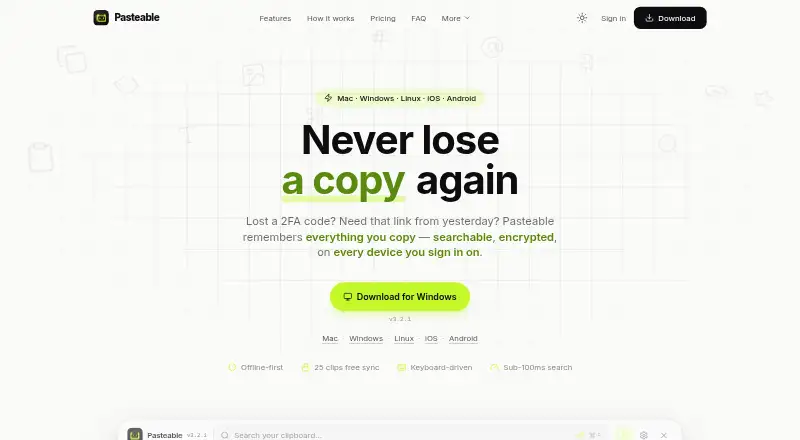
What Pasteable is
Pasteable saves copied text, rich text, HTML, images, files, URLs, and code in a searchable clipboard history. Its full-text and on-device semantic search can also find images by description. Smart collections sort clips into Photos, Code, Links, Files, and Design, while custom rules let users define their own collections. Desktop users can open a keyboard-driven overlay with ⌘/Ctrl+Shift+V and expand saved clips with system-wide snippets. Clipboard history is stored locally in SQLite, works offline without an account, and is encrypted at rest with a key sealed by the operating system. The maker says synced clips are encrypted on the device and servers store ciphertext. The free plan includes unlimited local history, 25 synced clips, and files up to 1 GB. Pasteable Pro costs $6/mo or $60/year; Lifetime costs $80 one-time. The site lists macOS 11+, Windows 10 and 11, and 64-bit Linux; its iOS and Android apps are in store review.
Who it suits
Pasteable suits people who want searchable clipboard history across copied content types, with local offline use or synced clips. Its listed desktop platforms are macOS, Windows, and Linux; its mobile apps are in store review.
What it does well
- Searches text and images by description
- Works offline without an account
- Free plan includes unlimited local history
- Supports custom collections and system-wide snippets
What to know first
- Free plan allows 25 synced clips
- Free plan files are limited to 1 GB
- iOS and Android apps are in store review
Limits
Free includes up to 25 synced clips and files up to 1 GB each. Pro allows files up to 5 GB each, with 20 GB per month. By default, history retention is the last 90 days and the most recent 5,000 items, whichever is more generous; the setting is configurable.
Plans
| Plan | Billed and limits | Price |
|---|---|---|
| Free | Unlimited local history · 25 synced clips · Files up to 1 GB · Full-text and on-device semantic search · Offline use | Free |
| Pasteable Pro (monthly) | $6/mo · Unlimited clip sync · Files up to 5 GB per file (20 GB/month) · Hosted AI · Shared boards · Full synced library in web app | $6 a month |
| Pasteable Pro (yearly) | Billed $60/year · $5/mo · Unlimited clip sync · Files up to 5 GB per file (20 GB/month) · Hosted AI · Shared boards · Full synced library in web app | $60 a year |
| Lifetime | $80 one-time · Everything in Pro forever · Every future Pro feature included · Launch price; $99 list | $80, paid once |
As pasteableapp.com lists them, read 30 Sept 2026. The maker's own page has the final word.
Getting started
- Open https://pasteableapp.com/ and choose the platform listed for your device.
- Use local history offline without an account, or choose a plan for synced clip access.
- Copy text, rich text, HTML, images, files, URLs or code to save clips.
- On desktop, open the overlay with ⌘/Ctrl+Shift+V or expand saved clips with system-wide snippets.
- Use search or collections to find clips; manage database export, import and backups in Settings.
Overview
Pasteable is for people who repeatedly reuse copied material and need more than a short-lived clipboard. Its search, organization, and offline local history make it a compelling solo tool; the free plan’s small sync allowance is the main constraint for anyone working across devices.
It captures text, rich text, HTML, images, files, URLs, and code, then keeps them in searchable history. Smart collections sort clips into Photos, Code, Links, Files, and Design, and custom rules let users shape additional collections around their own workflows.
By default, history keeps the last 90 days or the most recent 5,000 items, whichever is more generous. That setting is configurable, while favorites and pinned clips are exempt from automatic deletion. Users can export or import the database and create backups from Settings.
Pasteable belongs in the broader Clipboard Manager Software category, but its combination of semantic search, snippets, and local offline storage gives it a particular appeal to people who want a searchable working library rather than just a record of recent copies.
Key features
Search and reuse
Full-text and on-device semantic search are included even on Free, including searches for images by description. That makes a large or mixed-media history more useful than one that depends on remembering exact words. On desktop, ⌘/Ctrl+Shift+V opens a keyboard-driven overlay, and system-wide snippets expand saved clips outside the history window. These are practical advantages for people who reuse the same text frequently.
Capture and shared work
The maker describes iPhone capture through Back Tap, the Action Button, Shortcuts, and Siri; Android capture works through the keyboard, widget, or share sheet. Pro adds shared boards with real-time multi-cursor presence. Workspace owners can invite unlimited members without per-seat fees, a useful model for teams, though the plan’s file and sync limits still apply.
Privacy and safeguards
Local history is stored in SQLite, works offline without an account, and is encrypted at rest with a key sealed by the operating system. Synced clips are encrypted on the device with AES-256-GCM, and servers store ciphertext. The maker says password-manager output is skipped automatically, detected secrets are blurred, and apps can be excluded from capture. It also says it does not sell data or train AI on clips, crash reports omit clipboard content, and telemetry is coarse and opt-out. These protections address common concerns with clipboard tools, but users handling sensitive material should still review which apps they permit Pasteable to capture.
Pricing
Free costs nothing and includes unlimited local history, offline use, full-text and on-device semantic search, and files up to 1 GB. Its 25 synced clips are the meaningful compromise: Free suits someone who mainly works on one device or wants to try the workflow, but it is a tight allowance for a regularly synced library.
Pasteable Pro (monthly) costs $6 a month, billed $6/mo. It adds unlimited clip sync, files up to 5 GB per file with a 20 GB/month limit, hosted AI, shared boards, and the full synced library in the web app. Monthly billing fits users who need those capabilities without committing for a year.
Pasteable Pro (yearly) costs $60 a year, billed Billed $60/year · $5/mo. It includes the same Pro features as monthly, at the lower effective monthly rate for users expecting to keep it. The pricing note also offers a 7-day trial.
Lifetime costs $80, paid once, billed $80 one-time, with everything in Pro forever and every future Pro feature included; the launch price is $80 against a $99 list price. It is the clearest option for buyers who prefer a one-time purchase, though its appeal depends on valuing continued Pro access over recurring billing.
Platforms
Pasteable supports macOS, Windows, Linux, iOS, and Android. The site gives desktop requirements of macOS 11+, Windows 10 and 11, and 64-bit Linux. It says the iOS and Android apps are in App Store and Play Store review, so mobile availability may not be immediate for every reader.
Who it's for
Pasteable is best suited to individuals who frequently retrieve copied material, especially across text and files, and value local offline access, semantic search, and reusable snippets. Pro is a stronger fit for people who need unlimited sync or shared boards; unlimited team invitations without per-seat fees may also suit small groups. It is less compelling for someone who needs only basic recent-copy history or expects Free to sync a large library.
Pros and cons
- Pros: Search spans text and images, and semantic search is included on Free, reducing reliance on exact recall.
- Pros: Unlimited local history and offline use without an account make the free tier useful even beyond a brief trial.
- Pros: Device-side encryption, local storage, capture exclusions, and secret blurring provide meaningful privacy controls.
- Pros: Pro shared boards have real-time multi-cursor presence and no per-seat fee for invited members.
- Cons: Free sync stops at 25 clips, limiting its usefulness as a cross-device archive.
- Cons: Pro file uploads are capped at 5 GB per file and 20 GB/month, which may constrain heavy file workflows.
- Cons: The iOS and Android apps are still in store review, making mobile use less certain at present.
Alternatives
Choose ClipboardFusion if a lifetime license with all future versions is a better fit; its free tier is marked personal-only. Relic is the stronger candidate for readers who prioritize open-source apps, sync server, encryption code, and self-host stack. Clipman suits someone seeking free, MIT-licensed software with an optional self-hosted server. Buddi is budgeting software, not a clipboard-manager alternative.
Octoclip may suit users who want cross-device copy and paste, Nearby Sync, history, quick search, and Quick Input in a free tier. OmniClip is another free option, with storage limits that may apply. Qlipper suits readers looking for a free GPLv2+ option across Linux, macOS, and Windows. Ditto is a free GPLv3 clipboard-history utility for Windows users.
Verdict
Choose Pasteable if you want a searchable clipboard library that remains useful offline, handles varied content, and can grow into synced or shared Pro use. Its strongest reason to buy is the combination of semantic search, local-first storage, and flexible reuse; look elsewhere if 25 free synced clips are too few and Pro’s file quotas or recurring price do not fit your workload.
Verdict
Pasteable combines searchable clipboard history with collections, snippets, and local offline storage. Consider the free plan's 25 synced clips and 1 GB file limit, or Pro at $6/mo or $60/year for more sync and larger file limits.
Questions
How much does Pasteable cost?
The Free plan costs $0.00. Pro costs $6.00 per month or $60.00 per year, and Lifetime costs $80.00 one-time.
What does the Free plan include?
It includes unlimited local history, 25 synced clips, files up to 1 GB, full-text and on-device semantic search, and offline use.
Is there a free trial?
Yes. The pricing note lists a 7-day trial.
Which platforms does Pasteable support?
The site lists macOS 11+, Windows 10 and 11, and 64-bit Linux. It says the iOS and Android apps are in App Store and Play Store review.
Who makes Pasteable?
The site footer identifies the maker as Dsignable LLC.
What does Pro add?
Pro includes unlimited clip sync, files up to 5 GB per file with a 20 GB monthly allowance, hosted AI, shared boards and the full synced library in the web app.
Facts from Pasteable's own pages
- Data practices
- The maker says it does not sell data or train AI on clips, crash reports omit clipboard content, and telemetry is coarse and opt-out. · pasteableapp.com, 30 Sept 2026
- Exports
- Users can export and import their database and create backups from Settings. · pasteableapp.com, 30 Sept 2026
- Integrations
- The maker describes iPhone capture through Back Tap, the Action Button, Shortcuts, and Siri, and Android capture through the keyboard, widget, or share sheet. · pasteableapp.com, 30 Sept 2026
- Local privacy
- Clip history is stored locally in SQLite, works offline without an account, and is encrypted at rest with a key sealed by the operating system. · pasteableapp.com, 30 Sept 2026
- Maker
- The site footer identifies the maker as Dsignable LLC. · pasteableapp.com, 30 Sept 2026
- Organization
- Smart collections sort clips into Photos, Code, Links, Files, and Design, and users can create collections with custom rules. · pasteableapp.com, 30 Sept 2026
- Platform availability
- The site lists macOS 11+, Windows 10 and 11, and 64-bit Linux; it says the iOS and Android apps are in App Store and Play Store review. · pasteableapp.com, 30 Sept 2026
- Purpose
- Pasteable saves copied text, rich text, HTML, images, files, URLs, and code in a searchable clipboard history. · pasteableapp.com, 30 Sept 2026
- Retention
- By default, Pasteable keeps the last 90 days and the most recent 5,000 items, whichever is more generous; the setting is configurable and favorites and pinned clips are not auto-deleted. · pasteableapp.com, 30 Sept 2026
- Search
- It offers full-text and on-device semantic search, including searches for images by description. · pasteableapp.com, 30 Sept 2026
- Security
- The maker says synced clips are encrypted on the device with AES-256-GCM and its servers store only ciphertext. · pasteableapp.com, 30 Sept 2026
- Sensitive data
- The maker says password-manager output is skipped automatically, detected secrets are blurred, and apps can be excluded from capture. · pasteableapp.com, 30 Sept 2026
- Team sharing
- Pro shared boards support real-time multi-cursor presence, and the maker says a workspace owner can invite unlimited members without per-seat fees. · pasteableapp.com, 30 Sept 2026
- Workflow
- Desktop users can open the keyboard-driven overlay with ⌘/Ctrl+Shift+V and expand saved clips with system-wide snippets. · pasteableapp.com, 30 Sept 2026
Where Pasteable stands on Freedom251
- Clipboard Managers#3 of 40
- Clipboard Manager Software#14 of 39