Freedom251 › Clipboard Managers
OmniClip
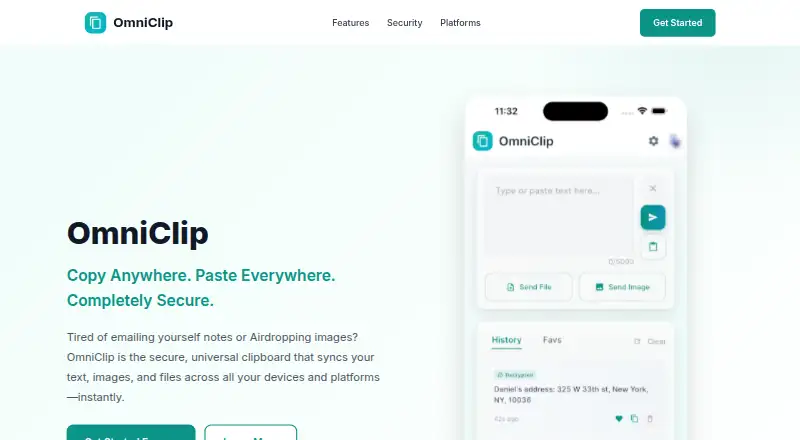
What OmniClip is
OmniClip syncs clipboard text, images, and files among connected devices. It is available on web, iOS, Android, and as a Chrome extension, and its maker describes copying between platforms such as Mac and Android or iPhone and Windows PC. Clipboard history can be searched to retrieve earlier items. Frequently used clips, including links, addresses, and email templates, can be saved and organized as favorites. Notifications can tell you when content is copied on another device. OmniClip is listed as free and the maker says it is currently provided free of charge. Storage limits may apply; the terms say limits can concern item count, file size, or total capacity, with users to be notified of applicable limits. Optional end-to-end encryption encrypts content on the device before it is sent to the cloud; the maker says only the user can decrypt it when enabled. The privacy policy also lists TLS 1.3 in transit, encryption at rest, multifactor authentication support, and OAuth 2.0. Google Firebase is listed for authentication and data storage, and Google Sign-In for account authentication. Email technical support typically replies within 24–48 hours during business days.
Who it suits
It suits people who want to keep clipboard content available across their personal devices, including across different operating systems. It may also suit users who want searchable history and organized favorites.
What it does well
- Syncs text, images, and files across connected devices.
- Available on web, iOS, Android, and Chrome extension.
- Searchable clipboard history and organized favorites.
- Optional end-to-end encryption is available.
What to know first
- Storage limits may apply.
- Applicable storage limits may cover item count or file size.
- Account deletion requests may take up to 30 days.
Limits
OmniClip is currently free. Storage limits may apply to item count, maximum file size, or total capacity, and users are to be notified of applicable limits.
Plans
| Plan | Billed and limits | Price |
|---|---|---|
| OmniClip | Currently provided free of charge. · Storage limits may apply; the maker says it will notify users of applicable limits. | Free |
| Free | free of charge · Terms allow possible limits on item count, file size and total storage | Free |
As getomniclip.com lists them, read 2 Oct 2026. The maker's own page has the final word.
Getting started
- Open the OmniClip website.
- Choose the web version, iOS or Android app, or Chrome extension.
- Sign in using Google Sign-In.
- Connect the personal devices you want to sync.
- Enable optional end-to-end encryption if you want it.
Verdict
OmniClip combines cross-device clipboard sync with searchable history, favorites, notifications, and optional end-to-end encryption. It is free, though users should check applicable storage limits.
Questions
How much does OmniClip cost?
The OmniClip plan is listed as free, and the maker says it is currently provided free of charge.
Which platforms does OmniClip support?
It is available on the web, iOS, Android, and as a Chrome extension. The maker describes cross-platform copying between Mac and Android and between iPhone and Windows PC.
What content can it sync?
It syncs clipboard text, images, and files across connected devices.
Does OmniClip encrypt clipboard content?
Optional end-to-end encryption encrypts content on the device before cloud transfer. The maker says only the user can decrypt it when enabled.
Are there storage limits?
Storage limits may apply to item count, file size, or total capacity. The maker says users will be notified of applicable limits.
How can I contact support?
Technical support is available by email. The contact page says replies typically arrive within 24–48 hours during business days.
Facts from OmniClip's own pages
- Age requirement
- The terms require users to be at least 13 years old. · getomniclip.com, 15 Oct 2026
- App privacy disclosure
- Apple’s listing says the developer may link email, user content, identifiers, usage data and diagnostics to the user. · apps.apple.com, 15 Oct 2026
- App size
- The iOS app listing reports a size of 64.3 MB and an age rating of 4+. · apps.apple.com, 15 Oct 2026
- Authentication integration
- The privacy policy identifies Google Sign-In as an authentication service. · getomniclip.com, 15 Oct 2026
- Availability disclaimer
- The terms say access can be interrupted by maintenance, technical issues, force majeure or third-party outages. · getomniclip.com, 15 Oct 2026
- Backend integration
- The privacy policy says Google Firebase provides authentication and data storage. · getomniclip.com, 15 Oct 2026
- Chrome extension details
- The Chrome listing reports version 1.3.0, a 48.13 KiB size and an October 23, 2025 update date. · chromewebstore.google.com, 15 Oct 2026
- Chrome privacy disclosure
- Chrome Web Store says the extension handles personally identifiable information and website content, and the developer declares that data is not sold outside approved use cases. · chromewebstore.google.com, 15 Oct 2026
- Clipboard history
- Users can search and retrieve previously copied items from clipboard history. · getomniclip.com, 15 Oct 2026
- Content types
- The service supports synchronized text, images and files. · getomniclip.com, 15 Oct 2026
- Data rights
- Users may access, correct, export text data, delete their account and request deletion of associated data. · getomniclip.com, 15 Oct 2026
- Deletion
- The maker says account deletion requests are processed within 30 days and permanently remove associated data. · getomniclip.com, 2 Oct 2026
- Encryption
- Optional end-to-end encryption encrypts content on the device before it is sent to the cloud, and the maker says only the user can decrypt it when enabled. · getomniclip.com, 2 Oct 2026
- Encryption details
- The privacy policy specifies optional AES-256 client-side encryption and says encryption keys remain on the user’s device. · getomniclip.com, 15 Oct 2026
- Encryption recovery limit
- The policy warns that encrypted content cannot be recovered if the user loses the device or clears app data. · getomniclip.com, 15 Oct 2026
- End-to-end encryption
- End-to-end encryption is optional and encrypts data on the device before cloud transfer, with local decryption. · getomniclip.com, 15 Oct 2026
- Favorites
- Users can save and organize frequently reused clips such as links, addresses and email templates. · getomniclip.com, 15 Oct 2026
- Google Play availability
- Google Play lists OmniClip with 100+ downloads and an Everyone content rating. · play.google.com, 15 Oct 2026
- Google Play data safety
- Google Play says no data is shared with third parties, while the app may collect personal information, photos and videos plus four other data types; it also says data is not encrypted. · play.google.com, 15 Oct 2026
- Google Play update
- The Android listing reports an update date of March 9, 2026. · play.google.com, 15 Oct 2026
- Instant sync
- The homepage claims copied content becomes available on other devices within seconds. · getomniclip.com, 15 Oct 2026
- Integrations
- The maker lists Google Firebase for authentication and data storage, and Google Sign-In for account authentication. · getomniclip.com, 2 Oct 2026
- Intended use
- The terms describe the service for synchronizing clipboard content across a user's personal devices. · getomniclip.com, 2 Oct 2026
- iOS requirements
- The App Store listing requires iOS 15.6 or later; Mac use requires macOS 12.5 or later with an Apple M1 chip or newer. · apps.apple.com, 15 Oct 2026
Where OmniClip stands on Freedom251
- Clipboard Managers#6 of 40
- Clipboard Manager Software#8 of 39