Freedom251 › Video Customer Support Software

CobrowseApp
What CobrowseApp is
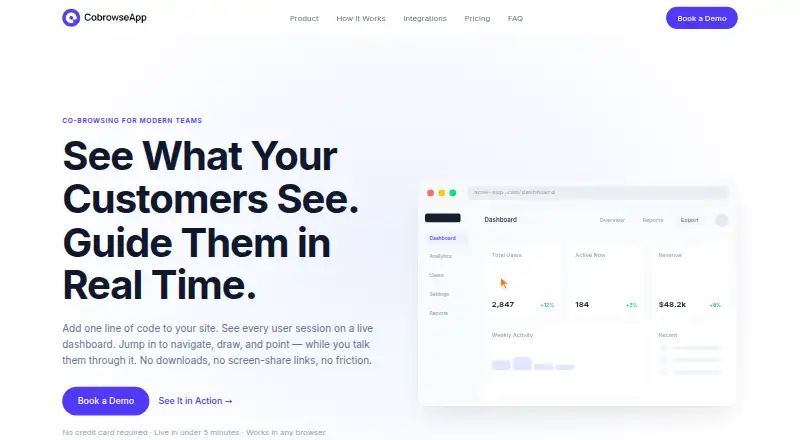
CobrowseApp helps customer support and customer success teams guide people through a website or app while talking with them. An agent can request a co-browsing session, but the user must approve with one click before the agent can guide them. During a session, agents can navigate pages, request screen control, and use a focus pointer to draw, circle, underline, or annotate elements. Live text chat is available, and an agent can move to a video call with one click while the customer remains on the website. A dashboard displays active user sessions in real time and allows filtering by page, company, user type, or behavior. Setup involves adding a JavaScript snippet to a website or app; the site says an SDK and server-side changes are not required. CobrowseApp works in any browser and does not require a customer download. Named supported tools include Salesforce, HubSpot, Zendesk, Slack, Microsoft Teams, and Segment. Every plan includes unlimited co-browsing sessions, drawing tools, and screen control. CobrowseApp is a paid web product with pricing on request. Its homepage identifies Captiwate Inc. as the company behind it and displays SOC 2, ISO 27001, GDPR, and CCPA labels.
Who it suits
CobrowseApp suits customer support and customer success teams that need to guide users through pages in a live conversation. Its listed use cases also include onboarding and training, with customer approval required before an agent can guide a session.
What it does well
- Users approve co-browsing requests with one click.
- Agents can navigate, request control, and annotate pages.
- Chat can escalate to video without leaving the website.
- Real-time sessions can be filtered by several user attributes.
- Every plan includes unlimited sessions and screen guidance tools.
What to know first
- Pricing is available only on request.
- The listed platform is web.
Limits
Every plan includes unlimited co-browsing sessions, drawing tools, and screen control.
Getting started
- Visit https://www.cobrowseapp.com/.
- Add the JavaScript snippet to your website or app.
- Start a free trial without a credit card, or request pricing for a paid plan.
- Offer a co-browse request; the user must approve it before guidance begins.
- Connect with supported tools such as Salesforce, HubSpot, Zendesk, Slack, Microsoft Teams, or Segment if needed.
Verdict
Choose CobrowseApp if your support, success, onboarding, or training team needs live page guidance with user approval and built-in chat or video escalation. Look elsewhere if you need pricing published upfront or a stated trial duration.
Questions
How much does CobrowseApp cost?
CobrowseApp is paid, with pricing available on request.
Which platforms does it support?
The listed customer platform is web. The site says it works in any browser and requires no customer download.
What integrations are named?
The site names Salesforce, HubSpot, Zendesk, Slack, Microsoft Teams, and Segment as supported tools.
Who is behind CobrowseApp?
The homepage footer identifies Captiwate Inc. as the company behind CobrowseApp.
Does every plan include screen control?
Yes. Every plan includes unlimited co-browsing sessions, drawing tools, and screen control.
Facts from CobrowseApp's own pages
- Browser access
- The site says it works in any browser and requires no customer download. · cobrowseapp.com, 9 Oct 2026
- Chat and video
- The product offers live text chat and one-click escalation to a video call without the customer leaving the website. · cobrowseapp.com, 9 Oct 2026
- Company
- The homepage footer identifies Captiwate Inc. as the company behind CobrowseApp. · cobrowseapp.com, 4 Oct 2026
- Customer approval
- A user must approve a co-browse request with one click before the agent can guide them. · cobrowseapp.com, 4 Oct 2026
- Demo
- The site offers a 15-minute demo using the prospective customer's own site. · cobrowseapp.com, 9 Oct 2026
- Guidance tools
- Agents can use a focus pointer, circle, underline, and annotate elements on a user's screen. · cobrowseapp.com, 9 Oct 2026
- Integrations
- The site lists Salesforce, HubSpot, Zendesk, Slack, Microsoft Teams, and Segment. · cobrowseapp.com, 9 Oct 2026
- Intended users
- The product is presented for customer support, customer success, onboarding, and training teams. · cobrowseapp.com, 4 Oct 2026
- Live visibility
- Its dashboard shows active user sessions in real time and can filter them by page, company, user type, or behavior. · cobrowseapp.com, 9 Oct 2026
- Pricing
- The site says every plan includes unlimited co-browsing sessions, drawing tools, and screen control, and directs visitors to request pricing. · cobrowseapp.com, 4 Oct 2026
- Purpose
- CobrowseApp is presented as co-browsing software for customer support and customer success teams. · cobrowseapp.com, 9 Oct 2026
- Screen control
- Agents can request screen control, and the user approves the request with one click. · cobrowseapp.com, 9 Oct 2026
- Screen guidance
- Agents can request screen control, navigate pages, and use a focus pointer to draw, circle, underline, or annotate. · cobrowseapp.com, 4 Oct 2026
- Security and privacy
- The homepage displays SOC 2, ISO 27001, GDPR, and CCPA labels. · cobrowseapp.com, 9 Oct 2026
- Security claims
- The homepage displays SOC 2, ISO 27001, GDPR, and CCPA; it does not provide details about these claims there. · cobrowseapp.com, 4 Oct 2026
- Session limits
- The site says every plan includes unlimited co-browsing sessions, drawing tools, and screen control. · cobrowseapp.com, 9 Oct 2026
- Session monitoring
- The dashboard shows active user sessions in real time and can filter them by page, company, user type, or behavior. · cobrowseapp.com, 4 Oct 2026
- Setup
- The site says setup requires adding a single JavaScript snippet, with no SDKs or server-side changes. · cobrowseapp.com, 9 Oct 2026
- Support audience
- The site describes the product for customer support and customer success teams, including onboarding and training use cases. · cobrowseapp.com, 9 Oct 2026
- Trial
- The site advertises a free trial with no credit card required but does not state its duration. · cobrowseapp.com, 9 Oct 2026
Where CobrowseApp stands on Freedom251
- Video Customer Support Software#15 of 26