Freedom251 › Barcode Printing Software
Cloudlabels
What Cloudlabels is
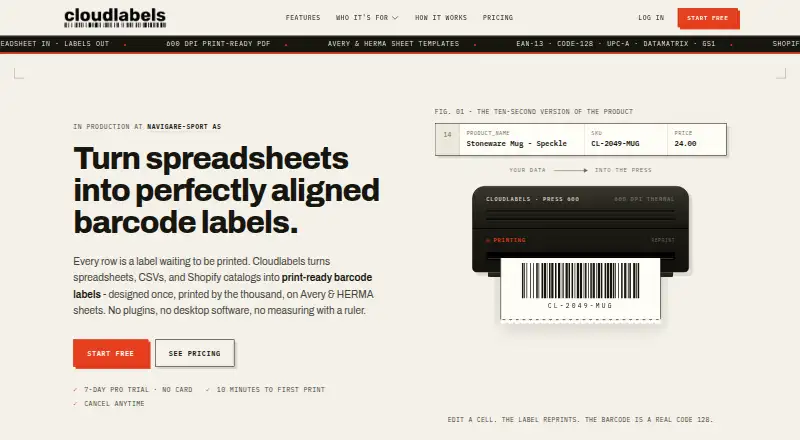
Cloudlabels turns spreadsheets, CSV files and Shopify catalogs into print-ready barcode labels. It runs in a browser, with no installation needed, and is also available on iOS. Users can import Excel or CSV files, enter items manually and export data back to either format. In the Design Center, they arrange text, barcodes, QR codes and images on a canvas, then bind those elements to data columns. Supported barcode formats include EAN-13, UPC-A, CODE-128, Code 39, DataMatrix, GS1 DataMatrix, EAN-8, UPC-E and QR. Shopify integration syncs products and variants, and the maker says changes can be pushed back to the store. Paid plans export 600 DPI PDFs, support Avery and HERMA sheets, and allow printing from a chosen position on a partly used sheet. The free plan costs nothing and covers 20 items and 20 labels per month, with 300 DPI exports bearing a watermark and one user. Paid options include a 19.00 USD one-time Starter Pack and Pro at $19.90 a month; a 7-day trial is listed.
Who it suits
Cloudlabels suits businesses that need to create barcode labels from spreadsheet data or Shopify catalogs. Its catalog, stock, purchasing and sales modules may also suit teams managing inventory, while an iOS scanner is available for mobile scanning.
What it does well
- Imports Excel and CSV, and supports manual item entry.
- Design Center binds label elements to data columns.
- Shopify products and variants can be synced.
- Paid plans export 600 DPI PDFs.
- iOS Scanner lists offline operation and camera scanning.
What to know first
- Free plan is limited to 20 items and labels monthly.
- Free exports are 300 DPI and carry a watermark.
- Free plan includes one user.
- Starter Pack labels expire after 90 days.
Limits
The Free plan allows 20 items and 20 labels per month, exports at 300 DPI with a watermark, and includes one user. The one-time Starter Pack includes 2,000 labels over 90 days; higher tier plans list their own item or team limits.
Plans
| Plan | Billed and limits | Price |
|---|---|---|
| Free | forever · 20 items · 20 labels/month · 300 DPI · PDF watermark · 1 user · community support | Free |
| Starter Pack | one-time · 2,000 labels over 90 days · 600 DPI · no watermark · all barcode types and templates · 1 user · email support | $19, paid once |
| Pro | monthly; $16/month billed annually ($192/year) · 25,000 items · unlimited labels · 600 DPI · 50 print profiles · custom label sheets · priority email support · 7-day trial | $19.90 a month |
| Business | monthly; $24/month billed annually ($288/year) · 250,000 items · 10 team members · 600 DPI · 200 print profiles · team collaboration · priority support · 7-day trial | $29.90 a month |
| Enterprise | custom pricing billed by invoice · 10+ users · dedicated success manager · custom onboarding · custom domain/white-label | On request |
As cloudlabels.io lists them, read 15 Oct 2026. The maker's own page has the final word.
Getting started
- Open the Cloudlabels website in a browser; installation is not needed.
- Import Excel or CSV data, or enter items manually.
- Use the Design Center to arrange label elements and bind them to data columns.
- Choose a plan; the site lists a 7-day trial.
- For iOS use, access the iOS Scanner module.
Cloudlabels is a browser-based label system that connects spreadsheet or Shopify data to barcode layouts. It suits retailers and small teams that need variable-data labels and Shopify synchronization rather than a standalone barcode generator. The main choice is between a tightly limited free tier, a one-time Starter Pack, and monthly plans that raise capacity and collaboration limits.
Overview
Cloudlabels imports Excel and CSV files, accepts manual item entry, and exports data back to Excel or CSV. Its Shopify connection synchronizes products and variants, with changes able to be pushed back to the store. Because it runs in a browser, there is no installation step, and the cloud deployment fits workflows that move between devices.
The service also lists product catalog, stock tracking, purchases and sales, and an iOS Scanner module. The scanner includes camera scanning, scan-to-sheet, Brother printing, and offline operation. These modules expand the product’s scope, but label work remains the clearest reason to choose it.
Key features
Data-linked design
The Design Center places text, barcodes, QR codes, and images on a canvas, then binds those elements to data columns. That makes repeated or changing product records practical without editing every label separately. Supported formats cover EAN-13, UPC-A, CODE-128, Code 39, DataMatrix, GS1 DataMatrix, EAN-8, UPC-E, and QR, giving it a broad mix of retail and industrial codes.
Printing
Paid plans produce 600 DPI print-ready PDFs, support Avery and HERMA sheets, and can start on any position of a partly used sheet. Those controls matter when alignment and media waste affect production. Free exports are 300 DPI and watermarked, so the no-cost tier is better for a small proof of concept than finished labels.
Security and support
Cloudlabels states that traffic uses SSL/TLS, stored data is encrypted, database row-level security and access controls are used, and security audits and updates are performed regularly. It says personal data is not sold and Shopify shop data is deleted within 48 hours after an uninstall redaction request. Email and in-app support are offered, with typical replies within one business day.
Pricing
Free costs 0.00 USD forever and includes one user, 20 items, and 20 labels per month. Exports are 300 DPI with a watermark, and support is through the community. The caps make it suitable for occasional testing or a very small catalog, not routine volume.
Starter Pack costs 19.00 USD once and supplies 2,000 labels over 90 days. It adds 600 DPI exports, removes the watermark, keeps one user, and includes email support. This is the sensible low-commitment option for a defined short run, but its finite quota is a poor fit for continuing production.
Pro is $19.90 a month, with annual billing available at a discount. It supports up to 25,000 items, unlimited labels, 600 DPI output, 50 print profiles, custom label sheets, and priority email support. It fits a growing shop that needs ongoing volume without team seats.
Business costs $29.90 a month, with annual billing available at a discount. It raises the catalog ceiling to 250,000 items, allows up to 10 team members, provides 200 print profiles, team collaboration, 600 DPI exports, and priority support. Choose it when shared workflows and a large catalog justify the extra monthly cost.
Enterprise uses custom pricing billed by invoice. It is aimed at 10 or more users and adds a dedicated success manager, custom onboarding, custom domain, and white-label options. Shopify App Store installs are billed at 19.90 USD every 30 days or 199 USD per year and include a 15-day trial; this billing route should be distinguished from the site's seven-day trial note.
Platforms
Cloudlabels is available on the web and iOS. The browser application needs no installation, while the iOS Scanner adds camera-based and offline scanning workflows.
Who it's for
Choose Cloudlabels if your labels must draw from spreadsheets or Shopify records, you need multiple barcode standards, or you print to Avery or HERMA sheets. Pro is the practical ongoing plan for a single operator; Business is better for a team. The free tier works for a small test, and Starter Pack suits a bounded 90-day run. Look elsewhere if you need desktop-only operation, a completely free high-volume workflow, or a plan whose limits do not depend on labels, items, or seats.
Pros and cons
- Pros: Data-column binding reduces repetitive label editing; Shopify product and variant syncing can keep store data aligned; paid PDF output reaches 600 DPI and supports partial-sheet starts; Business provides team seats and collaboration.
- Cons: Free use is restricted to 20 items and 20 labels monthly, with 300 DPI watermarked output; Starter Pack expires after 2,000 labels or 90 days; higher-capacity plans require recurring payment; Enterprise pricing is custom.
Alternatives
Barcode Labeling Software is the broader category guide for comparing label tools. Pick PrintSpirit instead if you want a free cloud designer with batch printing and broader Android, desktop, Linux, Windows, and API coverage. Brother P-touch Editor is the free choice for select Brother P-touch and QL printers. Choose ZebraDesigner for free basic design and printing tied to Zebra Link-OS printers. Zint Barcode Generator is preferable for a free, open-source generator that runs across desktop and self-hosted environments. Cloudlabel is a paid alternative with a 50.00 EUR monthly starter plan and three included users. EASYLABEL suits workflows centered on Tharo printers and Windows. LabelForge is a free MIT-licensed desktop option. Label Toolkit offers a free browser-based designer.
Verdict
Cloudlabels is a strong fit for shops that need data-driven barcode labels, Shopify synchronization, and flexible sheet printing in one cloud service. Its main reason to choose it is the combination of column-bound design and store/catalog workflows. Look elsewhere if your volume must stay free, because the free watermark and 20-label monthly ceiling quickly make paid service necessary.
Verdict
Cloudlabels combines label design, spreadsheet import and Shopify syncing, with paid plans adding higher-resolution exports and print-sheet options. Check the free plan’s monthly limits and watermark against your label volume before choosing a plan.
Questions
Is there a free plan?
Yes. The Free plan is billed forever and includes 20 items, 20 labels per month, 300 DPI exports with a watermark, and one user.
How much do paid plans cost?
The Starter Pack costs 19.00 USD one-time. Pro costs $19.90 a month, and Business costs $29.90 a month. Enterprise uses custom pricing.
Is there a free trial?
A 7-day trial is listed. Shopify App Store installs have separate stated billing of $19.90 USD every 30 days or $199/year and include a 15-day trial.
What platforms does Cloudlabels support?
Cloudlabels runs in a browser and is available on iOS.
Can it connect to Shopify?
Yes. It syncs Shopify products and variants, and says changes can be pushed back to the store.
What label and barcode options does it support?
Supported formats include EAN-13, UPC-A, CODE-128, Code 39, DataMatrix, GS1 DataMatrix, EAN-8, UPC-E, and QR. Paid plans export 600 DPI PDFs and support Avery and HERMA sheets.
Facts from Cloudlabels's own pages
- API
- The Cloudlabels versus NiceLabel comparison marks API availability for Cloudlabels. · cloudlabels.io, 15 Oct 2026
- Availability limitation
- The terms say Cloudlabels strives for 99.9% uptime but does not guarantee uninterrupted access and may experience maintenance or outages. · cloudlabels.io, 15 Oct 2026
- Barcode formats
- The site lists EAN-13, UPC-A, CODE-128, Code 39, DataMatrix, GS1 DataMatrix, EAN-8, UPC-E and QR codes. · cloudlabels.io, 15 Oct 2026
- Browser-based
- Cloudlabels runs in the browser and the site says no installation is needed. · cloudlabels.io, 2 Oct 2026
- Browser deployment
- Cloudlabels says it runs in the browser with nothing to install and keeps templates and data in the account. · cloudlabels.io, 15 Oct 2026
- Customer evidence
- Cloudlabels publishes a testimonial from Rune, CEO of Navigare-Sport AS, describing centralized barcode and shipping-mark management and fast printing. · cloudlabels.io, 15 Oct 2026
- Data export
- Users can export item data through the Items table CSV export or request a full export from support. · cloudlabels.io, 15 Oct 2026
- Data import and export
- It supports Excel and CSV import, manual item entry, and export back to Excel or CSV. · cloudlabels.io, 2 Oct 2026
- Free plan limit
- The Free plan allows 20 items and 20 labels per month, exports at 300 DPI with a watermark, and includes one user. · cloudlabels.io, 2 Oct 2026
- GDPR
- The privacy policy describes GDPR rights, standard contractual safeguards for EEA transfers and a dedicated DPO email. · cloudlabels.io, 15 Oct 2026
- Hosting providers
- Cloudlabels identifies Supabase, Railway and Vercel as service providers used for hosting or operation. · cloudlabels.io, 15 Oct 2026
- Independent categories
- SaaSHub places Cloudlabels in Barcode and QR Code, Inventory and Barcoding, and Inventory Management or eCommerce Tools. · saashub.com, 15 Oct 2026
- Independent directory listing
- SaaSHub describes Cloudlabels as online barcode, QR-code and inventory-label software with drag-and-drop design, Excel/CSV import, Shopify sync and high-DPI PDF export. · saashub.com, 15 Oct 2026
- Independent location
- SaaSHub categorizes Cloudlabels as a startup from Bergen, Norway. · saashub.com, 15 Oct 2026
- Independent release year
- SaaSHub's Bergen startup directory lists Cloudlabels as released in 2026. · saashub.com, 15 Oct 2026
- Inventory modules
- Listed modules include a product catalog, stock movements with locations and bins, purchases and sales, and an iOS scanner. · cloudlabels.io, 15 Oct 2026
- iOS scanner
- The iOS Scanner module lists camera scanning, scan-to-sheet, Brother printing and offline operation. · cloudlabels.io, 15 Oct 2026
- Label design
- The Design Center lets users drag text, barcodes, QR codes, and images onto a canvas and bind them to data columns. · cloudlabels.io, 2 Oct 2026
- Label designer
- Its Design Center lets users drag text, barcodes, QR codes and images onto a canvas and bind them to data columns. · cloudlabels.io, 15 Oct 2026
- Licence and ownership
- The terms describe the service as Cloudlabels-owned intellectual property and prohibit copying, modification or derivative works. · cloudlabels.io, 15 Oct 2026
- Limit: independent feedback
- SaaSHub lists no user reviews, so it provides no repeated customer praise or complaint themes. · saashub.com, 15 Oct 2026
- Notable date
- The terms page is dated January 2, 2026, and the privacy policy was last updated September 2, 2026. · cloudlabels.io, 15 Oct 2026
- Partial sheets
- Users can resume printing from any starting position on a partly used sheet. · cloudlabels.io, 15 Oct 2026
- Praise: browser workflow
- SaaSHub's independent description highlights browser-based label design, spreadsheet-style product data and print-ready PDF export. · saashub.com, 15 Oct 2026
Where Cloudlabels stands on Freedom251
- Barcode Printing Software#2 of 17
- Barcode Labeling Software#5 of 35