Freedom251 › AI Voice Note Apps
Cleft
What Cleft is
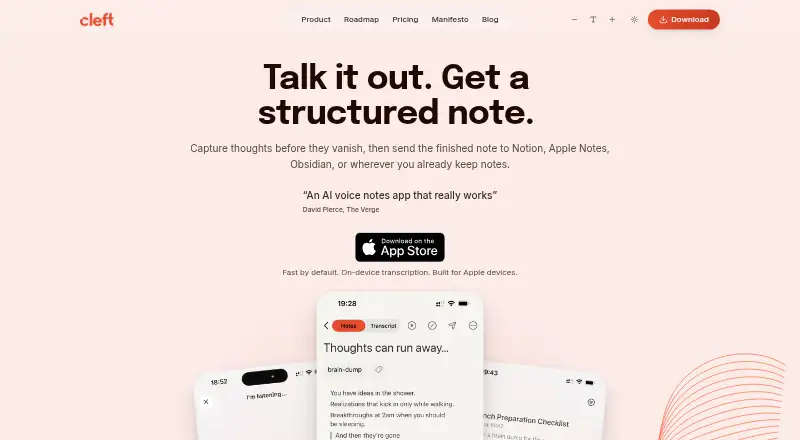
Cleft turns spoken thoughts into structured notes, with main points, actions, summaries and transcripts. Its built-in output styles are Structured, Structured Prose and Clean Transcript; Plus users can save custom styles. Cleft says it works offline and supports 99 languages, including switching languages mid-sentence. Transcription runs locally with Whisper, and temporary audio is deleted when transcription finishes unless Keep Audio is enabled. Optional cloud formatting sends transcript text—not audio—to OpenAI, with Groq as a backup. Notes are encrypted at rest with AES-256-GCM and in transit with TLS 1.2 or higher; cloud data is hosted in Ireland under a zero-access architecture. The free Basic plan includes recordings up to 5 minutes, on-device transcription, tags, search and export. Plus raises the recording limit to 30 minutes and adds attachments, Notion and Zapier integrations, and Family Sharing for up to five. Plus costs $6.99 a month or $39.99 a year, billed through the App Store and renewing automatically unless canceled. Cleft supports iPhone, iPad, Mac, Apple Watch and CarPlay.
Who it suits
Cleft may suit people who prefer speaking thoughts before organizing them, including users whose thoughts move faster than they can type. It is for Apple device users who want offline recording, searchable transcripts or exports to note-taking apps.
What it does well
- Works offline and supports 99 languages.
- On-device transcription with Whisper.
- Free plan includes tags, search and export.
- Plus connects with Notion and Zapier.
- Supports iPhone, iPad, Mac, Watch and CarPlay.
What to know first
- Basic recordings are limited to 5 minutes.
- Plus recordings are limited to 30 minutes.
- Plus custom AI instructions are limited to 500 characters.
- Plus renews automatically unless canceled.
Limits
Basic recordings are limited to five minutes. Plus recordings are limited to 30 minutes, and its custom AI instructions are limited to 500 characters. Plus renews automatically unless canceled.
Plans
| Plan | Billed and limits | Price |
|---|---|---|
| Basic | 5 minute recordings · 3 built-in output styles · on-device transcription · tags, search & export | Free |
| Cleft Plus (annual) | Billed through the App Store; renews automatically unless canceled. · 30 minute recordings · 500 characters custom instructions · attachments · Notion & Zapier integrations · Family Sharing (up to 5) | $39.99 a year |
| Cleft Plus (monthly) | Billed through the App Store; renews automatically unless canceled. · 30 minute recordings · 500 characters custom instructions · attachments · Notion & Zapier integrations · Family Sharing (up to 5) | $6.99 a month |
As cleftnotes.com lists them, read 29 Sept 2026. The maker's own page has the final word.
Getting started
- Open the Apple App Store download link from https://cleftnotes.com/.
- Install Cleft on a supported Apple device: iPhone, iPad, Mac, Apple Watch or CarPlay.
- Start with the free Basic plan and record up to five minutes.
- Choose Cleft Plus through the App Store for recordings up to 30 minutes and additional features.
Overview
Cleft is a voice-note app for Apple devices that turns spoken thoughts into structured notes, summaries, action points and transcripts. It is best suited to people who want to capture an idea quickly by speaking and organize it afterward. Its local transcription and offline recording are appealing, but the free plan’s five-minute cap rules out longer recordings.
Its emphasis on capturing first makes sense for people who find typing slows down their thinking. Three built-in styles let users choose between structured notes, prose and a clean transcript; paying for Plus is necessary to save custom styles and record for longer.
Compare it with other options in our AI Voice Note Apps and Voice Note Apps lists.
Key features
Voice capture and note formats
Cleft transcribes speech on-device using Whisper, then produces a note in one of its built-in styles: Structured, Structured Prose or Clean Transcript. Tags, search and export help users find and move saved material beyond the initial recording. Plus adds saved custom output styles and up to 500 characters for custom AI instructions, which can help with a repeatable format but do not extend the recording limit beyond 30 minutes.
Offline recording and support for 99 languages, including switching languages mid-sentence, make Cleft useful when a connection is unreliable or a speaker moves between languages. The short recording caps still matter: Basic stops at five minutes and Plus at 30.
Privacy and processing
Cleft says voice transcription happens locally, and audio is not sent to its servers or third parties for that process. Temporary audio is deleted after transcription unless Keep Audio is enabled. Optional cloud formatting sends transcript text, not audio, to OpenAI, with Groq as a backup; Cleft says provider agreements prohibit training on customer content. Someone who wants to avoid cloud formatting can stick to local transcription, while anyone using the optional service should be comfortable sending transcript text to those providers.
Cleft says notes are encrypted at rest with AES-256-GCM and in transit with TLS 1.2 or higher, and that cloud data is hosted in Ireland under a zero-access architecture. Its Trust Center says users own their notes, transcripts and audio, content is not sold or used for AI training, and its compliance statement names GDPR, CCPA and the EU AI Act.
Apple workflow
Cleft supports iPhone, iPad, Mac, Apple Watch and CarPlay. Plus can send notes to Notion and Zapier; export and Local Sync also support workflows involving Apple Notes, Obsidian, Bear, NotePlan, Drafts, Ulysses and Logseq. That makes it more compelling for Apple users who already work in those tools than for someone seeking a broad desktop and web app.
Pricing
Basic is free and includes five-minute recordings, three built-in output styles, on-device transcription, tags, search and export. It is a reasonable way to try short voice capture, but the recording cap is restrictive for meetings, interviews or extended dictation.
Cleft Plus costs $6.99 per month or $39.99 per year, billed through the App Store and renewing automatically unless canceled. Both paid terms include 30-minute recordings, 500-character custom instructions, attachments, Notion and Zapier integrations, and Family Sharing for up to five. Plus suits regular users who need longer recordings or those integrations; the annual option costs less than twelve monthly payments, in exchange for committing to a yearly renewal. Plus also includes priority support.
Platforms
Cleft is available for iOS and macOS, with support also listed for iPhone, iPad, Mac, Apple Watch and CarPlay. Its Apple focus is a limitation for people who need a Windows, Android or web app.
Who it's for
Cleft is a good fit for Apple users who think aloud, want searchable transcripts and structured notes, and value local transcription or offline capture. It is less suitable for people who routinely record longer than 30 minutes, need cross-platform access, or want integrations without a paid plan. The founders describe the product as built by neurodivergent founders for people whose thoughts move faster than they can type; its capture-before-organization approach is especially relevant to that audience.
Pros and cons
- Pros: Local transcription and offline recording reduce reliance on a network for core capture.
- Pros: Three built-in formats, transcript search, tags and export turn recordings into material users can revisit and organize.
- Pros: Support for 99 languages, including mid-sentence language switching, suits multilingual speech.
- Cons: Basic recordings stop at five minutes, and even Plus stops at 30, which limits longer sessions.
- Cons: Notion and Zapier integrations and saved custom styles require Plus, so the free tier is mainly for short, straightforward capture.
- Cons: iOS and macOS availability leaves out users who need Android, Windows or web access.
Alternatives
AudioPen is worth considering for broader platform coverage across Android, iOS, desktop, web and browser extension; its free recordings are capped at three minutes, shorter than Cleft Basic’s five.
Voicenotes may suit someone who wants Android or web access and a free allowance of 100 weekly transcription minutes, rather than Cleft’s short per-recording Basic cap.
Audionotes is another freemium voice-note option for readers looking beyond Apple platforms; its free plan includes one-minute voice notes and 99+ languages.
VoiceJournal is an option for readers who want Android or web access, though its free plan is limited to ten notes total and two minutes per recording.
Memex is a free Android and iOS option, with AI features requiring a configured model service that may incur provider charges.
Memoth offers an extension alongside iOS and macOS, making it an alternative for people who want browser access as well as Apple devices.
Murble is available on Android as well as iOS and macOS, and its free plan includes unlimited recording and on-device transcription.
PlancyAI is an Android and web alternative with a free allowance of five voice memos or notes per day and 100 voice minutes per month, plus a seven-day Pro trial.
Verdict
Choose Cleft if you use Apple devices and want to turn quick, spoken thoughts into searchable, structured notes without sending audio for transcription. Its local, offline-capable capture is the strongest reason to choose it. Look elsewhere if you need longer recordings, a non-Apple app, or paid integrations without a subscription.
Verdict
Cleft combines offline voice capture with structured notes and on-device transcription. The free plan has a 5-minute recording limit; longer recordings and integrations require Plus.
Questions
Is Cleft free?
Yes. The Basic plan is free and includes five-minute recordings, three built-in output styles, on-device transcription, tags, search and export.
How much does Cleft Plus cost?
Cleft Plus costs $6.99 a month or $39.99 a year. It is billed through the App Store and renews automatically unless canceled.
Which devices does Cleft support?
Cleft lists iPhone, iPad, Mac, Apple Watch and CarPlay support. Its download link goes to the Apple App Store.
Does Cleft work offline?
Yes. Cleft says it works offline, and voice transcription runs locally using Whisper.
Does Cleft send audio to cloud AI providers?
Cleft says audio is not sent to its servers or third parties for transcription. Optional cloud formatting sends transcript text to OpenAI, with Groq as a backup.
What integrations does Cleft offer?
Cleft Plus sends notes to Notion and Zapier. Export and Local Sync support workflows including Apple Notes, Obsidian, Bear, NotePlan, Drafts, Ulysses and Logseq.
Facts from Cleft's own pages
- Apple device support
- Cleft lists iPhone, iPad, Mac, Apple Watch, and CarPlay support; its download link goes to the Apple App Store. · cleftnotes.com, 29 Sept 2026
- Cloud processing
- Optional cloud formatting sends transcript text, not audio, to OpenAI with Groq as a backup; the page says provider agreements prohibit training on customer content. · cleftnotes.com, 29 Sept 2026
- Headquarters
- Dublin, Ireland · cleftnotes.com, 23 Sept 2026
- Integrations
- Plus sends notes to Notion and Zapier, while export and Local Sync support workflows including Apple Notes, Obsidian, Bear, NotePlan, Drafts, Ulysses, and Logseq. · cleftnotes.com, 29 Sept 2026
- Intended users
- The founders describe Cleft as built by neurodivergent founders for people whose thoughts move faster than they can type, with a focus on capture before organization. · cleftnotes.com, 29 Sept 2026
- Notable limits
- Basic recordings are limited to 5 minutes and Plus recordings to 30 minutes; Plus custom AI instructions are limited to 500 characters. · cleftnotes.com, 29 Sept 2026
- Offline and languages
- Cleft says it works offline and supports 99 languages, including switching languages mid-sentence. · cleftnotes.com, 29 Sept 2026
- Output styles
- Built-in styles are Structured, Structured Prose, and Clean Transcript; Plus can save custom output styles. · cleftnotes.com, 29 Sept 2026
- Privacy and compliance
- The Trust Center says users own their notes, transcripts, and audio, that content is not used for AI training or sold, and names GDPR, CCPA, and the EU AI Act in its compliance statement. · cleftnotes.com, 29 Sept 2026
- Security
- Cleft says notes are encrypted at rest with AES-256-GCM and in transit with TLS 1.2 or higher, and cloud data is hosted in Ireland under a zero-access architecture. · cleftnotes.com, 29 Sept 2026
- Support
- Plus includes priority support, and the About page says every email is read personally by co-founders Jonathan or Justin. · cleftnotes.com, 29 Sept 2026
- Transcription and audio
- Voice transcription runs locally using Whisper, and Cleft says audio is never sent to its servers or third parties; temporary audio is deleted after transcription unless Keep Audio is enabled. · cleftnotes.com, 29 Sept 2026
- What it does
- Cleft captures spoken thoughts and turns them into structured notes with main points, actions, summaries, and transcripts. · cleftnotes.com, 29 Sept 2026
Where Cleft stands on Freedom251
- AI Voice Note Apps#5 of 27
- Voice Note Apps#7 of 34
- AI Voice Dictation Software#6 of 22