Freedom251 › AI Voice Note Apps

Memoth
What Memoth is
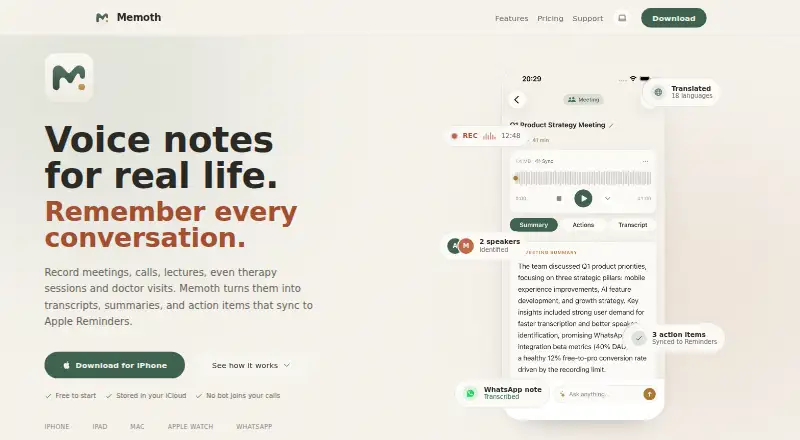
Memoth is a personal AI voice-notes app that records or imports conversations and produces transcripts, summaries, speaker labels, highlights, translations, and action items. It records on iPhone, iPad, Mac, and Apple Watch, accepts audio files, and processes WhatsApp voice messages. On Mac, it can detect meetings and record audio locally without a bot, calendar access, or an invitation; supported sources include Zoom, Microsoft Teams, Google Meet, Webex, FaceTime, and Slack huddles. Users can ask questions using a meeting's transcript, summary, speakers, and action items as context. Real-time transcription with live speaker labels across 23 languages is a Pro feature. Recordings, notes, and transcripts live in the device library and sync through the user's iCloud. Uploaded audio is kept as an AES-256 encrypted backup for 30 days, then automatically deleted. The free account includes 10 minutes per month; Pro costs $9.99 a month for 15 hours, and Pro Plus costs $24.99 a month for 40 hours. Imported audio and WhatsApp messages count against the same monthly recording allowance as app recordings.
Who it suits
Memoth suits students, freelancers, founders, researchers, journalists, professionals, sales teams, client-facing workers, and people who use personal voice notes. Its meeting capture and summaries may fit users who want conversation records and action items.
What it does well
- Records on iPhone, iPad, Mac, and Apple Watch.
- Mac meeting capture works without a bot or calendar access.
- Recordings and transcripts sync through the user's own iCloud.
- Uploaded audio backups are automatically deleted after 30 days.
- Free accounts include 10 minutes per month.
What to know first
- Imported audio and WhatsApp messages use the monthly recording allowance.
- The free account is limited to 10 minutes per month.
- Real-time transcription with live speaker labels is a Pro feature.
- Pro Plus costs $24.99 a month.
Limits
Guest allows one recording of up to three minutes. The free account allows 10 minutes per month and up to three folders. Pro includes 15 hours per month; Pro Plus includes 40 hours per month. Imported audio and WhatsApp voice messages count toward the same monthly allowance as app recordings.
Plans
| Plan | Billed and limits | Price |
|---|---|---|
| Guest | one recording · 3 minutes · no account · full AI transcription | Free |
| Free | 10 minutes/month · iPhone and iPad · AI transcription and summaries · import audio · 3 folders | Free |
| Pro Plus | monthly; also $189.99/year or $5.99/week · 40 hours/month · all Pro features | $24.99 a month |
| Pro | monthly; also $89.99/year or $2.99/week · 15 hours/month · Mac meeting detection · Apple Watch · WhatsApp bot · Reminders sync · audio export · unlimited folders | $9.99 a month |
As memoth.com lists them, read 15 Oct 2026. The maker's own page has the final word.
Getting started
- Visit https://memoth.com/ to get started.
- Use the Guest option for one recording of up to three minutes, or create a free account.
- Record on iPhone or iPad, or use the Mac app for local meeting capture.
- Import an audio file or send a voice message to the Memoth WhatsApp bot.
- Choose Pro or Pro Plus for the listed larger recording allowances and features.
Memoth is a personal AI voice-notes app for Apple users who record conversations, meetings, interviews, or everyday thoughts and want them turned into structured, searchable notes. It is particularly suited to people who move between iPhone, Mac, Apple Watch, imported audio, and WhatsApp. The deciding issue is its shared monthly allowance: every source consumes the same quota.
Overview
Memoth records on iPhone, iPad, Mac, and Apple Watch, imports audio files, and accepts WhatsApp voice messages through a bot. It can produce transcripts, summaries, speaker labels, highlights, translations, and action items, while transcript search helps retrieve specific material later. That makes it more capable than a simple dictation tool for classes, interviews, research, sales calls, and personal journaling.
On Mac, meeting detection captures computer audio locally without a bot, calendar access, or a meeting invitation. It works with Zoom, Microsoft Teams, Google Meet, Webex, FaceTime, Slack huddles, and other Mac audio sources. This is a strong fit for people who want unobtrusive capture, though the feature requires a Pro plan. Memoth stores recordings, notes, and transcripts in the device library and synchronizes them through the user’s own iCloud rather than a Memoth database. Uploaded audio remains as an AES-256-encrypted backup for 30 days before automatic deletion. Memoth says recordings are not sold or used to train AI models, and its third-party AI providers are contractually barred from training on them.
Key features
Capture and transcription
Offline recording supports situations where a connection is unavailable. Audio imports and WhatsApp processing broaden the workflow beyond live recording, but imported files and WhatsApp messages count against the same monthly recording allowance as app recordings. Users handling many long files should therefore monitor usage rather than assume imports are free of quota.
Meeting intelligence
Real-time transcription with live speaker labels supports 23 languages and is a Pro feature. Memoth’s meeting chat lets users ask questions using a meeting’s transcript, summary, speakers, and action items as context, turning the resulting record into something they can query instead of merely read.
Actions and sharing
On Pro plans, extracted action items can sync to Apple Reminders. Pro also adds audio export and sharing, while unlimited folders arrive with that tier. The service supports transcription in 99 languages overall, although live speaker-labelled transcription has the narrower 23-language coverage.
Pricing
Guest — free. This no-account option allows one recording of up to three minutes with full AI transcription. It is useful for a quick trial, but the single-recording cap makes it unsuitable for an ongoing archive.
Free — free account. The allowance is 10 minutes per month, with iPhone and iPad recording, AI transcription and summaries, audio import, and up to three folders. It suits occasional short notes; frequent meetings or imported recordings will exhaust the quota quickly.
Pro — $9.99 a month, billed monthly. The quota rises to 15 hours per month and adds Mac meeting detection, Apple Watch recording, the WhatsApp bot, Apple Reminders sync, audio export and sharing, and unlimited folders. This is the practical choice for regular Apple-device users who need meeting capture and integrations, provided 15 hours covers all recordings, imports, and WhatsApp messages combined.
Pro Plus — $24.99 a month, billed monthly. It provides 40 hours per month, all Pro features, and the ability to record every meeting. It is aimed at heavy meeting schedules and high-volume capture; lighter users are paying mainly for additional capacity.
Platforms
Memoth is offered as an extension plus iOS and macOS apps. Mobile recording covers iPhone and iPad, while Mac supplies meeting detection and computer-audio capture. Apple Watch recording is included on Pro. Offline recording is supported, and synchronization uses the customer’s iCloud.
Who it's for
Students, freelancers, founders, researchers, journalists, professionals, sales teams, client-facing workers, and personal voice-note users are all plausible fits. It is strongest for Apple-centered workflows that combine personal recordings with meetings and need searchable transcripts and follow-up actions. Android and Windows users, or anyone needing a large uncapped import workflow, should look elsewhere.
Pros and cons
- Pro: Local Mac meeting capture avoids bots, calendar permissions, and invitations.
- Pro: iCloud-based storage keeps the primary library in the user’s device ecosystem.
- Pro: Transcripts, speaker labels, summaries, translations, highlights, action items, search, and meeting chat cover the full path from audio to follow-up.
- Con: Recordings, imports, and WhatsApp messages draw from one monthly allowance, so mixed workflows can consume time faster than expected.
- Con: The free tiers are tightly capped at one three-minute Guest recording or 10 minutes per month.
- Con: Live speaker-labelled transcription is limited to 23 languages despite 99-language transcription support overall.
Alternatives
Choose AudioPen instead if you need Android, web, or Windows access, with a free tier covering recordings up to three minutes and transcription and rewriting.
Voicenotes is a better fit for cross-platform users who want unlimited recordings on its Basic plan, alongside 100 weekly transcription minutes and a 30-day history.
Pick Audionotes for unlimited one-minute voice notes, unlimited text notes, and transcripts and summaries across 99+ languages.
VoiceJournal suits users who prefer a 10-note free allowance with two-minute recordings and a basic AI transcription tier.
Choose Cleft for iOS and macOS when five-minute recordings, on-device transcription, tags, search, and export are the priority.
Memex is a free Android and iOS alternative, with AI features requiring a configured model service that may incur provider charges.
Murble is another option for Android, iOS, and macOS users seeking unlimited recording and on-device transcription.
PlancyAI fits Android and web users who want five voice memos or notes per day, 100 voice minutes per month, and a seven-day Pro trial.
Verdict
Memoth is a strong choice for Apple users who want one privacy-conscious workflow for recordings, Mac meetings, imported audio, and WhatsApp messages, with AI-generated notes and searchable transcripts. Choose Pro when meeting detection, Apple Watch, Reminders, or WhatsApp matter; choose Pro Plus only if 15 hours is not enough. Look elsewhere if you need Android or Windows support, or if a shared monthly quota across every audio source does not fit your volume.
Verdict
Memoth combines device recording, meeting capture, audio imports, and AI-generated notes with storage through the user's iCloud. Check the monthly time limits, since imported audio and WhatsApp messages count toward the same allowance as recordings.
Questions
Is Memoth free?
Yes. Guest is available without an account for one recording of up to three minutes, and the free account includes 10 minutes per month.
How much do the paid plans cost?
Pro costs $9.99 a month. Pro Plus costs $24.99 a month.
Which devices does Memoth support?
The listed platforms are extension, iOS, and macOS. Recording sources include iPhone, iPad, Mac, and Apple Watch.
What does Memoth do with recordings?
It creates transcripts, summaries, speaker labels, highlights, translations, and action items. Users can also ask questions using meeting content as context.
Where are recordings and transcripts stored?
They live in the user’s device library and sync through the user’s own iCloud. Uploaded audio is retained as an encrypted backup for 30 days, then deleted automatically.
Who is Memoth for?
Memoth lists students, freelancers, founders, researchers, journalists, professionals, sales teams, client-facing workers, and personal voice-note users as audiences.
Facts from Memoth's own pages
- AI data use
- Memoth says it does not use recordings, transcripts, summaries, or notes to train AI models and requires its AI providers to opt out of training. · memoth.com, 15 Oct 2026
- AI training policy
- Memoth says recordings are never sold or used to train AI models, and its third-party AI providers are contractually barred from model training. · memoth.com, 30 Sept 2026
- API and SDKs
- The terms refer to official APIs but provide no public endpoint reference, SDK listing, or developer documentation on the reviewed pages. · memoth.com, 15 Oct 2026
- App listing details
- The App Store lists Rotem Doron as seller, a 97 MB download, Productivity category, and English plus seven additional languages. · apps.apple.com, 15 Oct 2026
- App Store rating availability
- The United States App Store page says the app has not received enough ratings or reviews to display an overview. · apps.apple.com, 15 Oct 2026
- Audio retention
- Uploaded audio is retained as an AES-256 encrypted backup for 30 days and then deleted automatically. · memoth.com, 30 Sept 2026
- Billing limit
- Imported audio and WhatsApp voice messages consume the same monthly recording allowance as app recordings. · memoth.com, 30 Sept 2026
- Cloud processing
- Audio is uploaded over encrypted connections for transcription, stored as an encrypted backup for up to 30 days, and then automatically deleted. · memoth.com, 15 Oct 2026
- Company
- Memoth is operated by Artlink Live Ltd., registered in Israel, and sells consumer subscriptions. · memoth.com, 15 Oct 2026
- Data storage
- Recordings, transcripts, summaries, and notes are stored locally and synchronized through the user's private iCloud rather than a Memoth database. · memoth.com, 15 Oct 2026
- Founder discussion
- In a Reddit launch post, the maker described the product as still early and requested feedback from people recording meetings, lectures, therapy sessions, and calls. · reddit.com, 15 Oct 2026
- Headquarters
- Israel · memoth.com, 28 Sept 2026
- Integrations
- Published integrations include Apple iCloud, Apple Reminders, Zoom, Microsoft Teams, Google Meet, Webex, FaceTime, WhatsApp, and Siri/Shortcuts. · memoth.com, 15 Oct 2026
- Licence
- The terms identify Memoth software and associated technology as Artlink Live Ltd. property and prohibit reverse engineering, indicating a proprietary product. · memoth.com, 15 Oct 2026
- Limit: AI accuracy
- The terms warn that AI outputs can contain errors, omissions, inaccuracies, or hallucinations and should be independently verified. · memoth.com, 15 Oct 2026
- Limit: Apple ecosystem
- The maker said on Reddit that Memoth was Apple-only at launch, with Android dependent on future demand. · reddit.com, 15 Oct 2026
- Limit: cloud dependency
- The support documentation says recording, playback, and browsing work offline, but transcription and AI summaries require an internet connection. · memoth.com, 15 Oct 2026
- Limit: usage rollover
- Unused recording allowance does not roll over and resets on the first day of each calendar month in UTC. · memoth.com, 15 Oct 2026
- Mac meeting capture
- The Mac app detects meetings in Zoom, Teams, Google Meet, Webex, FaceTime, Slack huddles, and other apps without a bot or calendar connection. · memoth.com, 15 Oct 2026
- Mac meetings
- The Mac app detects meetings and records audio locally without a bot, calendar access, or meeting invitation. · memoth.com, 30 Sept 2026
- Meeting chat
- Users can ask questions about a recording and receive answers grounded in its transcript, speakers, summary, and action items. · memoth.com, 15 Oct 2026
- Meeting compatibility
- Mac capture works with Zoom, Microsoft Teams, Google Meet, Webex, FaceTime, Slack huddles, and other Mac audio sources. · memoth.com, 30 Sept 2026
- Praise: ease of use
- Two visible App Store reviewers praised the app as easy to use and said it worked great. · apps.apple.com, 15 Oct 2026
- Product
- Memoth is a personal AI voice-notes app that records or imports conversations and creates transcripts, summaries, speaker labels, highlights, translations, and action items. · memoth.com, 30 Sept 2026
Where Memoth stands on Freedom251
- AI Voice Note Apps#6 of 27