Freedom251 › AI Voice Note Apps

VoiceJournal
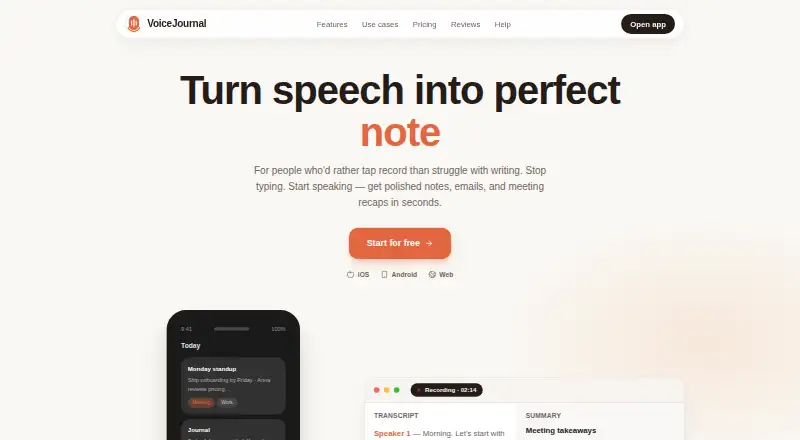
What VoiceJournal is
VoiceJournal turns spoken thoughts, meetings, and audio into notes that can be searched, reshaped, and shared. You can record in the app, capture through WhatsApp, paste a YouTube link, or import an audio file. For meetings, VoiceJournal describes recording without a bot and provides transcripts with speaker labels and summaries. Smart tags, folders, instant search, and Ask AI help organize and query recorded notes. Notes can be rewritten as emails, tweets, summaries, SOAP notes, or formats specified in custom prompts. The service detects spoken language, including changes mid-sentence, and says it can translate notes into 90+ languages. Recording works offline, and a mindmap feature provides a visual way to explore ideas. Integrations include Zapier, webhooks, Notion, public note pages, and an MCP connection for Claude, ChatGPT, and Cursor. It is available on Android, iOS, and the web. The free plan has 10 notes total, a two-minute limit per recording, and basic AI transcription. Individual is $99.99 a year; Teams is $490.99 a year.
Who it suits
VoiceJournal suits people who want to turn meetings, lectures, personal recordings, or other spoken material into organized notes. Its listed use cases also include journaling, legal notes, to-do lists, and scripts.
What it does well
- Records offline and supports audio-file transcription.
- Search, tags, folders, and Ask AI organize notes.
- Rewrites notes into several formats and custom prompts.
- Translates notes into 90+ languages.
- Available on Android, iOS, and web.
What to know first
- Free plan is limited to 10 notes total.
- Free recordings are limited to two minutes each.
- Individual costs $99.99 a year.
- Teams costs $490.99 a year.
Limits
The free plan includes 10 notes total, recordings of up to two minutes, and basic AI transcription. Individual costs $99.99 a year and includes unlimited notes; Teams costs $490.99 a year and adds unlimited team members and shared workspaces.
Plans
| Plan | Billed and limits | Price |
|---|---|---|
| Free | $0 forever · 10 notes total · 2 min per recording · Basic AI transcription | Free |
| Teams | $490.99 per year · Everything in Individual · Unlimited team members · Shared workspaces | $490.99 a year |
| Individual | $99.99 per year · Unlimited notes · YouTube & WhatsApp Bot · Meetings · Mindmap · Ask AI | $99.99 a year |
As voicejournal.io lists them, read 15 Oct 2026. The maker's own page has the final word.
Getting started
- Visit the VoiceJournal website.
- Choose the web version or use the Android or iOS app.
- Start with the free plan or choose Individual or Teams.
- Record in the app, capture through WhatsApp, paste a YouTube link, or import an audio file.
- Organize notes with tags and folders, then search or reshape them as needed.
VoiceJournal suits people who turn speech, meetings, and audio into notes they can organize and reuse. Its many ways to capture and reshape material make it more than a recorder, but the free plan is best treated as a brief trial of the workflow.
Overview
VoiceJournal brings recording, transcription, organization, and rewriting together on Android, iOS, and the web. It can serve someone who journals by voice as well as someone turning a meeting or lecture into follow-up writing. That range is useful if you want one service for capture and reuse; it is less compelling if all you need is a basic recorder.
Key features
Capture can start with an in-app recording, a WhatsApp route, a YouTube link, or an audio file. For meetings, VoiceJournal describes recording without a bot and transcripts with speaker labels and summaries. These routes cover spontaneous thoughts and material from elsewhere, but the free plan's two-minute recording limit makes it unsuitable for longer meetings or lectures.
Smart tags, folders, and instant search help keep a growing note collection usable. Ask AI works across recorded notes, while rewrites can shape them into emails, tweets, summaries, SOAP notes, or output guided by a custom prompt. Mindmaps provide a visual way to work with ideas. Together, these tools favor people who need to turn captured speech into several kinds of finished material, not just store a transcript.
VoiceJournal says it detects speech language, including mid-sentence changes, and translates notes into 90+ languages. Offline recording is useful when a connection is unavailable, though the stated offline capability is recording. Zapier, webhooks, Notion, and public pages support sending or sharing notes; through MCP, Claude, ChatGPT, and Cursor can search, rewrite, and create notes. The service describes itself as private by default. These claims make it relevant to varied workflows, but the product's breadth may be unnecessary for someone who only wants occasional voice memos.
Pricing
The Free plan costs nothing, billed $0 forever. It allows 10 notes total and recordings up to 2 minutes, with Basic AI transcription. That is enough to try short captures, but not a practical allowance for regular note-taking or full meetings.
Individual costs $99.99 a year, billed $99.99 per year. It includes unlimited notes, YouTube and WhatsApp Bot, meetings, Mindmap, and Ask AI. It is the relevant step up for an individual who needs sustained use and the broader capture and analysis tools; the free tier gives up those capabilities and imposes strict note and recording caps.
Teams costs $490.99 a year, billed $490.99 per year. It includes everything in Individual, unlimited team members, and shared workspaces. Teams is aimed at groups that need a shared workspace rather than solo users; the published price is annual, and no per-seat charge is stated. VoiceJournal also describes a 7-day trial, but no separate trial terms are given.
Platforms
VoiceJournal is available on Android, iOS, and the web, with a mobile app and offline recording. That combination suits people who move between phone and browser, while offline capture helps when connectivity drops.
Who it's for
Choose VoiceJournal if you regularly capture spoken thoughts, meetings, or source audio and want to search, translate, summarize, and rewrite that material in one place. Its SOAP-note formats and meeting tools may suit professional or study workflows, while its range of outputs also supports journaling and social posts. Look elsewhere if you need long recordings without paying or only want a simple recorder.
Pros and cons
- Pro: Multiple capture routes, including WhatsApp, YouTube links, and audio import, give users more than one way to bring material into the service.
- Pro: Search, folders, tags, Ask AI, and several rewrite formats support finding and reusing notes after capture.
- Pro: Offline recording and support for 90+ languages broaden its usefulness across settings and languages.
- Con: The free plan allows only 10 notes total and two-minute recordings, sharply limiting ongoing use.
- Con: Individual costs $99.99 a year, a meaningful commitment for someone who needs only basic transcription.
Alternatives
AI Voice Note Apps is a useful place to compare options across the category. AudioPen may fit someone who wants a simpler recording-and-rewrite workflow: its free plan supports recordings up to 3 minutes, transcription, and rewrite, but has limited voice-typing sessions.
Voicenotes is worth considering if a defined weekly transcription allowance and 30-day history suit your needs better; its Basic plan includes 100 weekly transcription minutes and unlimited recordings. Audionotes is another freemium option for voice and text notes.
Cleft is a narrower iOS and macOS alternative with on-device transcription, tags, search, and export on its free plan, which allows five-minute recordings. Memex may appeal if a free-to-download Android or iOS app is the priority, though its AI features require a configured model service that may incur provider charges.
Memoth, Murble, and PlancyAI are other options to compare; choose among them based on the workflows and limits that matter to you.
Verdict
VoiceJournal is a strong fit for people who want one place to capture speech through several routes, organize it, and turn it into useful writing. Its best reason to choose is that combination of meeting support, search, and flexible rewrites; its clearest reason to look elsewhere is the steep gap between the tightly capped free plan and the annual Individual price.
Verdict
VoiceJournal combines recording, transcription, organization, and rewriting in one service, with offline capture and multiple input routes. The free plan is tightly limited by note count and recording length; paid plans add broader capabilities and team features.
Questions
Is VoiceJournal free?
Yes. The Free plan costs nothing and is billed at $0 forever. It includes 10 notes total, a two-minute limit per recording, and basic AI transcription.
How much do the paid plans cost?
Individual costs $99.99 a year. Teams costs $490.99 a year.
Which platforms can I use?
VoiceJournal is available on Android, iOS, and the web.
Can I record without an internet connection?
Yes. VoiceJournal says users can record offline.
What integrations does VoiceJournal list?
It lists Zapier, webhooks, Notion, public pages, and an MCP integration for Claude, ChatGPT, and Cursor.
Can VoiceJournal translate notes?
VoiceJournal says it translates notes into 90+ languages and detects speech language, including mid-sentence changes.
Facts from VoiceJournal's own pages
- Android developer
- Google Play identifies the developer as Hamal Maksym Stepanovych and gives a Chernivtsi, Ukraine address. · play.google.com, 15 Oct 2026
- Android update
- Google Play shows version 1.0.3 updated on August 25, 2026. · play.google.com, 15 Oct 2026
- API access
- The OpenClaw integration uses a VoiceJournal API key supplied in the OpenClaw skill configuration or VOICEJOURNAL_API_KEY environment variable. · voicejournal.io, 15 Oct 2026
- Audio and mindmaps
- The product supports audio file transcription and includes a mindmap feature for visualizing ideas. · voicejournal.io, 30 Sept 2026
- Audio import
- Audio files can be uploaded for transcription from any device. · voicejournal.io, 15 Oct 2026
- Capture
- Users can record in the app, capture through WhatsApp, or paste a YouTube link. · voicejournal.io, 30 Sept 2026
- Capture methods
- Recording is available in the app, through WhatsApp, from the web, or by pasting a YouTube link. · voicejournal.io, 15 Oct 2026
- Company founder
- TrustMRR profiles Max Hamal as the founder behind VoiceJournal.io. · trustmrr.com, 15 Oct 2026
- Company revenue listing
- TrustMRR lists VoiceJournal.io with zero verified total revenue and zero MRR on the profile snapshot. · trustmrr.com, 15 Oct 2026
- Developer documentation
- The publicly indexed developer guidance covers OpenClaw setup and example commands, but no SDK is described on that page. · voicejournal.io, 15 Oct 2026
- Google Play data safety
- Google Play says the app may share personal information, may collect personal and financial information plus two other data types, encrypts data in transit and supports deletion requests. · play.google.com, 15 Oct 2026
- Google Play listing
- The Android listing describes one-tap recording, automatic transcription, AI rewrites, tags and search, with optional Premium billing. · play.google.com, 15 Oct 2026
- Independent technical assessment
- Build or Bill identifies the product as built by Max Hamal in Ukraine. · buildorbill.com, 15 Oct 2026
- Independent usage signal
- AppBrain lists the Android app as free, version 1.0.3, with one or more downloads and no user reviews. · appbrain.com, 15 Oct 2026
- Integrations
- The site lists WhatsApp Bot, Zapier, webhooks, Notion and public pages for moving or sharing notes. · voicejournal.io, 15 Oct 2026
- Languages
- VoiceJournal says it translates notes into 90+ languages and detects speech language, including mid-sentence language changes. · voicejournal.io, 30 Sept 2026
- License
- The pages reviewed do not state an open-source license or proprietary license. · voicejournal.io, 15 Oct 2026
- Limit: enterprise operations
- Build or Bill says a replacement would lack managed scaling, monitoring, uptime guarantees, commercial support and paid integrations. · buildorbill.com, 15 Oct 2026
- Limit: open-source availability
- Build or Bill states that no open-source build currently replaces VoiceJournal's full workflow. · buildorbill.com, 15 Oct 2026
- Limit: self-hosting
- Build or Bill says a self-hosted replacement would need to be built separately and that the commercial product's hosted scale and support are not supplied by such a replacement. · buildorbill.com, 15 Oct 2026
- MCP
- VoiceJournal says Claude, ChatGPT, and Cursor can search, rewrite, and create notes through its MCP integration. · voicejournal.io, 30 Sept 2026
- MCP integration
- VoiceJournal MCP lets Claude, ChatGPT and Cursor search, rewrite and create notes. · voicejournal.io, 15 Oct 2026
- Meeting notes
- The product records meetings without a bot and shows speaker-labelled transcripts with summaries and action items. · voicejournal.io, 15 Oct 2026
- Meetings
- The site describes meeting recording without a bot and shows transcripts with speaker labels and summaries. · voicejournal.io, 30 Sept 2026
Where VoiceJournal stands on Freedom251
- AI Voice Note Apps#15 of 27