Freedom251 › Digital Asset Management Software

Cirua
What Cirua is
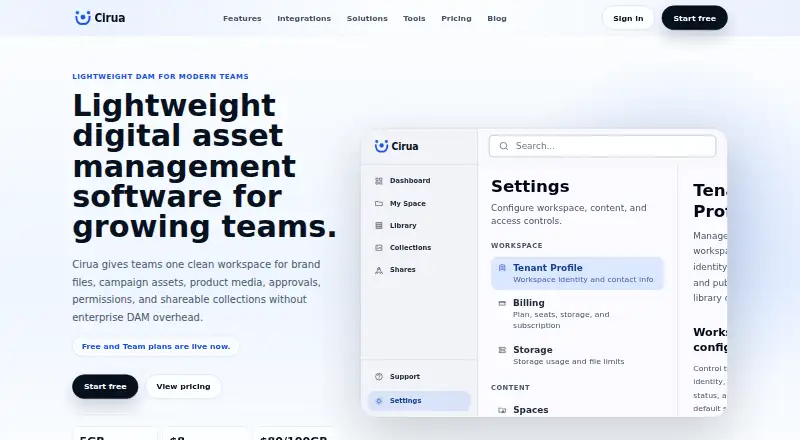
Cirua is a web-based digital asset management workspace for organizing, searching, approving and sharing brand and media assets. Its library can hold brand files, campaign assets, sales collateral and product media. Users can search by name, metadata, collection, file type or usage context, and organize assets with tags. Branded sharing links and portals can set access for teammates and external partners. The described workflow takes assets from upload through collections, metadata, permissions and approvals to controlled sharing. Microsoft OneDrive is the production-ready integration for approved files and team folders. SharePoint, Google Drive, Dropbox, Box, Amazon S3, Cloudflare R2, Azure Blob Storage and Google Cloud Storage are listed as in progress. The Always Free plan includes one user seat and 5 GB of workspace storage. Team costs $8.00 per month per seat and includes 20 GB per seat in storage. Enterprise is listed at $20.00 per month per seat but is marked as coming later, not currently available. Extra storage costs $80 per 100 GB per year across active plans. Cirua is aimed at growing teams that have outgrown shared folders but do not need enterprise DAM complexity.
Who it suits
Cirua suits growing marketing, sales, creative, operations and founder-led teams that need a shared library with search and controlled sharing. Its free and Team plans are self-serve.
What it does well
- Free plan includes one user seat and 5 GB storage
- Team includes 20 GB storage per seat
- Search by metadata, collections, file type or context
- Branded links and portals include access controls
- OneDrive integration is production-ready
What to know first
- Enterprise plan is not currently available
- Several listed storage integrations are still in progress
- Content approval workflows are unavailable
- Additional storage costs $80 per 100 GB per year
Limits
Always Free includes one user seat and 5 GB of workspace storage. Team includes 20 GB × seats in storage. Additional storage costs $80 per 100 GB per year across active plans.
Plans
| Plan | Billed and limits | Price |
|---|---|---|
| Always Free | $0 forever · 1 user seat · 5 GB workspace storage · personal asset library · folders, upload, preview, download, search, tags, metadata, collections, shareable links | Free |
| Team | $8 per seat / month · Unlimited team seats · 20 GB x seats included storage · shared library spaces · team roles and permissions · branded sharing links and buyer rooms · extra storage add-ons | $8 a month |
| Enterprise | $20 per seat / month · Coming later · Higher storage limits · brand portals · advanced permissions · workflow approvals · custom domain · SSO · dedicated onboarding · priority support · planned, not currently available | $20 a month |
As cirua.com lists them, read 29 Sept 2026. The maker's own page has the final word.
Getting started
- Access Cirua on the web.
- Start with Always Free or choose the self-serve Team plan.
- Upload assets to the central library.
- Organize files with collections, metadata, and tags.
- Connect Microsoft OneDrive for approved files and team folders.
- Share assets using controlled links or portals.
Cirua is a digital asset workspace for teams managing brand, campaign, sales, and product media. It is best suited to growing teams that need a shared library and controlled distribution without enterprise DAM complexity. Team is the practical plan for collaboration; the free tier is a small, single-user starting point.
Overview
Cirua brings different types of business assets into one searchable library. Users can find files by name, metadata, collection, file type, or usage context, then organize them with tags and collections. That flexibility can help teams move beyond folder structures where the right file is hard to locate. But teams that need content approval workflows should look elsewhere: those workflows are not currently offered.
Key features
Search and organization
Multiple search fields make the library useful when a teammate knows what an asset is for but not its filename. Folders, tags, metadata, and collections add structure; the Team plan makes library spaces shared rather than personal.
Controlled sharing
Branded sharing links and portals can be access-controlled for teammates and external partners. Team adds branded links and buyer rooms, a stronger fit for distributing collateral than simply opening a shared folder. The workflow includes approvals as a step, but Cirua does not currently provide content approval workflows.
Integration
Microsoft OneDrive is the production-ready integration, connecting approved files and team folders. SharePoint, Google Drive, Dropbox, Box, Amazon S3, Cloudflare R2, Azure Blob Storage, and Google Cloud Storage are in progress. Teams whose assets depend on another one of those services should not assume that connection is ready.
Pricing
Cirua is freemium. Always Free costs nothing, billed at $0 forever, and includes one user seat, 5 GB of workspace storage, a personal asset library, folders, upload, preview, download, search, tags, metadata, collections, and shareable links. It is useful for an individual testing a basic library, but its single seat and 5 GB cap rule it out as a shared team workspace.
Team costs $8 a month, billed at $8 per seat / month. It includes unlimited team seats, 20 GB x seats included storage, shared library spaces, team roles and permissions, branded sharing links and buyer rooms, and extra storage add-ons. This is the plan for teams that need collaboration and controlled sharing. Additional storage costs $80 per 100 GB per year across active plans, so growing libraries add a separate annual expense. The pricing page offers paid plans two months free with annual billing from 07/01/2026 through 12/31/2026; during that period Team is billed as 10 months.
Enterprise is planned, not currently available. Its listed price is $20 a month, billed at $20 per seat / month, with higher storage limits, brand portals, advanced permissions, workflow approvals, a custom domain, SSO, dedicated onboarding, and priority support. Teams needing those capabilities now cannot buy them through Cirua. Support is self-serve on Always Free and standard on Team; priority support is planned for Enterprise. Free and Team are self-serve, without a sales-led rollout or custom onboarding.
Platforms
Cirua is available on the web.
Who it's for
Cirua is aimed at growing marketing, sales, creative, and operations teams, as well as founder-led businesses, that have outgrown shared folders but do not need enterprise DAM complexity. It is less suitable for teams that require content approvals today, rely on an integration still in progress, or need Enterprise capabilities immediately.
Pros and cons
- Pros: Search by metadata, collection, file type, and usage context gives teams more ways to find assets than filenames alone.
- Pros: Team combines unlimited seats, shared library spaces, roles, and controlled branded sharing for collaborative use.
- Pros: Free provides a no-cost personal library with core organization and search tools.
- Cons: Free is limited to one seat and 5 GB, making it unsuitable for team collaboration.
- Cons: OneDrive is the only production-ready integration, which may constrain teams using other storage services.
- Cons: Content approval workflows are not currently offered, and the more advanced Enterprise features remain planned.
Alternatives
Sales Content Management Software and Digital Asset Management Software are broader categories to explore when comparing tools for those needs. YourShowroom is another freemium option, with a free plan for up to 3 users and 10 GB; it may suit smaller teams prioritizing those published limits. Airstride is a freemium partner-management option with a free plan for up to 3 partners, including deal management, account mapping, and CRM integration, so it is a better match for partner workflows. Attach offers a free plan limited to 3 documents, a narrower starting point for document sharing. Content Camel has a free Solo plan for one user with a content library, basic search, collections, and one published site; consider it when a published site is central to the workflow. Dock has a free plan with 10 workspaces and caps on CMS assets, slides, playbooks, courses, and order forms, making it an option for teams comparing a limited deal-desk workspace. Bigtincan Digital Sales Rooms is another option for Digital Sales Rooms and Shares. Templafy Email Signature Management focuses on email signature management. Enablix is another paid option.
Verdict
Choose Cirua if a growing team wants one searchable, shared home for brand and sales assets, with controlled branded distribution and a self-serve route into Team. Its central library and collaborative plan are the main reasons to choose it over loose folders. Look elsewhere if content approvals, a non-OneDrive integration, or currently available enterprise controls are essential.
Verdict
Cirua offers a searchable shared asset library and controlled sharing for growing teams. The free plan is limited to one seat and 5 GB; Team expands seats and storage, while Enterprise is not yet available.
Questions
Does Cirua have a free plan?
Yes. Always Free costs nothing and includes one user seat and 5 GB of workspace storage.
How much does Team cost?
Team is $8 a month per seat. It includes unlimited team seats and 20 GB × seats in storage.
Which platforms and integrations are available?
Cirua is web-based. Microsoft OneDrive is the production-ready integration; SharePoint, Google Drive, Dropbox, Box, Amazon S3, Cloudflare R2, Azure Blob Storage, and Google Cloud Storage are in progress.
Does Cirua support approval workflows?
Content approval workflows are marked unavailable.
Is Enterprise available?
Enterprise is planned for later at $20 a month per seat. Its planned features include higher storage limits, brand portals, advanced permissions, workflow approvals, custom domain, SSO, dedicated onboarding, and priority support.
How much does extra storage cost?
Additional storage costs $80 per 100 GB per year across active plans.
Facts from Cirua's own pages
- Annual billing offer
- The pricing page says paid plans receive two months free with annual billing from 07/01/2026 through 12/31/2026, and Team is billed as 10 months during that period. · cirua.com, 29 Sept 2026
- Central library
- The central asset library supports brand files, campaign assets, sales collateral, and product media. · cirua.com, 29 Sept 2026
- Company
- The About page describes Cirua’s mission as helping growing teams keep approved brand, campaign, product, and sales assets organized, searchable, and shareable. · cirua.com, 29 Sept 2026
- Free plan
- Yes · cirua.com, 20 Sept 2026
- Integration available
- Microsoft OneDrive is the production-ready integration for connecting approved files and team folders. · cirua.com, 29 Sept 2026
- Integrations in progress
- SharePoint, Google Drive, Dropbox, Box, Amazon S3, Cloudflare R2, Azure Blob Storage, and Google Cloud Storage are listed as in progress. · cirua.com, 29 Sept 2026
- Intended users
- Cirua is aimed at growing marketing, sales, creative, operations, and founder-led teams that have outgrown shared folders but do not need enterprise DAM complexity. · cirua.com, 29 Sept 2026
- Product
- Cirua is a lightweight digital asset management workspace for organizing, searching, approving, and sharing brand and media assets. · cirua.com, 29 Sept 2026
- Search
- Users can search by name, metadata, collection, file type, or usage context and organize assets with tags. · cirua.com, 29 Sept 2026
- Self-serve
- The maker says Free and Team are self-serve plans and users can start without a sales-led rollout or custom onboarding. · cirua.com, 29 Sept 2026
- Sharing and permissions
- Cirua offers branded sharing links and portals, with access controls for teammates and external partners. · cirua.com, 29 Sept 2026
- Paid from
- 8 · cirua.com, 20 Sept 2026
- Storage add-on
- Additional storage is priced at $80 per 100 GB per year across active plans. · cirua.com, 29 Sept 2026
- Support
- The pricing comparison lists self-serve support for Always Free and standard support for Team; priority support is planned for Enterprise. · cirua.com, 29 Sept 2026
- Workflow
- The maker describes a workflow to upload assets, organize them with collections, metadata, permissions, and approvals, then share controlled links and portals. · cirua.com, 29 Sept 2026
Where Cirua stands on Freedom251
- Digital Asset Management Software#39 of 151
- Sales Content Management Software#7 of 26