Freedom251 › AI Audio Restoration Software
Cathar
What Cathar is
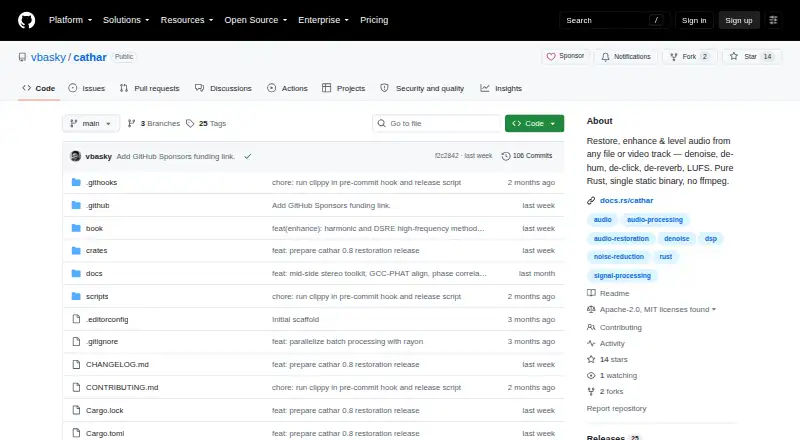
Cathar is a free audio restoration toolkit for Linux and macOS. It handles WAV, MP3, FLAC, OGG and M4A files, as well as audio tracks inside MP4 and MKV video, and can write WAV, FLAC or AIFF output. Its restoration tools address noise, hum, wind, clicks, clipping, reverb, plosives, rustle and spectral problems. For voice and sound refinement, it offers de-essing, breath removal, voice isolation and bandwidth extension. LUFS loudness and peak normalization help prepare levels for delivery. Cathar is written in pure Rust and does not rely on ffmpeg, C or C++ code, or system libraries. Its processing stages are inspectable and adjustable DSP, rather than opaque neural models. Developers can use effects through the Rust crate or run Cathar as a command-line stage in a media pipeline. An optional feature adds a deterministic GRU denoiser using safetensors weights. Optional terminal features provide an audio player and spectrogram viewer; Linux playback requires ALSA headers. The project is licensed under Apache 2.0 or MIT and lists v0.8.0 as its latest release.
Who it suits
Cathar suits Linux and macOS users who need to clean and level recordings, including those assembling media pipelines or working directly with Rust audio functions.
What it does well
- Reads common audio files and tracks inside MP4 or MKV.
- Includes denoise, de-hum, de-click and spectral repair.
- Provides LUFS and peak normalization.
- Can run in-process or as a pipeline command.
- Optional GRU denoiser and terminal spectrogram viewer.
What to know first
- Linux playback requires ALSA headers.
- The project describes its 0.8.x series as before 1.0.
Limits
Cathar's listed platforms are Linux and macOS. The project describes its 0.8.x series as being before 1.0; Linux playback for optional terminal tools requires ALSA headers.
Getting started
- Visit the project at https://github.com/vbasky/cathar
- Install the command-line binary with cargo install cathar-cli from crates.io
- Use the cathar Rust crate for in-process effects or invoke the command-line tool in a media pipeline
- Choose supported input files and an output filename ending in WAV, FLAC, or AIFF
- Enable optional features for machine-learning denoising or terminal tools as needed
Cathar is a free audio restoration toolkit for cleaning, enhancing and leveling recordings on Linux and macOS. It is best suited to Rust developers and teams building repeatable audio pipelines who want adjustable processing they can inspect. Its wide repair toolkit is a strong draw; its pre-1.0 status makes it a less settled choice for critical production workflows.
Overview
Cathar handles common recording problems, from hum and wind to clicks, clipping and reverberation, and adds voice enhancement and delivery-leveling tools. It supports batch processing, so it can serve recurring collections of recordings as well as individual jobs. Inputs include WAV, MP3, FLAC, OGG and M4A, plus audio tracks inside MP4 and MKV; output is WAV, FLAC or AIFF, chosen by the output filename extension.
This is a toolkit rather than a finished desktop editing suite. Processing stages are inspectable, tunable DSP, which suits users who need control over how a pipeline treats audio. The pure-Rust implementation avoids ffmpeg, C and C++ code, and system libraries—a useful fit for Rust-based workflows, though it does not by itself guarantee compatibility with every target environment.
Key features
Repair and enhancement
Restoration functions cover denoise, de-hum, de-wind, de-click, de-clip, de-reverb, spectral repair, de-plosive and de-rustle. De-essing, breath removal, voice isolation and bandwidth extension extend the toolkit beyond noise cleanup. That range is useful for mixed recording problems, while users looking for a visual, desktop-first editing workflow should look elsewhere.
Leveling and pipeline use
LUFS loudness normalization and peak normalization help prepare audio for delivery. Effects are plain functions over audio sample slices: developers can call them in-process through the cathar crate, or place the cathar command between stages in a media pipeline. This makes Cathar particularly practical for software teams that want restoration alongside their own processing, rather than a separate editing environment.
Optional tools
An optional ml feature adds a GRU-based denoiser with open safetensors weights and deterministic inference implemented in Rust. It is an additional option, not the toolkit’s default DSP approach. Optional tui features provide a terminal audio player and interactive spectrogram viewer; Linux playback requires ALSA headers, a dependency worth noting for minimal systems.
The command-line binary can be installed with cargo install cathar-cli from crates.io. The project also includes an illustrated book explaining its concepts and comparing them with tools including iZotope RX, Audition, Audacity, SoX and FFmpeg. Cathar is in the 0.8.x series, before 1.0, and its latest GitHub release is v0.8.0.
Pricing
Cathar is free, with a free plan and no free trial. The optional machine-learning denoiser and terminal features are feature options within the project, not separately priced plans. There are no paid tiers or plan quotas to weigh; the tradeoff is that users need to work with a toolkit and its command-line or Rust integration rather than a packaged desktop suite.
Platforms
Cathar supports Linux and macOS. The terminal player’s Linux playback requires ALSA headers. Its standalone workflow can be used as a command-line stage, while Rust projects can use the cathar crate in-process.
Who it's for
Cathar is a strong fit for Rust developers, audio teams and technically inclined users who need batch-capable restoration, adjustable DSP and pipeline integration without a software fee. It is less suitable for people seeking a polished desktop editor, or for teams that need a settled 1.0 release for production-critical work.
Pros and cons
- Pros: A broad restoration and voice-enhancement toolkit, including spectral repair, de-clip and voice isolation, covers more than basic noise reduction.
- Pros: Inspectable DSP and both in-process and command-line integration support controlled, repeatable workflows.
- Pros: Free use, batch processing and several common input and output formats make it practical for multi-file cleanup without a plan cost.
- Cons: The toolkit-oriented interface is a poor match for users who want a conventional desktop editing suite.
- Cons: Cathar remains pre-1.0, which may give production teams reason to prefer a more established workflow.
- Cons: Linux users who want the optional terminal player need ALSA headers.
Alternatives
Audio Restoration Software is a broader category to explore when comparing restoration tools. For a focus on machine-learning-led options, see AI Audio Restoration Software.
VinylRest is another free option for Linux and macOS, with web support as well; its VinylRest Live beta requires a license for processing and allows up to three active Mac installations. Neiro is also free and supports Linux, macOS, self-hosted, web and Windows deployments.
Choose CEDAR Cambridge if you want a paid modular hardware and software system with configurable options; pricing is custom. Vinyl Restoration Suite is a free alternative for Windows, macOS and Linux. Wave Corrector is free and supports Windows and Linux, while @audio/denoise is a free web option. Algorithmix Sound Laundry is a paid Windows alternative, and PD Cleaner is a free option for Windows.
Verdict
Choose Cathar if you need a free, broad audio-cleanup toolkit that can be inspected and built into a Linux or macOS pipeline, especially if Rust integration matters. Its combination of restoration, enhancement and leveling is compelling for that audience. Look elsewhere if you need a desktop-first editing suite or a more mature release for production-critical work.
Verdict
Cathar combines a broad set of restoration and enhancement tools with inspectable DSP and pipeline integration. It is free, with optional machine-learning denoising and terminal features.
Questions
Is Cathar free?
Yes. Cathar is listed as free, with a Free plan.
Which platforms does Cathar support?
The listed platforms are Linux and macOS.
What audio formats does Cathar accept and produce?
It accepts WAV, MP3, FLAC, OGG, and M4A, plus audio tracks in MP4 and MKV. It writes WAV, FLAC, or AIFF.
Is Cathar open source?
Cathar is licensed under either Apache License 2.0 or MIT.
Who makes Cathar?
The repository owner is Vikram Bhaskaran.
Does Cathar have a machine-learning denoiser?
An optional ML feature provides a deterministic GRU-based denoiser that loads safetensors checkpoints.
Facts from Cathar's own pages
- Current release
- The GitHub releases page lists cathar v0.8.0 as the latest release. · github.com, 30 Sept 2026
- Documentation
- The project includes an illustrated Cleaning Up Sound book explaining its concepts and comparing it with tools such as iZotope RX, Audition, Audacity, SoX and FFmpeg. · github.com, 30 Sept 2026
- DSP approach
- Its processing stages are inspectable and tunable DSP rather than opaque neural models. · github.com, 30 Sept 2026
- enhancement
- Its enhancement functions include de-essing, breath removal, voice isolation, and bandwidth extension. · github.com, 2 Oct 2026
- formats
- It reads WAV, MP3, FLAC, OGG, M4A, MP4, and MKV inputs and writes WAV, FLAC, or AIFF. · github.com, 2 Oct 2026
- implementation
- Cathar is implemented in pure Rust with no ffmpeg, C/C++, or system-library dependencies. · github.com, 2 Oct 2026
- Input formats
- It accepts WAV, MP3, FLAC, OGG and M4A files, plus audio tracks inside MP4 and MKV video. · github.com, 30 Sept 2026
- Installation
- The command-line binary can be installed with cargo install cathar-cli from crates.io. · github.com, 30 Sept 2026
- integration
- The toolkit can be called in-process through the cathar Rust crate or invoked as a command-line stage in a media pipeline. · github.com, 2 Oct 2026
- latest_release
- The GitHub releases page lists cathar v0.8.0 as the latest release. · github.com, 2 Oct 2026
- leveling
- Cathar supports LUFS and peak normalization for delivery. · github.com, 2 Oct 2026
- license
- The project is licensed under either Apache License 2.0 or MIT. · github.com, 2 Oct 2026
- Machine-learning denoise
- An optional ml feature adds a GRU-based denoiser whose open safetensors weights and deterministic inference are implemented in Rust. · github.com, 30 Sept 2026
- maker
- The repository owner is Vikram Bhaskaran, whose profile describes him as a technologist and lists Sydney. · github.com, 2 Oct 2026
- ml_denoise
- An optional ml feature provides a deterministic GRU-based denoiser that loads safetensors checkpoints. · github.com, 2 Oct 2026
- Output formats
- It writes WAV, FLAC or AIFF output selected by the output filename extension. · github.com, 30 Sept 2026
- Pipeline integration
- Effects are plain functions over audio sample slices and can run in-process through the cathar crate or as a cathar command between pipeline steps. · github.com, 30 Sept 2026
- purpose
- Cathar is an audio restoration toolkit for noisy recordings and video audio tracks. · github.com, 2 Oct 2026
- restoration
- Its restoration functions include denoise, de-hum, de-wind, de-click, de-clip, de-reverb, spectral repair, de-plosive, and de-rustle. · github.com, 2 Oct 2026
- roadmap
- Cathar is in the 0.8.x series and is described as being before 1.0. · github.com, 2 Oct 2026
- Terminal tools
- Optional tui features provide a terminal audio player and interactive spectrogram viewer; Linux playback requires ALSA headers. · github.com, 30 Sept 2026
- tui
- Optional tui features provide a terminal audio player and interactive spectrogram viewer. · github.com, 2 Oct 2026
Where Cathar stands on Freedom251
- AI Audio Restoration Software#5 of 22
- Audio Restoration Software#7 of 24