Freedom251 › Audio Restoration Software
Vinyl Restoration Suite
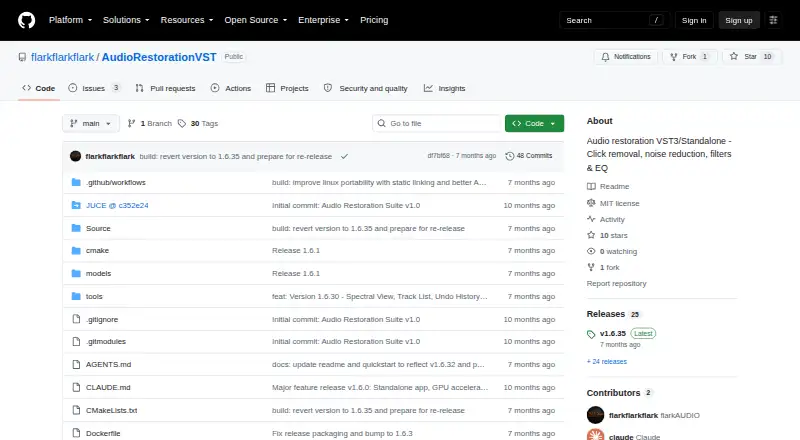
What Vinyl Restoration Suite is
Vinyl Restoration Suite is a free, open-source audio restoration plugin and standalone application for Linux, macOS, and Windows. It detects and repairs clicks and pops using crossfade and spline interpolation, and provides RNNoise-based AI denoising with DirectML and NPU acceleration. Real-time FFT noise reduction includes noise profile capture. A 10-band graphic equalizer covers 31 Hz to 16 kHz, while dedicated filters target subsonic rumble from 5–150 Hz and AC power line hum from 40–80 Hz. The application can record audio directly and split tracks at silence. Real-time waveform and spectral views help monitor processing, and Difference Mode plays the noise and clicks being removed. Use it as a VST3 plugin with a DAW or as a standalone app. Pre-built binaries are listed for all three operating systems; the macOS DMG is described as universal for Intel and ARM. The repository lists an MIT license, which provides the software “AS IS” and disclaims warranties and liability.
Who it suits
It may suit people restoring recordings who want click, pop, noise, or hum reduction on desktop systems. It offers both a standalone workflow and VST3 use with a DAW.
What it does well
- Free under an MIT license
- Provides standalone and VST3 formats
- Includes click, pop, noise, and hum tools
- Pre-built binaries listed for Linux, macOS, and Windows
What to know first
- MIT license disclaims warranties and liability
- Source builds require CMake 3.22 or later
- Source builds require a C++17-compatible compiler and JUCE
Limits
The free plan is the MIT-licensed standalone app and VST3 plugin. The MIT license provides the software “AS IS” and disclaims warranties and liability.
Plans
| Plan | Billed and limits | Price |
|---|---|---|
| Free | MIT License · standalone app and VST3 | Free |
As github.com lists them, read 8 Oct 2026. The maker's own page has the final word.
Getting started
- Visit the project at https://github.com/flarkflarkflark/AudioRestorationVST.
- Download a pre-built binary for Linux, macOS, or Windows.
- For DAW use, place the VST3 files in the DAW’s VST3 folder.
- For independent use, launch the standalone application.
- To build from source, use CMake 3.22 or later, a C++17-compatible compiler, and JUCE as a submodule.
Overview
Vinyl Restoration Suite is a desktop restoration tool for cleaning recordings, whether you prefer a standalone app or a VST3 plugin in a DAW. It suits vinyl owners and audio editors who want several repair methods in one free package. Its broad toolkit is appealing, but it is not a browser-based choice.
Key features
Automatic click and pop repair uses crossfade and spline interpolation, while an RNNoise-based AI denoiser supports DirectML and NPU acceleration. Real-time FFT noise reduction with noise-profile capture provides a separate, profile-based approach. Having both methods gives users more than one route for unwanted noise, though the suite does not promise that every recording will respond equally well.
A 10-band graphic EQ covers 31 Hz to 16 kHz. Dedicated filters target subsonic rumble from 5–150 Hz and AC power-line hum from 40–80 Hz, making the tool useful beyond surface clicks. The standalone app can record audio and split tracks automatically at silences, a practical fit for transferring and cleaning material without a DAW.
Real-time waveform and spectral views show the signal, and Difference Mode plays the noise and clicks being removed. That listening check helps users judge whether cleanup is also taking material they want to keep. The choice of standalone or VST3 workflow is flexible, but plugin use requires a compatible DAW and the project’s VST3 installation instructions.
Pricing
Free — free. The MIT-licensed plan includes the standalone app and VST3, with noise reduction, click and crackle removal, and hum removal. There is no paid tier or trial to weigh against it. The license provides the software “AS IS” and disclaims warranties and liability, a meaningful caveat for anyone relying on it for important work.
Platforms
Pre-built binaries are available for Linux, macOS, and Windows; the macOS DMG is described as universal for Intel and ARM. Source builds require CMake 3.22 or later, a C++17-compatible compiler, and JUCE as a submodule, so compiling it is a more involved path than using a binary.
Who it's for
Choose it if you want desktop vinyl cleanup with both automated and profile-based noise reduction, dedicated hum and rumble filters, recording, and track splitting at no cost. It is less suitable if you need a web workflow or prefer a tool limited to one simple repair task.
Pros and cons
- Pros: A free plan combines click repair, AI and FFT noise reduction, hum filtering, EQ, and recording in one package.
- Pros: Standalone and VST3 formats accommodate independent use or a DAW workflow across three desktop operating systems.
- Cons: The MIT license disclaims warranties and liability, which may matter for users depending on the software for consequential work.
- Cons: Source compilation has specific toolchain and JUCE requirements, adding friction for users who cannot use a pre-built binary.
Alternatives
Audio Restoration Software is a useful directory starting point for comparing tools. Choose VinylRest if Linux, macOS, or web access is important; its VinylRest Live beta requires a license for processing and allows up to three active Mac installations. @audio/denoise is the browser-based option, with a free plan that runs locally in the browser without an account or upload. PD Cleaner is another free, open-source choice for Windows 64-bit users who want no account and no trial.
Wave Corrector is worth considering for Linux or Windows users seeking a tool inspired by the same restoration lineage; its Professional Edition is free for personal use and requires no registration. Neiro is another free option spanning Linux, macOS, self-hosted, web, and Windows. Cathar is a free alternative for Linux and macOS. For a paid modular hardware-and-software system on macOS or Windows, consider CEDAR Cambridge; its configuration varies and pricing is custom. Algorithmix Sound Laundry is a paid alternative for Windows.
Verdict
Vinyl Restoration Suite is a strong fit for vinyl listeners and editors who want a versatile desktop cleanup workflow without a purchase price. Its combination of repair tools and standalone or VST3 use is the main reason to choose it; look elsewhere if you need browser access or cannot accept the MIT license’s warranty and liability disclaimer.
Verdict
Vinyl Restoration Suite combines several restoration tools with standalone and plugin workflows across three desktop operating systems. The MIT license’s warranty and liability disclaimer is worth noting before use.
Questions
How much does Vinyl Restoration Suite cost?
The listed Free plan costs nothing.
Is Vinyl Restoration Suite open source?
Yes. The repository lists an MIT license.
Which platforms are available?
Pre-built binaries are listed for Linux, macOS, and Windows. The macOS DMG is described as universal for Intel and ARM.
Can I use it with a DAW?
Yes. It is available as a VST3 plugin, with instructions to copy the plugin files into a DAW’s VST3 folder. A standalone application is also available.
What does it do for audio restoration?
It detects and repairs clicks and pops, reduces noise, and provides filters for subsonic rumble and AC power line hum. It also includes recording, automatic track splitting at silence, and real-time waveform and spectral views.
Who makes it?
The maker identifies as flarkAUDIO and says they create music, audio tools, plugins, and experimental projects.
Facts from Vinyl Restoration Suite's own pages
- AI denoise
- The AI-powered denoiser is based on RNNoise and supports DirectML and NPU acceleration. · github.com, 8 Oct 2026
- Click and pop repair
- It automatically detects and repairs clicks and pops using crossfade and spline interpolation techniques. · github.com, 8 Oct 2026
- Click repair
- It detects and repairs clicks and pops using crossfade and spline interpolation techniques. · github.com, 8 Oct 2026
- Denoising
- Its RNNoise-based AI denoiser supports DirectML and NPU acceleration. · github.com, 8 Oct 2026
- Equalizer
- The suite includes a 10-band graphic EQ with frequency control from 31 Hz to 16 kHz. · github.com, 8 Oct 2026
- Filters
- Dedicated filters target subsonic rumble from 5–150 Hz and AC power line hum from 40–80 Hz. · github.com, 8 Oct 2026
- Formats
- The project lists VST3 and standalone application formats, with instructions to copy VST3 files into a DAW's VST3 folder. · github.com, 8 Oct 2026
- License
- The repository's MIT license grants permission to use, copy, modify, publish, distribute, sublicense, and sell the software, subject to its conditions. · github.com, 8 Oct 2026
- License limitation
- The MIT license provides the software “AS IS” and disclaims warranties and liability. · github.com, 8 Oct 2026
- macOS support
- The macOS DMG is described as universal for Intel and ARM. · github.com, 8 Oct 2026
- Maker
- The maker identifies as flarkAUDIO and says they create music, audio tools, plugins, and experimental projects. · github.com, 8 Oct 2026
- Monitoring
- Difference mode lets users listen to the noise and clicks being removed, and the app provides real-time waveform and spectral views. · github.com, 8 Oct 2026
- Operating systems
- Pre-built binaries are listed for Linux, macOS, and Windows. · github.com, 8 Oct 2026
- Platforms
- Pre-built releases are listed for Linux, macOS, and Windows. · github.com, 8 Oct 2026
- Plugin format
- The product is available as a VST3 plugin and a standalone app for use with a DAW or independently. · github.com, 8 Oct 2026
- Product
- Vinyl Restoration Suite is an audio restoration plugin and standalone application inspired by Wave Corrector. · github.com, 8 Oct 2026
- Purpose
- Vinyl Restoration Suite is an audio restoration plugin and standalone application with AI-powered noise reduction. · github.com, 8 Oct 2026
- Recording
- The app can record audio directly and split tracks automatically based on silence. · github.com, 8 Oct 2026
- Source build
- The project provides source build instructions requiring CMake 3.22 or later, a C++17-compatible compiler, and JUCE as a submodule. · github.com, 8 Oct 2026
- Spectral processing
- Real-time FFT-based noise reduction includes noise profile capture. · github.com, 8 Oct 2026
- Visual tools
- The app provides real-time waveform and spectral views and a Difference Mode for listening to removed noise and clicks. · github.com, 8 Oct 2026
Where Vinyl Restoration Suite stands on Freedom251
- Audio Restoration Software#6 of 24