Freedom251 › Audio Restoration Software

@audio/denoise
What @audio/denoise is
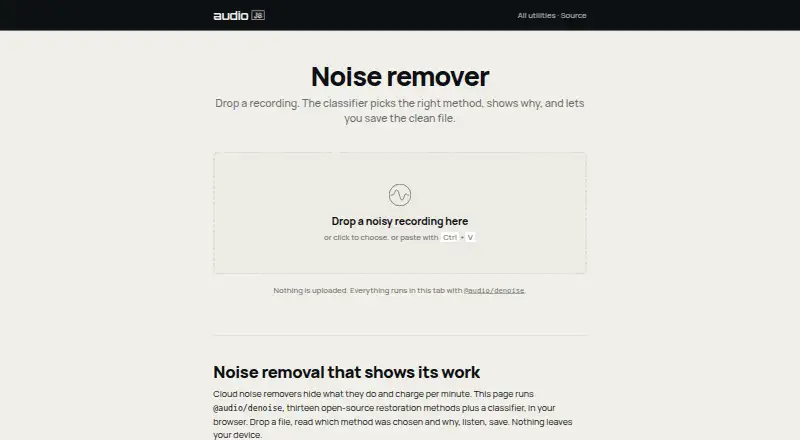
@audio/denoise is a free browser-based tool for cleaning recordings and listening to or saving the result. It uses classical signal processing rather than AI noise removal, and the page says processing happens in the browser without uploading audio. Automatic mode measures properties of a recording, selects a specialized method, and shows the chosen plan. Users can also select methods such as dehum, declick, declip, and gate themselves.
The page describes thirteen open-source restoration methods and a classifier. Targets include steady background noise, mains hum, clicks, pops, vinyl crackle, clipping, wind rumble, plosives, sibilance, room reverb, and noise between phrases. For music, it can address hum, clicks, crackle, and clipping; broadband denoising should be used lightly and compared with the original. Machine learning models may do better with heavy speech-over-noise. Automatic mode does not select dereverb, which users must choose explicitly. The associated package can be installed with npm and processes mono Float32Array audio in and out.
Who it suits
It suits people cleaning recordings in a browser, including those addressing hum, clicks, crackle, or clipping in music. Developers can also use the associated npm package to process mono Float32Array audio.
What it does well
- Runs in the browser without uploading audio.
- Automatic mode shows its selected processing plan.
- Users can select restoration methods manually.
- Targets hum, clicks, crackle, and clipping.
- Free and requires no account.
What to know first
- May be less effective for heavy speech-over-noise than machine learning models.
- Automatic mode does not select dereverb.
- Broadband denoising should be used lightly and checked against the original.
- Batch processing is not available.
Limits
The free plan runs in the browser, with no account and no upload. Batch processing is unavailable, and automatic mode does not select dereverb.
Plans
| Plan | Billed and limits | Price |
|---|---|---|
| Free | Runs in browser · no account · no upload | Free |
| Free browser noise remover | Local browser processing · no upload · save cleaned file | Free |
As audiojs.dev lists them, read 7 Oct 2026. The maker's own page has the final word.
Getting started
- Open https://audiojs.dev/util/denoise/ in a web browser.
- Use automatic mode to see the selected method, or choose a method manually.
- Listen to the processed audio and save the result.
- For developer use, install the package with npm and process mono Float32Array audio.
Overview
@audio/denoise is a web tool for cleaning recordings and listening to or saving the result. It suits people who want to address a defined audio problem without sending recordings off-device. Its focused repairs are more compelling than its fit for speech buried under heavy noise.
Key features
Thirteen open-source restoration methods and a classifier give users two ways into a repair: automatic mode measures the recording, chooses a specialized method and shows its plan, while manual selection lets users pick methods such as dehum, declick, declip or gate. The automatic recommendation can help narrow the starting point, but it is not a substitute for choosing deliberately: it does not select dereverb, which must be enabled manually.
The target list covers steady background noise, mains hum, clicks, pops, vinyl crackle, clipping, wind rumble, plosives, sibilance, room reverb and noise between phrases. That breadth makes it useful for several common recording defects, including music repair. The approach is classical signal processing, not AI noise removal; for speech competing with heavy noise, machine-learning models can do better.
For music, hum, clicks, crackle and clipping are particularly direct use cases. Broadband denoising calls for restraint: compare the processed result with the original rather than assuming stronger reduction is better.
Processing runs in the browser, and audio does not leave the device. That is a meaningful choice for recordings users do not want to upload, while keeping the tool’s scope to local browser use. Developers can also install the package with npm; its documented input and output are mono Float32Array audio, a narrower integration path than a general-purpose file-processing interface.
Pricing
The Free plan costs nothing, with no account required. It includes noise reduction, click and crackle removal, hum removal, declip repair and spectral repair. The absence of batch processing matters for anyone cleaning a large library: this is better suited to individual repair work than a bulk workflow. No paid plan is described.
Platforms
The user-facing tool runs on the web. Browser processing avoids uploading audio, but the documented developer package is specifically for mono Float32Array audio in and out.
Who it's for
Choose @audio/denoise for browser-based cleanup of hum, clicks, crackle, clipping or other targeted defects, especially when keeping audio on-device matters. It is also a reasonable starting point for users comfortable comparing an automatic recommendation with manual method selection. Look elsewhere if the priority is batch processing or speech restoration under heavy noise.
Pros and cons
- Pros: Browser processing keeps recordings on the device, with no account or upload required.
- Pros: Thirteen specialized methods cover both common noise problems and music defects such as clicks, crackle and clipping.
- Pros: Automatic recommendations and manual method choice support both guided and targeted repairs.
- Cons: Automatic mode skips dereverb, so room-reverb treatment requires a manual choice.
- Cons: There is no batch processing, limiting its usefulness for large collections.
- Cons: Heavy speech-over-noise is a weak spot compared with machine-learning approaches.
Alternatives
For a broader comparison, browse Audio Restoration Software; for transcription-focused tools, see Music Transcription Software.
VinylRest is another free option, with Linux, macOS and web platforms. PD Cleaner is a free, open-source Windows 64-bit option with no account or trial. Neiro is free and spans Linux, macOS, self-hosted, web and Windows platforms. Cathar is a free Linux and macOS alternative. CEDAR Cambridge is a paid modular hardware and software system for macOS and Windows, with configuration-dependent options and custom pricing. Vinyl Restoration Suite is a free option for Windows, macOS and Linux. Wave Corrector offers a no-charge Professional Edition for personal use on Linux and Windows. Algorithmix Sound Laundry is a paid Windows alternative.
Verdict
@audio/denoise is a strong fit for people who want free, local browser cleanup for specific recording defects, especially hum, clicks, crackle or clipping. Its on-device processing and choice of specialized methods are the main reasons to choose it. For heavy speech noise or bulk cleanup, look elsewhere.
Verdict
@audio/denoise offers browser-based restoration with automatic and manual method selection, without uploading recordings. Its page notes limits for heavy speech-over-noise and says dereverb must be selected manually.
Questions
Is @audio/denoise free?
Yes. Its Free plan costs nothing.
What platforms does it support?
The listed platform is web.
Does it upload recordings?
No. Processing runs in the browser, and the page says nothing is uploaded or leaves the device.
Does it use AI noise removal?
The page says processing uses classical signal processing rather than AI noise removal.
Can I use it for music?
The page says hum, clicks, crackle and clipping can be treated in music. It recommends using broadband denoising lightly and comparing with the original.
Is there a developer package?
Yes. The repository describes an npm package with thirteen specialized methods and an auto-classifier, processing mono Float32Array audio in and out.
Facts from @audio/denoise's own pages
- Automatic API
- The denoise function can return cleaned samples, a classifier plan, or be forced to a named method. · github.com, 15 Oct 2026
- Automatic classifier
- The classifier evaluates hum, click density, rumble, noise-floor stability and sibilance before selecting a method. · audiojs.dev, 15 Oct 2026
- Automatic mode
- A classifier selects a specialized method based on measured properties of the recording and shows its plan. · audiojs.dev, 7 Oct 2026
- Automatic mode limit
- The repository says automatic mode does not select dereverb; users must choose it explicitly. · github.com, 7 Oct 2026
- Browser workflow
- Users can drop or paste a recording, inspect the selected method and plan, audition the result and save the cleaned file. · audiojs.dev, 15 Oct 2026
- Classical DSP
- The product states that its methods use classical signal processing rather than AI models. · audiojs.dev, 15 Oct 2026
- Click repair
- Clicks, pops and crackle are detected and reconstructed with LPC-based interpolation. · audiojs.dev, 15 Oct 2026
- Clipping repair
- The package can detect clipping levels automatically and reconstruct clipped waveform sections. · audiojs.dev, 15 Oct 2026
- Developer demo
- The repository includes a self-contained demo.html for selecting scenarios, choosing methods, viewing waveforms and hearing differences. · npmjs.com, 15 Oct 2026
- Developer use
- The repository documents installing the package with npm and processing mono Float32Array audio in and out. · github.com, 7 Oct 2026
- Hiss processing
- Hiss and fan noise can be treated with Wiener or MMSE-LSA processing, or OM-LSA when speech is present. · audiojs.dev, 15 Oct 2026
- Hum processing
- The dehum method tracks 50 or 60 Hz mains frequencies and their harmonics with adaptive notch or sinusoidal subtraction processing. · audiojs.dev, 15 Oct 2026
- Input and output
- The JavaScript API accepts and returns mono Float32Array audio; stereo should be processed channel by channel. · npmjs.com, 15 Oct 2026
- Installation
- Installation is documented with npm using `npm install @audio/denoise`. · github.com, 15 Oct 2026
- License
- The repository and npm metadata state that the package is released under the MIT license. · github.com, 15 Oct 2026
- Limit
- The page says machine learning models can do better for heavy speech-over-noise. · audiojs.dev, 7 Oct 2026
- Limit: automatic dereverb
- Automatic routing does not select dereverb because the documentation says it lacks a reliable single-pass signature; dereverb must be selected explicitly. · github.com, 15 Oct 2026
- Limit: data shape
- The core API is sample-array based and does not provide a hosted upload service or graphical desktop editor in the package documentation. · npmjs.com, 15 Oct 2026
- Limit: heavy speech noise
- The maker cautions that machine-learning models can outperform these classical methods for heavy speech-over-noise cases. · audiojs.dev, 15 Oct 2026
- Limit: single-pass operations
- The package describes itself as single-pass noise reduction, and several operations such as desqueak are documented as whole-clip rather than streaming processors. · github.com, 15 Oct 2026
- Maker history
- The home page dates audiojs maintenance to 2016 and describes the stack as cross-runtime JavaScript for browser, Node, Deno and Bun. · audiojs.dev, 15 Oct 2026
- Maker scale
- The audiojs home page states more than 300 open-source packages and over 9 million npm downloads per month. · audiojs.dev, 15 Oct 2026
- Manual selection
- Users can choose methods such as dehum, declick, declip and gate by hand. · audiojs.dev, 7 Oct 2026
- Methods
- The page describes thirteen open-source restoration methods plus a classifier. · audiojs.dev, 7 Oct 2026
Where @audio/denoise stands on Freedom251
- Audio Restoration Software#2 of 24