Freedom251 › AI Audio Restoration Software
Selekt Audio Restoration
What Selekt Audio Restoration is
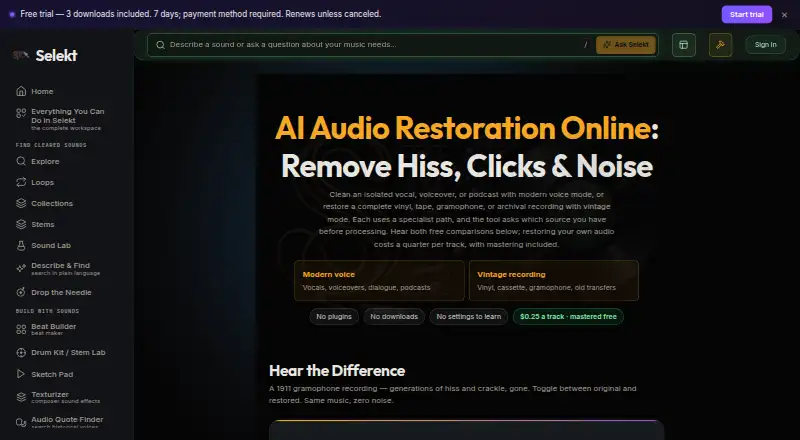
Selekt Audio Restoration is a browser-based tool for cleaning audio. Modern voice mode targets steady room noise in isolated vocals, voiceovers, and podcasts. Vintage mode is intended for full recordings and transfers, targeting hiss, hum, crackle, clicks, and surface noise. After restoration, users can optionally master the track at no extra charge and compare or download the original, restored, and mastered versions. It accepts MP3, WAV, FLAC, M4A, and OGG files up to 250 MB. The restoration page says a track costs a quarter to restore, with mastering included, and also shows a 0.5 credit ($0.50) call to action. Uploads are processed privately and not added to the catalog. Results appear in My Library → Studio Results and can be streamed or downloaded for 48 hours. One limitation matters: voice mode treats non-voice audio as noise, so a full mix may need a vocal stem separated first. Selekt lists a free plan, a 7-day trial, and paid access from $5/mo.
Who it suits
It suits producers, composers, video creators, podcasters, and game developers who need to clean isolated voice or vintage recordings in a browser. Those working from a full mix should account for voice mode’s preference for voice-only audio.
What it does well
- Targets noise in voice and vintage recordings.
- Optional mastering and version comparison are free.
- Accepts five audio formats up to 250 MB.
- Uploads are processed privately, not added to the catalog.
- Results can move to Stem Lab and Drum Kit.
What to know first
- Voice mode expects voice-only audio.
- Results remain available for only 48 hours.
- Paid access starts at $5/mo.
Limits
The Free plan does not include fresh upload processing. The Free Trial lasts seven days, requires a payment method, and includes three tool credits and three total catalog or quote downloads; paid allowances begin after successful payment. Restored results remain available to stream or download for 48 hours.
Plans
| Plan | Billed and limits | Price |
|---|---|---|
| Free Trial | 7 days; payment method required; then $5/month or $50/year unless canceled · 3 tool credits · 3 catalog/quote downloads · trial library access | Free |
| Free | catalog browsing · full listening · provenance viewing · instant browser utilities · no catalog downloads or fresh upload processing | Free |
| Audio Restoration processing | per uploaded track; mastering included · one restoration run · optional stems cost additional credits | $0.25, paid once |
| Early Access | $5/month; annual option $50/year · 50 catalog downloads/month · 15 studio credits/month · full studio · rate locked while subscribed | $5 a month |
| Early Access monthly | monthly; price locked while subscription remains active · 50 catalog downloads/month · 15 studio credits/month · browser utilities · certificates and reports | $5 a month |
| Early Access annual | annual; price locked while subscription remains active · 50 catalog downloads/month · 180 studio credits granted annually · browser utilities · certificates and reports | $50 a year |
As selektaudio.com lists them, read 15 Oct 2026. The maker's own page has the final word.
Getting started
- Open the Audio Restoration page in a browser.
- Choose the Free Trial or Early Access plan for studio processing; the trial requires a payment method.
- Upload an MP3, WAV, FLAC, M4A, or OGG file up to 250 MB.
- Choose modern voice or vintage mode for the recording.
- Optionally master the cleaned track or choose stems to split the audio.
- Open My Library → Studio Results to stream or download the result within 48 hours.
Selekt Audio Restoration is a browser-based tool for cleaning isolated speech and complete vintage recordings. It is best suited to creators who want both restoration modes in one connected audio workspace. Its practical appeal is optional mastering at no extra charge; the main caveats are voice-only input for modern mode and a 48-hour window to retrieve results.
Overview
Choose modern voice mode for isolated vocals, voiceovers or podcasts with steady room noise, and vintage mode for full recordings affected by hiss, hum, crackle, clicks or surface noise. The distinction is important: voice mode treats anything other than voice as noise, so it is not a good choice for an unseparated mix. Selekt recommends separating a vocal stem first when you only have the full mix.
Uploads can be MP3, WAV, FLAC, M4A or OGG files up to 250 MB. After restoration, users can compare or download the original, restored and optionally mastered versions. Results are in My Library → Studio Results and remain available to stream or download for 48 hours, so this is a workflow that rewards prompt retrieval.
Uploads are processed privately, used to produce the result and not added to the catalog or used to train models. Selekt's privacy policy describes TLS/SSL encryption in transit and infrastructure access controls. The browser workflow connects to other Selekt tools, including Stem Lab and Drum Kit, which may be useful to users already working in its audio workspace.
Key features
Separate voice and vintage modes
Voice mode targets steady room noise in isolated speech, while vintage mode targets common recording and surface defects in complete recordings. This gives podcasters and voiceover creators a focused option without making it the right tool for every mix: voice mode can remove wanted music or other non-voice sound. Users can choose stems to split restored audio as well.
Optional mastering and comparison
Mastering can be applied to a cleaned track for free. Comparing or downloading the original, restored and mastered versions makes it easier to retain the source alongside the processed result, though the 48-hour availability window means users should save files they want to keep.
Private browser processing
Selekt says uploads stay private and are not put in its catalog or used to train models. The policy also describes encryption in transit and infrastructure access controls. This may suit creators handling recordings they do not want added to a public catalog, while the browser-only format is less suitable for anyone who needs a desktop plugin; plugin support is not offered.
Pricing
Selekt uses a freemium model, with paid access from $5/mo and a 7-day trial. The restoration page says a track costs a quarter to restore, with mastering included, and also displays a call to action for 0.5 credit ($0.50). The pricing options and processing allowance matter more than the low entry price for anyone planning regular work.
- Free: free. It includes catalog browsing, full streaming, sample provenance and instant browser utilities, but no catalog downloads or fresh upload processing. This is for exploring the workspace, not restoring new audio.
- Free Trial: free, billed 7 days free; then $5/month or $50/year unless canceled. A payment method is required. It includes 3 tool credits and 3 total catalog/quote downloads; paid allowances begin after successful payment. Cancel before renewal if you do not want the paid term.
- Early Access: $5 a month, billed $5/month, with an annual option of $50/year. It includes 50 catalog downloads/month, 15 studio credits/month and full studio access; the rate is locked while subscribed. This is the fit for recurring restoration and broader studio use, but its monthly credits cap processing.
The free plan cannot process fresh uploads, while the trial's three credits are limited. The per-track wording and 0.5-credit call to action do not align neatly, so users should check the credit cost before relying on a particular restoration quota.
Platforms
Selekt Audio Restoration runs on the web. Its 250 MB file limit accommodates larger recordings than small-upload tools, but the lack of plugin support means it is not an in-session desktop restoration option.
Who it's for
The tool is aimed at producers, composers, video creators, podcasters and game developers. It is especially suitable for creators cleaning isolated voice recordings or vintage transfers who can work in a browser and download finished files promptly. It is a weaker fit for full-mix vocal cleanup without stem separation, long-term result storage, or users who want a plugin-based workflow.
Pros and cons
- Pro: Two modes address distinct jobs, from steady room noise in speech to hiss, hum and surface defects in vintage recordings.
- Pro: Optional mastering is free, and users can compare the original, restored and mastered versions.
- Pro: Private processing keeps uploads out of the catalog and away from model training, according to Selekt.
- Con: Voice mode expects voice-only audio, so cleaning vocals from an unseparated mix can remove wanted non-voice sound.
- Con: Results remain available for only 48 hours, making timely downloads necessary.
- Con: The free plan does not process new uploads, and the trial includes only 3 tool credits.
Alternatives
AI Audio Restoration Software is the category list for readers comparing restoration tools more broadly.
- Neural Analog may suit readers who need API, Linux, macOS, web or Windows access; its free plan limits uploads to 50 MB and processing to 6 minutes/month.
- Decrackle Audio AI is worth considering for a free web, API or self-hosted option; its free plan offers 30 minutes of processing/month, 10 MB storage and MP3 output only.
- Denoise may fit mobile users who want to import and hear a full before/after preview on Android or iOS, though saving and exporting require Pro.
- MusiCraft AI Audio Enhancer is another web-based freemium option.
- PD Cleaner is a free, open-source Windows 64-bit option that requires no account.
- Cathar is a free option for Linux and macOS.
- CEDAR Cambridge is a paid modular hardware and software system for macOS and Windows, with configuration-dependent pricing.
- Cine Sound is a paid web-based alternative.
Verdict
Choose Selekt Audio Restoration if you need browser-based cleanup for isolated voice or vintage recordings and value free optional mastering within a connected audio workspace. Look elsewhere if you need to clean vocals from a full mix without separating a stem, keep results available beyond 48 hours, or work through a desktop plugin.
Verdict
Selekt Audio Restoration offers separate approaches for voice recordings and vintage audio, with optional mastering and private processing. Check the voice-only requirement and 48-hour result window against your workflow.
Questions
How much does restoration cost?
Selekt lists paid access from $5/month and an annual option at $50/year. The restoration page says a track costs a quarter with mastering included and also displays a 0.5 credit ($0.50) call to action.
Is there a free plan or trial?
Yes. The Free plan includes catalog browsing, full streaming, sample provenance, and instant browser utilities, but no fresh upload processing. The seven-day Free Trial requires a payment method and includes three tool credits.
Which platforms and audio formats are supported?
The tool runs on the web. It accepts MP3, WAV, FLAC, M4A, and OGG files up to 250 MB.
How long are restored files available?
Results appear in My Library → Studio Results and remain available to stream or download for 48 hours.
Are uploads private?
Uploads are stored privately, used solely to produce the result, and not added to the catalog or used to train models. The privacy policy describes TLS/SSL encryption in transit and infrastructure access controls.
Can modern voice mode process a complete mix?
Modern voice mode treats anything that is not voice as noise and expects voice-only audio. Selekt recommends separating a vocal stem first when only a full mix is available.
Facts from Selekt Audio Restoration's own pages
- API and SDK status
- The site exposes public certificate pages under /api/cert/, but no public API or SDK documentation is provided on the pages reviewed. · selektaudio.com, 15 Oct 2026
- Audience
- Selekt describes its workspace as intended for producers, composers, video creators, podcasters and game developers. · selektaudio.com, 3 Oct 2026
- Catalog size
- The catalog contains more than 100,000 recordings, loops, stems and sound effects from CC0, public-domain and CC-BY sources. · selektaudio.com, 15 Oct 2026
- Certificates
- Eligible catalog downloads include signed certificates documenting source, license, screening evidence and attribution requirements, with a tamper-evident audit chain. · selektaudio.com, 15 Oct 2026
- Company location signal
- A LinkedIn services profile for Marcus Kelley lists him in Richmond, Virginia and identifies Selekt Audio as one of his current software projects. · linkedin.com, 15 Oct 2026
- Company operator
- The privacy policy identifies the service operator as Selekt Audio. · selektaudio.com, 15 Oct 2026
- Connected tools
- The workspace currently connects 35 live tools and workflows, although other official pages display lower counts such as 28. · selektaudio.com, 15 Oct 2026
- Copyright screening
- Catalog candidates are fingerprint-screened against more than 150 million commercial recordings and matches are withheld. · selektaudio.com, 15 Oct 2026
- Desktop companion
- The FAQ describes Selekt Studio as a free desktop app that automatically organizes downloaded samples by genre, BPM and key and supports drag-and-drop into a DAW. · selektaudio.com, 15 Oct 2026
- Independent domain fact
- Gridinsoft reports that selektaudio.com was registered on April 1, 2026 through Cloudflare with registrant details withheld. · gridinsoft.com, 15 Oct 2026
- Independent infrastructure fact
- Scam Detector lists the domain's country as the United States, state as Virginia, and registrar as Cloudflare, Inc. · scam-detector.com, 15 Oct 2026
- Independent risk assessment
- Scam Detector assigned selektaudio.com a 30.3/100 medium-risk score while noting valid HTTPS and no blacklist detection. · scam-detector.com, 15 Oct 2026
- Independent security assessment
- Gridinsoft gave selektaudio.com a 70/100 trust score, citing no major malware or phishing detections, active SSL and a relatively new domain as a caution. · gridinsoft.com, 15 Oct 2026
- Independent social footprint
- Gridinsoft reports a verified Selekt Audio YouTube channel with five subscribers, three videos and 61 total views at its check. · gridinsoft.com, 15 Oct 2026
- Independent technical assessment
- Gridinsoft identified the site as a React and Next.js web application with installable web-app behavior. · gridinsoft.com, 15 Oct 2026
- Input formats and size
- Audio Restoration accepts MP3, WAV, FLAC, M4A and OGG files up to 250 MB. · selektaudio.com, 15 Oct 2026
- Integration and workflow
- Selekt describes restoration as a focused browser workflow within its connected audio workspace, and says results can move to other tools such as Stem Lab and Drum Kit. · selektaudio.com, 3 Oct 2026
- Integrations
- Selekt's Custom Mix page directs serious production users to export stems into Ableton Live, FL Studio, Logic Pro or another DAW. · selektaudio.com, 15 Oct 2026
- Licence
- Selekt's product interface, brand and AI models are proprietary; catalog samples are separately licensed from public-domain, CC0 or CC-BY sources. · selektaudio.com, 15 Oct 2026
- Limit: AI quality
- The terms warn that automated metadata may be inaccurate and separated stems can contain artifacts inherent to the separation process. · selektaudio.com, 15 Oct 2026
- Limit: clearance guarantee
- Selekt states that screening and certificates are evidence rather than a legal guarantee and that users remain responsible for verifying rights in their jurisdiction. · selektaudio.com, 15 Oct 2026
- Maker history
- The About page says Selekt began with a cleared catalog for producers, beatmakers and composers, but does not state a founding year or headquarters. · selektaudio.com, 3 Oct 2026
- Mastering
- Users can optionally master the cleaned track for free and compare or download the original, restored and mastered versions. · selektaudio.com, 3 Oct 2026
- Mode limitation
- Modern voice mode expects voice-only audio because it treats anything that is not voice as noise; the page recommends separating a vocal stem first when only a full mix is available. · selektaudio.com, 3 Oct 2026
Where Selekt Audio Restoration stands on Freedom251
- AI Audio Restoration Software#7 of 22