Freedom251 › Sales Appointment Scheduling Software
Buildout Schedule
What Buildout Schedule is
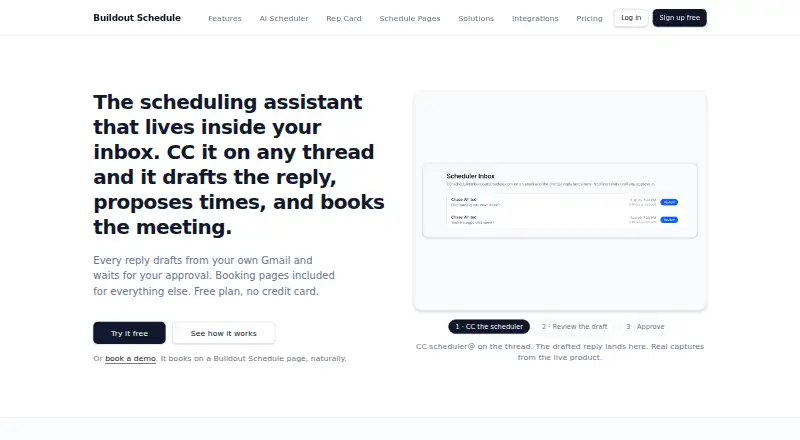
Buildout Schedule is a hosted scheduling assistant that can be copied on an email thread to draft replies, suggest available times, and book meetings after approval. Schedule Pages gather multiple event types under one shareable URL, while Rep Cards pair booking with a profile and contact details. Calendar connections include Google Calendar, Outlook/Microsoft 365, and Zoom; the product also lists Google Meet and generated meeting links. Bookings can collect payments through the customer's Stripe account, with a stated 0% platform fee. Slack notifications and SMS reminders through the customer's Twilio account are also listed. Monthly AI scheduler draft limits are 10 on Free, 50 on Solo, 100 per person on Pro, and 500 per person on Team. There is no public REST API, though hosted pages and cards can be linked or embedded. Free is available; Solo costs $9 a month and Pro costs $16 a month. The product is presented for solo operators and teams in areas including coaching, consulting, real estate, home services, and sales.
Who it suits
Buildout Schedule suits solo operators and teams that arrange appointments by email or booking pages. Listed use cases include coaches, consultants, real estate agents, home services, and sales teams.
What it does well
- Can draft email replies and propose available times.
- Combines multiple event types on a shareable page.
- Stripe bookings have a stated 0% platform fee.
- Lists Google, Microsoft, and Zoom integrations.
- Offers a free plan.
What to know first
- No public REST API is available.
- Free plan allows 10 AI drafts monthly.
- SMS reminders use the customer's Twilio account.
Limits
The Free plan includes one meeting type and 10 AI scheduler drafts per month. Solo includes 50 drafts per month, Pro includes 100 per person, and Team includes 500 per person; AI Unlimited removes monthly caps on scheduler drafts and meeting transcript summaries when attached to a paid plan.
Plans
| Plan | Billed and limits | Price |
|---|---|---|
| Free | $0/mo · 1 meeting type · Google Calendar sync · public booking page · email confirmations/reminders · Stripe payments at 0% platform fee · 10 AI drafts/month | Free |
| Pro | $16/person/mo · Custom workflows · collective and round-robin events · Zoom and Google Meet · single-use links · waitlists · 100 AI drafts/person/month | $16 a month |
| AI Unlimited | $19/person/mo · Removes monthly caps on scheduler drafts and transcript summaries · requires a paid plan | $19 a month |
| Team | $30/person/mo · Routing forms · managed events/workflows · custom domain · team pages · leaderboard · admin roles · 500 AI drafts/person/month | $30 a month |
| Solo | $9/mo · Unlimited meeting types · SMS reminders · booking analytics · custom web addresses · 1 seat · 50 AI drafts/month | $9 a month |
| Enterprise Agent Access | Starts at $997/mo · Metered access for AI agents · 10,000 agent bookings | $997 a month |
| Enterprise | Custom · Session policy, MFA and IP controls · managed templates · uncapped AI drafts/transcripts · metered agent access · priority support | On request |
As buildoutschedule.com lists them, read 15 Oct 2026. The maker's own page has the final word.
Getting started
- Open the Buildout Schedule website.
- Choose Free or a paid plan; the Free plan has no trial requirement listed and a free plan is available.
- Connect a listed calendar such as Google Calendar or Outlook/Microsoft 365.
- Create a Schedule Page or Rep Card to share booking options.
- Connect your Stripe account if you want bookings to collect payment.
Buildout Schedule is a hosted tool for managing appointments through email and shareable booking pages. It is best suited to solo operators and teams that want approval-based scheduling and booking workflows; its appeal depends on whether its monthly AI draft allowance fits your volume.
Overview
CC the assistant on an email thread and it can draft a reply, suggest times, and book a meeting after approval. That keeps a person in control of the final step, while making the product particularly relevant to businesses that arrange appointments in email conversations.
Schedule Pages place multiple event types on one shareable URL, with four layouts. Rep Cards pair booking with profile and contact details. If someone cancels, the waitlist can offer the slot for a 24-hour claim window; Pocket Agent can also draft a rebooking note with three open times for approval.
Key features
Google Calendar and Meet, Outlook/Microsoft 365, and Zoom integrations support calendar sync and generated meeting links. Bookings can take payment through the customer’s Stripe account with a stated 0% Buildout Schedule platform fee. Slack notifications and SMS reminders are supported, with SMS using the customer’s Twilio account.
Qualification forms, round-robin routing, lead routing, and automated reminders support more structured appointment flows. The lack of CRM integrations is a clear drawback for teams that need booking activity connected to a CRM. There is also no public REST API, though hosted Schedule Pages and Rep Cards can be linked or framed for embedding.
Workspace isolation is enforced at the database, OAuth tokens are encrypted at rest with AES-256-GCM, and MFA and session controls are available. Card handling is by Stripe. These controls address important account and payment concerns, while Enterprise adds session policy, MFA, and IP rules.
Pricing
The Free plan costs nothing and includes one meeting type, Google Calendar sync, a public booking page, email confirmations and reminders, reschedule and cancel links, Stripe payments with a 0% platform fee, and 10 AI scheduler drafts per month. It is a sensible way to try the basic booking flow, but one event type and a small draft quota limit its usefulness for busier operators.
Solo costs $9 a month, billed monthly, and adds unlimited meeting types, text reminders, booking analytics, and custom web addresses. It includes one seat and 50 AI scheduler drafts per month. Annual billing is 20% off and two-year billing is 30% off, both charged up front. This is the natural step up for a solo operator who needs more event types and reminders, but not team workflows.
Pro costs $16 a month, billed monthly, with the same annual and two-year discounts charged up front. It adds custom email and text workflows, collective and round-robin events, Zoom and Google Meet, waitlists, and 100 AI drafts per person each month. It fits teams or appointment businesses that need coordinated booking, though draft limits still matter at higher volume.
AI Unlimited costs $19 a month and attaches to any paid plan, removing monthly caps on scheduler drafts and meeting transcript summaries. It is for users whose use would otherwise outgrow the included quota; the price is additional to a paid plan.
Team costs $30 a month, billed monthly, with the same upfront annual and two-year discounts. It includes everything in Pro plus routing forms, managed team events and workflows, a custom domain, team booking pages, admin roles and permissions, and 500 AI drafts per person per month. It is the more complete option for teams needing management controls and higher draft capacity.
Enterprise is custom pricing and includes everything in Team, workspace security controls, managed templates, no cap on AI drafts or transcripts, metered agent access, and priority support from the product team. Enterprise Agent Access is a separate metered plan at $997 a month for 10,000 agent bookings. There is no free trial; annual and two-year billing require upfront payment.
Platforms
Buildout Schedule is offered on web and through an API platform designation, although it has no public REST API. The practical embedding options are hosted Schedule Pages and Rep Cards.
Who it's for
The product is aimed at solo operators and teams, with use cases including coaches, trainers, contractors, consultants, med spas, real estate agents, home services, and sales teams. It suits appointment-led work that benefits from email-assisted booking, routing, and reminders. Businesses that depend on CRM integrations or a public API should look elsewhere.
Pros and cons
Pros
- Email-thread scheduling requires approval before a meeting is booked, preserving human control over commitments.
- Shareable pages, Rep Cards, waitlists, and cancellation recovery cover more of the booking lifecycle than a basic calendar link.
- Stripe payments carry a stated 0% platform fee, and the customer retains its own Stripe account.
- Pro and Team add routing and coordinated event options, with higher AI draft allowances for larger workflows.
Cons
- Monthly draft caps are 10 on Free, 50 on Solo, 100 per person on Pro, and 500 per person on Team; unlimited drafts require an additional paid add-on or Enterprise.
- No CRM integrations or public REST API make it a weaker fit for CRM-centered operations and custom integrations.
- Solo has one seat, and the discounts for annual or two-year terms are charged up front.
Alternatives
Sales Appointment Scheduling Software is the broader category to explore when comparing tools for sales booking workflows.
Choose Cal.com if unlimited event types, unlimited calendars, or more than 100 app integrations on a free plan matter more than Buildout Schedule’s email-assisted booking. Consider Schedly if a free plan with unlimited bookings is the priority and one user, one event type, one location, and one calendar connection are sufficient. Calendly is another freemium scheduling option, with a free plan capped at one event type and one calendar connection.
Intempt Marketing, Avoma, Kronologic, Setupp, and Jicoo are also alternatives to compare.
Verdict
Buildout Schedule is a strong fit for appointment-based operators who want to turn email conversations into approved bookings and combine that with shareable pages, payments, and team routing. Its main advantage is the breadth of booking workflows; its main reasons to look elsewhere are capped AI drafts on most plans, no CRM integrations, and no public REST API.
Verdict
Buildout Schedule combines email-assisted booking with shareable scheduling pages and several calendar integrations. Note the per-plan AI draft caps and the absence of a public REST API.
Questions
Is Buildout Schedule free?
Yes. The Free plan costs nothing and includes one meeting type, Google Calendar sync, a public booking page, and 10 AI scheduler drafts per month.
How much do the paid plans cost?
Solo costs $9 a month, Pro costs $16 a month, and Team costs $30 a month. Annual billing is 20% off and two-year billing is 30% off, charged up front.
Which platforms does Buildout Schedule support?
The listed platforms are web and API. The maker says there is no public REST API today; hosted Schedule Pages and Rep Cards can be linked or embedded.
Which calendar and meeting services are listed?
The integrations page lists Google Calendar and Meet, Outlook/Microsoft 365, and Zoom, including calendar sync and generated meeting links.
Can bookings collect payments?
Yes. Bookings can collect payments through the customer’s own Stripe account, with a stated 0% Buildout Schedule platform fee.
Who operates Buildout Schedule?
The About page describes it as a Buildout Studios scheduling product and names Chase Whited as its operator.
Facts from Buildout Schedule's own pages
- AI email scheduling
- Users copy scheduler@ on a thread, review a proposed reply, and approve it before it sends from their Gmail. · buildoutschedule.com, 15 Oct 2026
- AI limitation
- Terms say AI output can be imperfect and users are responsible for reviewing material messages before sending. · buildoutschedule.com, 15 Oct 2026
- AI rebooking
- Pocket Agent drafts replacement meeting times when someone cancels or asks to move a booking. · buildoutschedule.com, 15 Oct 2026
- AI scheduling limits
- Monthly AI scheduler draft limits are 10 on Free, 50 on Solo, 100 per person on Pro, and 500 per person on Team. · buildoutschedule.com, 4 Oct 2026
- Analytics
- Solo and higher plans include booking analytics, including funnel and page engagement information. · buildoutschedule.com, 15 Oct 2026
- API limitation
- The maker states there is no public REST API today; hosted Schedule Pages and Rep Cards can be linked or framed for embedding. · buildoutschedule.com, 4 Oct 2026
- Availability controls
- Hosts can configure working hours, buffers, minimum notice, booking horizons and date overrides per event type. · buildoutschedule.com, 15 Oct 2026
- Availability limitation
- The terms aim for high uptime but explicitly do not guarantee zero downtime. · buildoutschedule.com, 15 Oct 2026
- Booking pages
- Schedule Pages put multiple event types on one shareable URL with four layouts, while Rep Cards combine booking with a profile and contact details. · buildoutschedule.com, 4 Oct 2026
- Calendar and meeting integrations
- The integrations page lists Google Calendar and Meet, Outlook/Microsoft 365, and Zoom, including calendar sync and generated meeting links. · buildoutschedule.com, 4 Oct 2026
- Calendar integrations
- Google Calendar and Microsoft calendars block unavailable times and receive booked events. · buildoutschedule.com, 15 Oct 2026
- Cancellation recovery
- When a booking is canceled, the waitlist can receive the slot with a 24-hour claim window, and Pocket Agent can draft a rebooking message with three open times for approval. · buildoutschedule.com, 4 Oct 2026
- Company operating model
- Whited Consulting says its products are proven in an operating roofing business before being sold. · whited.consulting, 15 Oct 2026
- Contacts
- Bookings are associated with contacts and contacts can be imported from CSV or Google. · buildoutschedule.com, 15 Oct 2026
- Custom domains
- Paid tiers can use branded web addresses, while Team and Enterprise support a customer-owned domain through CNAME. · buildoutschedule.com, 15 Oct 2026
- Enterprise security
- Enterprise pricing lists session policy, MFA, and IP rules as workspace security controls. · buildoutschedule.com, 4 Oct 2026
- Founder
- Whited Consulting identifies Chase Whited as the founder and describes his background as an Air Force investigator, entrepreneur and K-12 SaaS seller. · whited.consulting, 15 Oct 2026
- Funding disclosure
- The reviewed company pages do not state venture funding, investment amounts or an acquiring owner. · whited.consulting, 15 Oct 2026
- Headquarters indication
- The Whited Consulting site lists Chattanooga, Tennessee in its footer. · whited.consulting, 15 Oct 2026
- Holding company description
- Whited Consulting describes itself as the holding entity behind its software studio, SaaS products and roofing company. · whited.consulting, 15 Oct 2026
- Hosted delivery
- Schedule Pages and Rep Cards are hosted and can be pointed to a customer domain with one CNAME. · buildoutschedule.com, 15 Oct 2026
- Integrations list
- The documented OAuth connections are Google Calendar, Microsoft, Zoom, Stripe, Slack and Twilio. · buildoutschedule.com, 15 Oct 2026
- Intended users
- The maker presents the product for solo operators and teams, with use cases including coaches, trainers, contractors, consultants, med spas, real estate agents, home services, and sales teams. · buildoutschedule.com, 4 Oct 2026
- Legal entity
- The service is identified as a product of Whited Consulting LLC operating under the Buildout Studios brand. · buildoutschedule.com, 15 Oct 2026