Freedom251 › Nonprofit Board Management Software

BoardSite
What BoardSite is
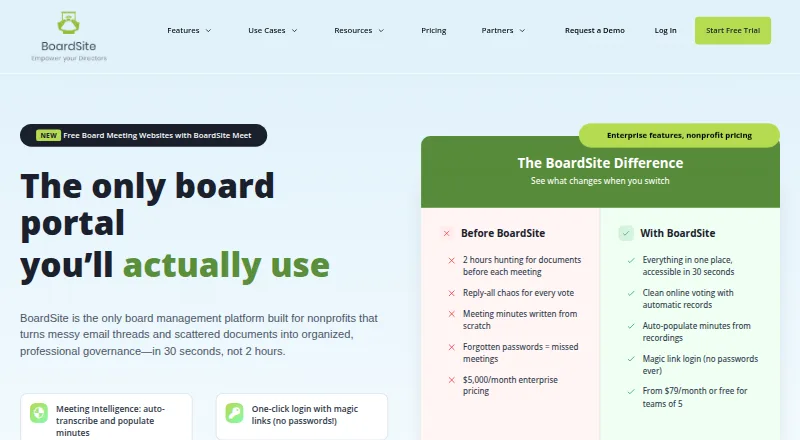
BoardSite is board management software for nonprofits, associations, and growing organizations. It brings governance tasks together with tools for meeting materials, agendas, minutes, attendance, RSVPs, discussions, and online voting. Votes can have notifications and deadlines, with results recorded and optional anonymity. The document library supports centralized storage, folders, meeting links, and version control, and connects with Google Drive, Dropbox, and OneDrive.
BoardSite offers Android, iOS, and web access. Its mobile apps support reviewing meeting materials, voting, discussions, and push notifications. Security features include app-based or SMS two-factor authentication, need-to-know access controls, and activity logs that cover actions such as logins and votes. Listed integrations include Zoom, Microsoft Teams, storage services, Slack notifications, and ICS calendar sync, with availability varying by plan.
Advanced and Enterprise plans include recording uploads, transcription, automatic minutes, and action-item detection; Enterprise also includes meeting summaries. The Free plan is billed forever and allows up to five users, 10 documents, and one vote per month. Paid plans start with Starter at $79 a month, billed annually. BoardSite also offers a free trial without requiring a credit card.
Who it suits
BoardSite suits nonprofit boards, associations, and growing organizations that need to organize meetings, documents, and voting. Its mobile apps can help members review materials, vote, and take part in discussions from Android or iOS devices.
What it does well
- Meeting tools cover agendas, minutes, attendance, and RSVPs.
- Online voting supports deadlines and optional anonymity.
- Document library includes folders and version control.
- Mobile apps are available for Android and iOS.
- The free trial does not require a credit card.
What to know first
- The Free plan is limited to five users and 10 documents.
- The Free plan includes one vote per month.
- Starter is $79 a month, billed annually.
- Integration availability varies by plan.
Limits
The Free plan allows up to five users, 10 documents, and one vote per month. Starter, billed annually at $79 a month, allows up to 12 users, three committees, 200 documents, and five votes per month.
Plans
| Plan | Billed and limits | Price |
|---|---|---|
| Free | forever · Up to 5 users · 10 documents · 1 vote/month | Free |
| Professional | paid annually · Up to 25 users · 10 committees · 1,000 documents · 15 votes/month · 10 e-signatures/month | $149 a month |
| Advanced | paid annually · Up to 50 users | $299 a month |
| Enterprise | paid annually · $599+ · Unlimited users | $599 |
| Starter | paid annually · Up to 12 users · 3 committees · 200 documents · 5 votes/month | $79 a month |
As boardsite.com lists them, read 28 Sept 2026. The maker's own page has the final word.
Getting started
- Visit the BoardSite website.
- Start the free trial without a credit card, or choose a plan.
- Invite board members within the user limit for the selected plan.
- Add meeting materials, agendas, or documents to the library.
- Use the Android or iOS app, or access BoardSite on the web.
Overview
BoardSite is governance software for organizations that need a shared place to prepare meetings, manage board documents, and run votes. It is most compelling for nonprofits and associations that want those workflows on web and mobile; its free tier is tightly capped, and the paid entry point is a substantial commitment for a small board.
Meeting administration is the product’s center of gravity, with document controls, voting, committee management, and mobile access extending the workflow. Founded in 2000, the company is headquartered in Alexandria, Virginia.
Key features
Meetings and follow-through
BoardSite supports materials, agendas, minutes, attendance, RSVPs, and meeting viewers. That combination can keep preparation and the official record in one place, rather than treating agendas and minutes as separate tasks. Online voting adds notifications, deadlines, recorded results, and optional anonymity, useful when decisions need a traceable process or confidential ballots.
Advanced and Enterprise add recording uploads, transcription, automatic minutes, and action-item detection; Enterprise also adds meeting summaries. These capabilities could reduce manual follow-up for organizations with frequent meetings, but they sit above the lower tiers and are not part of the basic offer.
Documents, access, and integrations
The library combines folders, meeting links, and version control with integrations for Google Drive, Dropbox, and OneDrive. Zoom, Microsoft Teams, Slack notifications, and ICS calendar sync are also listed, with availability varying by plan. This makes BoardSite a stronger fit for teams coordinating governance across existing tools than for buyers seeking a single fixed integration package across every tier.
App-based or SMS two-factor authentication, need-to-know access controls, and activity logs covering actions such as logins and votes provide governance-oriented safeguards. iOS and Android apps let members review materials, vote, join discussions, and receive push notifications, which is useful for boards whose members are not always at a desk.
Pricing
The Free plan costs nothing, billed forever, and permits 5 users, 10 documents, and 1 vote/month. It is a low-risk way to try the basic workflow with a very small board, but the document and vote ceilings make it unsuitable as a durable home for active governance.
Starter costs $79 a month, billed paid annually, for up to 12 users, 3 committees, 200 documents, and 5 votes/month. It is the entry paid tier for a small organization that needs more room than Free, though the annual billing and vote quota are worth weighing before choosing it.
Professional costs $149 a month, billed paid annually, and raises capacity to 25 users, 10 committees, 1,000 documents, 15 votes/month, and 10 e-signatures/month. It suits a larger or more active board that needs broader committee and document capacity. Advanced costs $299 a month, billed paid annually, for up to 50 users; it is also where meeting intelligence features begin. Enterprise is priced on request, billed paid annually, starts at $599+, and includes unlimited users and meeting summaries alongside the other meeting intelligence features.
A free trial is offered without a credit card. No duration is stated, so buyers should confirm the trial window before planning an evaluation. Starter and above include email support, Professional and above add chat, and Advanced and Enterprise add phone support.
Platforms
BoardSite is available on web, Android, and iOS. The mobile apps focus on member-facing work—reviewing meeting materials, voting, discussions, and push notifications—rather than simply extending administrative access to a phone.
Who it's for
Nonprofits, associations, and growing organizations are the clearest fit, particularly those that need agendas, minutes, committees, document versioning, and recorded votes in one governance workflow. Organizations with only a handful of users and occasional votes can start on Free, while boards exceeding 12 members or 5 monthly votes will need a paid tier. It is less suitable for buyers who need generous ongoing capacity without annual paid billing.
Pros and cons
- Pros: Meetings, controlled document storage, and voting are covered together, reducing the need to split core board work across separate workflows.
- Pros: Mobile apps support members reviewing materials and voting away from a desktop, with push notifications to draw attention to updates.
- Pros: Optional anonymous voting and activity logs support both confidential decisions and an auditable record of actions.
- Cons: Free is limited to 5 users, 10 documents, and 1 vote/month, so a board can outgrow it quickly.
- Cons: The first paid tier is $79 a month billed annually, while higher-end meeting intelligence starts at Advanced.
- Cons: User limits remain tiered through Advanced, and Enterprise is priced per contact rather than as a simple flat monthly rate.
Alternatives
For a broader comparison set, see Nonprofit Board Management Software.
Board I.V. is another freemium option with web and mobile apps; its maker says it was built by someone with 40 years inside nonprofit boardrooms. Board Management is worth considering if macOS or Windows support matters, while BoardKite is a web-only freemium alternative with a stated Core plan at €39 a month. NonprofitBase is a paid web option with a 14-day trial, and NonprofitBOD offers a free web plan for one board and up to five members.
Board Manager is a web alternative with a free starter tier for up to 25 members and candidates, but no free trial. My Board View is a free web option, while Hippoly offers freemium access across web, Android, and iOS.
Verdict
BoardSite is a sound choice for nonprofits and associations that want meeting preparation, document governance, and voting in one platform, with mobile access for members. Its breadth is the main reason to choose it; the strict Free caps and annual commitment starting at $79 a month are the main reasons smaller or less active boards should compare alternatives before moving beyond a trial.
Verdict
Choose BoardSite if your organization needs meeting materials, document management, and online voting in one platform, with Android and iOS apps for members. The free plan has strict user, document, and vote limits; paid plans start at $79 a month billed annually.
Questions
Does BoardSite have a free plan?
Yes. Free is billed forever and includes up to five users, 10 documents, and one vote per month.
What does BoardSite cost?
Starter costs $79 a month when billed annually. Other listed plans are Professional at $149 a month, Advanced at $299 a month, and Enterprise on request, all billed annually.
Is there a free trial?
Yes. The trial does not require a credit card.
Which platforms does BoardSite support?
BoardSite is available on Android, iOS, and the web.
What integrations are listed?
The pricing page lists Zoom, Microsoft Teams, Google, OneDrive, Dropbox, Slack notifications, and ICS calendar sync. Availability varies by plan.
Which plans include meeting transcription and automatic minutes?
Advanced and Enterprise include recording uploads, transcription, automatic minutes, and action-item detection. Enterprise also includes meeting summaries.
Facts from BoardSite's own pages
- Documents
- The document library supports centralized storage, folders, meeting links, version control, and integrations with Google Drive, Dropbox, and OneDrive. · boardsite.com, 28 Sept 2026
- Founded
- 2000 · boardsite.com, 28 Sept 2026
- Headquarters
- Alexandria, Virginia, United States · boardsite.com, 28 Sept 2026
- Integrations
- The pricing page lists Zoom, Microsoft Teams, Google/OneDrive/Dropbox storage, Slack notifications, and ICS calendar sync, with availability varying by plan. · boardsite.com, 28 Sept 2026
- Intended users
- The company describes BoardSite as built for nonprofits, associations, and growing organizations. · boardsite.com, 28 Sept 2026
- Meeting intelligence
- Advanced and Enterprise plans include recording uploads, transcription, automatic minutes, and action item detection; Enterprise also includes meeting summaries. · boardsite.com, 28 Sept 2026
- Meeting management
- The platform supports meeting materials, agendas, minutes, attendance, RSVPs, and meeting viewers. · boardsite.com, 28 Sept 2026
- Mobile
- BoardSite offers iOS and Android apps for reviewing meeting materials, voting, discussions, and push notifications. · boardsite.com, 28 Sept 2026
- Plan limits
- The Free plan allows up to 5 users and 10 documents, while the paid plans list user caps of 12, 25, and 50 before Enterprise’s unlimited users. · boardsite.com, 28 Sept 2026
- Product
- BoardSite is board management software that organizes governance work for nonprofits and growing organizations. · boardsite.com, 28 Sept 2026
- Security
- BoardSite supports app-based or SMS two-factor authentication, need-to-know access controls, and activity logs covering actions such as logins and votes. · boardsite.com, 28 Sept 2026
- Support
- The pricing page lists email support on Starter and above, chat support on Professional and above, and phone support on Advanced and Enterprise. · boardsite.com, 28 Sept 2026
- Trial
- The website offers a free trial and states that no credit card is required, but the page does not specify a trial duration. · boardsite.com, 28 Sept 2026
- Voting
- Online voting includes vote notifications, deadlines, recorded results, and optional anonymous voting. · boardsite.com, 28 Sept 2026