Freedom251 › AI Architectural Rendering Software

Blue Moon AI
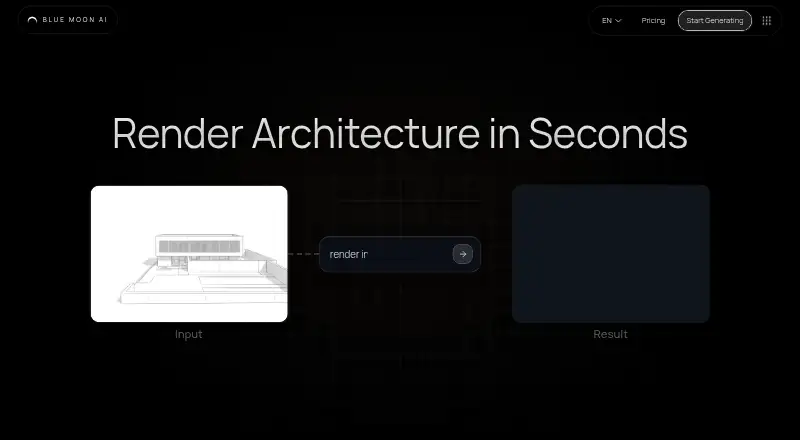
What Blue Moon AI is
Blue Moon AI is a web-based workspace for turning architectural drawings and visual references into photorealistic renderings. Its Render tool supports architectural drawings and 3D models, with workflows for exterior scenes, interiors, and text-based visualization. You can revise a design with written instructions or a brush tool, and virtually furnish room photos while aiming to preserve their walls, windows, and layout. The site also offers tools for floor plan rendering, image upscaling, animation, vectorization, and converting a photo into a textured 3D model.
For teams, Canvas provides a shared real-time workspace with pooled credits, version history, and generation lineage. Most individual renders use one credit, though Pro models and higher-definition settings may require more. Subscription credits roll over while the subscription remains active, up to a plan-specific balance: 1,000 credits for Light and Student, 3,000 for Standard, and 15,000 for Professional. Blue Moon AI says renders and edits are licensed for commercial use. The Free plan costs nothing and includes three signup credits and five daily generations on the Free Daily model, resetting at midnight UTC.
Who it suits
Blue Moon AI suits architects and real estate teams that need rendering, virtual staging, or design editing in a shared workspace. It may also suit users who want to work from sketches, drawings, photos, or text prompts through a web platform.
What it does well
- Renders architectural drawings and 3D models for interiors and exteriors.
- Edit designs with text instructions or a brush tool.
- Canvas includes pooled credits and version history.
- Renders and edits are licensed for commercial use.
- Free plan includes five daily generations and three signup credits.
What to know first
- Available platform is web only.
- CAD/BIM import is not supported.
- Pro models and higher-definition settings may require extra credits.
Limits
The Free plan includes three signup credits and five daily generations on the Free Daily model; daily generations reset at midnight UTC. Most single renders use one credit, while Pro models and higher-definition settings may require more. Paid-plan maximum balances are 1,000 credits for Light and Student, 3,000 for Standard, and 15,000 for Professional.
Plans
| Plan | Billed and limits | Price |
|---|---|---|
| Free | 5 free generations per day on Free Daily model · 3 signup credits · daily generations reset at midnight UTC | Free |
| Light, Student, Standard, Professional, Team | Paid plans are listed, but their prices and plan limits were not visible on the opened pages | On request |
As blmn.ai lists them, read 7 Oct 2026. The maker's own page has the final word.
Getting started
- Open https://blmn.ai/ in a web browser.
- Create an account; sign-in may require email verification or another security step.
- Start with the Free plan, which includes three signup credits and five daily generations.
- Use Render with an architectural drawing, 3D model, or text-based visualization workflow.
- Use other listed tools for floor plan rendering, upscaling, animation, vectorization, or photo-to-3D conversion.
Blue Moon AI is a web workspace for turning architectural inputs into visual concepts and preparing room images for property presentation. It is best suited to architects and real estate teams who want rendering, editing, staging, and collaboration together. Its breadth is useful, but unsupported CAD/BIM import and opaque paid-plan limits make it a poor choice for file-led pipelines or teams that need predictable ongoing costs.
Overview
The workflow spans early design visualization and property imagery: render sketches, elevations, facades, 3D models, reference photos, or text prompts, then refine the results or virtually furnish room photos. That makes Blue Moon AI more useful to teams handling several kinds of visual work than to users seeking a single-purpose renderer.
The key constraint is input compatibility. CAD and BIM import are not supported, so teams whose process depends on bringing those project files directly into a rendering tool should choose another workflow.
Key features
Rendering and editing
Render supports interior, exterior, and text-based visualization from architectural drawings and 3D models. Most single renders use one credit, while Pro models and higher-definition settings may require more. The standard cost is easy to understand, but premium settings can make credit use less predictable.
Text instructions and a brush tool provide two ways to revise designs. The toolset also includes floor plan rendering, upscaling, animation, vectorization, and photo-to-textured-3D conversion, extending the workspace beyond static architectural views.
Virtual staging and teamwork
Virtual staging adds furnishings to room photos while aiming to preserve walls, windows, and the existing layout. That makes it relevant to real estate teams preparing property imagery without changing the room’s structure.
Canvas gives collaborators a shared real-time workspace, pooled credits, version history, and generation lineage. Those features help teams work from a common record of changes; commercial-use rights for renders and edits also support professional use.
Pricing
Blue Moon AI uses a freemium model. Free costs nothing and includes five generations per day on the Free Daily model, plus three signup credits. Daily generations reset at midnight UTC. This is a reasonable way to explore the workflow, but the daily allowance is tied to one model and is not a substitute for a clear production budget.
Light, Student, Standard, Professional, and Team are paid plans with custom pricing. Their prices and plan limits are not available, so it is difficult to compare tiers or estimate the cost of regular use before choosing a plan. Most single renders use one credit, with higher costs possible for Pro models and high-definition settings. Unused subscription credits roll over while the subscription remains active, but only up to the plan’s balance cap: 1,000 credits for Light and Student, 3,000 for Standard, and 15,000 for Professional. These rollover terms reward continued subscribers, while the caps limit how much unused credit can accumulate.
Platforms
Blue Moon AI runs on the web. That keeps the workflow browser-based, but it does not serve users who need a desktop or mobile app as their primary platform.
Who it's for
Architects who visualize from drawings, sketches, or 3D models and real estate teams that need staging and image editing are the clearest fit. The shared Canvas and pooled credits make it more compelling when several people contribute. It is less suitable for CAD/BIM-dependent practices or anyone who needs a non-web platform.
Pros and cons
- Pros: Rendering, editing, staging, and several image tools sit in one workspace, which can reduce the need to split visual tasks across separate apps.
- Pros: Canvas combines real-time collaboration with pooled credits, version history, and generation lineage, useful for teams tracking shared work.
- Pros: Commercial-use rights cover renders and edits, an important fit for professional design and property workflows.
- Cons: CAD/BIM import is unsupported, ruling it out for workflows that start with those files.
- Cons: Paid-plan prices and limits are unclear, making recurring costs hard to forecast.
- Cons: Pro models and higher-definition settings may consume more than the usual one credit per render, so heavier use can outpace the basic expectation.
Alternatives
AI Architectural Rendering Software is a broader category guide for comparing architectural rendering options.
Choose Luw.ai Studio if an iOS or macOS app matters alongside web access; its free plan includes two daily credits at 512×512 with a watermark and basic models.
Treform is another freemium option with desktop and web platforms.
RenderMage is an alternative freemium workspace available as a browser extension and on desktop platforms.
Gendo is another web-based freemium option, with a free plan that allows unlimited generations but watermarks output and limits collaboration to one collaborator.
Harth may suit users seeking a web-based free plan with a monthly credit allowance and a paid Plus tier.
PLANA is worth considering if API or self-hosted access matters; it offers a seven-day Max trial and a paid Starter plan.
Renderica is a web and API alternative whose free plan is limited to three renders per month at 1024px.
Rendero is another web-based freemium option, with a one-time free credit allowance that does not refill monthly.
Verdict
Blue Moon AI is a strong fit for architects and real estate teams who want rendering, staging, editing, and shared project work in one commercial-use web workspace. Its broad workflow and team features are the main reasons to choose it. Look elsewhere if CAD/BIM import is essential, or if you need clear paid-plan limits and costs before committing to a recurring workflow.
Verdict
Choose Blue Moon AI if you need architectural rendering, staging, and editing in a shared web workspace, especially with commercial-use rights. Look elsewhere if CAD/BIM import is necessary or you need a platform beyond the web.
Questions
Is there a free plan?
Yes. The Free plan costs nothing and includes three signup credits and five daily generations on the Free Daily model.
Which platforms does Blue Moon AI support?
The listed platform is web.
Can I use renders commercially?
Yes. Blue Moon AI says renders and edits are licensed for commercial use.
Does it import CAD or BIM files?
No. CAD/BIM import is listed as unsupported.
What are the paid plan prices?
Light, Student, Standard, Professional, and Team are listed as paid plans, but their prices are not provided here.
Facts from Blue Moon AI's own pages
- Account security
- The documentation says sign-in may require email verification or an additional security step. · blmn.ai, 7 Oct 2026
- Commercial use
- The site says renders and edits are licensed for commercial use. · blmn.ai, 7 Oct 2026
- Credit caps
- The site states maximum balances of 1,000 credits for Light and Student, 3,000 for Standard, and 15,000 for Professional. · blmn.ai, 7 Oct 2026
- Credit costs
- Most single renders use 1 credit, while Pro models and higher-definition settings may require more. · blmn.ai, 7 Oct 2026
- Credit rollover
- Unused subscription credits roll over while the subscription remains active, subject to the plan's maximum credit balance. · blmn.ai, 7 Oct 2026
- Editing
- Users can modify designs with text instructions or a brush tool. · blmn.ai, 7 Oct 2026
- Intended users
- The site describes Blue Moon AI as a collaborative rendering, staging, and editing workspace for architects and real estate teams. · blmn.ai, 7 Oct 2026
- Other tools
- The site lists tools for floor plan rendering, upscaling, animation, vectorization, and converting a photo into a textured 3D model. · blmn.ai, 7 Oct 2026
- Purpose
- Blue Moon AI turns architectural sketches, elevation drawings, and facade plans into photorealistic renderings. · blmn.ai, 7 Oct 2026
- Rendering
- The Render tool supports architectural drawings and 3D models, with exterior, interior, and text-based visualization workflows. · blmn.ai, 7 Oct 2026
- Support
- The documentation advises users with billing or generation issues to contact support. · blmn.ai, 7 Oct 2026
- Team collaboration
- Canvas provides a shared real-time workspace with pooled credits, version history, and generation lineage. · blmn.ai, 7 Oct 2026
- Virtual staging
- Stage virtually furnishes room photos while aiming to keep walls, windows, and layout unchanged. · blmn.ai, 7 Oct 2026