Freedom251 › AI Architectural Rendering Software
Treform
What Treform is
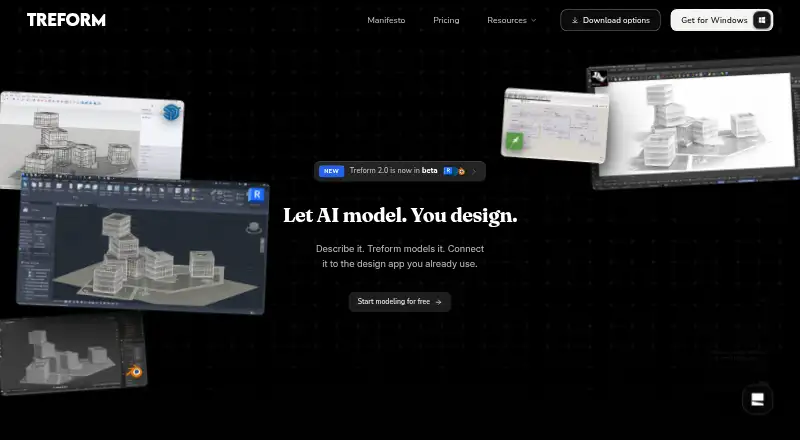
Treform is an architecture platform that generates editable building forms, plans, 3D models, and renders from descriptions and reference photos. Users can describe changes in plain language and generate plans, sections, and elevations from a model. Listed architectural guidance covers circulation, structure, daylight, and code, alongside area calculations and sun path analysis. Supported inputs include text prompts, reference photos, site addresses, and property lines. Treform Desktop is described as working with Rhino, Grasshopper, SketchUp, Revit, and Blender; the homepage also lists AutoCAD. Exports include DWG and PDF for plans, GLB, OBJ, and IFC for 3D models, and high-resolution PNG or JPG for renders. The Free plan allows three AI edits per month, has no rendering, and is not licensed for commercial use; its exports are watermarked. Paid plans include a commercial license and start at $25/mo with annual billing. Desktop is offered for macOS Apple silicon and Windows 10/11 64-bit; Rhino use requires Rhino 8 SR29 or later. Treform says it does not use user projects, prompts, images, or outputs to train its own generative models.
Who it suits
Treform suits students, solo architects, practicing architects, and design teams, with plans described for those groups. It may also fit users who want to turn text, photos, or site information into editable architectural models and drawings.
What it does well
- Generates editable forms from text or reference photos
- Produces plans, sections, and elevations
- Exports drawings, 3D models, and renders in listed formats
- Paid plans include a commercial license
What to know first
- Free plan allows three AI edits per month
- Free plan has no rendering or commercial use
- Rhino use requires Rhino 8 SR29 or later
Limits
The Free plan allows 3 AI edits per month, Haiku-only generations, and 1 OSM map import per week; it has no rendering or commercial use, and exports are watermarked. The listed paid plans have different edit and render allowances, from 30 edits and 25 renders per month on Student monthly and Pro to 80 edits and 100 renders on Studio; BYOK includes unlimited edits and 50 renders per month.
Plans
| Plan | Billed and limits | Price |
|---|---|---|
| Free | Forever free · 3 AI edits / mo · Haiku-only generations · 1 OSM map import / week · no rendering · no commercial use | Free |
| Student monthly | Billed monthly · 30 AI edits / mo · 25 renders / mo · unlimited site and map imports | $25 a month |
| BYOK | billed yearly · Unlimited AI edits · 50 renders / mo · bring your own Claude and/or OpenAI (Codex) key | $25 a month |
| Pro | billed yearly · 30 AI edits / mo · 25 renders / mo · unlimited site & map imports | $39 a month |
| Team plan | $4,800 per year, billed yearly (10 seats; 10 seats minimum) · Unlimited usage · one company key for the team · shared projects | $40 a month |
| Student quarterly | $23 a month, billed once per term · 30 AI edits / mo · 25 renders / mo · unlimited site and map imports | $693, paid once |
| Studio | billed yearly · 80 AI edits / mo · 100 renders / mo · priority compute & rendering queue | $99 a month |
| Custom | Priced for your office · For larger firms, schools, or needs beyond the standard team plan | On request |
As treform.ai lists them, read 2 Oct 2026. The maker's own page has the final word.
Getting started
- Open treform.ai.
- Choose the Free plan or a paid plan.
- Use the web app or install Treform Desktop for macOS Apple silicon or Windows 10/11 64-bit.
- Start with a text prompt, reference photo, site address, or property lines.
- For Rhino use, have Rhino 8 SR29 or later.
Treform is an architecture platform for people developing concepts into editable models and drawings. It is best suited to students and architects who want generative work tied to architectural workflows. Its breadth is appealing, but the right plan depends heavily on how often you need edits and renders.
Overview
Treform combines text and photo-based massing generation with plain-language revisions and drawing production. That makes it more useful for an evolving design workflow than a tool focused only on finished imagery. Architectural guidance and analysis add practical context, although they do not remove the need to weigh the monthly usage caps on most plans.
Treform says it does not use project materials, prompts, images, or outputs to train its own generative models, nor opt into optional subprocessor training. Its safeguards include TLS in transit, encryption of BYOK keys at rest, row-level security, access controls, and audit logging. Deleted project or account data is deleted or de-identified within 30 days, except where law requires longer retention.
Key features
- Editable generation: Create 3D massing from text prompts or reference photos, then request form changes in plain language. Editable output is a stronger fit for design iteration than a workflow that ends at a static image.
- Drawings and analysis: Generate editable plans, sections, and elevations from a model, with guidance for circulation, structure, daylight, and code. Area calculations and sun path analysis help connect concept work to architectural considerations.
- Interoperability and exports: Treform Desktop is described as working with Rhino, Grasshopper, SketchUp, Revit, and Blender; its homepage also names AutoCAD. Floor plans export as DWG or PDF, models as GLB, OBJ, or IFC, and renders as high-resolution PNG or JPG. This range supports handoff into other design tools, though the Free plan's watermark and noncommercial restriction reduce its usefulness for client work.
Pricing
Treform has a permanent Free plan and no free trial. Its paid entry point is $25 a month, with billing terms varying by plan. The cheaper plans trade usage capacity or commercial rights for lower cost; compare the term as well as the monthly figure.
| Plan | Price and billing | What it includes |
|---|---|---|
| Free | free; forever free | 3 AI edits per month, Haiku-only generations, 1 OSM map import per week, no rendering, and no commercial use. Exports are watermarked. Best for evaluation, not production. |
| Student monthly | $25 a month; billed monthly | 30 AI edits and 25 renders per month, with unlimited site and map imports. A lower-commitment paid option for students. |
| Student quarterly | $69 a month; billed once per term | 30 AI edits and 25 renders per month. The term billing makes this less flexible than monthly billing. |
| BYOK | $25 a month; billed yearly | Unlimited AI edits, 50 renders per month, and use of your own Claude and/or OpenAI (Codex) key. Best for users comfortable bringing their own model key; the key is encrypted at rest. |
| Pro | $39 a month; billed yearly | 30 AI edits and 25 renders per month, with unlimited site and map imports. Aimed at students and solo architects. |
| Team plan | $40 a month; $4,800 per year, billed yearly | 10 seats minimum, unlimited usage, one company key for the team, and shared projects. The minimum commitment makes it a studio-scale choice rather than a solo plan. |
| Studio | $99 a month; billed yearly | 80 AI edits and 100 renders per month, plus priority compute and rendering queue. A better fit for practicing architects with heavier image and editing needs. |
| Custom | Custom pricing | For larger firms, schools, or needs beyond the standard team plan. |
Paid plans include a commercial license, unlike Free. Support is available at [email protected]; custom-plan inquiries receive a reply within one business day.
Platforms
Treform supports macOS, Windows, and the web. Treform Desktop requires macOS on Apple silicon or Windows 10/11 64-bit; Rhino integration requires Rhino 8 SR29 or later. Those requirements matter if the workflow depends on a particular desktop setup.
Who it's for
Students and solo architects can start with the Student plans or Pro, while BYOK suits users who prefer to supply a Claude or OpenAI key in return for unlimited edits. Practicing architects with greater rendering needs may find Studio's higher quotas more practical. The Team plan and custom pricing target studios, offices, larger firms, and schools. Treform is a weaker fit for someone who only needs occasional rendered images or needs commercial output on a no-cost plan.
Pros and cons
- Pro: Editable massing can lead into drawings, architectural guidance, and analysis in the same product, rather than stopping at visual generation.
- Pro: DWG, PDF, GLB, OBJ, IFC, PNG, and JPG exports cover both drawing and model handoff.
- Pro: Paid plans include commercial rights, while stated privacy and security safeguards address project data and BYOK keys.
- Con: Free permits only 3 AI edits per month, has no rendering, watermarks exports, and bars commercial use, so it is an evaluation tier rather than a usable business tier.
- Con: Most paid plans cap monthly edits and renders, and several require yearly or term billing; frequent users need to choose carefully between quotas and commitment.
- Con: Desktop use is limited to Apple silicon on macOS or 64-bit Windows 10/11, with a specific Rhino version requirement.
Alternatives
For a broader comparison of tools in this category, see AI Architectural Rendering Software and AI Floor Plan Generators.
Choose Luw.ai Studio instead if you want a freemium image-generation option with iOS support and a $19.00 USD monthly Pro plan; its Free tier limits resolution to 512×512 and adds a watermark.
Gendo is a web-based alternative with a free plan that allows unlimited generations but limits the workspace to one active canvas, one collaborator, and watermarked output.
Consider Harth if a web-based free tier with 700 credits per month and 20+ renders is a better match; its Plus plan is $59 a month.
Renderica may suit users seeking a focused web or API rendering option: its Free plan allows 3 renders per month at 1024px, while Starter costs $24 a month.
Rendero offers a one-time free allowance of 50 credits rather than a monthly refill, which may suit occasional web use.
ArchiVinci is another freemium option, available as a web product and extension.
Empoli is a freemium option for iOS and web with a 30-day trial.
Fenestra offers a web-based freemium option, with its Individual plan at $8 a month.
Verdict
Treform is a strong candidate for students and architecture practices that want editable AI-generated forms to feed into drawings, analysis, and established design tools. Its main reason to choose is that connected workflow; its main reason to look elsewhere is the combination of capped usage on standard plans and a Free tier that cannot render or support commercial work.
Verdict
Treform combines model generation with editable architectural drawings, analysis tools, and multiple export formats. The Free plan is limited and excludes commercial use; paid plans include a commercial license.
Questions
Is Treform free?
Yes. Its Free plan is listed at 0.00 USD, forever free, with 3 AI edits per month and no rendering.
How much do paid plans cost?
Listed plans include Student monthly at $25 a month, BYOK at $25 a month billed yearly, Pro at $39 a month billed yearly, Team at $40 a month billed yearly, and Studio at $99 a month billed yearly. Student quarterly is listed at $69 a month, billed once per term.
Can I use Treform for commercial work?
Paid plans include a commercial license. The Free plan does not allow commercial use, and its exports are watermarked.
Which platforms does Treform support?
Treform is available on the web, macOS, and Windows. Treform Desktop is offered for macOS Apple silicon and Windows 10/11 64-bit.
Which design tools does Treform work with?
Treform Desktop is described as working with Rhino, Grasshopper, SketchUp, Revit, and Blender. The homepage also lists AutoCAD; Rhino use requires Rhino 8 SR29 or later.
What can Treform export?
Floor plans can be exported as DWG or PDF, 3D models as GLB, OBJ, or IFC, and renders as high-resolution PNG or JPG.
Facts from Treform's own pages
- Architectural features
- The site lists architectural guidance for circulation, structure, daylight, and code, plus area calculations and sun path analysis. · treform.ai, 2 Oct 2026
- Commercial license
- The FAQ says paid plans include a commercial license, while Free plan exports are watermarked and not licensed for commercial use. · treform.ai, 2 Oct 2026
- Data retention
- The privacy policy says deleted project or account data will be deleted or de-identified within 30 days, except where longer retention is required by law. · treform.ai, 2 Oct 2026
- Desktop requirements
- Treform Desktop is offered for macOS Apple silicon and Windows 10/11 64-bit; Rhino use requires Rhino 8 SR29 or later. · treform.ai, 2 Oct 2026
- Editing and drawings
- Users can describe changes to forms in plain language and generate editable plans, sections, and elevations from a model. · treform.ai, 2 Oct 2026
- Exports
- The FAQ lists DWG and PDF for floor plans, GLB, OBJ, and IFC for 3D models, and high-resolution PNG or JPG for renders. · treform.ai, 2 Oct 2026
- Free plan limit
- The Free plan is for evaluation, has 3 AI edits per month and no rendering, and does not allow commercial use. · treform.ai, 2 Oct 2026
- Integrations
- Treform Desktop is described as working with Rhino, Grasshopper, SketchUp, Revit, and Blender; the homepage also lists AutoCAD among supported design tools. · treform.ai, 2 Oct 2026
- Privacy and training
- Treform says it does not use users’ projects, prompts, images, or AI outputs to train its own generative models and does not opt into subprocessors’ optional training programs. · treform.ai, 2 Oct 2026
- Product
- Treform describes itself as an AI-native architecture platform that generates floor plans, 3D models, and renders from plain-language descriptions. · treform.ai, 2 Oct 2026
- Security
- Treform lists TLS in transit, encryption of BYOK keys at rest, row-level security on user data, access controls, and audit logging as safeguards. · treform.ai, 2 Oct 2026
- Support
- Treform lists [email protected] for support and says custom-plan inquiries receive a reply within one business day. · treform.ai, 2 Oct 2026
- Text and image modeling
- Treform says it can generate editable 3D massing from text prompts or reference photos. · treform.ai, 2 Oct 2026
- Who it is for
- The pricing page describes Pro for students and solo architects, Studio for practicing architects, and team and custom plans for studios, offices, larger firms, and schools. · treform.ai, 2 Oct 2026
Where Treform stands on Freedom251
- AI Architectural Rendering Software#12 of 23
- AI Floor Plan Generators#24 of 40