Freedom251 › AI Sketch-to-Image Generators
ArchiVinci
What ArchiVinci is
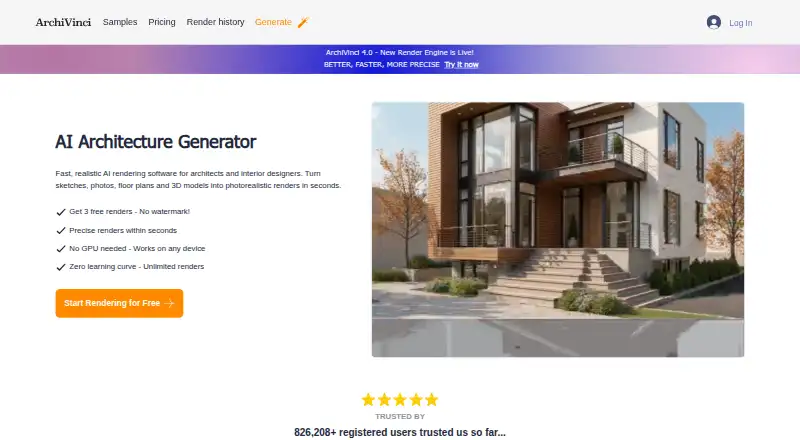
ArchiVinci turns images of architectural designs into visualizations in a browser. It accepts sketches, photos, floor plans, elevations and screenshots of 3D models, with tools to render, edit and plan designs or turn still images into short architectural videos. The company says the platform tracks geometry and warns when a prompt could distort a structure. SketchUp designs need to be uploaded as PNG, JPEG or WEBP images; native .skp files are not supported. The site names Rhino, SketchUp, Revit, 3ds Max, AutoCAD and Archicad as compatible when their designs are supplied in those image formats. A SketchUp render plugin is also listed. The service is aimed at architecture studios, interior designers, landscape and urban planners, real estate professionals, students and homeowners. A free plan and free trial are listed, with paid access noted from $39; individual plan prices are not provided. Premium plans allow up to four concurrent renders, while other models use coins. Video generation costs 5 to 25 coins per video depending on quality. Renders are stored for 7 days before deletion.
Who it suits
ArchiVinci may suit architecture and interior design teams, planners, real estate professionals, students and homeowners who want to visualize design images. It can also suit SketchUp users willing to upload image exports rather than native files.
What it does well
- Works with sketches, plans and 3D screenshots
- Includes tools for rendering and editing
- Warns when prompts may distort geometry
- Free plan and free trial are listed
What to know first
- Native SketchUp .skp files are unsupported
- Renders are deleted after 7 days
- Video generation costs 5 to 25 coins
Limits
Premium plans allow up to four concurrent renders. Other models use coins, and each generated video costs 5 to 25 coins depending on quality.
Plans
| Plan | Billed and limits | Price |
|---|---|---|
| Monthly Subscription | monthly · unlimited ArchiVinci renders · 40 coins for other models | On request |
| 1 MONTH | one-time payment · 1-month access to all models · unlimited ArchiVinci renders · 40 coins for other models | On request |
| 1 YEAR | one-time payment · 1-year access to all models · unlimited ArchiVinci renders · 500 coins for other models | On request |
| 3 DAYS | one-time payment · 3-day access to all models · unlimited ArchiVinci renders · 20 coins for other models | On request |
| 6 MONTHS | one-time payment · 6-month access to all models · unlimited ArchiVinci renders · 300 coins for other models | On request |
| 6 MONTHS team plan | one-time payment · 5 users · unlimited ArchiVinci renders · 300 coins per user for other models | On request |
| Weekly Subscription | weekly · unlimited ArchiVinci renders · 20 coins for other models | On request |
| Yearly Subscription | unlimited ArchiVinci renders · 500 coins for other models | On request |
The first 8 of 10 plans, as archivinci.com lists them, read 3 Oct 2026. The maker's own page has the final word. Every plan
Getting started
- Visit https://www.archivinci.com/.
- Start with the free plan or free trial, or choose a listed paid access option.
- Upload a sketch, photo, floor plan, elevation, or 3D model screenshot.
- For SketchUp, export a view as PNG, JPEG, or WEBP before uploading.
- Use the browser tools to render, edit, plan, or create a short video.
Verdict
ArchiVinci offers a browser workflow for turning architectural images into visualizations and short videos. Users should account for its image-format requirement for SketchUp and the coin costs for video generation.
Questions
Does ArchiVinci have a free plan or trial?
Yes. A free plan and a free trial are listed.
What platforms does ArchiVinci support?
The listed platforms are web and extension.
Can I upload a SketchUp file?
Native .skp files are not supported. Export a SketchUp view as PNG, JPEG, or WEBP and upload the image.
Which design tools are compatible?
The site names Rhino, SketchUp, Revit, 3ds Max, AutoCAD, and Archicad when designs are supplied as PNG, JPEG, or WEBP images.
What does paid access cost?
Paid access is listed from $39. The individual prices for the listed plans are not provided in these facts.
How long are renders kept?
The privacy policy says renders are stored for 7 days before deletion.
Facts from ArchiVinci's own pages
- Compatible software
- The site names Rhino, SketchUp, Revit, 3ds Max, AutoCAD, and Archicad as compatible CAD or 3D modeling software when using PNG, JPEG, or WEBP images. · archivinci.com, 3 Oct 2026
- Compliance
- The privacy policy says ArchiVinci handles personal data in accordance with applicable laws including UK GDPR and the Data Protection Act 2018. · archivinci.com, 3 Oct 2026
- Data retention
- The privacy policy says renders are stored for 7 days before deletion. · archivinci.com, 3 Oct 2026
- Design tools
- Its platform includes tools to render, edit, plan, and turn still images into short architectural videos. · archivinci.com, 3 Oct 2026
- Geometry preservation
- The company says it provides near-100% geometry tracking and alerts when a prompt risks distorting a structure. · archivinci.com, 3 Oct 2026
- Headquarters
- London, United Kingdom · archivinci.com, 28 Sept 2026
- Input formats
- ArchiVinci accepts images of designs; SketchUp views must be uploaded as PNG, JPEG, or WEBP because native .skp files are not supported. · archivinci.com, 3 Oct 2026
- Integrations
- The pricing page includes access to a SketchUp render plugin, and the homepage links to its SketchUp Extension Warehouse listing. · archivinci.com, 3 Oct 2026
- Intended users
- The company says its users include architecture studios, interior designers, landscape and urban planners, real estate professionals, students, and homeowners. · archivinci.com, 3 Oct 2026
- Notable limits
- The pricing page says premium plans allow up to 4 concurrent renders; additional models use coins, and video generation costs 5 to 25 coins per video depending on quality. · archivinci.com, 3 Oct 2026
- Purpose
- ArchiVinci turns sketches, photos, floor plans, elevations, and 3D model screenshots into photorealistic architectural visuals in the browser. · archivinci.com, 3 Oct 2026
- Security
- The privacy policy says sensitive data is encrypted in transit and payment card details are handled by Stripe rather than stored on ArchiVinci servers. · archivinci.com, 3 Oct 2026
- Support
- The company lists [email protected] for contact and says its blog and How It Works page provide how-to videos, render examples, and workflow guides. · archivinci.com, 3 Oct 2026
Where ArchiVinci stands on Freedom251
- AI Sketch-to-Image Generators#2 of 29
- AI Interior Design Generators#2 of 26
- AI Architectural Rendering Software#2 of 23