Freedom251 › AI Architectural Rendering Software
Harth
What Harth is
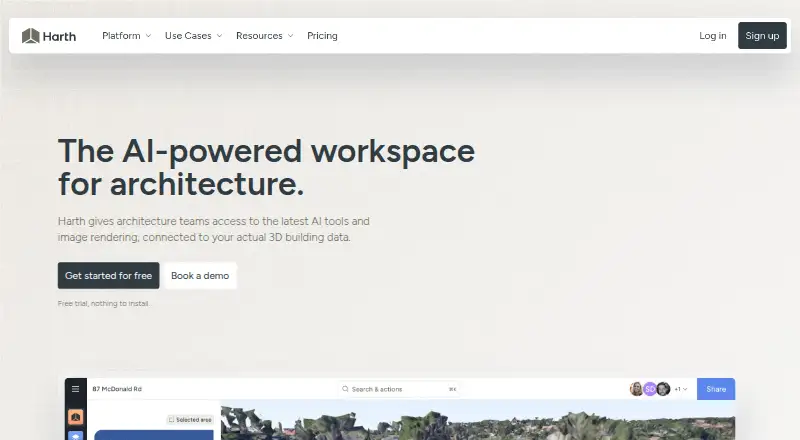
Harth is a browser-based workspace for architecture practices to design, research, collaborate on, and present projects, with AI agents working on building data. It imports Revit, Archicad, SketchUp, and IFC models while preserving elements and coordinates. Its roughly 40 discipline-specific agent skills cover areas such as structure, envelope, interiors, and analysis. Site tools include 3D satellite terrain, surrounding-building imports, boundary tracing, geolocation, and sun studies. Users can render a view framed in the model, apply area masks and lighting presets, and upscale images for print. Collaboration features include simultaneous model work, live cursors, presence, comments pinned over 3D, and per-project voice. Exports include PDF, image, and 3D files, along with 360-degree views and recorded walkthroughs. Harth can turn 360-camera footage into an explorable, measurable 3D scan, with processing taking one to two days. Every plan includes the full workspace; plans differ in AI credits. Free includes 700 credits per month; Plus costs $59 a month for 5,000 credits, and Pro costs $149 a month for 15,000 credits.
Who it suits
Harth is aimed at architecture practices, particularly those of roughly 15 to 30 people in New Zealand, Australia, and the United States. It suits teams working with architectural models, site context, visualization, and shared project presentations.
What it does well
- Imports Revit, Archicad, SketchUp, and IFC models.
- Provides site context tools including terrain and sun studies.
- Supports simultaneous model work and threaded 3D comments.
- Exports PDF, image, and 3D files, plus walkthroughs.
What to know first
- The Free plan has 700 credits per month.
- Plus costs $59 a month.
- Pro costs $149 a month.
Limits
The Free plan includes 700 credits per month. Plus costs $59 a month and includes 5,000 monthly credits; Pro costs $149 a month and includes 15,000. Credit packs are available separately and do not expire.
Plans
| Plan | Billed and limits | Price |
|---|---|---|
| Free | $0 per month · 700 credits / month · 20+ renders · Community support | Free |
| Pro | $149 per month · 15,000 credits / month · 500+ renders · Priority rendering · Priority support | $149 a month |
| Medium credit pack | $199 · 16,000 credits · 500+ renders · Never expires | $199, paid once |
| Large credit pack | $399 · 36,000 credits · 1000+ renders · Never expires | $399, paid once |
| Plus | $59 per month · 5,000 credits / month · 150+ renders · Priority rendering · Email support | $59 a month |
| Small credit pack | $99 · 7,500 credits · 250+ renders · Never expires | $99, paid once |
As harth.build lists them, read 3 Oct 2026. The maker's own page has the final word.
Getting started
- Visit the Harth website in a browser.
- Start with the Free plan, or choose Plus or Pro based on the plan's monthly credits and support.
- Import a model from Revit, Archicad, SketchUp, or IFC.
- Use the workspace for design, research, collaboration, or presentation.
- Add a credit pack if you need additional credits.
Harth is a browser workspace for architecture practices that need design, site context, AI assistance, visualization, and collaboration around the same project. It suits practices of roughly 15 to 30 people, particularly in New Zealand, Australia, and the United States. The main decision is whether its broad project environment justifies paying for ongoing AI credits.
Overview
Harth is built around existing architectural work rather than a blank canvas. It brings Revit, Archicad, SketchUp, and IFC models into a shared browser project while retaining elements and coordinates, then adds site information, analysis-oriented AI agents, rendering, communication, and exports. That combination is more useful to a practice coordinating a project than to someone who only wants quick concept images.
All plans contain the full workspace. Plan choice therefore changes the amount of AI activity available, not access to separate design or collaboration modules. Teams should treat the credit allowance as an operating budget for agent work and rendering.
Key features
Model import is a practical strength. Revit, Archicad, SketchUp, and IFC support lets a team bring established BIM or 3D work into Harth without losing model structure or positioning. That makes it a more credible shared environment for active projects than a tool requiring reconstruction.
Harth describes about 40 discipline-specific agent skills, including structure, envelope, interiors, and analysis. The range could support different roles within one practice, but the usefulness of that breadth depends on available credits; the plans do not unlock different agent sets.
Its site context tools include 3D satellite terrain, surrounding-building import, site-boundary tracing, geolocation, and sun studies. These features make Harth relevant to early design and site review, where surrounding conditions matter. A rendering-only workflow would not gain as much from this additional context.
Visualization starts from a view framed in the model. Users can apply area masking and lighting presets, then upscale images for print. This links presentation output to the project model instead of treating each image as a separate exercise.
Collaboration is unusually project-oriented: simultaneous model work, live cursors, presence, threaded comments pinned over 3D, and per-project voice keep discussion attached to the geometry. Harth also says 360-camera footage can become an explorable, measurable 3D scan, processed in one to two days. Exports cover PDF, images, and 3D files, plus 360-degree views and recorded walkthroughs.
Pricing
The Free plan costs nothing and includes 700 credits per month, 20+ renders, and community support. It is a sensible way for a small team to assess the workspace, but the credit ceiling limits sustained AI use.
Plus costs $59 a month, billed $59 per month, with 5,000 credits, 150+ renders, priority rendering, and email support. It is the entry point for practices that need regular AI-assisted work and faster rendering without the Pro allowance.
Pro costs $149 a month, billed $149 per month, and raises the allowance to 15,000 credits and 500+ renders. It adds priority rendering and priority support, making it the stronger fit for larger or more active practices that would otherwise exhaust Plus credits.
Credit packs provide non-expiring, one-time capacity: Small is 99.00 USD once for 7,500 credits and 250+ renders; Medium is 199.00 USD once for 16,000 credits and 500+ renders; Large is 399.00 USD once for 36,000 credits and 1,000+ renders. They suit teams with uneven demand or occasional bursts better than moving permanently to a higher monthly tier. Paid plans start at $59/mo, and a free trial is available.
Support rises with price: community on Free, email on Plus, and priority on Pro. Harth NZ Limited's privacy policy addresses New Zealand and Australian privacy law and GDPR rights for EU and UK individuals. It also says prompts and generated outputs may be stored for improvement and quality assurance, with anonymized or aggregated prompt data potentially used to develop and train its AI systems. Practices should factor that into project-data policies.
Platforms
Harth runs on the web, so teams can access the workspace through a browser rather than a platform-specific desktop application.
Who it's for
Harth is aimed at architecture practices of approximately 15 to 30 people, especially in New Zealand, Australia, and the United States. It is a strong match for teams that want imported project models, site studies, shared 3D review, AI assistance, and presentation exports in one place. A solo user seeking only inexpensive image generation is less likely to need its wider collaboration and site toolkit.
Pros and cons
- Pros: imports major architectural model formats while preserving elements and coordinates, reducing migration friction.
- Pros: combines site analysis, discipline-focused agents, model-based rendering, and 3D collaboration in one workspace.
- Pros: every plan includes the complete workspace, and non-expiring credit packs accommodate occasional demand.
- Cons: AI usage is constrained by monthly credits, so active teams must monitor consumption or buy additional packs.
- Cons: the browser-only platform may not suit practices requiring a native desktop workflow.
- Cons: prompts and outputs may contribute to service improvement and AI training in anonymized or aggregated form, which may require internal review for sensitive projects.
Alternatives
AI Architectural Rendering Software is the broader list to consult when image generation is the primary requirement rather than a complete project workspace.
Choose Luw.ai Studio instead if you want iOS, macOS, and web access with a $19 a month Pro plan; its free tier is limited to two credits daily, 512×512 output, and watermarked basic models.
Treform is an alternative for macOS, web, and Windows users seeking AI edits and renders, including a student quarterly option.
RenderMage is worth considering for a Studio workspace with RM_Sync plugins, floor-plan-to-3D and DXF export, and video output.
Blue Moon AI is a web alternative centered on daily image generations, with five free generations per day on its Free Daily model.
Gendo is another web-based option with a free canvas, asset limit, collaboration, and watermarked generations.
PLANA suits readers wanting a paid architectural-rendering service with a seven-day Max trial and no watermark.
Renderica is a web/API option with a free allowance of three renders per month and paid higher-resolution tiers.
Rendero is a web alternative offering a one-time free credit allowance and lower-cost monthly tiers.
Verdict
Choose Harth if your architecture practice wants one browser workspace for imported models, site context, AI disciplines, visualization, collaboration, and project exports. Its decisive advantage is that the full environment is present on every plan; its main drawback is that meaningful AI use depends on recurring credit limits and, for sensitive work, acceptance of the stated prompt and output data practices.
Verdict
Harth combines model imports, site tools, collaboration, rendering, and project exports in a browser workspace. Plans include the same workspace but have different AI credit allowances.
Questions
How much does Harth cost?
The Free plan costs nothing. Plus is $59 a month, and Pro is $149 a month. Credit packs cost 99.00 USD, 199.00 USD, or $399 as a one-time purchase.
What is included in the Free plan?
Free includes 700 credits per month, 20+ renders, and community support.
Which platforms and model formats does Harth support?
Harth is browser-based. It imports models from Revit, Archicad, SketchUp, and IFC.
Do plans differ in workspace features?
The maker says all plans include the full workspace and differ only in AI usage. Each plan has a monthly credit allowance, and credits can be topped up with packs.
How does Harth handle prompts and generated outputs?
Its privacy policy says prompts and generated outputs may be stored for platform improvement and quality assurance. Anonymized or aggregated prompt data may be used to develop and train Harth's AI systems.
Who makes Harth?
Harth NZ Limited is identified in the product's privacy policy.
Facts from Harth's own pages
- AI agents
- Harth describes roughly 40 discipline-specific agent skills for areas including structure, envelope, interiors, and analysis. · harth.build, 3 Oct 2026
- AI data handling
- The privacy policy says prompts and generated outputs may be stored for platform improvement and quality assurance, and anonymized or aggregated prompt data may be used to develop and train Harth's AI systems. · harth.build, 3 Oct 2026
- CAD imports
- Harth imports models from Revit, Archicad, SketchUp, and IFC while preserving elements and coordinates. · harth.build, 3 Oct 2026
- Collaboration
- Harth supports simultaneous model work with live cursors, presence, threaded comments pinned over 3D, and per-project voice. · harth.build, 3 Oct 2026
- Exports
- Harth lists PDF, image, and 3D exports, plus 360-degree views and recorded walkthroughs. · harth.build, 3 Oct 2026
- Intended users
- Harth says it is built for architecture practices of roughly 15 to 30 people in New Zealand, Australia, and the United States. · harth.build, 3 Oct 2026
- Plan limits
- The maker says all plans include the full workspace and differ only in AI usage; each plan has a monthly credit allowance and credits can be topped up with packs. · harth.build, 3 Oct 2026
- Privacy
- Harth NZ Limited says its privacy policy takes account of the New Zealand Privacy Act 2020 and Australian Privacy Act 1988, and describes rights for EU and UK individuals under GDPR. · harth.build, 3 Oct 2026
- Product
- Harth is a browser-based workspace for architecture practices to design, research, collaborate, and present projects, with AI agents working on building data. · harth.build, 3 Oct 2026
- Reality capture
- Harth says 360-camera footage can be turned into an explorable, measurable 3D scan, processed in one to two days. · harth.build, 3 Oct 2026
- Site context
- Harth supports 3D satellite terrain, surrounding-building import, site-boundary tracing, geolocation, and sun studies. · harth.build, 3 Oct 2026
- Support
- The Free plan includes community support, Plus includes email support, and Pro includes priority support. · harth.build, 3 Oct 2026
- Visualization
- Harth can render from a view framed in the model, apply area masking and lighting presets, and upscale images for print. · harth.build, 3 Oct 2026