Freedom251 › AI Architectural Rendering Software
PLANA
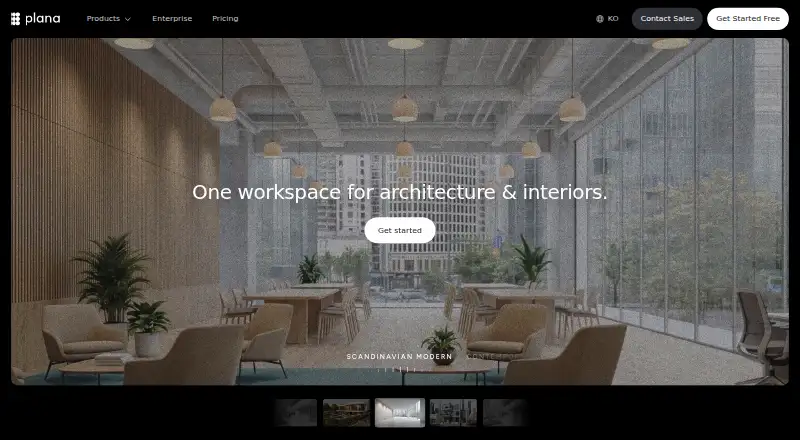
What PLANA is
PLANA is a workspace for architecture and interiors that combines AI rendering, collaboration and node-based workflows. From a browser, users can turn photos, sketches or 3D models into photorealistic visuals. They can connect workflow nodes to build rendering pipelines without code and save them as reusable templates. Workflows can also turn renders into video walkthroughs and produce structured, branded client proposals. Projects sit in hierarchical workspaces, with search across projects and files. PLANA is available on the web, through self-hosted deployment and via API. Enterprise options include API integration into existing systems, dedicated server environments, on-premise software and early API access. Enterprise controls include custom roles, granular permissions, organization management and SCIM provisioning. PLANA says enterprise AI use does not train on or store customer data, and that data is encrypted in transit and at rest. A new account gets one 7-day trial without a card; it stops automatically without charge. Starter costs $8/mo and includes 500 monthly credits, one project, up to 2K image generation and 5GB storage.
Who it suits
PLANA suits architecture and interiors teams that want browser-based rendering workflows and project organization. Its self-hosted, API and enterprise options may suit organizations needing custom deployment or access controls.
What it does well
- Turns photos, sketches and 3D models into visuals.
- Node workflows can be saved as reusable templates.
- Can generate video walkthroughs and branded proposals.
- Trial lasts 7 days and requires no card.
- Starter includes 500 monthly credits.
What to know first
- There is no free plan beyond the 7-day trial.
- Starter limits image generation to up to 2K.
- Starter images are stored for up to 30 days.
Plans
| Plan | Billed and limits | Price |
|---|---|---|
| Free | 7-day Max trial · no card required · 4K resolution · all models · no watermark | Free |
| Pro | Monthly · 1,600 monthly credits · multiple projects · 4K resolution · 10GB storage · unlimited image retention · team participation | $20 a month |
| Max | Monthly · Up to 8,000 monthly credits · multiple projects · 4K resolution · unlimited asset storage and image retention · team participation | $50 a month |
| Starter | Monthly · 500 monthly credits · single project · up to 2K image generation · 5GB storage · images stored up to 30 days | $8 a month |
| Enterprise | Unlimited usage · custom AI models · on-premise software · early API access · various delivery methods | On request |
As useplana.ai lists them, read 7 Oct 2026. The maker's own page has the final word.
PLANA is an AI rendering and production workspace for architecture and interior-design work. It suits designers, studios, and organizations that need repeatable visual pipelines as well as client deliverables, rather than occasional image generation alone. Its $8 entry tier is inexpensive, but project, credit, resolution, and retention limits make plan selection consequential.
Overview
Founded in 2023, PLANA combines browser-based rendering, real-time collaboration, node workflows, and project management in one environment. You can start with prompts, photos, sketches, reference images, or 3D models, then carry the result into presentations and other outputs. That breadth is valuable when a project moves from concept exploration to client communication; it is less relevant if you only need isolated renders.
Commercial use is supported. PLANA is offered as a web product, API, and self-hosted deployment, giving larger organizations more ways to fit it into existing systems.
Key features
The browser workflow turns source images, sketches, photographs, or models into photorealistic visuals. Resolution depends on the subscription: Starter stops at 2K, while the trial, Pro, and Max include 4K output. Monthly credits also determine how much generation a regular user can do.
A no-code canvas connects nodes into rendering pipelines and saves them as reusable templates. This is a practical advantage for studios that repeat briefing, rendering, or post-processing sequences and want a consistent method across projects. Someone creating a few unrelated images may get less benefit from the extra workflow layer.
Workflows can convert renders into video walkthroughs and produce structured, branded client proposals. Those outputs make PLANA more useful for client-facing work than a render-only tool, although the plan's credit and storage allowances still govern how extensively you can use it.
Hierarchical workspaces and projects, with search across projects and files, help keep a larger design library navigable. Pro and Max allow multiple projects; Starter is restricted to one, which can quickly become a constraint for an active studio.
Enterprise customers can connect PLANA through an API, use dedicated servers or on-premise software, and obtain custom AI models and multiple delivery methods. Custom roles, granular permissions, organization management, and SCIM provisioning address administration at scale. Enterprise AI use is stated to involve no training or storage of customer data, with encryption in transit and at rest. Data is stored on AWS servers in the United States, and listed service providers include Stripe, Google Cloud, OpenAI, Google Gemini, Microsoft Clarity, and AWS.
Pricing
Every new account receives one seven-day trial without a card. It ends automatically without charging, so it is useful for evaluating the workflow but is not an ongoing free tier.
| Plan | Price | What you get |
|---|---|---|
| Free trial | 0.00 USD for 7 days | 4K resolution, all models, and no watermark; one trial per new account. |
| Starter | $8 a month, billed monthly | 500 monthly credits, one project, up to 2K image generation, 5GB storage, and images stored for up to 30 days. |
| Pro | $20 a month, billed monthly | 1,600 monthly credits, multiple projects, 4K resolution, 10GB storage, unlimited image retention, and team participation. |
| Max | $50 a month, billed monthly | Up to 8,000 monthly credits, multiple projects, 4K resolution, unlimited asset storage and image retention, and team participation. |
| Enterprise | Custom pricing | Unlimited usage, custom AI models, on-premise software, early API access, and various delivery methods. |
Starter is suited to a solo designer with one active project and moderate output. Its 500-credit allowance, 2K ceiling, 5GB storage, and 30-day image retention are meaningful compromises for ongoing portfolios. Pro is the more practical baseline for teams or anyone juggling projects, while Max is aimed at high-volume production and long-term asset storage. Enterprise is justified when deployment control, governance, provisioning, or support requirements outweigh the need for a published price.
Enterprise support includes 24/7 priority assistance with guaranteed response times, plus a dedicated Customer Success Manager and Technical Account Manager.
Platforms
PLANA runs on the web and can be integrated through an API or deployed as self-hosted software. Enterprise options include dedicated server environments and on-premise operation, which matter for organizations with infrastructure or data-location requirements.
Who it's for
Choose PLANA if you are an architect, interior designer, visualization studio, or design team that wants reusable rendering processes and polished client outputs in the same workspace. It is particularly well matched to recurring work where templates, search, collaboration, and multiple deliverable types save coordination effort.
It is a weaker fit for casual users who want a permanent free plan, very small one-off tasks, or unlimited 4K work at the lowest price. Starter's single project and temporary image retention can also frustrate a growing practice.
Pros and cons
Pros
- Accepts prompts, photos, sketches, reference images, and 3D models, covering both early concepts and existing assets.
- Reusable no-code node pipelines support consistent studio processes.
- Video walkthroughs and branded proposals extend results beyond still images.
- Searchable hierarchical projects help organize substantial bodies of work.
- API, self-hosting, on-premise deployment, and enterprise controls support larger organizations.
Cons
- There is no continuing free plan; access after the seven-day trial starts at $8 per month.
- Starter permits only one project, caps generation at 2K, and retains images for 30 days.
- Credit quotas mean heavy rendering can require Pro or Max.
- Data is stored on AWS servers in the United States, a consideration for organizations with location restrictions.
Alternatives
AI Architectural Rendering Software is the broader directory choice when you want to compare this category rather than commit to PLANA's workflow model.
Luw.ai Studio is worth choosing if you prefer a freemium option with iOS and macOS apps; its free tier supplies two daily credits at 512×512 with a watermark.
Treform suits users seeking a freemium desktop-and-web alternative with dedicated monthly AI edits and renders on its paid student tier.
RenderMage is a better match when plugins, floor-plan-to-3D tools, DXF export, and video features are priorities.
Blue Moon AI fits lightweight browser experimentation with five free daily generations and signup credits.
Gendo is an alternative for canvas-based work with a free, watermarked tier and one active canvas.
Harth offers a free monthly credit allowance and a trial, making it preferable if you want to start without paying.
Renderica is suited to API-and-web users who need a small free allowance and fixed render quotas.
Rendero is the alternative to consider if a one-time starter credit allowance or per-person monthly plans better fit your usage.
Verdict
PLANA is a strong choice for design professionals who will reuse rendering pipelines and turn concepts into organized, client-ready media. Choose it for the combination of flexible inputs, templates, project structure, and enterprise deployment options. Look elsewhere if you need a lasting free tier, several projects on the entry plan, or a simpler generator without credit and retention trade-offs.
Verdict
PLANA brings rendering, reusable node workflows and client-facing outputs into one architecture and interiors workspace. Consider the plan limits carefully: Starter costs $8/mo, while the free access is a single 7-day trial.
Facts from PLANA's own pages
- Company
- The About page lists company incorporation in April 2023, and the privacy policy gives Planby Technologies Inc.'s U.S. address as San Jose, California. · useplana.ai, 7 Oct 2026
- Enterprise access controls
- The enterprise page describes custom roles, granular permissions, organization management, and SCIM user provisioning. · useplana.ai, 7 Oct 2026
- Enterprise data protections
- The enterprise page states that enterprise AI use involves no training or storage of customer data and that data is encrypted in transit and at rest. · useplana.ai, 7 Oct 2026
- Founded
- 2023 · useplana.ai, 28 Sept 2026
- Integrations and deployment
- The enterprise page offers API integration into existing systems and dedicated server environments; the pricing page lists on-premise software and early API access for Enterprise. · useplana.ai, 7 Oct 2026
- Privacy and data handling
- The privacy policy names Stripe, Google Cloud, OpenAI, Google Gemini, Microsoft Clarity, and AWS as service providers, and says data is stored on AWS servers in the United States. · useplana.ai, 7 Oct 2026
- Project organization
- The Projects page describes hierarchical workspaces and projects, with search across projects and files. · useplana.ai, 7 Oct 2026
- Purpose
- PLANA describes itself as a workspace for architecture and interiors that brings AI rendering, real-time collaboration, and node-based workflows together. · useplana.ai, 7 Oct 2026
- Rendering
- The workflow page says users can turn photos, sketches, or 3D models into photorealistic visuals from a browser. · useplana.ai, 7 Oct 2026
- Support
- Enterprise customers are offered 24/7 priority support with guaranteed response times and a dedicated Customer Success Manager and Technical Account Manager. · useplana.ai, 7 Oct 2026
- Trial and plan limits
- The pricing FAQ says each new account receives one 7-day trial with no card required, which stops automatically without charge; Starter includes 500 monthly credits and 5GB storage. · useplana.ai, 7 Oct 2026
- Video and documents
- Workflows can turn renders into video walkthroughs and generate structured, branded client proposals. · useplana.ai, 7 Oct 2026
- Workflow canvas
- Users can connect nodes to build rendering pipelines without code and save workflows as reusable templates. · useplana.ai, 7 Oct 2026
Where PLANA stands on Freedom251
- AI Architectural Rendering Software#18 of 23