Freedom251 › Software Update Tools

Avira Software Updater
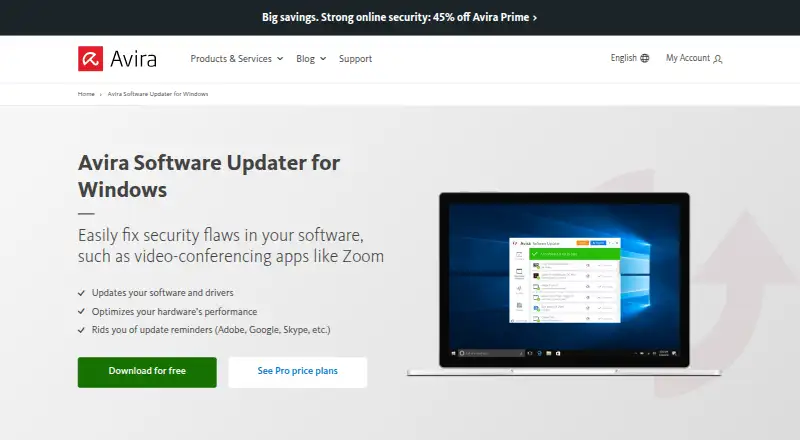
What Avira Software Updater is
Avira Software Updater scans Windows for outdated software and helps users obtain updates. Avira says it manages updates and patches for more than 150 programs, and the product also updates drivers. The free version identifies outdated programs and provides links to updates on publishers’ websites. Pro can download and install selected software, app, and driver updates automatically, including silently.
Avira lists Windows operating system updates, automatic exploit protection, priority access to updates, customer support, and an ad-free experience among Pro features. The system requirements list Windows 7 SP1 and later. Avira says current software and drivers can help address vulnerabilities, and that current drivers can improve system stability and hardware performance. Some updates may not install if a software maker blocks third-party update initiation or rolls out updates gradually. The free version is included in Avira Free Security, while Pro is included in Avira Internet Security. Standalone Pro plans cover one PC, but their displayed prices are “loading...” rather than amounts; the annual plan lists a 60-day money-back guarantee.
Who it suits
It suits Windows users who want to identify outdated programs and obtain update links, or automate selected updates with Pro. The listed operating system requirement is Windows 7 SP1 or later.
What it does well
- Free version scans and links to publisher updates.
- Avira says it manages updates for over 150 programs.
- Pro can silently install selected updates.
- Also updates drivers.
- Free version is included in Avira Free Security.
What to know first
- Windows only.
- Some updates may be blocked or rolled out gradually by publishers.
- Standalone Pro prices display as “loading...” rather than amounts.
Limits
The free version provides links to updates on publishers’ websites; automatic downloads and installations for selected updates are Pro features. Some updates may not install when a software maker blocks third-party initiation or rolls updates out gradually.
Plans
| Plan | Billed and limits | Price |
|---|---|---|
| Avira Software Updater Free | Windows · manual update links · free download | Free |
| Avira Software Updater Pro monthly | 1 PC billed monthly; automatically renews unless cancelled · 1 PC · monthly subscription · price shown as “loading... / month” | On request |
| Avira Software Updater Pro annual | 1 PC billed annually; automatically renews unless cancelled · 1 PC · annual subscription · price shown as “loading... / year” · 60-day money-back guarantee | On request |
As avira.com lists them, read 4 Oct 2026. The maker's own page has the final word.
Getting started
- Visit the Avira Software Updater website.
- Use the free download or choose a Pro subscription for one PC.
- Install it on a Windows PC running Windows 7 SP1 or later.
- Scan for outdated programs and follow publisher links with the free version, or enable automatic updates for selected items with Pro.
Overview
Avira Software Updater is a Windows utility that scans installed programs and drivers for outdated versions and points users toward updates. It is best suited to people who want a broad update check at no cost, while Pro targets users who prefer selected updates installed in the background. The free tier is useful for finding maintenance work, but anyone considering Pro should weigh its automation against an undisclosed subscription price and the fact that some updates cannot be installed by third-party tools.
Key features
Avira says Software Updater manages patches for more than 150 programs and also covers device drivers. That scope can make it a practical single place to spot neglected software rather than checking each publisher individually. Avira links current software and drivers with addressing vulnerabilities; it also says newer drivers can improve system stability and hardware performance. Those benefits make regular scans worthwhile, although an updater is one maintenance layer rather than a complete security solution.
Free update checks
The free edition scans for outdated programs and opens links to the publishers' websites. This keeps the basic service genuinely usable without a subscription, but the user must download and install each update. It is a good fit for someone who wants visibility and control, not for a household that expects unattended patching.
Pro automation
Pro can silently download and install selected software, application, and driver updates. Scheduled scans, bulk app updates, and silent installation support a more hands-off routine and reduce repetitive maintenance. Pro also lists automatic exploit protection, Windows operating-system updates, priority access to updates, no ads, and unlimited customer support by toll-free phone and email. These additions are most relevant to users who value convenience or want direct help when update work goes wrong.
Automation has a clear boundary: some software makers block third-party update initiation, while others release updates gradually. Consequently, Pro can streamline many updates without guaranteeing that every item in a scan will install immediately.
Pricing
Avira Software Updater Free costs nothing. It includes Windows access, manual update links, and a free download, making it the sensible starting point for users comfortable handling installations.
Pro is sold for one PC in two automatically renewing subscriptions. The monthly plan is billed monthly, but its price is displayed as “loading... / month” rather than an amount. The annual plan is billed annually and likewise shows “loading... / year”; it includes a 60-day money-back guarantee. Both paid plans give up the free edition's publisher-link workflow for automatic installation and add the listed Pro features, but the missing displayed prices prevent a meaningful value comparison before checkout. Avira includes Software Updater Pro with Avira Internet Security, while Software Updater Free is included with Avira Free Security, so existing users of those suites may not need a separate subscription.
Platforms
Software Updater is Windows-only. Avira's requirements cover Windows 7 SP1 and later, so it can serve older supported Windows installations as well as newer ones, but it is not an option for macOS or Linux households.
Who it's for
Choose the free edition if you want one scan to identify stale applications and drivers and you are willing to follow publisher links and install updates yourself. Pro is aimed at a single-PC Windows user who wants selected downloads and installations handled silently, scheduled scanning, bulk updates, and phone or email support. It is less suitable when you need multi-device coverage, a cross-platform tool, or certainty that every vendor update will be applied automatically.
Pros and cons
Pros
- Broad stated coverage: Avira says it manages patches for more than 150 programs and includes drivers.
- More automation in Pro: Silent installation, scheduled scans, and bulk updates reduce repetitive work on one Windows PC.
- Support and protection extras: Pro adds automatic exploit protection, Windows updates, no ads, priority access, and unlimited toll-free and email support.
Cons
- Manual free installs: The free edition does not install updates itself; users must complete downloads and setup at publisher sites.
- Incomplete automation: Vendor blocking and staged rollouts can prevent some updates from installing through the tool.
- Windows restriction: There is no macOS or Linux edition.
- Unclear Pro cost: Monthly and annual prices display as “loading...”, making the paid commitment hard to judge.
Alternatives
Software Update Tools is the broader list to consult when you want to compare this category rather than choose a single updater.
Pick Patch My PC instead if you need a free Windows desktop and server home plan, a free trial, or paid enterprise coverage priced at $3.50 per year per device; it also reaches macOS and the web.
UniGetUI is the better choice for a free, open-source MIT-licensed option that runs on Linux, macOS, and Windows.
Choose IObit Uninstaller when batch uninstalling Windows applications and cleaning leftovers matters more than update management.
Topgrade suits users who want a free open-source command-line updater with package-manager installation options across Linux, macOS, and Windows.
AppGeek is a free GPL-3.0 Windows alternative with no Pro tier, ads, or bundled offers.
Avira Phantom VPN Free is for VPN use rather than software updating.
Glarysoft Software Update offers a free manual-download edition and a $12.95-per-year Pro plan for Windows.
Karate is a free, MIT-licensed Windows updater with no paid plans or stated usage limits.
Verdict
Avira Software Updater is a sound pick for a Windows user who wants broad detection of outdated programs and drivers, with a capable free workflow based on publisher links. Pro is the reason to choose it when silent, scheduled installation and support matter on one PC. Look elsewhere if you need macOS or Linux support, guaranteed installation of every update, or a clearly priced subscription before committing.
Verdict
The free version provides update checks and publisher links, while Pro adds automatic installation and other listed features. Users should account for the Windows-only platform and the possibility that some third-party updates cannot be installed.
Questions
Is Avira Software Updater free?
Yes. The free plan costs 0.00 USD and provides manual update links. Pro is also available as a monthly or annual subscription for one PC.
What does the free version do?
It scans for outdated programs and provides links to updates on publishers’ websites.
What does Pro add?
Pro can silently download and install selected software, app, and driver updates automatically. Listed Pro features also include Windows operating system updates, automatic exploit protection, priority access to updates, customer support, and no ads.
Which operating systems does it support?
It is for Windows, with Windows 7 SP1 and later listed as the system requirement.
How much do the Pro plans cost?
Standalone monthly and annual plans are listed for one PC, but their prices display as “loading...” rather than amounts. The annual plan includes a 60-day money-back guarantee.
Can updates fail to install?
Yes. Some software makers block third-party update initiation, and some roll updates out gradually.
Facts from Avira Software Updater's own pages
- Bundling
- Avira says Software Updater Pro is included in Avira Internet Security, and the free version is included in Avira Free Security. · avira.com, 4 Oct 2026
- Coverage
- Avira says Software Updater manages updates and patches for over 150 programs. · avira.com, 4 Oct 2026
- Drivers
- The product updates drivers as well as software, and Avira says current drivers can improve system stability and hardware performance. · avira.com, 4 Oct 2026
- Free updates
- The free version scans for outdated programs and provides links to updates on the publishers’ websites. · avira.com, 4 Oct 2026
- Platform requirement
- Avira’s system requirements page lists Software Updater for Windows 7 SP1 and later. · support.avira.com, 4 Oct 2026
- Price display
- The product page lists monthly and annual Pro plans for one PC, but displays their prices as “loading...” instead of amounts. · avira.com, 4 Oct 2026
- Pro automation
- Pro can silently download and install selected software, app, and driver updates automatically. · avira.com, 4 Oct 2026
- Pro features
- The product page lists automatic exploit protection, Windows operating system updates, priority access to updates, customer support, and no ads among Pro features. · avira.com, 4 Oct 2026
- Purpose
- Avira Software Updater scans Windows for outdated software and helps users download updates. · avira.com, 4 Oct 2026
- Security
- Avira says the updater helps address software vulnerabilities by keeping programs and drivers up to date. · avira.com, 4 Oct 2026
- Support
- The product page lists unlimited customer support by toll-free number and email as a Pro feature. · avira.com, 4 Oct 2026
- Update limits
- Avira says some updates may not install because some software makers block third-party update initiation or roll updates out gradually. · support.avira.com, 4 Oct 2026
Where Avira Software Updater stands on Freedom251
- Software Update Tools#3 of 29