Freedom251 › Software Update Tools

Floodtide
What Floodtide is
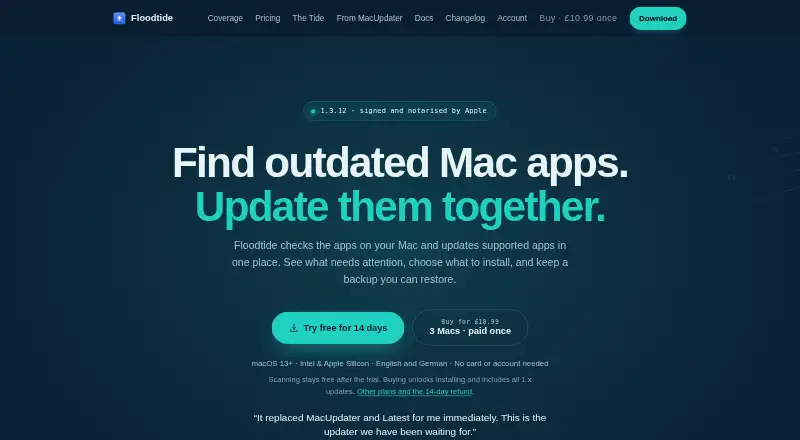
Floodtide checks Mac applications for updates and can install supported updates in one place. It runs on macOS 13 Ventura or later on Apple silicon and Intel Macs. Update sources include Sparkle feeds, its signed catalog, Electron feeds, Homebrew Cask, GitHub Releases and the Mac App Store. It can check on a schedule, show a menu-bar count and install updates the user has allowed. Before replacing an app, it verifies downloads by checksum or code signature and requires the same Apple developer identity as the installed app. Replaced versions can be retained for three days, a week, two weeks or a month, then restored with Undo Last Update. Floodtide lists coverage of 4,795 apps: 3,263 matched through Homebrew and 1,532 through its signed catalog. The 14-day trial unlocks all features without a card or account; scanning remains free afterward, while installation requires a license. Licenses cost £10.99 once for three Macs or £19.99 once for ten Macs. Some apps require manual handling, and open apps are not automatically closed.
Who it suits
Floodtide may suit Mac users who want to check and install supported app updates from several sources. It covers both Apple silicon and Intel Macs running macOS 13 Ventura or later.
What it does well
- Supports Apple silicon and Intel Macs.
- Checks updates from several listed sources.
- Retains replaced versions for up to a month.
- Trial unlocks all features without a card or account.
What to know first
- Requires macOS 13 Ventura or later.
- Some apps need manual handling.
- Does not automatically close open apps.
- Installation requires a license after the trial.
Limits
The 14-day trial unlocks all features; afterward, scanning remains free but installing updates requires a license. Licenses cover three Macs for £10.99 once or ten Macs for £19.99 once, while business coverage is for more than ten Macs.
Plans
| Plan | Billed and limits | Price |
|---|---|---|
| 3 Macs | £10.99 once · 3 Macs · unlimited apps · all 1.x updates | £10.99, paid once |
| 10 Macs | £19.99 once · 10 Macs · no per-seat fee · all 1.x updates | £19.99, paid once |
| For business | Contact us for more than 10 Macs · more than 10 Macs · office, school or fleet | On request |
As bhopstudio.com lists them, read 30 Sept 2026. The maker's own page has the final word.
Getting started
- Install Floodtide on a Mac running macOS 13 Ventura or later
- Start the 14-day trial without a card or account
- Allow Floodtide to scan supported application sources
- Review the update count and approve installations
- Choose a license for three Macs or ten Macs when installing beyond the trial
Verdict
Floodtide combines update checks, installation and rollback for supported Mac apps. Check whether its macOS requirement and handling of apps needing manual steps fit your setup.
Questions
How much does Floodtide cost?
The three-Mac plan costs £10.99 once. The ten-Mac plan costs £19.99 once. A business plan for more than ten Macs uses contact-for-pricing terms.
Is there a free plan or trial?
Yes. The 14-day trial unlocks all features without a card or account. Afterward, scanning remains free, while installing requires a license.
Which Macs are supported?
Floodtide runs on macOS 13 Ventura or later and supports Apple silicon and Intel Macs.
What update sources does Floodtide check?
It checks Sparkle feeds, Floodtide's signed catalog, Electron feeds, Homebrew Cask, GitHub Releases and the Mac App Store.
Can Floodtide undo an update?
Yes. It can retain replaced versions for three days, a week, two weeks or a month and restore one with Undo Last Update.
What privacy controls are provided?
Installed-app inventory stays local by default. Optional usage analytics are off until enabled, and Floodtide says it does not sell or share data for advertising.
Facts from Floodtide's own pages
- Apple notarization
- The app is signed and notarised by Apple. · bhopstudio.com, 30 Sept 2026
- Automatic updates
- Floodtide can check on a schedule, show a menu-bar count and install updates that the user has allowed. · bhopstudio.com, 30 Sept 2026
- Backups and undo
- Floodtide can retain replaced app versions for three days, a week, two weeks or a month and restore a retained backup with Undo Last Update. · bhopstudio.com, 30 Sept 2026
- Coverage
- The coverage page lists 4,795 apps, including 3,263 matched through Homebrew and 1,532 covered through Floodtide's signed catalog. · bhopstudio.com, 30 Sept 2026
- CPU support
- Floodtide supports Apple silicon and Intel Macs. · bhopstudio.com, 30 Sept 2026
- Notable limits
- Floodtide leaves apps requiring administrator approval, vendor installers or newer macOS versions for the user to handle and does not automatically close open apps. · bhopstudio.com, 30 Sept 2026
- Privacy
- Installed-app inventory stays local by default, optional usage analytics are off until enabled, and Floodtide says it does not sell or share data for advertising. · bhopstudio.com, 30 Sept 2026
- Purpose
- Floodtide checks Mac applications for updates and lets users update supported apps in one place. · bhopstudio.com, 30 Sept 2026
- Security checks
- Before replacement, Floodtide verifies downloads by checksum or code signature and requires the new build to carry the same Apple developer identity as the installed app. · bhopstudio.com, 30 Sept 2026
- Support
- Support is available by email or Discord, and both channels connect users with the person who wrote the code. · bhopstudio.com, 30 Sept 2026
- Supported macOS
- Floodtide runs on macOS 13 Ventura or later. · bhopstudio.com, 30 Sept 2026
- Trial behavior
- The 14-day trial has all features unlocked without a card or account; afterward scanning remains free while installing requires a license. · bhopstudio.com, 30 Sept 2026
- Update sources
- Floodtide checks Sparkle feeds, its signed catalog, Electron feeds, Homebrew Cask, GitHub Releases and the Mac App Store. · bhopstudio.com, 30 Sept 2026
Where Floodtide stands on Freedom251
- Software Update Tools#4 of 29