Freedom251 › Software Update Tools

UniGetUI
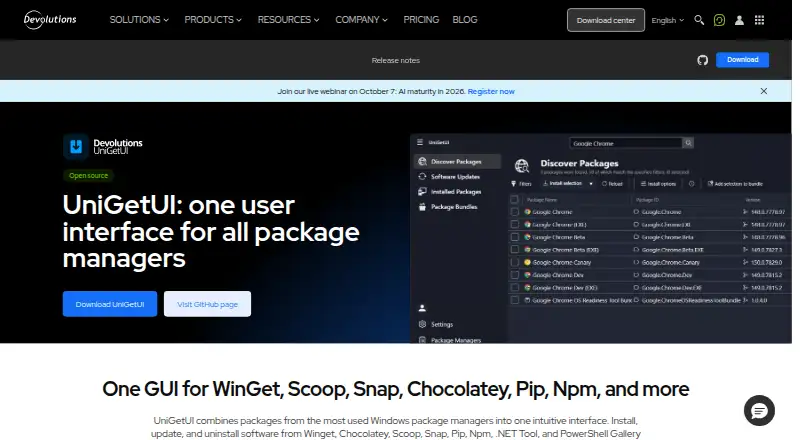
What UniGetUI is
UniGetUI provides a graphical interface for finding, installing, updating, and removing software through package managers, for people who want to manage software without using the command line. It supports WinGet, Chocolatey, Scoop, Snap, Pip, Npm, .NET Tool, and PowerShell Gallery. Users can search and filter packages and inspect publisher, size, and direct download URL details. Batch actions cover installing, updating, or uninstalling multiple packages. Package lists, including parameters, can be exported and imported on another machine. Updates can run automatically or appear as notifications, and individual packages can be ignored. Builds are available for Windows, macOS, and Linux; installation options include Microsoft Store, WinGet, Scoop, and Chocolatey. UniGetUI is free, open source, and MIT licensed. The project advises checking package publishers and sources because packages come from third parties. Package manager support can vary by Windows version, and some packages may need administrator privileges or additional dependencies.
Who it suits
It suits individuals and organizations that want to manage software without the command line. It is available across Windows, macOS, and Linux.
What it does well
- Supports multiple package managers in one interface.
- Can batch install, update, and uninstall packages.
- Exports package lists with parameters for another machine.
- Available for Windows, macOS, and Linux.
- Free, open source, and MIT licensed.
What to know first
- Package manager support may vary by Windows version.
- Some packages require administrator privileges or dependencies.
- Packages come from third parties.
Plans
| Plan | Billed and limits | Price |
|---|---|---|
| Free | Free · open source · MIT licensed | Free |
As devolutions.net lists them, read 30 Sept 2026. The maker's own page has the final word.
Getting started
- Visit https://devolutions.net/unigetui/.
- Choose a build for Windows, macOS, or Linux.
- On Windows, install through Microsoft Store, WinGet, Scoop, or Chocolatey.
- Search or filter for packages and review their publisher and source details.
- Install packages individually or in a batch.
Overview
UniGetUI brings several package managers into one desktop interface for finding and maintaining software. It is best suited to people who want to manage packages without using the command line; its breadth is useful, though package behavior and compatibility still depend on the managers and packages underneath.
Created by Martí Climent and now maintained by Devolutions, the project is free, open source, and MIT licensed. It is intended for individual and organizational use.
Key features
Discovery across package managers
Search and filters bring package discovery into one place, with publisher, size, and direct download URL details to help users assess a package before installing it. The official site names WinGet, Chocolatey, Scoop, Snap, Pip, Npm, .NET Tool, and PowerShell Gallery. That range is a meaningful convenience for people working across package sources, but support can vary by Windows version; some packages also require administrator privileges or additional dependencies.
Batch maintenance and update controls
Batch installation, updating, and uninstallation reduce repetitive work when maintaining several packages. UniGetUI can update packages automatically or notify users when updates are available, and it lets users ignore updates for individual packages. Silent installation, scheduled scans, and update rollback are also supported, making it more than a package browser for users who want ongoing maintenance controls.
Package lists
Users can export package lists with parameters and import them on another machine. That makes it easier to reproduce a software setup elsewhere, though the imported packages remain subject to the destination system’s compatibility and package requirements.
Pricing
UniGetUI is free: the Free plan costs nothing. The project is open source under the MIT license, with no paid tier identified. Its supported capabilities include bulk app updates, scheduled scans, a portable version, silent installation, and update rollback, so individual users and organizations can use the same core package-management approach without a subscription.
Platforms
The download center provides builds for Windows, macOS, and Linux. UniGetUI can be installed through Microsoft Store, WinGet, Scoop, or Chocolatey. Package-manager support may vary by Windows version, and some packages require administrator privileges or extra dependencies, so platform availability does not guarantee that every package behaves identically on every system.
Packages are supplied by third parties. Users should review package sources and publishers before installation rather than treating a unified interface as a guarantee about each package.
Who it's for
UniGetUI suits individuals and organizations that want a graphical route to software discovery and package maintenance, especially when batch actions and reusable package lists are useful. It is a less direct fit for people who prefer command-line package management or need assurance that every package source behaves consistently across operating systems.
Pros and cons
- Pros: One interface covers eight named package managers, reducing the need to manage each through a separate command-line workflow.
- Pros: Batch actions, update notifications or automation, per-package update ignoring, and rollback support give users several ways to manage maintenance.
- Pros: Exporting and importing package lists with parameters helps carry a software setup to another machine.
- Pros: Free, MIT-licensed availability across Windows, macOS, and Linux makes it accessible to a wide range of users.
- Cons: Package-manager support can vary by Windows version, while some packages need elevated privileges or extra dependencies.
- Cons: Third parties supply packages, so users must assess sources and publishers themselves.
Alternatives
Software Update Tools is a category directory for comparing more update utilities.
Choose IObit Uninstaller instead if the priority is Windows app removal: its free version includes batch uninstall, drag-and-drop uninstall, and automatic leftover cleanup.
Topgrade is a free, open-source command-line alternative for Linux, macOS, and Windows, with a self-updating binary or source installation and package-manager installation options. It is the better fit for users who prefer a CLI workflow.
AppGeek is a free Windows option with no Pro tier, ads, or bundled offers, usable at home and at work under GPL-3.0.
Avira Phantom VPN Free is a VPN alternative, rather than a package-management tool.
Ninite Updater is a free Windows alternative supporting 150 apps.
RuckZuck is free for private use and offers Windows, API, and self-hosted options; its public API currently allows 5 getsoftwares requests/min and 20 checkforupdate requests/min.
UCheck is a Windows freemium alternative whose Premium plan costs $12 a year and includes scheduled scans, installing new software, update scanning and installation, PUP protection, enterprise use, and email support.
Version Tracker is a freemium alternative for macOS.
Verdict
Choose UniGetUI if you want a free graphical hub for managing software across several package managers, particularly for batch maintenance and moving package lists between machines. Look elsewhere if you want command-line control, or if a specific package’s source, requirements, and platform compatibility need to be predictable without checking them individually.
Verdict
UniGetUI makes package-manager tasks accessible through a graphical interface and supports batch actions across multiple package sources. Check compatibility and package sources before installing.
Questions
Is UniGetUI free?
Yes. It is free, open source, and MIT licensed.
Which operating systems are supported?
Builds are available for Windows, macOS, and Linux.
Which package managers does it support?
The listed managers are WinGet, Chocolatey, Scoop, Snap, Pip, Npm, .NET Tool, and PowerShell Gallery.
How can I install UniGetUI?
The site lists Microsoft Store, WinGet, Scoop, and Chocolatey as installation options.
Who maintains UniGetUI?
It was created by Martí Climent and is now maintained by Devolutions.
Are all packages supplied by UniGetUI?
No. Packages are supplied by third parties. The project advises reviewing their sources and publishers before installation.
Facts from UniGetUI's own pages
- Bulk actions
- UniGetUI supports batch installation, updating, and uninstallation of multiple packages. · devolutions.net, 30 Sept 2026
- Company location
- Devolutions says it was founded in Québec, Canada. · devolutions.net, 30 Sept 2026
- Compatibility limit
- The product page says package manager support may vary by Windows version and some packages may require administrator privileges or additional dependencies. · devolutions.net, 30 Sept 2026
- Headquarters
- Québec, Canada · devolutions.net, 23 Sept 2026
- Install methods
- The site says UniGetUI can be installed through Microsoft Store, WinGet, Scoop, or Chocolatey. · devolutions.net, 30 Sept 2026
- Intended users
- The product page says UniGetUI is designed for individual and organizational use and for managing software without the command line. · devolutions.net, 30 Sept 2026
- License
- The project is free, open source, and MIT licensed. · github.com, 30 Sept 2026
- Package backup
- Users can export package lists with parameters and import them on another machine. · devolutions.net, 30 Sept 2026
- Package discovery
- Users can search and filter packages and view publisher, size, and direct download URL details. · devolutions.net, 30 Sept 2026
- Package managers
- The official site lists WinGet, Chocolatey, Scoop, Snap, Pip, Npm, .NET Tool, and PowerShell Gallery. · devolutions.net, 30 Sept 2026
- Project stewardship
- The project README says UniGetUI was created by Martí Climent and is now maintained by Devolutions. · github.com, 30 Sept 2026
- Purpose
- UniGetUI provides one graphical interface to discover, install, update, and uninstall software through package managers. · devolutions.net, 30 Sept 2026
- Security note
- The project says packages are supplied by third parties and advises reviewing their sources and publishers before installation. · github.com, 30 Sept 2026
- Supported operating systems
- The official download center provides UniGetUI builds for Windows, macOS, and Linux. · devolutions.net, 30 Sept 2026
- Updates
- UniGetUI can automatically update packages or notify users when updates are available, and users can ignore updates per package. · devolutions.net, 30 Sept 2026
Where UniGetUI stands on Freedom251
- Software Update Tools#12 of 29
- App Installation#10 of 24