Freedom251 › Software Update Tools

UCheck
What UCheck is
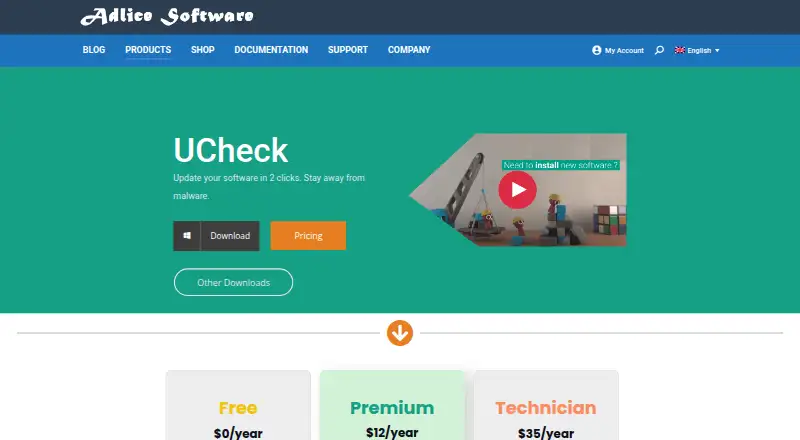
UCheck is a Windows software updater for checking, installing, and maintaining compatible programs. It supports bulk selection for updates, scheduled scans, and automated updates. Users can install compatible software from a library described as containing hundreds of programs, and can list installed software to uninstall or repair it. The software list identifies 436 programs with full version-checking, updating, and installation support; another 73,674 community entries provide version information only. UCheck says it can protect against optional offers during new software installation and presents software updates as a way to help avoid software exploits. Windows downloads include installer and portable versions, with Windows 7 or later and Windows 10 or later options listed, including 32-bit, 64-bit, and ARM64. The Free plan is limited to personal use and includes forum support. Premium costs $12 a year and allows enterprise use; Technician costs $35 a year and includes an unlimited-machines license. A 30-day trial is available before buying a license.
Who it suits
UCheck may suit Windows users looking to update, install, repair, or remove compatible software. The Free plan is for personal use; Premium allows enterprise use, while Technician includes an unlimited-machines license.
What it does well
- Bulk selection for software updates
- Scheduled scans and automated updates
- Can install, uninstall, or repair software
- Portable Windows version is available
- 30-day trial before purchasing a license
What to know first
- Free plan is limited to personal use
- Full support covers 436 programs
- Technician costs $35 a year
Limits
The Free plan is for personal use and includes forum support. Premium costs $12 per year, and Technician costs $35 per year; a 30-day trial is available before purchase.
Plans
| Plan | Billed and limits | Price |
|---|---|---|
| Premium | $12/year · Enterprise use allowed · Email support · Scheduled scans · Install new software · PUP protection · Scan and install updates · Uninstall software | $12 a year |
| Technician | $35/year · Unlimited machines · Portable config and license · Scriptable software · All Premium features · Email support | $35 a year |
| Free | $0/year · Personal use only · Forum support · Scan and install updates · Uninstall software | On request |
As adlice.com lists them, read 30 Sept 2026. The maker's own page has the final word.
Getting started
- Open the UCheck website.
- Choose an installer or portable download for a listed Windows version and architecture.
- Start with the Free plan for personal use, or review Premium and Technician.
- Use the 30-day trial to try features before buying a license.
Verdict
UCheck combines updating with software installation and removal, while its supported list distinguishes full program support from community version information. Choose a plan based on personal or enterprise use and the number of machines you need to cover.
Questions
Is UCheck free?
Yes. The Free plan is billed at $0 per year and is limited to personal use.
What do the paid plans cost?
Premium is $12 per year, and Technician is $35 per year.
Is there a free trial?
Yes. Users can try features free for 30 days before buying a license.
Which operating systems does UCheck support?
UCheck is for Windows. Downloads include installer and portable versions, with Windows 7 or later and Windows 10 or later options listed, as well as 32-bit, 64-bit, and ARM64 options.
How much software does it support?
The supported list has 436 programs with version checking, updating, and installation. Another 73,674 community entries provide version information only.
What support comes with each plan?
Free includes forum support. Premium and Technician include email support.
Facts from UCheck's own pages
- Audience and use
- The Free plan is limited to personal use, while Premium allows enterprise use; Technician includes an unlimited-machines license. · adlice.com, 30 Sept 2026
- Bulk updates
- UCheck can update compatible software with bulk selection. · adlice.com, 30 Sept 2026
- Compatibility coverage
- The software list page states that 436 programs are fully supported for version checking, updating, and installing, while 73,674 community entries provide version information only. · adlice.com, 30 Sept 2026
- Founded
- 2010 · adlice.com, 28 Sept 2026
- Headquarters
- Sautron, France · adlice.com, 28 Sept 2026
- Optional offers
- UCheck says it protects users from optional offers when installing new software. · adlice.com, 30 Sept 2026
- Purpose
- UCheck is a software updater intended to help users keep compatible software updated and avoid software exploits. · adlice.com, 30 Sept 2026
- Scheduled updates
- The product page says scheduled tasks and automated updates are available. · adlice.com, 30 Sept 2026
- Security feature
- The product page presents software updates as a way to stay away from malware and protect against software exploits. · adlice.com, 30 Sept 2026
- Software installs
- UCheck can install compatible software from a library described as containing hundreds of programs. · adlice.com, 30 Sept 2026
- Support
- The Free plan lists forum support, while Premium and Technician list email support. · adlice.com, 30 Sept 2026
- Trial
- The documentation says users can test features free for 30 days before buying a license. · adlice.com, 30 Sept 2026
- Uninstall and repair
- UCheck lists installed software and can uninstall or repair it. · adlice.com, 30 Sept 2026
- Windows support
- The download links include installer and portable versions for Windows 7 or later and Windows 10 or later, with 32-bit, 64-bit, and ARM64 options listed. · adlice.com, 30 Sept 2026
Where UCheck stands on Freedom251
- Software Update Tools#17 of 29