Freedom251 › Software Update Tools
Software Updater
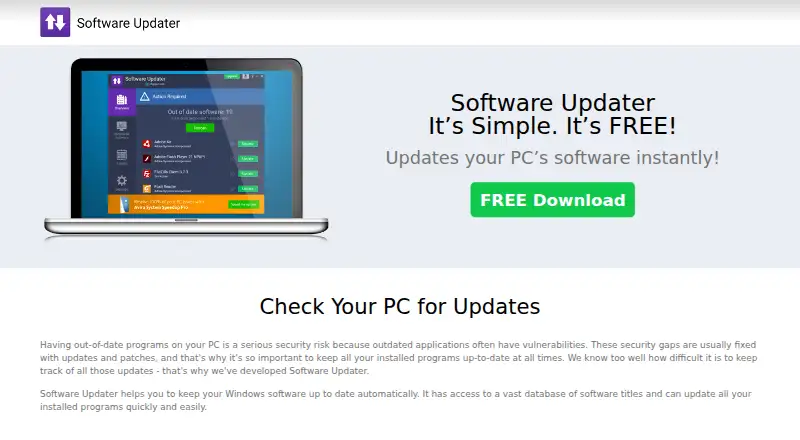
What Software Updater is
Software Updater scans Windows software and checks installed versions against a database to identify newer releases. It displays programs that need updates in a browser, where users can download current versions and choose which updates to install or skip. The site says its catalog supports thousands of popular Windows applications, including Chrome, Firefox, Skype, iTunes, and Adobe Reader. Bulk app updates are supported, and a scheduler can run the app automatically in the background.
Software Updater is a free Windows app, listed as free. Its EULA licenses the service for one computer per license and limits use to non-commercial purposes. The download page lists version 1.18.1122.31 at 5.17MB and specifies PC-only use with Windows 10, 8.1, 8, 7, Vista, and XP. The maker says it vets updates for malicious threats and describes the app as free of malware, adware, viruses, added bundles, installers, and toolbars. TouchStoneSoftware.com provides free support to users. The privacy policy says the site collects information users submit and non-personal information such as URLs, browser, and IP address.
Who it suits
Software Updater suits Windows PC users who want to find newer releases for installed applications and decide which updates to install. Its scheduler and bulk update support may suit people maintaining multiple applications on a computer, subject to the one-computer license and non-commercial-use restriction.
What it does well
- Scans Windows software for newer versions.
- Catalog covers thousands of popular Windows applications.
- Choose which updates to install or skip.
- Scheduler can run automatically in the background.
- Bulk app updates are supported.
- Free support is available through TouchStoneSoftware.com.
What to know first
- Each license covers one computer.
- Use is limited to non-commercial purposes.
- The app is for Windows PCs only.
Limits
The free app’s EULA permits use on one computer per license and restricts use to non-commercial purposes. The download page specifies PC use with Windows 10, 8.1, 8, 7, Vista, and XP.
Plans
| Plan | Billed and limits | Price |
|---|---|---|
| Software Updater | Free app; one computer per license under the EULA | Free |
As softwareupdater.com lists them, read 8 Oct 2026. The maker's own page has the final word.
Getting started
- Visit https://www.softwareupdater.com/.
- Download the Windows app for your PC.
- Run a scan to see programs with newer versions.
- Choose which updates to install or skip.
- Set the scheduler to run automatically in the background if useful.
Verdict
Choose Software Updater if you want a free Windows utility that identifies newer software versions and lets you choose updates. Look elsewhere if you need a license for multiple computers or commercial use.
Questions
Is Software Updater free?
Yes. The plan is listed as free.
Which operating systems does it support?
The download page lists Windows 10, 8.1, 8, 7, Vista, and XP for PC.
Does it update programs automatically?
It can run scans automatically in the background with its scheduler. Users choose which updates to install or skip; the app displays update downloads in a browser.
How many computers can use one license?
The EULA limits each license to one computer.
Can I use it for commercial purposes?
No. The EULA limits use to non-commercial purposes.
What does the app collect?
The privacy policy says the site collects information users submit and non-personal information such as URLs, browser, and IP address.
Facts from Software Updater's own pages
- Bundling and malware
- The maker says the app has no malware, adware, or viruses and is free of added bundles, installers, or toolbars. · softwareupdater.com, 8 Oct 2026
- Company location
- The contact page lists Software Updater at 950 N Collier Blvd., Marco Island, Florida 34145. · softwareupdater.com, 8 Oct 2026
- Download
- The download page lists version 1.18.1122.31 at 5.17MB. · softwareupdater.com, 8 Oct 2026
- License limit
- The EULA licenses the software and service for use on one computer and limits use to non-commercial purposes. · softwareupdater.com, 8 Oct 2026
- Privacy
- The privacy policy says the site collects personal information users submit and non-personal information such as URLs, browser, and IP address. · softwareupdater.com, 8 Oct 2026
- Purpose
- Software Updater scans Windows software and checks its versions against a database to identify newer releases. · softwareupdater.com, 8 Oct 2026
- Scheduler
- The app includes a scheduler to run automatically in the background. · softwareupdater.com, 8 Oct 2026
- Security claims
- The maker says it carefully vets updates to keep them free from malware and other malicious threats. · softwareupdater.com, 8 Oct 2026
- Software catalog
- The site says the service supports thousands of popular Windows applications, including Chrome, Firefox, Skype, iTunes, and Adobe Reader. · softwareupdater.com, 8 Oct 2026
- Support
- The site says TouchStoneSoftware.com offers free support to Software Updater users. · softwareupdater.com, 8 Oct 2026
- System requirements
- The download page specifies PC only and lists Windows 10, 8.1, 8, 7, Vista, and XP. · softwareupdater.com, 8 Oct 2026
- Update choice
- Users can choose which updates to install and which to skip. · softwareupdater.com, 8 Oct 2026
- Update workflow
- The app displays programs needing updates in a browser so users can download the latest versions. · softwareupdater.com, 8 Oct 2026
Where Software Updater stands on Freedom251
- Software Update Tools#15 of 29